“We’re certified, so we should be fine.” It’s an easy thing to believe on the side that builds the website. Yet even on sites with a certification mark, it’s common for a screen reader user to fail to find the log-in button, or a low-vision user to be unable to read gray text on gray. Having been audited once, and being usable right now, are two different stories.
The tool I built to shrink that gap is A11y Check. Put in a URL and it audits the accessibility automatically, then hands back a report and a fix guide. This article covers what A11y Check does, how it works, and why I opened the code. Let’s start with where it came from.
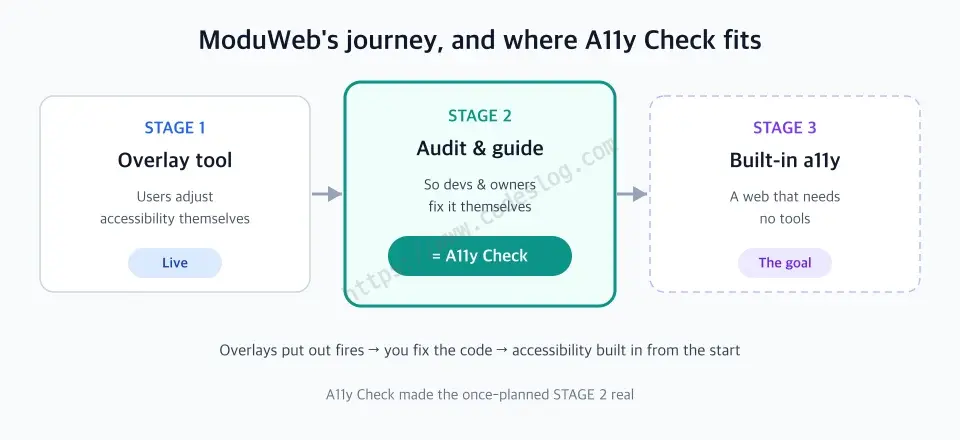
The STAGE 2 that ModuWeb left as a plan became A11y Check.
Where ModuWeb left off#
In an earlier seminar talk I introduced ModuWeb, an overlay-type accessibility helper. With a single line of script it lets users adjust font size, color contrast, and keyboard navigation for themselves — an open-source tool.
Back then I drew ModuWeb’s journey as three stages.
- STAGE 1 — Overlay support: users adjust accessibility themselves (live)
- STAGE 2 — Audit & guide: so developers and site owners fix it themselves (a plan, then)
- STAGE 3 — Built-in web: a world where overlays aren’t needed (the goal)
An overlay puts out the immediate fire but doesn’t fix the root. It’s a layer laid over the screen, so the actual HTML problems stay put. So I wrote that someday we’d have to reach the stage of fixing the code itself. A11y Check is that STAGE 2, actually built.
There’s a reason it took this direction. Big companies and institutions with strong accessibility already have dedicated staff and budget. The places that actually need help are small public offices, welfare and non-profit organizations, and small businesses unfamiliar with accessibility. What those places need isn’t perfect consulting — it’s a tool that tells you, right now, what’s wrong and where to fix it. For a field that can’t wait for the debate to settle, a concrete next step comes first.
What A11y Check does#
A11y Check’s job, in one sentence: take a URL, find the accessibility violations, and hand them back in a form you can fix.
It audits against two standards at once.
- WCAG 2.2 AA — the AA level of the international standard, the Web Content Accessibility Guidelines
- KWCAG 2.2 — its Korean counterpart (Korean Web Content Accessibility Guidelines). Korean law, public procurement, and certification use this one
The two share roots and overlap heavily, but their item numbers and wording differ. “Insufficient contrast,” for example, is 1.4.3 in WCAG and 5.4.1 in KWCAG. For a Korean site you need both so neither the international nor the domestic standard slips through. A11y Check maps each finding to both standards side by side in a single audit.
You get three things out.
- Compliance rate — the share of checked elements that pass, as one number. It’s recorded each audit so you can watch the trend.
- Violation list — per rule: “on which page, which element, and why it was flagged”
- Fix guide — how to fix each violation. This is the part A11y Check put the most work into
How it works#
The audit engine is built on axe-core — the open-source rule engine that’s effectively the standard for accessibility testing (made by Deque Systems, released under MPL-2.0). axe-core actually renders the page, then judges color contrast, presence of labels, ARIA usage, landmark structure, and so on against its rules. On top of that, A11y Check adds its own rules that map to KWCAG and catch patterns common in the Korean field.
Look at how a single violation gets recorded and the character of the tool shows. Here’s one item lifted straight from a real report.
Rule: color-contrast (serious)
Standard: WCAG 1.4.3 · KWCAG 5.4.1
Page: /posts/high-contrast-mode
Selector: .toc-has-children > a
Diagnosis: foreground #7a7a7a, background #f5f5f3
           → contrast 3.93:1 (expected 4.5:1)
Reference: dequeuniversity.com/rules/axe/color-contrast
The point is that “where (selector), why (diagnosis), and how much (numbers)” are all in there. Not a vague “accessibility is insufficient” notice, but a clue a developer can use to find that exact element in the editor and fix it.
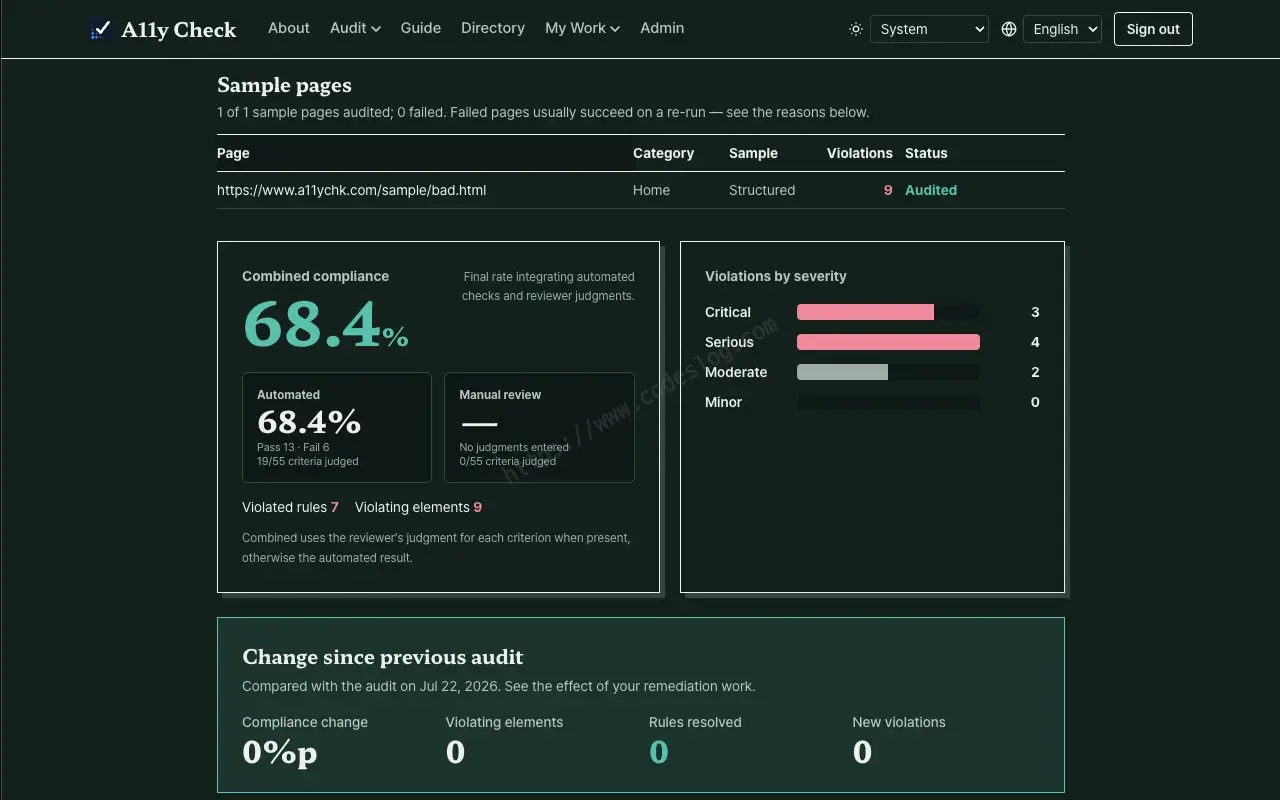
The web report screen: a compliance rate that integrates automated and manual review, violations by severity, and the change since the previous audit, all at a glance.
It goes a step further. A11y Check gathers these violations into an AI fix-guide document. For each violation it lays out [target location] → [fixed code] → [one-line reason], prefaced with working principles like “prefer semantic HTML over ARIA” and “keep visual change minimal.” It reads fine for a human, and it’s just as ready to hand straight to an AI coding tool. Reports download not only on screen but as CSV, PDF, and Markdown.
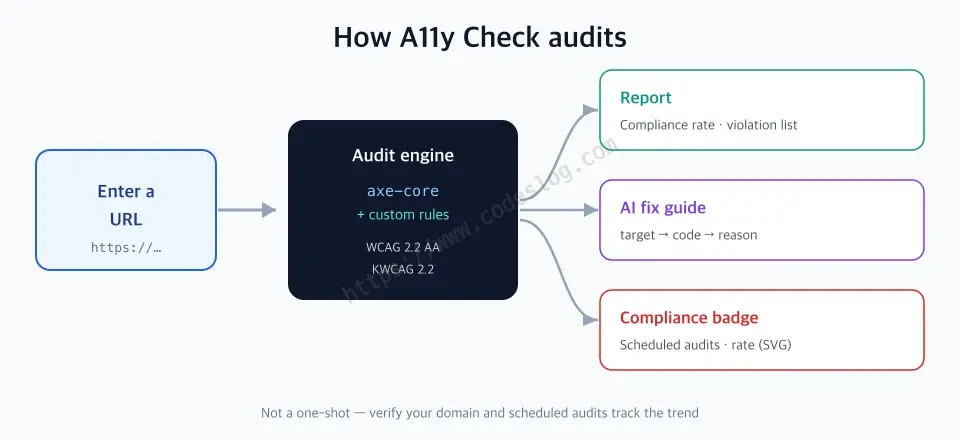
Enter a URL → axe-core + custom rules scan → report, fix guide, and badge.
One audit isn’t the end. Verify domain ownership and you can set scheduled audits that track the compliance trend, and it issues a compliance badge — a small SVG you paste in a README or footer. The badge is a transparency marker grounded in the automated audit — it doesn’t replace an official certification, but it signals “we keep checking.”
I’ve actually pinned an A11y Check badge at the very bottom of this blog’s footer, too. Scroll all the way down and you’ll see the current compliance rate as a small badge. It would be inconsistent for a blog that talks about accessibility to hide its own, so I figured I’d put my own status on permanent display first.
An explanation feels hollow without a real case, so here’s one. This very blog was audited with A11y Check. The compliance rate started at 87%, and I fixed the inline-code contrast, the table-of-contents link color, and the landmark-name issues the report pointed out, one by one, until it reached 100%. What’s interesting is that along the way the report caught mistakes I’d missed — like the trap where opacity eats contrast. Watching even the tool’s own author learn a new bug on his own site, you feel afresh why auditing matters.
Trying it yourself — web and the Chrome extension#
There are two ways to use A11y Check, and they’re best used together.
The web service (a11ychk.com) is the simplest entry point. Put in a URL and a report comes back shortly. Log in and verify domain ownership and it extends to scheduled audits and the badge. It’s good for seeing “our site — how’s it doing right now?” at a glance.
The Chrome extension audits the very page you’re looking at in the browser, right where it is. The web service reaches sites by URL, so places like a screen behind a login or a local dev server (localhost) are hard to get to by URL alone — the extension can audit those in their open state as-is. From the side panel you can see the compliance rate and violation details, highlight the problem elements right on the page with “Show violations on page,” or pull the fix guide on the spot with “Export AI fix request.” It’s great for checking as you develop. You can install it from the Chrome Web Store.
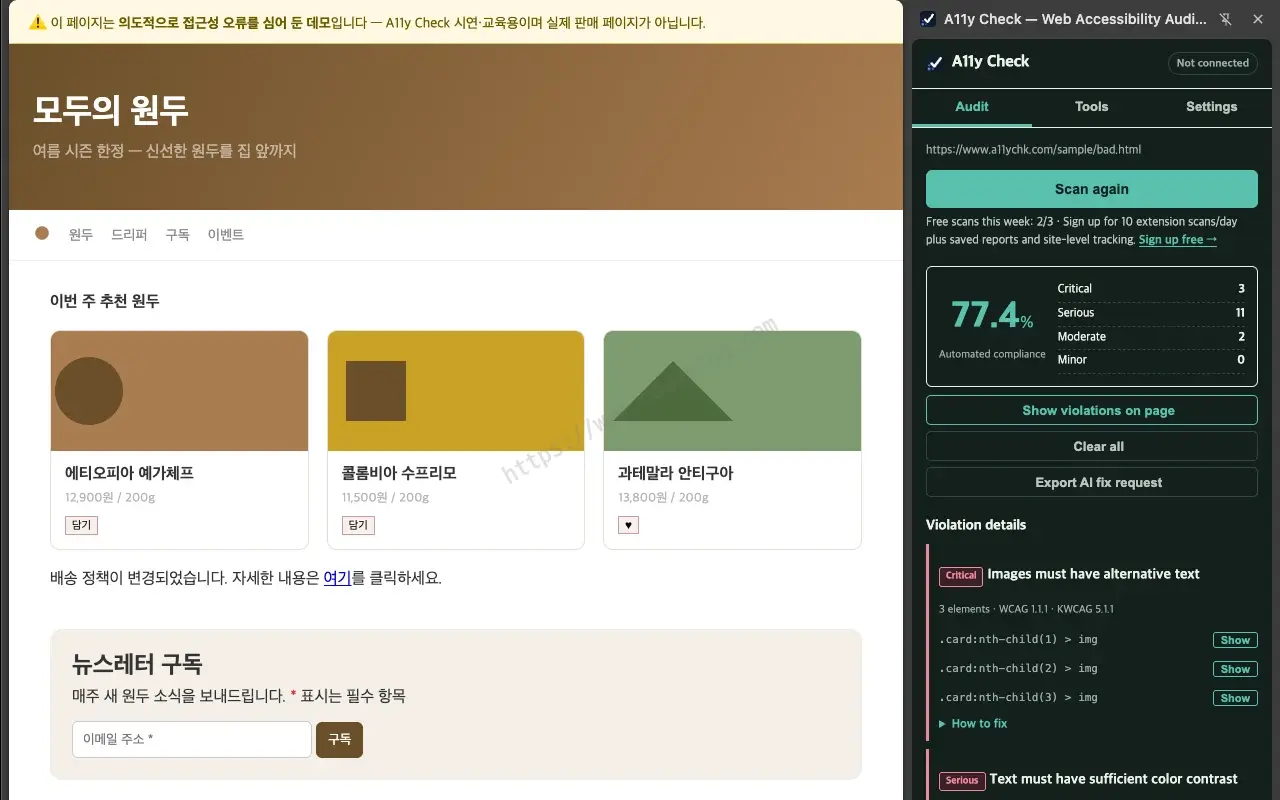
The Chrome extension audits the page you're on right in the side panel, and marks the violation locations directly on the page.
The two aren’t rivals; they’re a pair. Sweep the whole deployed site periodically with the web service, and catch in-development screens on the fly with the extension.
And the audit itself has two layers. An automated scan sweeps the baseline fast, then a human reinforces it by hand. Once you clear the list the automation caught, the rest is the human’s turn — whether the alt text fits the context, whether the tab order feels natural. This automated-then-manual pair is the audit flow A11y Check recommends.
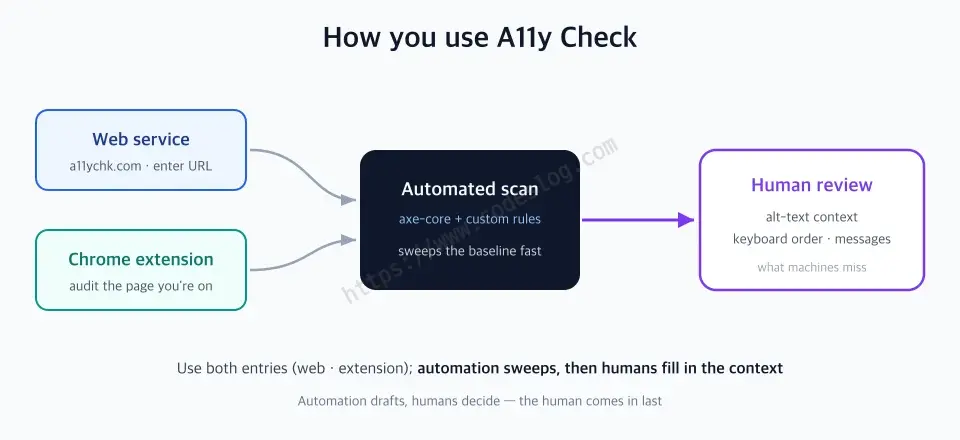
Use the web and extension together, then lay human manual review on top of the automated scan.
What automated audits can’t do#
Here’s where I have to be honest. An automated audit isn’t a cure-all.
An automated checker is like a spell-checker. It catches typos (low contrast, missing labels, wrong ARIA) like a bloodhound, but it doesn’t know whether the writing makes sense. The things in accessibility that correspond to “does it make sense” — whether the alt text really carries the image’s context, whether the tab order across the screen is natural, whether an error message is phrased so a person understands it — in the end a human has to look.
That’s why A11y Check’s fix guide includes a line like this: “Alt text generated by AI must be reviewed by a human.” An automated tool raises the floor quickly. But the ceiling is filled by human judgment. Not confusing the two matters. Passing an audit doesn’t mean accessibility is complete — it means it’s finally ready for a human to look at.
Doesn’t the structure look familiar? The vibe coding everyone’s handing to AI these days is the same. AI drafts something in an instant, but whether it fits the context, whether it missed an edge case — a human has to confirm at the end. This pattern, where automation drafts and the human holds the final judgment, is called human-in-the-loop. The automated-then-manual pair from the previous section is exactly this. A11y Check isn’t a tool that tries to replace people; it’s a tool that does the tedious baseline audit for you so you can focus on what people actually need to look at.
Open source — so what can you do with it#
A11y Check is public on GitHub. But the license isn’t one license. It uses split licensing — a different license per part — so “what can I do with it” differs by part.
| Part | License | What you can do |
|---|---|---|
Audit engine · KWCAG/WCAG rule catalog (@a11ychk/core) | Apache-2.0 | Use · modify · commercial use · private integration — all free |
| Chrome extension | Apache-2.0 | Fork and redistribute freely |
| Service app (a11ychk.com) | AGPL-3.0 | Free to just use · share source if you run it as a service |
The audit engine and rule catalog (Apache-2.0). If you’re building an accessibility tool or a CI pipeline, you can drop our audit engine and KWCAG/WCAG rule catalog straight in. Apache-2.0 is a permissive license that allows modification, commercial use, even private integration into your product. “I just want to bolt the KWCAG rules onto our internal tool” — you can do that without looking over your shoulder. Just like A11y Check did with axe-core. The Chrome extension is the same, so fork it or modify it freely.
The service app (AGPL-3.0). There’s exactly one condition, and it’s irrelevant to most readers. If you just use a11ychk.com, there are no restrictions — use it as usual. The condition applies when you modify this service’s code, put it on your server, and offer it to others: then you have to publish your modified source too. A web service hands out screens, not code, so improvements are easy to hide (the “SaaS loophole,” as it’s often called); AGPL closes that hole so improvements come back into the open.
In one line — use the engine and extension freely; if you want to clone the whole service, open your source. If you’re building an accessibility tool, A11y Check’s audit engine is practically already yours. It was opened up to be used that way.
One-page summary#
- A11y Check is a web accessibility checker that takes a URL and audits against WCAG 2.2 AA + KWCAG 2.2 together.
- The engine is open-source axe-core + custom rules for the Korean field. Each violation carries the selector, diagnosis, and numbers, handed back in a form you can fix right away.
- Outputs are a compliance rate, a violation list, an AI fix guide (target → code → reason), plus scheduled audits and a compliance badge.
- Use the web service + Chrome extension together; an automated scan sweeps the baseline, then a human reinforces it — automation drafts, the human decides: human-in-the-loop.
- An automated audit raises the floor but can’t fill the ceiling — alt text, keyboard flow, and messages need a human to review.
- The code is public with split licensing — the engine and extension are Apache-2.0 so you can take them, and only the service app is AGPL-3.0 (share source only if you run it as a service).
Closing#
Closing the ModuWeb talk, I left this line: “Accessibility isn’t a feature — it’s digital consideration.” A11y Check is an attempt to make that consideration a little more graspable. To place the next step down where someone wanted to care but was stuck, not knowing where to start.
The real destination of this journey is STAGE 3, a world where the audit tool isn’t needed — where accessibility is baked into the code from the start, so there’s less and less occasion to run a checker like A11y Check. It may sound strange to aim at shrinking your own reason to exist, but that’s the success an accessibility tool should hope for.
There’s still plenty lacking, and the limits of automated auditing are clear. Even so, the reason I left the code open is simple. Together goes farther than alone. If you have a better rule or a sharper diagnosis, add it anytime. That’s how I hope we get one step closer, together, to a web for everyone.
Explore A11y Check — Web service a11ychk.com · Chrome extension · GitHub (open source)
Leave a comment