I put the same page into two checkers. One says “needs review.” The other says “fail.” If your team has used more than one automated accessibility checker, you’ve probably seen this. So which one is right?
I decided to answer that with numbers. The 37 accessibility test rules that W3C has approved come with 558 approved examples, each one labeled with the correct answer: this HTML passes, this HTML fails. I ran them through axe-core and IBM Equal Access, one by one. Of the 430 cases both tools checked, 413 agreed on whether the example fails (407 if you count “cannot tell” as its own result). The 17 that split were mostly cases where one tool returned cannot tell, or where one tool failed code that ACT doesn’t consider a failure. ACT rules are the yardstick for this comparison. The format they’re written in, ACT Rules Format 1.1, became a W3C Recommendation, W3C’s name for an official web standard, in February 2026.

Photo by Patricia Serna on Unsplash
Why accessibility checkers give different results#
WCAG (the Web Content Accessibility Guidelines) is a document written for people to read. Success criterion 4.1.2, for example, boils down to this: every user interface component must have a name and role that software can determine. Fair enough. But turning that into code means making a lot of decisions.
- If a
divonly has anonclick, is it a “user interface component”? - If a link is pushed off screen, is it still in scope?
- If a script moves focus somewhere else, can you even tell that from static HTML?
Every vendor has to answer these questions one by one, and the answers differ from vendor to vendor. That’s where most disagreements on the same page start.
Even the same tool can change its answer between versions. The practice page in Google’s web.dev accessibility course has an input with both aria-hidden="true" and tabindex="-1", and the course says Lighthouse flagged it in 2022. Run the same code through Lighthouse 13.4.1 in 2026 and it passes. That matches the ACT rule we’ll look at in this post: with tabindex="-1", the Tab key can’t reach the element.
What are ACT rules? A shared format for writing accessibility checks#
ACT stands for Accessibility Conformance Testing. Two similarly named things get mixed up, so here’s the difference.
| Aspect | What it is | Who makes it |
|---|---|---|
| ACT Rules Format | The W3C standard that defines how to write a check | W3C Accessibility Guidelines Working Group (AG WG) |
| ACT Rules | The actual checks written in that format | Written by the ACT Rules Community Group, reviewed and approved by the AG WG |
Think of a recipe card template and the recipes written on it. The template says “include ingredients, steps, and a notes box,” and dozens of recipes follow it. As of October 7, 2026, W3C’s rule list has 37 approved rules, 50 proposed rules, and 7 deprecated rules.
Anatomy of an ACT rule#
Open one up and it’s simpler than you’d expect. Take Element with aria-hidden has no content in sequential focus navigation (ID 6cfa84) as an example. Every rule has a six-character ID like this.
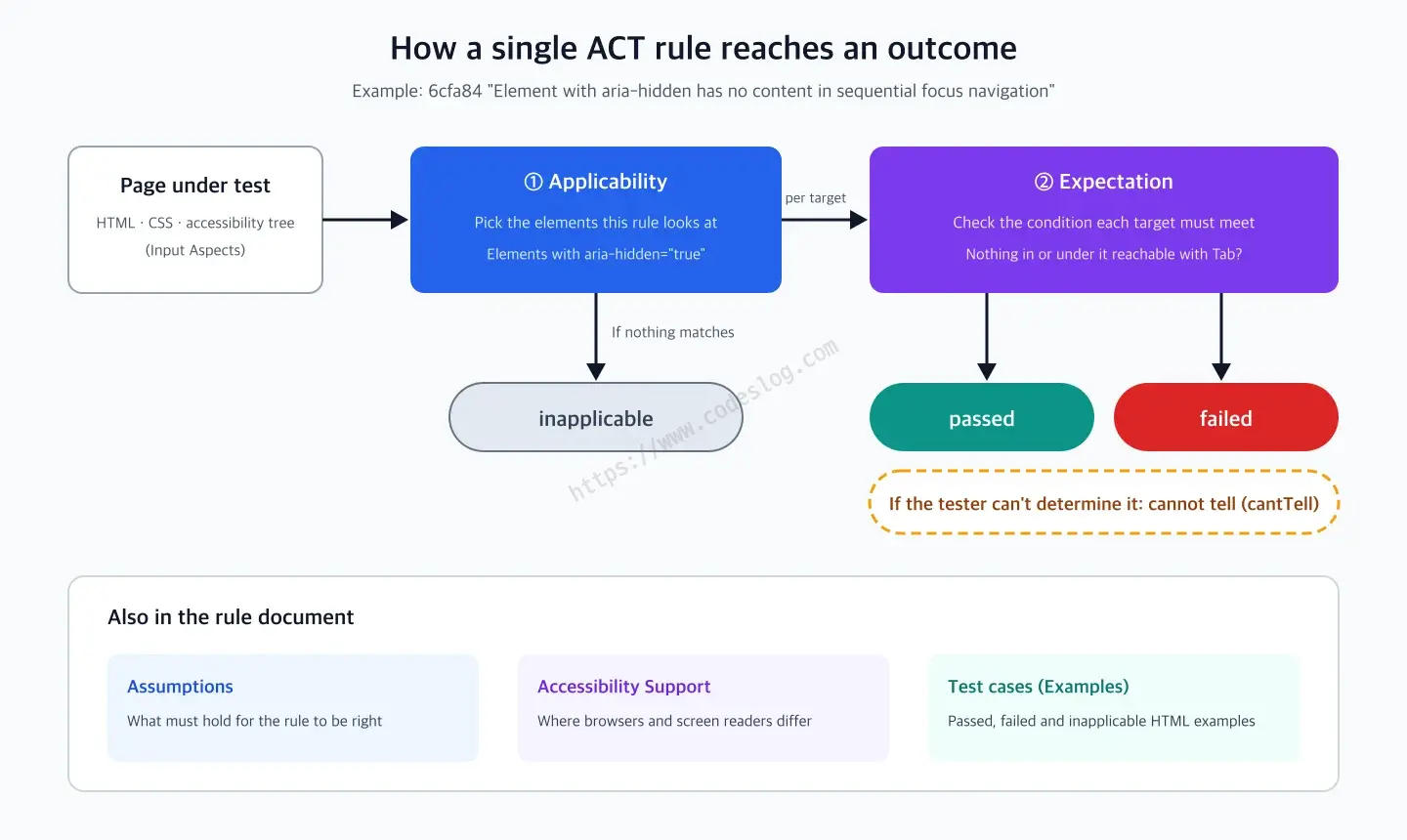
First, the applicability picks the elements this rule looks at. Here that’s any element with aria-hidden="true". If no element matches, the result is “inapplicable.” For each element it picks, the rule checks the expectation. This rule’s expectation is that neither the element nor anything inside it can be reached with the Tab key. If the element meets it, the outcome is passed; if not, it’s failed.
A rule document has a few more fields. Assumptions lists what has to be true for the rule to be valid. Accessibility support notes where browsers or screen readers behave differently. And then come the test cases: example HTML for passed, failed, and inapplicable. This rule’s W3C page has 15 of them.
The test cases are the most useful part. A rule that exists only in words gets interpreted differently by different people. But with examples that say “this HTML passes, this HTML fails,” you can check mechanically whether a tool gets them right. That’s how I took the measurements in this post.
One more thing. The 1.1 spec defines five outcomes: passed, failed, inapplicable, cannot tell (cantTell), and untested. “Cannot tell” means the tester couldn’t determine whether the rule applies or whether the expectation was met. In automated tools, it shows up as a “needs review” result, like axe’s incomplete or IBM’s POTENTIAL. As we’ll see, 8 of the 17 cases where the two tools disagreed came from this “cannot tell.”
What changed in ACT Rules Format 1.1#
1.1 became a W3C Recommendation on February 5, 2026. That’s a little over six years after 1.0 (October 31, 2019). The spec itself says 1.1 is mostly, but not fully, compatible with 1.0, and it names two changes. All 87 rules currently on W3C (excluding deprecated ones) are written in the 1.1 format.
1.1 went through its First Public Working Draft on June 18, 2024 and Candidate Recommendation on August 19, 2025 before becoming a Recommendation. Nothing changed after the Candidate Recommendation.
Change 1. Conformance requirements and secondary requirements#
A rule document has a field (Accessibility Requirements Mapping) that says which WCAG success criteria the rule connects to. From 1.1, that link comes in two kinds.
- Conformance requirements: the rule directly decides this criterion. If the rule fails, the criterion isn’t met. If it passes, the criterion may be met, or it may need further checks.
- Secondary requirements: related, but the rule wasn’t written to decide this criterion.
The contrast rule shows the difference right away.
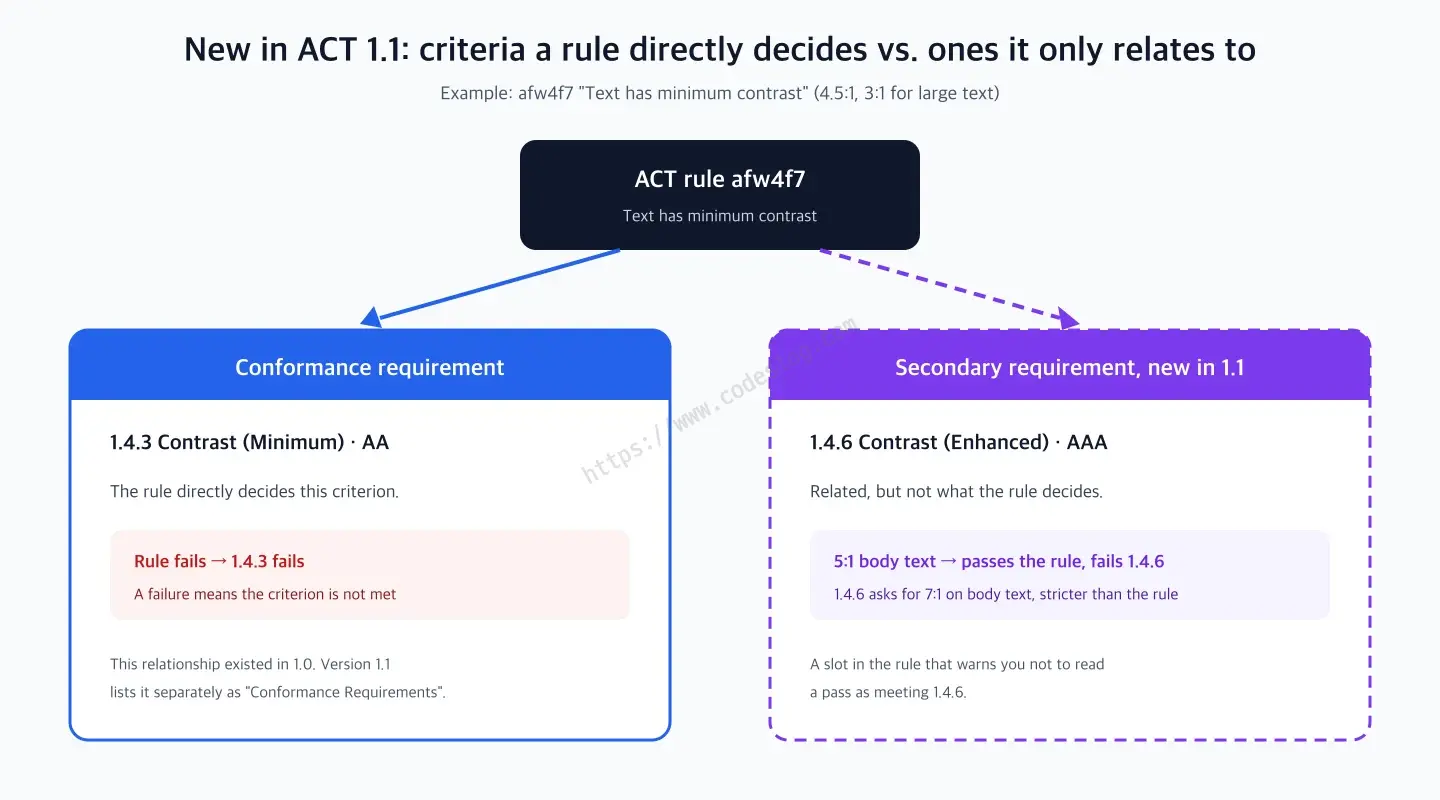
“Text has minimum contrast” (afw4f7) checks for 4.5:1 (3:1 for large text). If this rule fails, 1.4.3 Contrast (Minimum) fails too. But passing it doesn’t mean 1.4.6 Contrast (Enhanced) is met, because 1.4.6 asks for 7:1 on body-size text. So 1.4.6 is listed separately as a secondary requirement. W3C’s rule page shows it like this.
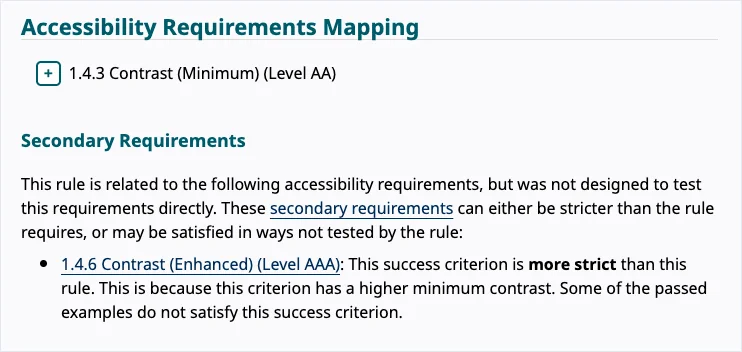
W3C ACT rule “Text has minimum contrast” page (captured October 7, 2026)
The contrast rule is a case where the criterion is stricter than the rule. It can go the other way too: the rule can be stricter than the criterion, and then the criterion becomes a secondary requirement. “ARIA attribute is defined in WAI-ARIA” (5f99a7) lists 1.3.1 and 4.1.2 as secondary requirements. This rule also fails ARIA attributes that do nothing at all, so some of its failed examples aren’t problems under WCAG. Of the 87 rules now, 21 list secondary requirements, in either direction.
Why does this matter to a developer? Because a tool not reporting a “1.4.6 violation” doesn’t mean you meet 1.4.6. And a “1.3.1-related failure” doesn’t always mean a WCAG violation. With 1.1, you can see that difference right in the rule document.
Change 2. Applicability may now rely on human judgment#
1.0 required applicability to be written objectively: tag names, computed roles, distance between elements, properties anyone would evaluate the same way. 1.1 softens that to “should be objective.” And when there’s no objective way to define it, and only then, a rule may use subjective concepts like “decorative,” “navigation mechanism,” and “pre-recorded,” which are the spec’s own examples.
You might think that makes things harder for automated tools. But ACT rules were never only for automated tools. The goal is to write manual testing methods down in the same format too, so they can be compared with automated ones. In fact, W3C’s ACT Implementations report, which collects how each tool or method implements ACT rules, also lists Trusted Tester, a manual testing methodology from the US government. “Is this image decorative?” is a judgment a machine can hardly settle, but it’s one a human tester definitely has to make.
That was the standards side of things. Now let’s put some real tools to the test.
Comparing axe and IBM on 558 W3C-approved test cases#
W3C publishes the test cases for its approved rules in one JSON file. As of October 7, 2026, the 37 approved rules had 558 test cases that W3C marked as approved (196 passed, 178 failed, 184 inapplicable). Two of them are XML documents, and Chrome replaces those with its own XML viewer, so I couldn’t test the actual document. I left them out of the tally. The other 556 went through two tools. One is axe-core (4.14.0 for this run), the engine under Lighthouse and axe DevTools. The other is IBM’s open source engine, Equal Access (accessibility-checker-engine) 4.0.34.
Both tools carry a mapping in their code that says “our rule X corresponds to ACT rule Y.” axe puts it in actIds on each rule, and IBM in an act field. Here’s how I judged results.
- Both tools ran with default settings. For axe, that means leaving out rules that are off by default and experimental rules. For IBM, only rules in the default policy (
IBM_Accessibility). - I only looked at results from tool rules that map to the ACT rule in question.
- If any of them reports a violation, that’s a failure. If there are no violations but there’s a “needs review” result (axe
incomplete, IBMPOTENTIALorMANUAL), that’s cannot tell. If neither, passed and inapplicable are lumped together as “not failed.” The exception is a rule where IBM maps ACT outcomes separately per failure reason; for those I followed IBM’s mapping (for example, a viewport setting that blocks zooming comes out as “needs review” in IBM, but IBM itself maps it to an ACT failure). - Code that sends the page somewhere else (meta refresh and the like) was blocked from navigating, so the check ran on the test document.
- Each result was then compared against the test case’s expected outcome.
If you just want to try one rule, the script below is enough. You need Node.js, Chrome, and two npm packages. If you only care about results, skip the code and go straight to the output underneath.
// check-act-rule.mjs: run axe-core on the W3C-approved test cases of one ACT rule
// Setup: npm i [email protected] [email protected] (Chrome must be installed)
// Run: node check-act-rule.mjs 6cfa84
import { chromium } from 'playwright';
import fs from 'node:fs';

const RULE = process.argv[2] ?? '6cfa84';
const AXE = fs.readFileSync('node_modules/axe-core/axe.min.js', 'utf8');
const res = await fetch('https://www.w3.org/WAI/content-assets/wcag-act-rules/testcases.json');
const { testcases } = await res.json();
const browser = await chromium.launch({ channel: 'chrome' });

for (const tc of testcases.filter((t) => t.ruleId === RULE && t.approved)) {
  // Open a fresh context per case so resources left by the previous case don't affect the next verdict
  const ctx = await browser.newContext();
  const page = await ctx.newPage();
  // Block page navigation (meta refresh and the like) so we stay on the test document
  await page.route('**/*', (route) => {
    const req = route.request();
    const leaving = req.isNavigationRequest() && req.frame() === page.mainFrame() && req.url() !== tc.url;
    return leaving ? route.abort('aborted') : route.continue();
  });
  await page.goto(tc.url);

  let outcome;
  if (await page.evaluate(() => !!document.getElementById('xml-viewer-style'))) {
    // Chrome swaps an XML document without a stylesheet for its own viewer, so we skip it
    outcome = 'not measurable (Chrome XML viewer)';
  } else {
    // Inject axe into iframes too (skipping frames that disappeared in the meantime)
    for (const f of page.frames()) await f.evaluate(AXE + ';0').catch(() => {});
    outcome = await page.evaluate(async (rid) => {
      // Run only the axe rules that declare they map to this ACT rule and are enabled by default
      // (the public axe.getRules() has no enabled flag, so we read the internal list _audit.rules)
      const ids = axe._audit.rules
        .filter((r) => (r.actIds ?? []).includes(rid))
        .filter((r) => r.enabled && !r.tags.includes('experimental'))
        .map((r) => r.id);
      if (ids.length === 0) return 'not implemented or off';
      const r = await axe.run(document, { runOnly: { type: 'rule', values: ids } });
      if (r.violations.length) return 'failed';
      if (r.incomplete.length) return 'cantTell';
      return 'passed/inapplicable';
    }, RULE);
  }
  console.log(`${tc.testcaseTitle.padEnd(24)} expected: ${tc.expected.padEnd(13)} axe: ${outcome}`);
  await ctx.close();
}

await browser.close();
Here’s the actual output for 6cfa84.
Passed Example 1         expected: passed        axe: passed/inapplicable
Passed Example 2         expected: passed        axe: passed/inapplicable
Passed Example 3         expected: passed        axe: passed/inapplicable
Passed Example 4         expected: passed        axe: cantTell
Passed Example 5         expected: passed        axe: passed/inapplicable
Passed Example 6         expected: passed        axe: passed/inapplicable
Failed Example 1         expected: failed        axe: failed
Failed Example 2         expected: failed        axe: failed
Failed Example 3         expected: failed        axe: failed
Failed Example 4         expected: failed        axe: failed
Failed Example 5         expected: failed        axe: failed
Failed Example 6         expected: failed        axe: cantTell
Inapplicable Example 1   expected: inapplicable  axe: passed/inapplicable
Inapplicable Example 2   expected: inapplicable  axe: passed/inapplicable
Inapplicable Example 3   expected: inapplicable  axe: passed/inapplicable
axe returned cannot tell on 2 of the 15. Those two are the first case we’ll look at below. The script that runs all 558 through both tools and tallies the results is in the demo repository. Running eight Chrome tabs in parallel took a little over two minutes (on an M-series Mac).
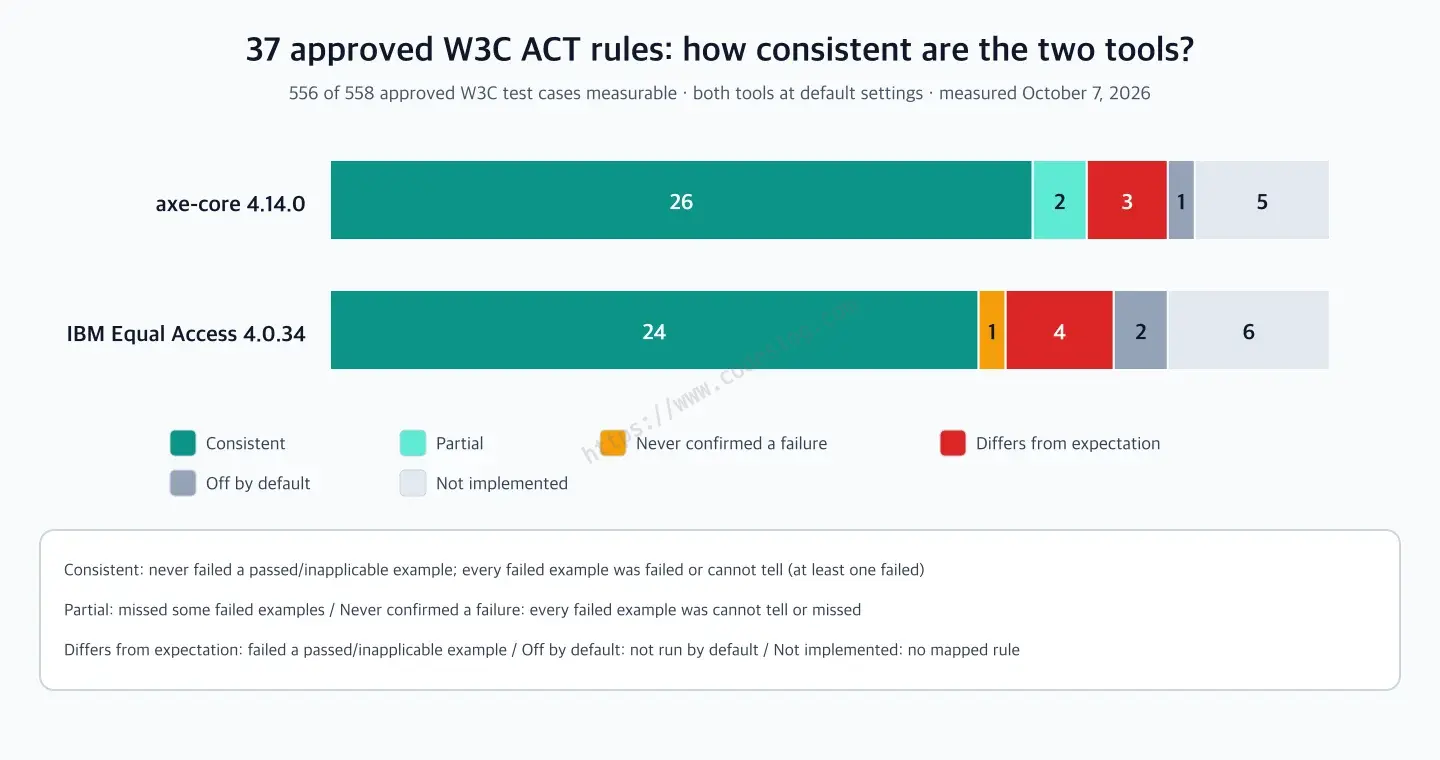
Results: axe consistent on 26 of 37 approved rules, IBM on 24#
I sorted each rule into a category, modeled on the “consistent” definition in W3C’s ACT Implementations report (without the check on reported success criteria).
- Consistent: never failed a passed or inapplicable example, returned failed or cannot tell for every failed example, and caught at least one as a failure
- Partial: no failures that differ from expectation, but missed some failed examples (treated as not failed)
- Never confirmed a failure: no failures that differ from expectation, but didn’t confirm any failed example as a failure (all cannot tell, or missed)
- Differs from expectation: failed a passed or inapplicable example at least once. This means it differs from what ACT expects, not that the tool’s judgment is necessarily wrong
- Off by default: a corresponding rule exists but doesn’t run in the default configuration
- Not implemented: no corresponding tool rule
| Item | axe-core 4.14.0 | IBM Equal Access 4.0.34 |
|---|---|---|
| Rules that ran in default configuration | 31 | 29 |
| Consistent | 26 | 24 |
| Failed examples caught as failures | 140 / 159 | 135 / 145 |
| Failed examples returned as cannot tell | 7 | 9 |
| Failed examples missed | 12 | 1 |
| Passed or inapplicable examples judged as failures | 3 / 328 | 6 / 297 |
Each tool ran a different set of rules, so the denominators differ. Nine of the 12 failed examples axe missed came from the 1.4.6 Contrast (Enhanced) rule. axe’s AAA contrast rule (color-contrast-enhanced) is off by default, so only the 4.5:1 check ran. IBM’s two “off by default” rules (“Scrollable content can be reached with sequential focus navigation” and “Meta element has no refresh delay (no exception)”) also exist in IBM’s engine but aren’t in its default policy. IBM’s one “never confirmed a failure” is the meta refresh rule from case 3, where all four failed examples came back as cannot tell.
The six passed or inapplicable examples IBM judged as failures: three flagged the nameless
svgelement itself (case 2), one was the focus sentinel (case 1), one was anaria-errormessagepointing to an ID that doesn’t exist, and one wasautocomplete="bday-day"on atype="tel"input. axe’s three: one iframe example that’s inert because a modal dialog is open, plus two examples with two meta elements (case 3).
W3C’s ACT Implementations report has similar numbers. It lists axe-core 4.10.2 with 26 approved rules consistent and Equal Access 3.1.42-rc.0 with 21. They aren’t the same set of rules, though. When I lined up the rule lists, 23 of axe’s 26 overlapped, and 20 of IBM’s 21. Going through the mismatches one by one, I found a few reasons. The tool versions in the report are older than the ones I measured. W3C’s axe results were produced with the AAA contrast and no-exception refresh rules turned on, even though both are off by default. And some cases, like the meta refresh examples, come out differently depending on the environment. W3C also checks whether the success criteria a tool reports are correct. The numbers in this post don’t replace that report. They’re a side-by-side of the latest versions as of October 2026, under the same conditions.
28 rules ran in both tools, covering 430 test cases. On 17 of those cases (8 rules), the tools disagreed on “fail or not.” That’s 4%, or 9 out of 141 if you look only at failed examples. Here’s how the 17 break down.
| Reason for disagreement | Count |
|---|---|
| One side returned cannot tell (IBM 6, axe 2) | 8 |
| One side failed code that ACT considers passed or inapplicable (IBM 5, axe 2) | 7 |
| One side missed a failure (IBM 1, axe 1) | 2 |
In this run, which tool returned cannot tell depended on the rule. Here are three disagreements up close.
Three cases where axe and IBM disagreed#
Case 1. A modal where a script moves focus: axe can’t tell, IBM fails it#
Passed Example 4 and Failed Example 6 of 6cfa84 are almost the same HTML. Behind a modal dialog, there’s a link hidden with aria-hidden="true". It’s called a focus sentinel, and its job is to catch keyboard focus so it doesn’t leak out of the modal.
<!-- The part both examples share -->
<div aria-hidden="true">
  <a href="#" id="sentinelAfter" style="position:absolute; top:-999em">
    Upon receiving focus, this focus sentinel should wrap focus to the top of the modal
  </a>
</div>

<!-- Script only in the passed example: when the link gets focus, send it straight back to the modal's first input -->
<script>
  document.getElementById('sentinelAfter').addEventListener('focus', () => {
    document.getElementById('dialogFirst').focus()
  })
</script>
The difference is that one focus event handler. With the handler, the moment Tab reaches the hidden link, focus goes back to the modal, so the user never lands on that link (pass). Without it, a screen reader user’s focus lands on a link that’s hidden from the accessibility tree, and they have no idea what they’re on (fail).
| Example | ACT expectation | axe-core | IBM |
|---|---|---|---|
| Passed Example 4 (with handler) | Passed | Cannot tell | Failed |
| Failed Example 6 (no handler) | Failed | Cannot tell | Failed |
Neither tool can tell what that handler does by looking at the HTML structure. So axe hands both cases off with “have a human check,” while IBM says “fail” to both. axe doesn’t brand the passed example a failure, but it also doesn’t confirm the failed example. IBM doesn’t miss the failure, but it fails the passed example too. That’s how it went for this rule. The next two cases include rules where the roles flip.
Case 2. A nameless svg: IBM casts a wider net than ACT#
7d6734, “SVG element with explicit role has non-empty accessible name,” is the rule where IBM’s verdicts differ from ACT’s expectations most often. One inapplicable example shows why.
<svg xmlns="http://www.w3.org/2000/svg">
  <circle cx="50" cy="50" r="40" fill="yellow"></circle>
</svg>
There’s no role attribute, so by the ACT rule this isn’t in scope. IBM still failed it, saying the svg element has no accessible name. All three examples IBM failed against expectation in this rule had the same complaint. Even in a passed example where the circle has both a role and an aria-label, it failed because the outer svg has no name. In effect, IBM requires a name on the svg itself in more situations than the ACT rule does. That differs from ACT’s expectation, but I wouldn’t call the requirement itself wrong.
In the other direction, Failed Example 4 of this rule (an svg with role="img" whose only label is a text element, with no title or aria-label) was caught by axe and missed by IBM. The ACT rule doesn’t use SVG text elements for name computation, but IBM decided this svg has an accessible name.
Case 3. meta refresh: axe catches it, IBM can’t tell#
The four failed examples for bc659a, “Meta element has no refresh delay,” are code like <meta http-equiv="refresh" content="30"> that swaps out the page after a set time. axe failed all four. IBM returned cannot tell for all four. This time the roles are the reverse of case 1: here it’s IBM that won’t commit. Which tool returns cannot tell really does depend on the rule.
On the other hand, this rule is also where axe departs from ACT’s expectation. Passed Example 2 has two meta refreshes.
<meta http-equiv="refresh" content="0; https://w3.org" />
<meta http-equiv="refresh" content="5; https://w3.org" />
The ACT rule only considers the first valid meta, and since the first one redirects immediately with no delay, it passes. axe flagged the second one’s 5 second delay as a failure. Only the first meta takes effect, so no user ever waits 5 seconds. Still, the second line is dead code, so axe’s flag does no harm.
When two tools disagree, a human ends up making the call, and the examples in the ACT rule give you something concrete to check against.
What this measurement doesn’t tell you#
An ACT test case is a tiny piece of HTML that isolates one feature. It says nothing about how often each error actually shows up on real web pages. Rules with many examples (the two contrast rules have 32 and 34) also weigh more heavily in the numbers. So don’t read these results as “this tool finds more errors on real sites.”
I also used each tool’s own declared mapping as is. If a tool catches the same problem with some other rule it hasn’t linked to an ACT rule, that doesn’t show up here. These are default settings, so turning on disabled rules changes the numbers. And I counted verdicts per page. I didn’t check whether a tool pointed at the exact element the ACT rule looks at.
What to do when your accessibility checkers disagree#
First, don’t read “needs review” as a pass. The incomplete and POTENTIAL results from earlier mean “I don’t know.” In this measurement, axe returned cannot tell for a failed example 7 times, and IBM did so 9 times. If your CI only looks for zero violations before it passes, it’s safer to collect the needs-review items separately and have a person look at them. I wrote up how to add axe to Playwright tests in Accessibility E2E testing with axe.
When two tools disagree, compare against the ACT rule examples. Find the ACT rule that matches the rule name in the tool’s report, then pick the passed or failed example closest to your code. Swap the rule ID into the script above and you can also see right away how your tool judges that rule.
If you need to meet AAA criteria, check the tool’s default configuration. axe has its AAA contrast rule off by default, so unless you turn it on, it won’t catch text with contrast between 4.5:1 and 7:1. Other tools may have rules missing from their defaults too.
When choosing a tool, the implementations report is worth a look. The W3C ACT Implementations report shows how consistently tools like axe-core, IBM Equal Access, Alfa, QualWeb, and SortSite implement each rule. As of October 7, 2026, no Korean tools were on this list. ACT test cases could be a good common benchmark for comparing Korean automated checkers with each other, too.
Finally, automated checking is only one part of an evaluation. Which screens to pick and in what order to evaluate them is covered in WCAG-EM 2.0 evaluation methodology, and how to divide up units of testing is covered in WCAG 3’s atomic and holistic tests. ACT rules fit inside that picture as a way to line up machine checks and human checks using the same method.
The one-page summary#
- Accessibility checkers disagree because each one turns the WCAG text into code differently. An ACT rule writes that method down in one shared format and attaches passed and failed example HTML.
- ACT Rules Format 1.1 became a W3C Recommendation on February 5, 2026. A rule’s link to WCAG is now split into conformance requirements (directly decided) and secondary requirements (only related), and applicability that needs human judgment is allowed when it can’t be defined objectively.
- I ran the test cases for W3C’s 37 approved rules with default settings (556 measurable). axe-core 4.14.0 was consistent on 26 rules and IBM Equal Access 4.0.34 on 24.
- Of the 430 cases both tools checked, 413 agreed on whether the example fails. The 17 that split came from one side returning cannot tell (8), one side failing code ACT counts as a pass (7), and misses (2). Which tool returned cannot tell depended on the rule.
- “Needs review” is not a pass. When results disagree, compare with the ACT rule examples, and do the final check yourself with a keyboard and a screen reader.
질문으로 다시 보기#
What are ACT rules?
What changed in ACT Rules Format 1.1?
If axe, Lighthouse, and IBM's checker disagree, which one should I trust?
Where can I see how well an automated tool supports ACT rules?
References#
- Accessibility Conformance Testing (ACT) Rules Format 1.1: W3C Recommendation, 2026-02-05
- ACT Rules Format 1.1 is a Web Standard: W3C WAI announcement
- ACT Rules list: rules W3C has approved and proposed
- ACT Implementations report: how each tool and methodology implements the rules
- ACT Rules Community Group: the community that writes the rules
- Measurement script and raw data: the test case results behind this post
Leave a comment