Click “Add to Cart” on an online store, and the badge in the top-right corner flips from 3 to 4. For someone who can see the screen, that’s feedback enough. But what about someone browsing the web with a screen reader — software that reads the screen aloud? A number quietly changing somewhere on the page tells them nothing. Whether the item was added, how many are in the cart now, whether it failed — there’s no way to know.
This is exactly the problem WCAG’s Success Criterion 4.1.3 Status Messages addresses, and aria-live is the tool that implements it. Adding the attribute is the easy part — the real questions start right after. If the count changes several times in a row, does the screen reader read every single one? What’s the actual difference between polite and assertive? What about status that’s only shown through an icon or a sound? This post works through each of these, one experiment at a time.
Every example here is live on the aria-live status messages demo page, so you can try them yourself — it’s worth clicking along as you read.
This Post Started on a Tuesday Evening — the a11ykr Translation & Documentation Meetup#
Before I get into it, I want to introduce where this post actually came from. If you’re here for the technical content, feel free to skip straight to the definition of a status message.
a11ykr is a community of Korean accessibility practitioners who get together to translate W3C accessibility documents into Korean and build documentation around them. At the weekly Tuesday evening meetup, we’re currently working through the WCAG 2.2 Understanding documents together, translating them line by line as a study group. Whoever’s presenting a given success criterion walks the group through the original text, and everyone digs in and debates what a sentence actually means in practice. I take part too, and when an accessibility question comes up, the conversation usually keeps going on Discord afterward. Since the group’s own output is in Korean, a quick heads-up: the links below lead to Korean-language material.
- a11ykr’s official introduction — the group, its activities, and where accessibility resources live
- a11ykr Discord — the channel where we talk accessibility
- GitHub repository — where translation work and edit suggestions happen
I covered what WCAG 2.2 is and what’s new in it back in WCAG 2.2’s 6 New Criteria. This week’s meetup covered 4.1.3 Status Messages. Listening to the presentation, one question led to another — “if the cart count keeps climbing, does the screen reader really read out every single number?” — and since the spec alone couldn’t answer that, we decided to build something and check. This post is the result. Reading a standards document alone can put you to sleep, but pick it apart with a group and you end up with something to write about. If you’re curious, feel free to drop by the GitHub repo.
What Is a Status Message? — What WCAG 4.1.3 Actually Requires#
WCAG (the Web Content Accessibility Guidelines) defines a status message like this:
change in content that is not a change of context, and that provides information to the user on the success or results of an action, on the waiting state of an application, on the progress of a process, or on the existence of errors
“5 search results,” “Cart, 5 items,” “Invalid input,” “Saving…” — all of these qualify. And 4.1.3 asks for exactly one thing about messages like these:
In content implemented using markup languages, status messages can be programmatically determined through role or properties such that they can be presented to the user by assistive technologies without receiving focus. (Level AA)
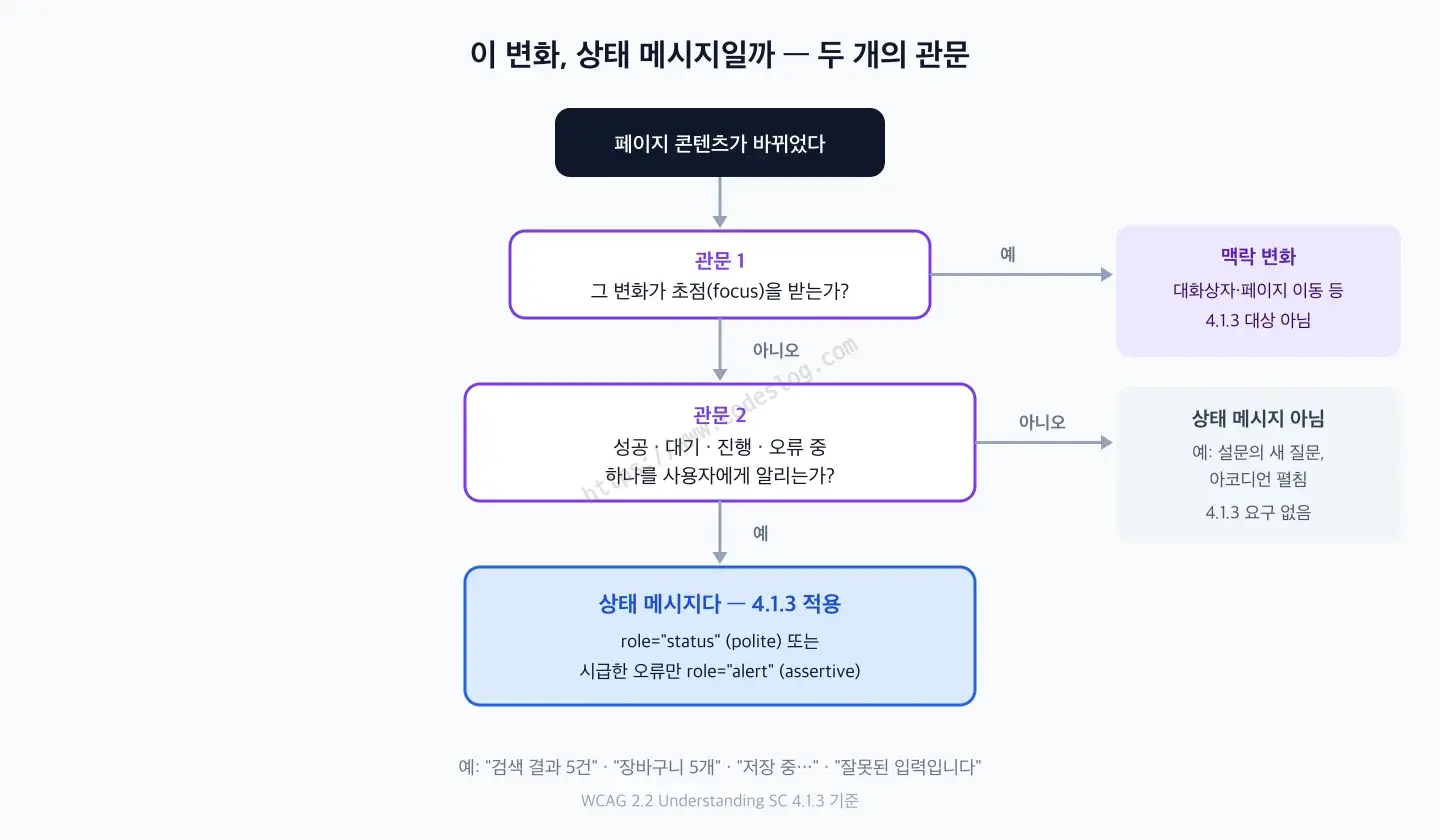
“Assistive technology” here means software or hardware, like a screen reader, that reads or operates content on the user’s behalf. The key phrase is “without receiving focus.” Focus is wherever keyboard input is currently directed. UI that takes focus, like a dialog, was never in scope for this criterion to begin with — moving focus is itself a change of context, so a screen reader ends up reading it anyway. What 4.1.3 actually targets is content that changes quietly, somewhere off in a corner of the screen. The goal is to make that change audible without interrupting whatever the user is doing.
Flip the definition around and one important conclusion follows: a change that doesn’t fall under success, waiting, progress, or error isn’t a status message at all, and 4.1.3 doesn’t apply to it.
aria-live polite vs. assertive — Waiting in Line, or Cutting In#
The standard tool for getting a status message to a screen reader is the live region. An element with the aria-live attribute declares to assistive technology, “tell the user when the content inside changes.” Two values are used in practice.
Here’s what the ARIA specification says, word for word:
| Value | Spec definition | One-line summary |
|---|---|---|
polite | Indicates that updates to the region should be presented at the next graceful opportunity, such as at the end of speaking the current sentence or when the user pauses typing. | Waits in line |
assertive | Indicates that updates to the region have the highest priority and should be presented the user immediately. | Cuts in line |
Think of it like a checkout line at a café: polite is the customer who joins the back of the line, and assertive is the one who cuts to the front saying, “Sorry, just this one thing.” The spec attaches a warning to that second behavior: because an interruption may disorient users or cause them to not complete their current task, authors SHOULD NOT use assertive unless the interruption is imperative. In fact, WCAG’s own list of common failures for this criterion calls out exactly this: “Using role="alert" or aria-live="assertive" on content which is not important and time-sensitive.”
You don’t have to hand-write aria-live every time — some roles already have it built in as a default.
<!-- role="status": implicitly applies aria-live="polite" + aria-atomic="true" -->
<div role="status">Cart, 5 items</div>

<!-- role="alert": implicitly applies aria-live="assertive" + aria-atomic="true" -->
<div role="alert">Your session has expired</div>
aria-atomic="true" means “don’t just read the characters that changed — re-read the whole region.” That’s why even a count flipping from 4 to 5 gets read out as the complete sentence “Cart, 5 items.” For everyday status messages, use role="status"; for something the user needs to know about right now, use role="alert" — remembering just these two covers most situations. There’s a third option, role="log", for cases like a chat transcript where the accumulating history itself matters, but when only the latest value counts, like here, role="status" is the right call. I covered how to put role="alert" to work for real form-error announcements in Form Accessibility Mastery, and the fundamentals of ARIA attributes in general in ARIA Practical Guide.
One more thing, and this is the landmine most people step on in practice. A live region has to already exist in the DOM before its content changes. If you insert the role="status" element itself at the same moment the message appears, screen readers frequently miss it. The standard approach is to place an empty region on the page from load time, and only ever change the text inside it when there’s something to announce. Failure technique F103 nails this down explicitly too — a role or property that isn’t already set before dynamic content is added is called out as a failure. I’ve written up the reasons a live region can end up silent, including the trap where re-inserting the same text can get skipped, in Why Your Live Region Isn’t Being Announced.
What Happens When You Add 10 Items to a Cart in a Row#
Now for the question that actually came out of the study group. If a user mashes the add button and the cart count climbs 1, 2, 3… all the way to 10, how does a screen reader handle that? The short answer: polite backs up, assertive cuts itself off.
While the user is clicking, the screen reader is usually already talking — reading the button’s name, or still in the middle of a previous announcement — and live region updates keep pouring in on top of that. Per the spec, this is where the two values diverge.
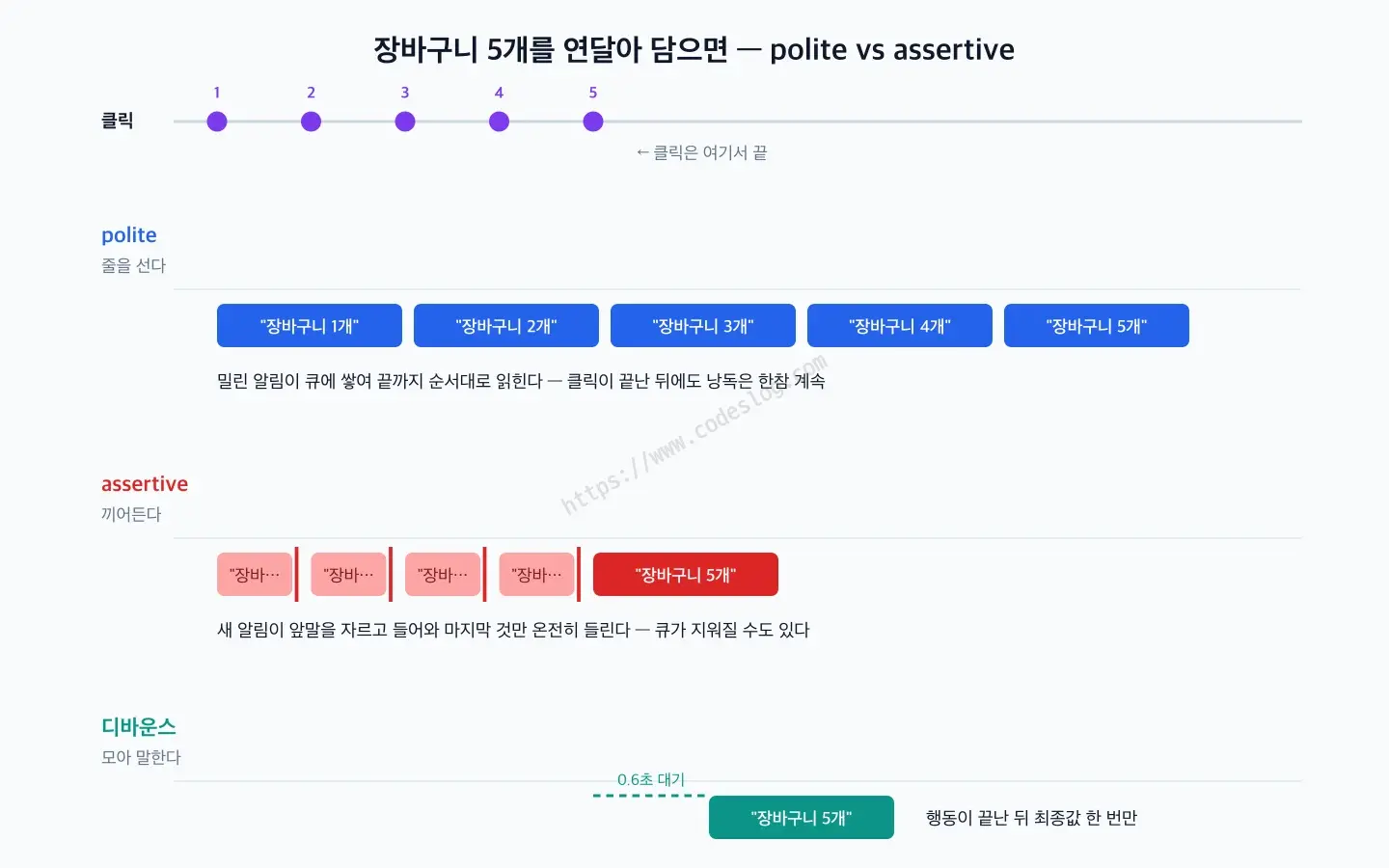
With polite, the backlog piles up in a queue. It waits for the current sentence to finish before reading the next one, so if clicks come in faster than speech does, “Cart, 1 item… 2 items… 3 items…” just keeps stacking up. The clicking might be over in three seconds, but the reading can drag on well after that. Per the spec model, the screen reader dutifully works through the entire backlog to the end. The problem is exactly that diligence.
With assertive, every previous announcement keeps getting cut off. Each new update interrupts the one before it, so you get something like “Cart… Cart… Cart, 10 items,” with everything in the middle chopped off and only the last one heard in full. You might think that’s actually better, since you only hear the final result — but the spec warns that the interruption itself is disorienting, and it goes further: “User agents or assistive technologies MAY choose to clear queued changes when an assertive change occurs.” That means other, unrelated announcements can get wiped out along with it.
Demo 1 puts both carts side by side, with a simulated screen reader panel that lets you watch the speech queue itself. Click “Add 10 in a row” and you’ll see queued items pile up on the polite side while the assertive side gets struck through one after another.
A note of caution: the simulated screen reader in the demo is only a model of the priority rules the spec describes. Real products don’t all behave the same way — some skip backlogged items, others merge consecutive changes in the same region and read only the final value. When I tested this demo on my Mac with VoiceOver,
politereally did read all 10 announcements to the end,assertivecame through with only the last one intact, and the debounce pattern coming up next was read exactly once. That matched the spec model, but it can easily differ by product and version. That’s why every live region on the demo page is wired up for real. Turn on NVDA (a free screen reader for Windows) or VoiceOver (built into the Mac, Cmd+F5) and press the same buttons, and you’ll hear exactly how your own setup behaves. No automated tool can do this check for you.
Either way, mashing the button produces something loud or something messy. The cart count is definitely a status message and definitely worth announcing — but relaying every single change in real time clearly isn’t the answer. So what should you actually do?
Debouncing: Announce Once, After the Action Settles#
The Understanding document puts its finger right on this problem:
However, there is a risk of making an application too “chatty” for a screen reader user. User testing should be carried out to ensure the appropriate level of feedback is achieved.
Someone in the study group mentioned that the Advisory Techniques cover this, so I checked — turns out that’s only half right. What’s actually listed there includes things like using role="timer", identifying errors with aria-alertdialog (ARIA18), and letting users turn off nonessential alerts (SCR14). There’s no technique registered under a name like “batch announcements with a timer.”
Still, since the document explicitly warns against chattiness, as quoted above, the practical pattern that answers it is debouncing — waiting until a burst of events goes quiet, then running just once.
The idea is to separate what’s on screen from what gets spoken. The visible number needs to update instantly, but the audible announcement only needs to fire once, with the final result, after the action is done.
<button type="button" id="add-btn">Add to Cart</button>

<!-- For on-screen display — not a live region, so changes here aren't announced -->
<span id="cart-count">Cart is empty</span>

<!-- For screen reader announcements only — hidden visually, must exist from page load -->
<div role="status" class="sr-only" id="cart-live"></div>/* Standard utility: hidden visually, still available to screen readers */
.sr-only {
position: absolute;
width: 1px; height: 1px;
margin: -1px; padding: 0;
overflow: hidden;
clip-path: inset(50%);
white-space: nowrap;
border: 0;
}const addBtn = document.getElementById('add-btn');
const cartCount = document.getElementById('cart-count');
const cartLive = document.getElementById('cart-live');
let count = 0;
let pending = null;
addBtn.addEventListener('click', () => {
count++;
cartCount.textContent = `Cart, ${count} items`; // screen updates instantly
// defer the announcement while clicks keep coming
clearTimeout(pending);
pending = setTimeout(() => {
cartLive.textContent = `Cart, ${count} items`; // announce once, 0.6s after the last click
}, 600);
});Click ten times in a row, and the screen reader still hears “Cart, 10 items” exactly once. Try the same interaction in Demo 2, and the difference in the simulated screen reader panel is immediately obvious next to Demo 1.
There’s no single right delay, but starting somewhere between 500 and 1000ms is a reasonable default. Too short, and announcements leak out mid-click; too long, and you get an awkward silence where it feels like the click didn’t register at all. This is exactly why the Understanding document recommends user testing.
Two boundaries worth drawing here. Debouncing only applies to repeating state, like a count. An error like a failed add should still go out immediately through a separate role="alert" path — mixing it into the same region as the success count means the last announcement can silently overwrite the failure. And a polite announcement is a one-shot signal that can get lost if the user moves elsewhere in the meantime. It’s safer to treat the on-screen count text as the source of truth you can always re-read, and the announcement as just a supplementary channel on top of it.
Looking ahead: there’s an ongoing discussion around an
ariaNotifyAPI that would try to solve this speech-queue pain at the platform level. The Understanding document’s technique list already includes ARIA27 (communicating progress withariaNotify). Browser support is still too early for it, though, so live regions remain the practical answer for now.
What happens if you skip the live region altogether? If the text changes visibly but there’s no role and no aria-live, the screen reader stays completely silent. WCAG documents exactly this as failure technique F103, and Demo 3 lets you hear this “silent failure” for yourself.
Icons and Sounds Are Status Messages Too — Non-Text Status Content#
Status isn’t always shown as text. A spinner next to a save button, a checkmark icon meaning “done,” a little “ding” notification sound — are these covered by 4.1.3 too?
The Understanding document has a dedicated section for exactly this (Non-textual status content). Here’s the core of it, quoted directly:
Changes in content are not restricted to text changes. Where an icon or sound indicates a status message, this information will be surfaced by the screen reader through a combination of two things: 1) existing WCAG requirements governing text alternatives (under Success Criterion 1.1.1 Non-Text Content), and 2) the requirement of this current success criterion to supply an appropriate role.
In other words, an icon-based status is only complete when a text alternative (1.1.1) and a role (4.1.3) are both in place. Either one alone falls short: a text alternative with no live region means nothing gets announced when it changes, and a live region wrapped around an icon with no text alternative means the announcement fires but has nothing in it to say.
<!-- Place the live region ahead of time -->
<span role="status" id="save-state"></span>const saveState = document.getElementById('save-state');
// Save starts — the icon is decorative (aria-hidden), the text carries the meaning
saveState.innerHTML =
'<svg class="spinner" aria-hidden="true">…</svg>' +
'<span class="sr-only">Saving…</span>';
// Save complete
saveState.innerHTML =
'<svg class="check" aria-hidden="true">…</svg>' +
'<span class="sr-only">Saved</span>';Instead of hidden text, you could just as well carry the alt text on an <img alt="Saved">. Either way, the screen reader ends up reading “Saving…” and then “Saved.”
Sound needs an extra layer of care. A status conveyed by a notification sound alone never reaches users who are deaf or hard of hearing, and it doesn’t tell a screen reader user what the sound actually means, either. So treat sound strictly as a supplementary signal, and always provide the same information as a text status message alongside it. Demo 4 places an icon-only version next to one that combines an icon, hidden text, and a notification sound.
Why a New Survey Question Isn’t a Status Message#
One last question that came out of the study group. In a satisfaction survey, if picking “dissatisfied” makes a follow-up question appear on the page, does that need to be announced too? Short answer: there’s no obligation to. It turns out the Understanding document has exactly this example, so I went and checked the original text. In the section on content changes that are not status messages, it reads:
After a user completes a survey question which indicates they are unhappy, a series of new questions are added to the page about customer satisfaction. The new inputs do not meet the definition of status message. They do not “provide information to the user on the success or results of an action, on the waiting state of an application, on the progress of a process or on the existence of errors,” and so are not required to meet this success criterion.
— Understanding SC 4.1.3: Examples of changes that are not status messages
So the claim checks out. A newly appearing question isn’t success, waiting, progress, or error, so it doesn’t clear the definition’s gate and 4.1.3 doesn’t require anything of it. Quietly adding the follow-up question isn’t a violation of this criterion.
Combined with the “does it take focus” question from earlier, the full test becomes a two-gate sequence:
That said, “not a violation” and “good enough as-is” are two different questions. From a screen reader user’s perspective, they might pick one radio button and then head straight for the submit button, never realizing a new question just appeared further down the page. The Understanding document, in fact, attaches a note right after this exact survey example.
Note: Creating a status message about these questions being added, or notifying the user in advance that content changes may take place based on the user’s response, are best practices but are not requirements in this scenario.
— Understanding SC 4.1.3: Examples of changes that are not status messages
Here’s how the options break down:
- Add it quietly. Since it’s not a violation of the criterion, you can leave it as-is. If the new question falls into the natural reading order right after the current position, users encounter it naturally as they keep moving down the page.
- Flag it in the answer option itself. Something like “No (selecting this adds 2 more questions)” written right into the option label. This is the “notify in advance” path the quote above points to, solved right at the point of choice. Since the user learns about the change before it happens, there’s no need to build a separate announcement at all.
- Add a one-line polite announcement. A short heads-up like “Two more questions have appeared below” placed in a
role="status"region, delivered after the fact. The Understanding document itself notes that using a live region for a change that isn’t technically a status message can still improve the user experience — just don’t let it get chatty. - Move focus. This one needs care. Forcing focus to move mid-input, like while someone’s still choosing a radio option, tends to be an unexpected change of context and can conflict with a different success criterion (3.2.2 On Input). Not recommended unless the new question is the direct result of an explicit user action, like clicking a button.
My own pick is option 2, flagging it in advance. An after-the-fact polite announcement can, by nature, get lost, but a heads-up written into the label is guaranteed to be read at the exact moment the user makes their selection. And it only costs you a parenthetical. Demo 5 lets you switch between all three approaches and hear the difference for yourself.
TL;DR#
- WCAG 4.1.3: A content change reporting success, waiting, progress, or error must be programmatically determinable through a role or property, so assistive technology can present it without the user needing to receive focus (AA).
- Default to
role="status"(polite): read after the current speech finishes. Useassertive(role="alert") only for genuinely urgent errors, since it interrupts. - Debounce rapid updates: the on-screen number updates instantly; the announcement fires once, with the final value, after the action settles. The live region must already exist in the DOM beforehand.
- Icon and sound status: only gets through when a text alternative (1.1.1) and a role (4.1.3) are both present. Sound alone isn’t enough.
- Newly appearing inputs or questions: not a status message, so 4.1.3 doesn’t require anything — but flagging it in the option itself, like “No (adds more questions),” is the best practice the document recommends.
질문으로 다시 보기#
What's the actual difference between aria-live polite and assertive?
If I use role='status', do I still need to add aria-live separately?
I added aria-live, but the screen reader isn't reading it. What's going on?
What's the best way to announce a value that keeps changing rapidly, like a cart count?
If choosing a survey answer adds new questions to the page, do I need to announce that as a status message?
Wrapping Up#
4.1.3 is a single-sentence criterion, but dig into it and it turns into a design question: how much should you actually announce? Announce nothing, and you get a silent failure. Announce everything, and you get a chatty one. Where exactly the right balance sits in between isn’t something a standards document can tell you — only real users’ ears can. I’d encourage you to turn on a screen reader and click through today’s demos yourself. Once you’ve actually heard polite waiting its turn and assertive cutting in, you won’t mix them up again.
And if you’re ever looking for people to dig into questions like these with — Tuesday evenings, a11ykr is there.
References
Leave a comment