Introduction#
Blogs built with Static Site Generators (SSG) are incredibly fast and secure. However, adding dynamic features like comments requires careful consideration. This blog uses Giscus, a GitHub Discussions-based comment system, but there was one inconvenience.
Comments only appear at the bottom of each post, making it difficult to see at a glance which articles have active discussions.
So I built three features:
- Display comment counts in post lists - See which articles have ongoing conversations
- Show recent comments on the explore page - View recent blog activity at a glance
- Create an all comments page - Browse all comments in one place
This article shares the process of bringing dynamic comment information to a static site using GitHub GraphQL API while maintaining optimal performance.
Implemented Features#
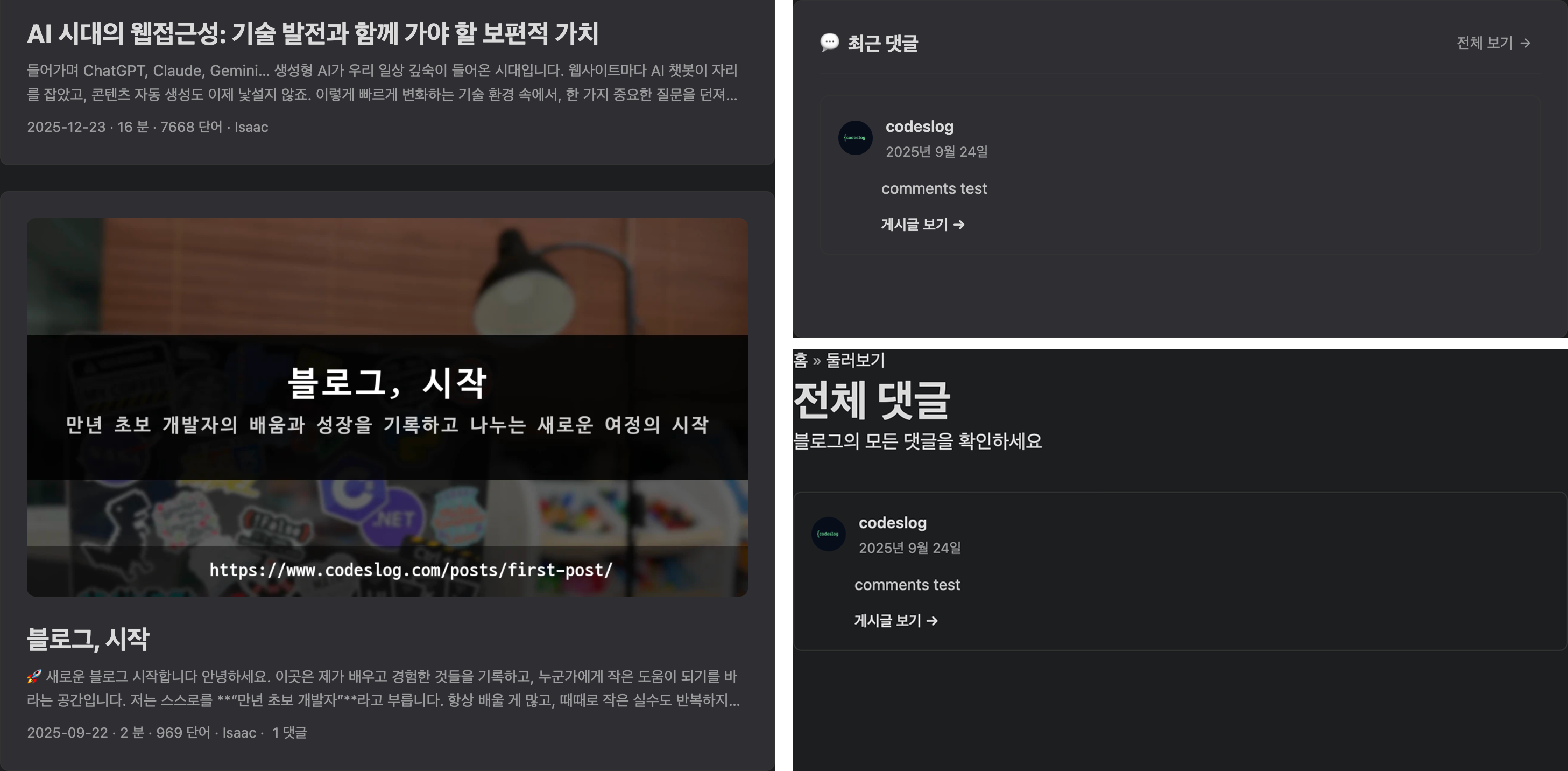
Updated comment UI on codeslog
1. Comment Counts in Post Lists#
Display comment counts for each post in lists (/posts/, /archives/).
Features:
- Only shows when comments ≥ 1
- Completely hidden when no comments (no trailing separator)
- Screen reader accessible with proper labels
- 5-minute caching to minimize API calls
<!-- Output example -->
January 12, 2026 · 5 min · Isaac · 3 comments
2. Recent Comments on Explore Page#
Display recent comments as cards on the /explore/ page.
Displayed Information:
- Author profile picture and name
- Relative time (e.g., “3 minutes ago”, “2 hours ago”)
- Comment content preview (max 150 characters)
- “View post” link (scrolls directly to the comment!)
3. All Comments Page#
Created a dedicated page at /explore/comments/ to view all blog comments.
Features:
- Fetches comments from up to 100 discussions
- Sorted by newest first
- Same design as recent comments
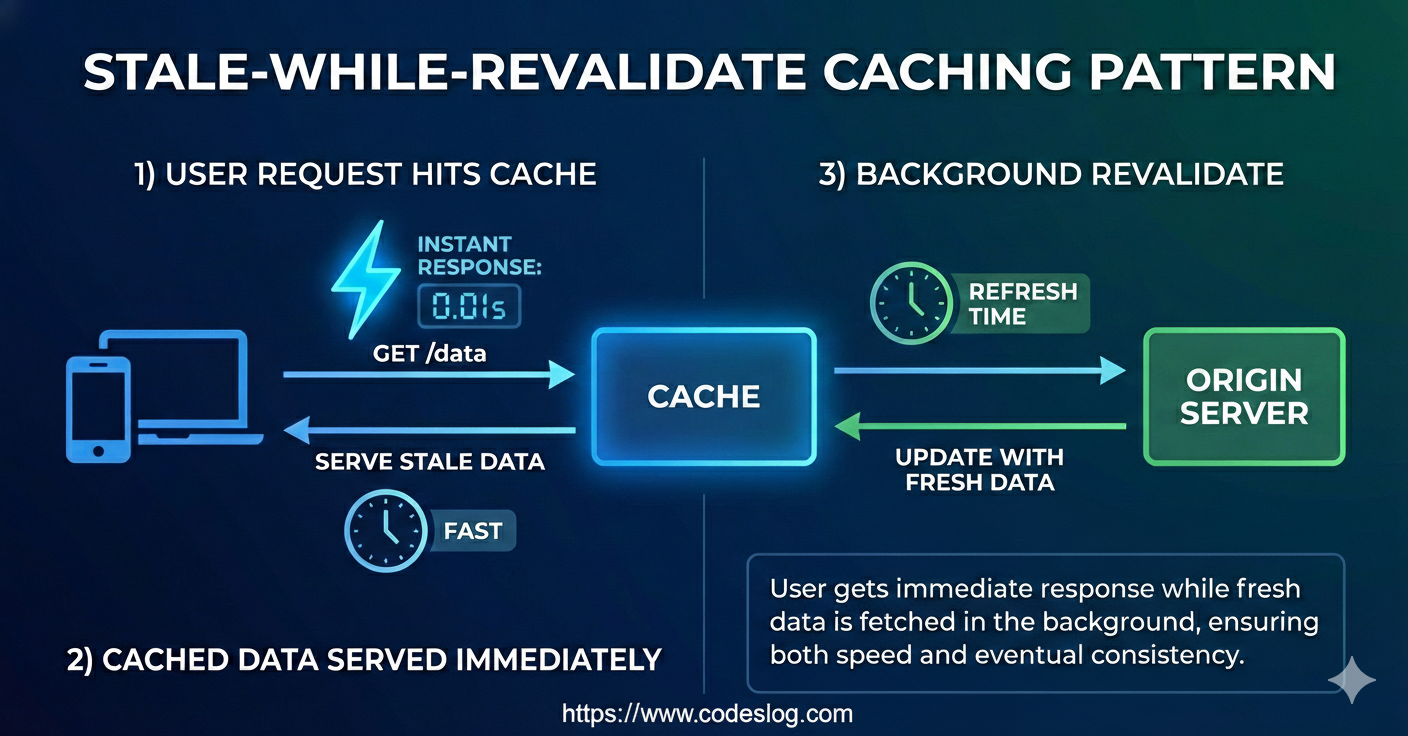
- 5-minute cache + stale-while-revalidate pattern for fast display
Tech Stack#
Giscus: GitHub Discussions-Based Comment System#
Giscus is an open-source comment system that uses GitHub Discussions as the backend.
Advantages:
- Convenient GitHub account login
- Markdown support
- Reactions and nested replies supported
- Free with no ads
- Data stored on GitHub (direct ownership)
Limitations:
- Comment information is only accessible within the iframe
- Requires separate implementation to display comment counts in post lists
GitHub GraphQL API#

Created by: NanoBanana
GitHub provides a GraphQL API in addition to RESTful API. GraphQL is much more efficient for fetching comment information.
Query used:
query($owner: String!, $repo: String!, $categoryId: ID!) {
  repository(owner: $owner, name: $repo) {
    discussions(first: 50, categoryId: $categoryId, orderBy: {field: UPDATED_AT, direction: DESC}) {
      nodes {
        title
        url
        comments(last: 10) {
          totalCount
          nodes {
            author {
              login
              url
              avatarUrl
            }
            body
            bodyText
            createdAt
            url
          }
        }
      }
    }
  }
}
Why GraphQL:
- Request only the data you need (no unnecessary data transfer)
- Fetch multiple resources in a single request
- Less network overhead compared to RESTful API
Creating GitHub Personal Access Token#
GitHub API can be used without authentication, but it’s limited to 60 requests per hour. Using a Personal Access Token (PAT) increases this to 5000 requests per hour.
1. Generate Token on GitHub#
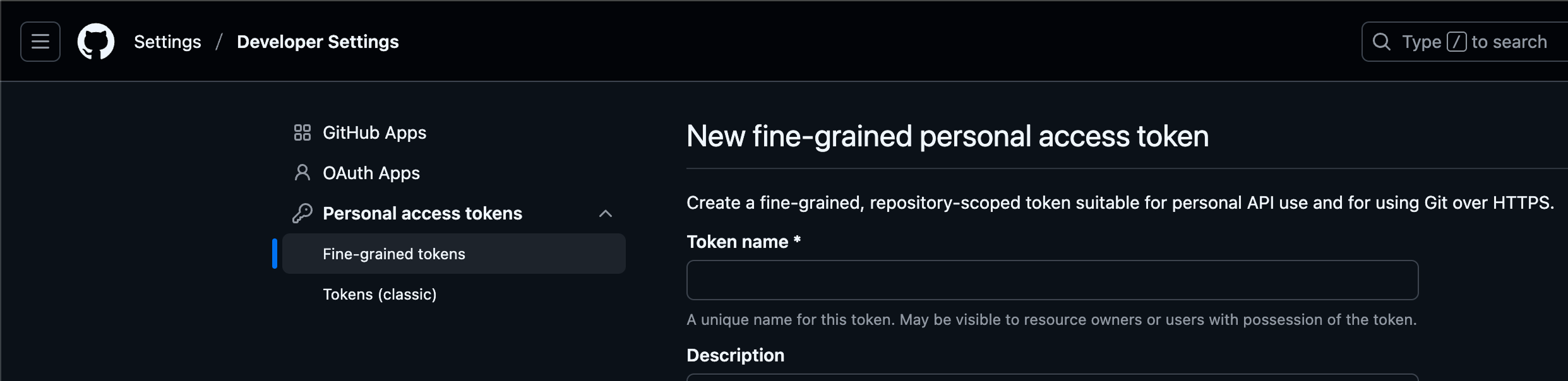
Screenshot: GitHub
Log in to GitHub and go to Settings > Developer settings > Personal access tokens > Fine-grained tokens
Click “Generate new token”
Configure as follows:
- Token name:
Blog Comment API(any name you prefer) - Expiration:
90 daysorNo expiration(90 days recommended) - Repository access:
Public Repositories (read-only) - Permissions:
Discussions: Read-only (required)- Rest set to
No access
- Token name:
Click “Generate token”
Copy the generated token immediately (cannot be viewed again)
The generated token is a long string starting with github_pat_ or ghp_.
2. Token Security Management#
Security Measures (Required):
- Never commit tokens to Git
- Be especially careful with public repositories
- Always add
.envfile to.gitignore
Setting Up Local Development Environment#
1. Create .env File#
Create a .env file in the project root:
# .env
GITHUB_TOKEN=github_pat_paste_your_actual_token_here
2. Configure Hugo Security Policy#
Hugo restricts environment variable access by default. Add this to config.yaml:
# config.yaml
security:
  funcs:
    getenv:
      - ^HUGO_
      - ^CI$
      - ^GITHUB_TOKEN$
3. Use Token in Hugo Template#
Create layouts/partials/github-token.html:
{{- if getenv "GITHUB_TOKEN" -}}
<meta name="github-token" content="{{ getenv "GITHUB_TOKEN" }}">
{{- else if site.Params.githubToken -}}
<meta name="github-token" content="{{ site.Params.githubToken }}">
{{- end -}}
Include it in layouts/partials/extend_head.html:
<!-- layouts/partials/extend_head.html -->
{{- partial "github-token.html" . -}}
4. Add .env to .gitignore#
# .gitignore
# Environment variables (contains secrets)
.env
.env.local
.env.*.local
5. Test Locally#
# Run from directory containing .env file
hugo server

# Or pass environment variable directly
GITHUB_TOKEN=your_token_here hugo server
Configuring Cloudflare Pages Environment Variables#
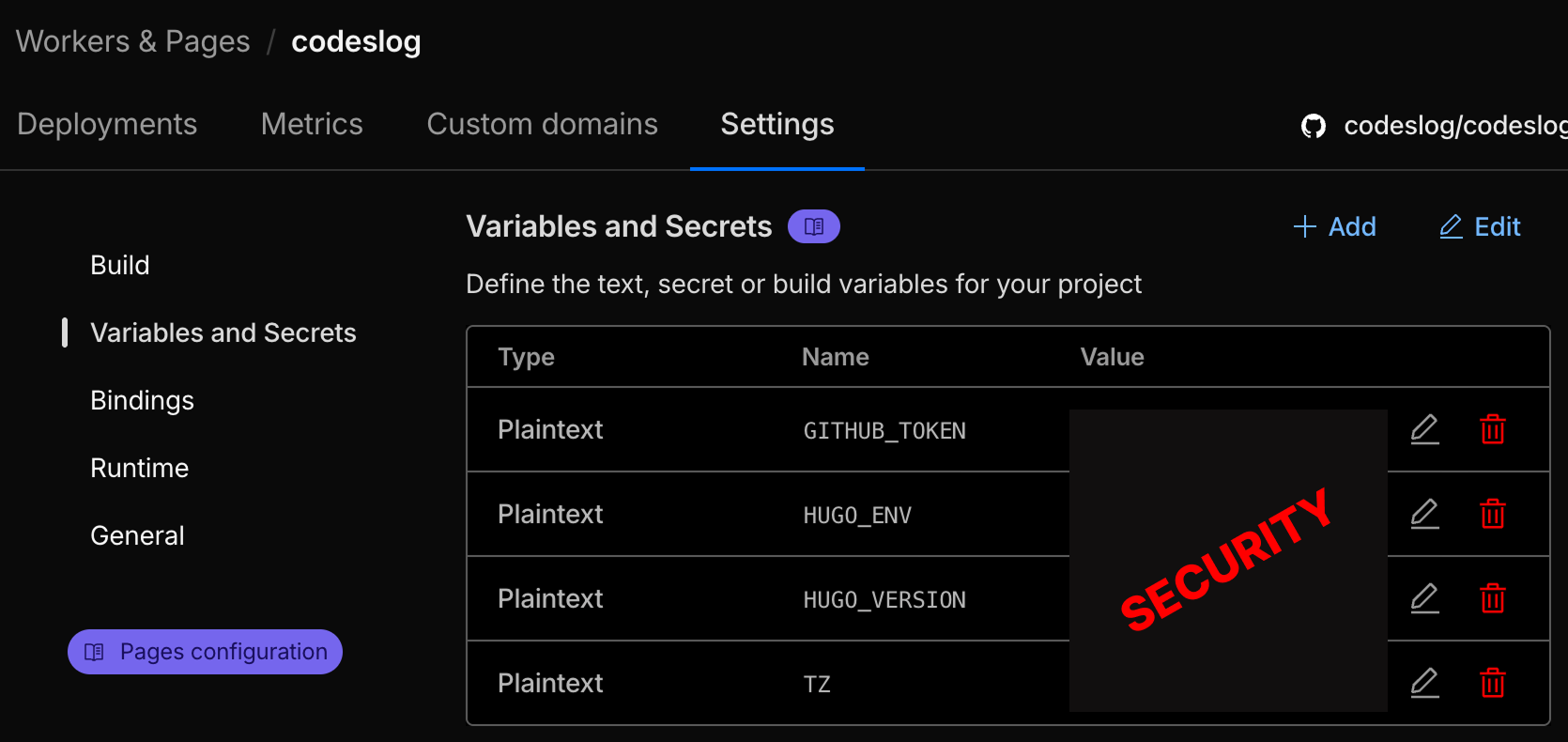
Cloudflare environment variables settings page
Once local testing is successful, configure the production environment.
1. Access Cloudflare Pages Dashboard#
- Log in to Cloudflare Dashboard
- Navigate to Workers & Pages
- Select your site (project)
- Click Settings tab
- Scroll to Environment variables section
2. Add Environment Variable#
Click “Add variable” button
Enter the following:
- Variable name:
GITHUB_TOKEN - Value: (paste the token you copied earlier)
- Environment: Select both
ProductionandPreview
- Variable name:
Click “Save”
3. Redeploy#
Environment variables don’t apply to existing deployments. Redeploy using one of these methods:
Method 1: Git Push
git commit --allow-empty -m "Trigger rebuild for environment variables"
git push
Method 2: Cloudflare Dashboard
- In the Deployments tab, click “Retry deployment” next to the latest deployment
4. Verify Deployment#
After deployment completes, check on your live site:
- Are comment counts displayed in post lists?
- Do recent comments appear on the explore page?
- Does the all comments page (
/explore/comments/) work?
You can also check if GitHub API calls succeed in the browser’s Network tab.
Detailed Code Implementation#
Calling GitHub API with JavaScript#
Fetch comment counts in static/js/comment-counts.js:
const GITHUB_TOKEN = document.querySelector('meta[name="github-token"]')?.content || '';

async function fetchCommentCounts() {
  const query = `
    query($owner: String!, $repo: String!, $categoryId: ID!) {
      repository(owner: $owner, name: $repo) {
        discussions(first: 50, categoryId: $categoryId) {
          nodes {
            title
            comments {
              totalCount
            }
          }
        }
      }
    }
  `;

  const headers = {
    'Content-Type': 'application/json',
  };

  if (GITHUB_TOKEN) {
    headers['Authorization'] = `Bearer ${GITHUB_TOKEN}`;
  }

  const response = await fetch('https://api.github.com/graphql', {
    method: 'POST',
    headers: headers,
    body: JSON.stringify({
      query,
      variables: {
        owner: 'codeslog',
        repo: 'codeslog-comments',
        categoryId: 'DIC_kwDOP13p-c4Cv1Rv'
      }
    })
  });

  const result = await response.json();

  // Map comment counts by giscus_term
  const counts = {};
  result.data.repository.discussions.nodes.forEach(discussion => {
    counts[discussion.title] = discussion.comments.totalCount;
  });

  return counts;
}
Caching with localStorage#
Cache for 5 minutes to reduce API calls:
const CACHE_KEY = 'codeslog_comment_counts';
const CACHE_DURATION = 1000 * 60 * 5; // 5 minutes

function getCachedData() {
  try {
    const cached = localStorage.getItem(CACHE_KEY);
    if (!cached) return null;

    const data = JSON.parse(cached);
    const now = Date.now();

    if (now - data.timestamp < CACHE_DURATION) {
      return data.counts;
    }
  } catch (e) {
    console.warn('Failed to read cache:', e);
  }
  return null;
}

function setCachedData(counts) {
  try {
    localStorage.setItem(CACHE_KEY, JSON.stringify({
      timestamp: Date.now(),
      counts: counts
    }));
  } catch (e) {
    console.warn('Failed to save cache:', e);
  }
}
Stale-While-Revalidate Pattern#
Display cached data immediately and update in the background:
async function init() {
  // Show cached data first if available
  const cached = getCachedData();
  if (cached) {
    updateCommentCounts(cached);

    // Fetch new data in background
    fetchCommentCounts().then(counts => {
      setCachedData(counts);
      updateCommentCounts(counts);
    }).catch(error => {
      console.error('Background update failed:', error);
    });

    return;
  }

  // Fetch new data if no cache
  try {
    const counts = await fetchCommentCounts();
    setCachedData(counts);
    updateCommentCounts(counts);
  } catch (error) {
    console.error('Failed to fetch:', error);
  }
}
Benefits of this pattern:
- Instant display: Cached data shows immediately for fast response
- Always fresh: Background updates keep data current
- Error resilient: Cached data remains even if background request fails
Modifying Hugo Template#
Add comment count wrapper in layouts/partials/post_meta.html:
{{- with ($scratch.Get "meta") }}
{{- delimit . " · " | safeHTML -}}
{{- end -}}

{{- if (.Param "giscus_term") -}}
<span class='comment-count-wrapper'
      data-giscus-term='{{ .Param "giscus_term" }}'
      data-lang='{{ .Lang }}'
      style='display:none;'>
</span>
{{- end -}}
JavaScript dynamically fills the content:
function updateCommentCounts(counts) {
const elements = document.querySelectorAll('.comment-count-wrapper');
elements.forEach(element => {
const term = element.getAttribute('data-giscus-term');
const lang = element.getAttribute('data-lang') || 'ko';
const count = counts[term];
if (count !== undefined && count > 0) {
const commentLabel = lang === 'ko' ? '댓글' : 'comments';
const commentLabelSR = lang === 'ko' ? '댓글 수' : 'comment count';
// Output with separator
element.innerHTML = ` · <span><span class='sr-only'>${commentLabelSR}: </span><span class='comment-count' aria-live='polite'>${count}</span> ${commentLabel}</span>`;
element.style.display = '';
}
});
}Key Points:
- Wrapper remains
display:nonewhen comments = 0 - Displays with
· separator when comments ≥ 1 - This ensures proper display only when comments exist
Scrolling to Comments Section#
Add id="comments" in layouts/partials/comments.html:
{{- if and (.Site.Params.comments) (ne .Params.comments false) (.Params.giscus_term) -}}
<div id="comments" class="giscus-container">
    <script src="https://giscus.app/client.js" ...>
    </script>
</div>
{{- end -}}
Now scrolls to exact position with #comments anchor:
// In recent-comments.js
const postUrl = `${langPrefix}/posts/${slug}/#comments`;
CSS Styling#
assets/css/extended/comments.css:
/* Comment card styles */
.recent-comment-item {
  border: 1px solid var(--border);
  border-radius: 8px;
  overflow: hidden;
  transition: all 0.2s ease;
}

.recent-comment-item:hover {
  border-color: var(--primary);
  box-shadow: 0 2px 8px rgba(0, 0, 0, 0.1);
}

/* Improved link contrast */
.recent-comment-link {
  color: var(--primary);  /* Darker color */
  font-weight: 600;  /* Bolder text */
  text-decoration: none;
}

.recent-comment-link:hover {
  color: var(--tertiary);
  text-decoration: underline;  /* Underline on hover */
}
Accessibility Considerations#

Photo: Unsplash by Product School
Web accessibility ensures all users can access content. Here are the accessibility features implemented.
1. Using ARIA Attributes#
<!-- Loading state -->
<div class="recent-comments-loading"
     aria-live="polite"
     aria-busy="true">
  Loading comments...
</div>

<!-- Comment list -->
<ul class="recent-comments-list" role="list">
  <!-- Comment items -->
</ul>

<!-- Error state -->
<div class="recent-comments-error"
     role="alert"
     style="display: none;">
  Failed to load comments.
</div>
ARIA Attribute Explanations:
aria-live="polite": Screen reader announces changes after current reading completesaria-busy="true": Indicates loading staterole="list": Explicitly indicates list (required when usinglist-style: nonein CSS)role="alert": Immediately announces important messages
2. Screen Reader-Only Labels#
<span>
  <span class='sr-only'>Comment count: </span>
  <span class='comment-count' aria-live='polite'>3</span>
  comments
</span>
CSS:
.sr-only {
  position: absolute;
  width: 1px;
  height: 1px;
  padding: 0;
  margin: -1px;
  overflow: hidden;
  clip: rect(0, 0, 0, 0);
  white-space: nowrap;
  border-width: 0;
}
Screen readers announce “Comment count: 3 comments” but only “3 comments” is visually displayed.
3. Keyboard Navigation#
All clickable elements are keyboard accessible:
.recent-comment-link:focus {
  outline: 2px solid var(--tertiary);
  outline-offset: 2px;
  border-radius: 2px;
}- Navigate focus with
Tabkey - Activate links with
Enterkey - Clear focus indication
4. Meaningful Link Text#
<a href="/posts/slug/#comments"
   aria-label="Go to post">
  View post →
</a>
Use clear text like “View post” instead of “Click here”.
Performance Optimization#
Created by: NanoBanana
1. Caching Strategy#
5-minute TTL + Stale-While-Revalidate:
- First visit: API call → store in localStorage
- Revisit within 5 minutes: instant display from cache
- After 5 minutes: display cache + background update
// Cache hit: 0ms (instant!)
// Background update: ~300ms (user doesn't wait)
2. Deferred Script Loading#
<script src="/js/comment-counts.js" defer></script>
<script src="/js/recent-comments.js" defer></script>
<script src="/js/all-comments.js" defer></script>
defer attribute:
- Doesn’t block HTML parsing
- Faster page load
- Execution guaranteed before DOMContentLoaded
3. Minimizing API Calls#
Before (inefficient):
// Individual API call for each post
posts.forEach(post => {
  fetch(`/api/comments/${post.id}`);
});
After (efficient):
// Fetch all data in single request
const allDiscussions = await fetchAllDiscussions();
const countMap = buildCountMap(allDiscussions);
GraphQL allows fetching comment information for 50 discussions in a single request.
4. Rate Limit Management#
GitHub API rate limits:
- Without authentication: 60 requests/hour
- Personal Access Token: 5000 requests/hour
With 5-minute caching, maximum 12 calls per hour:
- 60 requests/hour ÷ 12 = 5 page views/5 minutes
- PAT provides ample headroom
5. Conditional Rendering#
// Don't manipulate DOM when no comments
if (count !== undefined && count > 0) {
  element.innerHTML = `...`;
  element.style.display = '';
}
Prevents unnecessary DOM updates to reduce browser reflow.
Performance Measurement Results#
Actual measurements (Chrome DevTools):
First Page Load:
- HTML download: ~150ms
- JavaScript execution: ~50ms
- API call: ~300ms
- Total Time to Interactive: ~500ms
Cached Second Visit:
- HTML download: ~100ms (CDN cache)
- JavaScript execution: ~50ms
- localStorage read: ~1ms
- Total Time to Interactive: ~150ms
Background Update:
- Users don’t wait
- Latest data shows on next page load
Troubleshooting#
Issue 1: Hugo Build Error#
Error: access denied: "GITHUB_TOKEN" is not whitelisted in policy "security.funcs.getenv"Solution:
# config.yaml
security:
  funcs:
    getenv:
      - ^GITHUB_TOKEN$
Issue 2: Comment Counts Not Showing#
Browser console shows:
[Comment Counts] Found 0 comment count elementsCause: Hugo template conditional preventing element rendering
Solution: Remove conditional from layouts/partials/post_meta.html
Issue 3: Environment Variables Not Working on Cloudflare Pages#
Cause: Environment variables don’t apply to existing deployments
Solution: Redeploy required
git commit --allow-empty -m "Trigger rebuild"
git push
Issue 4: CORS Error#
GitHub GraphQL API supports CORS, so there shouldn’t be issues. If errors occur:
Check:
- API endpoint is
https://api.github.com/graphql Content-Type: application/jsonheader is present- Browser is up-to-date
Issue 5: Rate Limit Exceeded#
{
  "message": "API rate limit exceeded"
}
Temporary fix:
- Clear localStorage cache:
localStorage.clear() - Refresh page
Permanent fix:
- Set up Personal Access Token
- Increase cache duration (10 minutes, 15 minutes, etc.)
Lessons Learned and Future Improvements#
Lessons Learned#
GraphQL Efficiency: Could fetch exactly the data needed more efficiently than RESTful API.
Importance of Caching: Stale-while-revalidate pattern secured both performance and freshness.
Early Accessibility Consideration: Implementing accessibility from the start requires minimal additional cost.
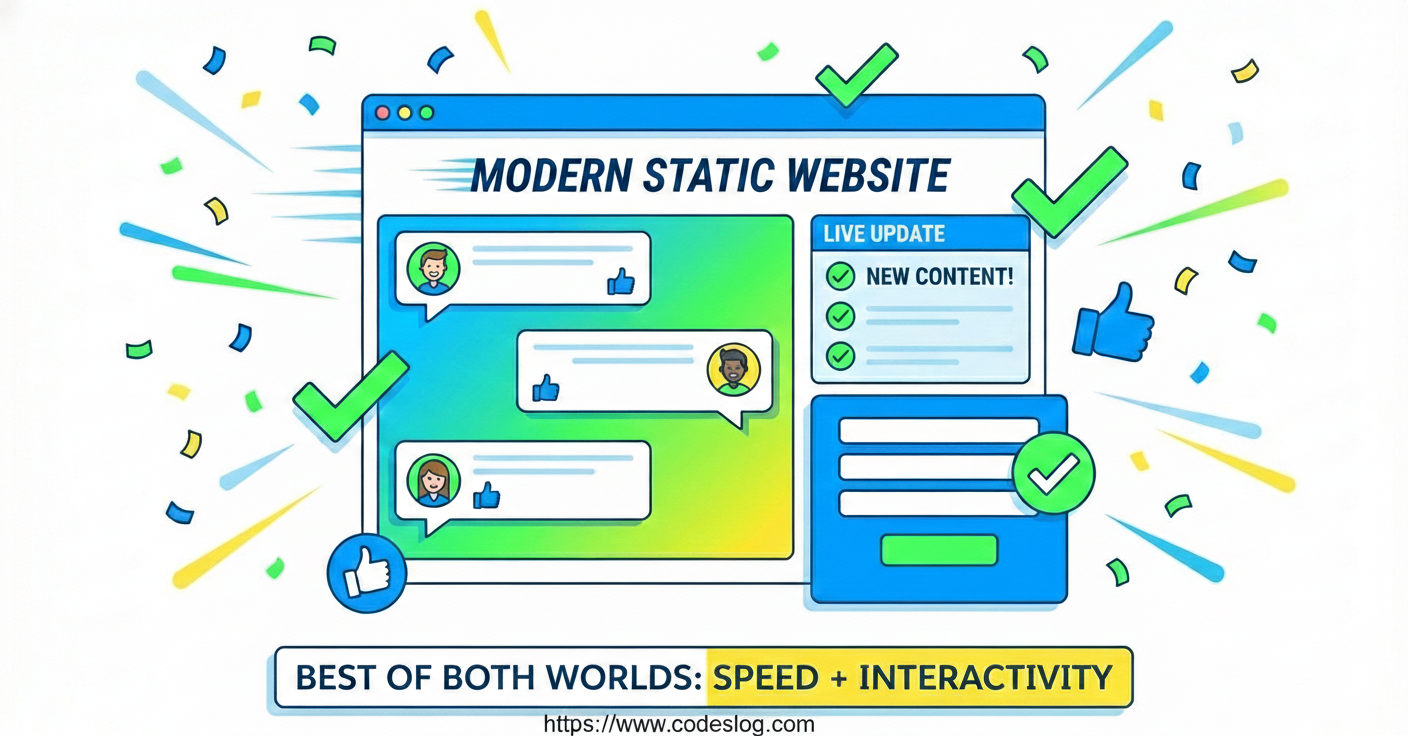
Dynamic Features on Static Sites: SSG and dynamic features can coexist through client-side processing.
Future Improvement Plans#
1. Real-time Updates
Currently using 5-minute caching, considering real-time updates via WebSocket or Server-Sent Events (SSE).
// Could be implemented like this
const eventSource = new EventSource('/api/comments/stream');
eventSource.onmessage = (event) => {
  const newComment = JSON.parse(event.data);
  updateUI(newComment);
};
2. Comment Search Feature
Adding search functionality to the all comments page would be useful.
function searchComments(query) {
  return allComments.filter(comment =>
    comment.bodyText.toLowerCase().includes(query.toLowerCase())
  );
}
3. Comment Notifications
Considering adding notifications for new comments.
4. Include Replies in Count
Currently only counting top-level comments, would need to modify GraphQL query to include replies:
comments(last: 100) {
  totalCount
  nodes {
    replies(last: 100) {
      totalCount
    }
  }
}
Created by: NanoBanana
Conclusion#
Dynamic features can be fully implemented on static sites. The key points:
- Leverage APIs: Fetch data using external APIs like GitHub GraphQL API
- Effective Caching: Optimize performance with localStorage + stale-while-revalidate
- Ensure Accessibility: Design considering all users
- Gradual Improvement: Start with basic features and improve incrementally
I hope this article helps those looking to build a comment system on a static site. Feel free to leave comments below if you have questions!