When you wire up another server’s API from the frontend, sooner or later you hit the moment the console turns red. The page is blank, and the console says something like this.
Access to fetch at 'http://localhost:3011/notices' from origin 'http://localhost:5173' has been blocked by CORS policy: No 'Access-Control-Allow-Origin' header is present on the requested resource.
GET http://localhost:3011/notices net::ERR_FAILED 200 (OK)
Captured: Chrome 157 DevTools (reproduced while writing this post)
But look at the second line. Something’s odd: the server answered 200 (OK). The server did its job, so what got blocked, and why?
If you came here in a hurry with a console message in hand, you can jump straight to the table of causes by message. If the words in the table are unfamiliar, though, reading the concept sections first ends up faster.
By the end, you should be able to tell from the console message alone whether the cause is a server error, a header setting, or a preflight, and pick where to fix things in your situation. I reproduced the messages and example code on Chrome 157 and real servers (Express 5, nginx 1.27, Next.js 16, Vite 7). For IIS and a few browser policies I couldn’t run, I followed the docs.
Why CORS errors happen: the browser blocks the response#
An origin is a bundle of protocol, host, and port#
The browser tells addresses apart by origin. An origin bundles the protocol (http, https), the host (localhost, api.example.com), and the port (5173). If any one of the three differs, it’s a different origin. The path (/notices) isn’t part of the origin.
Take a page opened from the Vite dev server (http://localhost:5173) as the baseline.
| Request URL | What differs from the baseline | Verdict |
|---|---|---|
http://localhost:5173/api/notices | Nothing (only the path differs) | Same origin |
http://localhost:3011/notices | Port | Different origin |
https://localhost:5173/notices | Protocol | Different origin |
http://127.0.0.1:5173/notices | Host spelling (even on the same machine) | Different origin |
So the moment you run the frontend (5173) and the API (3011) separately on your machine, they’re already different origins. A request sent to a different origin is called a cross-origin request. When the browser sends a request to another origin, it includes the page’s origin in a request header called Origin.
Same-origin policy and CORS#
Browsers have an old default rule: JavaScript on a page can’t freely read responses that came from a different origin. It’s called the Same-Origin Policy. Without it, a script on a site you happened to open could borrow your browser’s login state, call the API of your mailbox or company system, and read the response.
CORS (Cross-Origin Resource Sharing) is how a server opens an exception to that rule. If the server writes something like Access-Control-Allow-Origin: http://localhost:5173 in the response headers, the browser hands the response to pages from that origin. So CORS is a loosening mechanism. Keep in mind that every CORS header you add relaxes the protection a little more.
What gets blocked is the response, not the request#
Here’s the most common misunderstanding. Even when a CORS error appears, the request reached the server. When I reproduced this for the post, I had the API server log every request it received, and the GET request that produced the CORS error in the console showed up in the server log all the same. The server handled the request and even sent the 200 response. The browser simply checked the response and didn’t pass it on to the page.
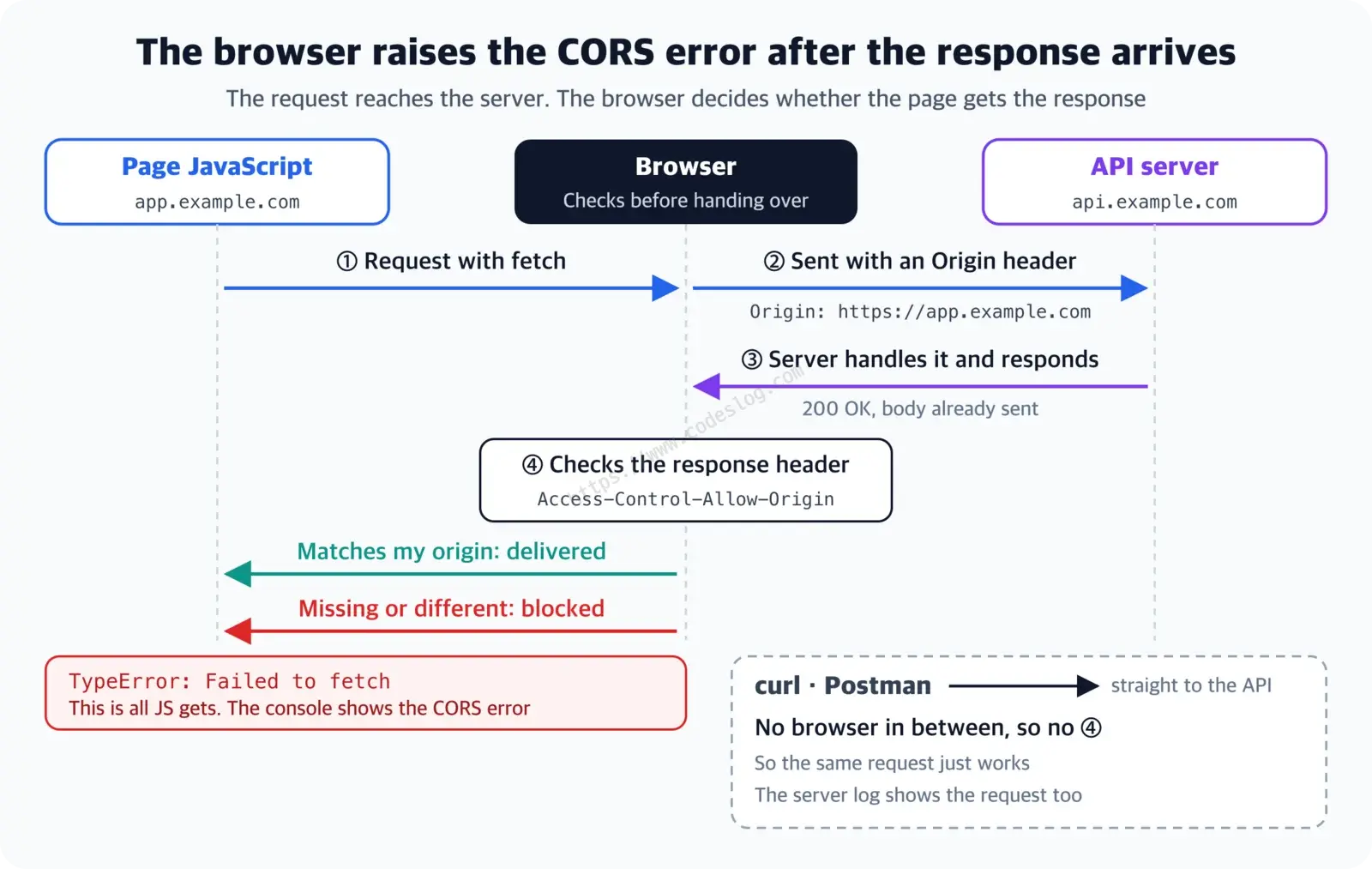
The browser raises the CORS error after it has received the response
Reading the diagram in order:
- JavaScript on the page sends a request to another origin with
fetch. - The browser adds an
Originheader and sends it to the server. - The server handles the request and sends a response. This part happens regardless of CORS.
- The browser compares the response’s
Access-Control-Allow-Originheader with the page’s origin. If they match, it passes the response on. If the header is missing or different, JavaScript gets onlyTypeError: Failed to fetch, and the browser prints a CORS error in the console.
There’s one exception: if the preflight (coming up shortly) fails, the actual request isn’t sent at all. More on that in a moment.
When a CORS error shows up, frontend developers tend to suspect the server and backend developers tend to suspect the frontend. The one who actually closed the door is the browser standing between them, and the server holds the key.
So the place to fix is usually the server sending the response. No matter what options you change in frontend code, if the server doesn’t write a permission on the response, the browser won’t hand it over.
Why Postman works but only the browser shows a CORS error#
“It works in Postman” is the CORS version of “it works on my machine.”

Photo by Tim Gouw on Unsplash
The answer is in the bottom row of the diagram above. Requests from curl, Postman, or another server don’t go through the browser, so step 4 never happens. The same-origin policy is a rule the browser enforces, so outside the browser the same request just works.
Here’s the request that was blocked in the console, sent with curl. Adding the same Origin header the browser sends gives the same result. On Windows PowerShell, curl can be an alias for a different command, so typing curl.exe is safer.
curl -i http://localhost:3011/notices -H "Origin: http://localhost:5173"HTTP/1.1 200 OK
Content-Type: application/json
Date: Fri, 13 Nov 2026 06:49:44 GMT
{"ok":true}I trimmed a few connection-related header lines. It’s a 200 with a normal body. So “it works in Postman” tells you only that the server is alive and answering. It doesn’t tell you whether the CORS settings are right.
curl is useful in a different way, though. With -i to show the response headers, you can see right away that there’s no access-control-allow-origin line at all. You can confirm what the browser looked at when it blocked the response, exactly as the server sent it. I’ll use this again in Checking server headers with the preflight row and curl below.
When does the browser send a preflight (OPTIONS) request?#
If you open the Network tab in DevTools, you’ll sometimes see the same address listed on two lines.
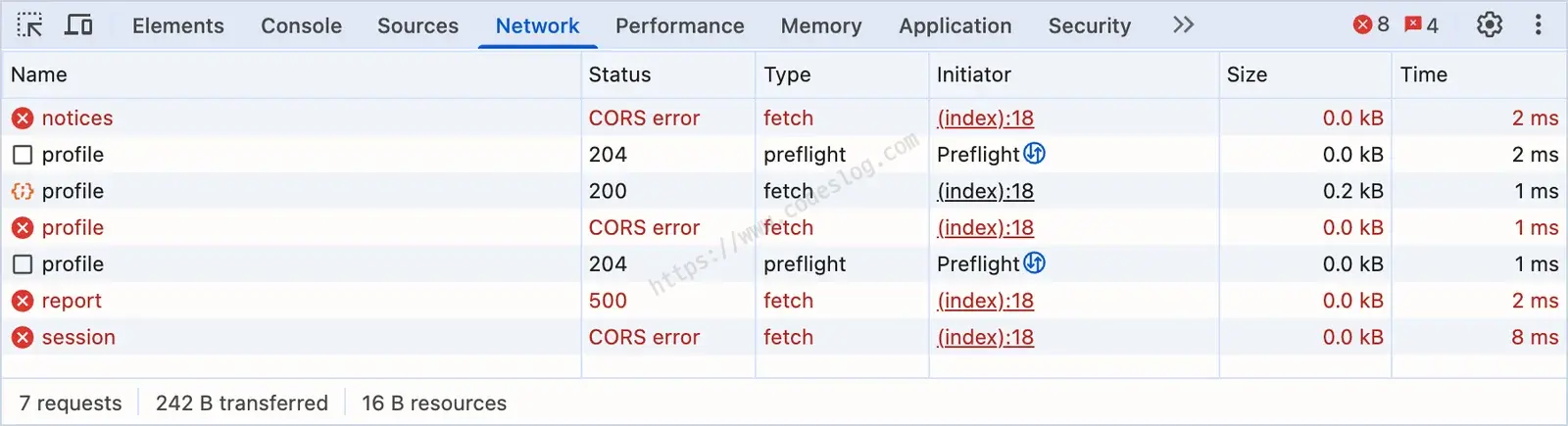
Captured: Chrome 157 DevTools
In this capture I sent one PUT and one DELETE to profile, so there are four rows. The two rows with Type preflight are what I mean (the PUT passed, and we’ll see in a moment why the DELETE was blocked). A preflight is a request the browser sends with the OPTIONS method to ask the server first, before the actual request: “I’m about to send a request from this origin with this method and these headers. Is that OK?” In daycare terms, it’s the step where the person picking up says they’ll take the child in an unusual way (PUT or DELETE, a token header), and the daycare calls the parent first to confirm.
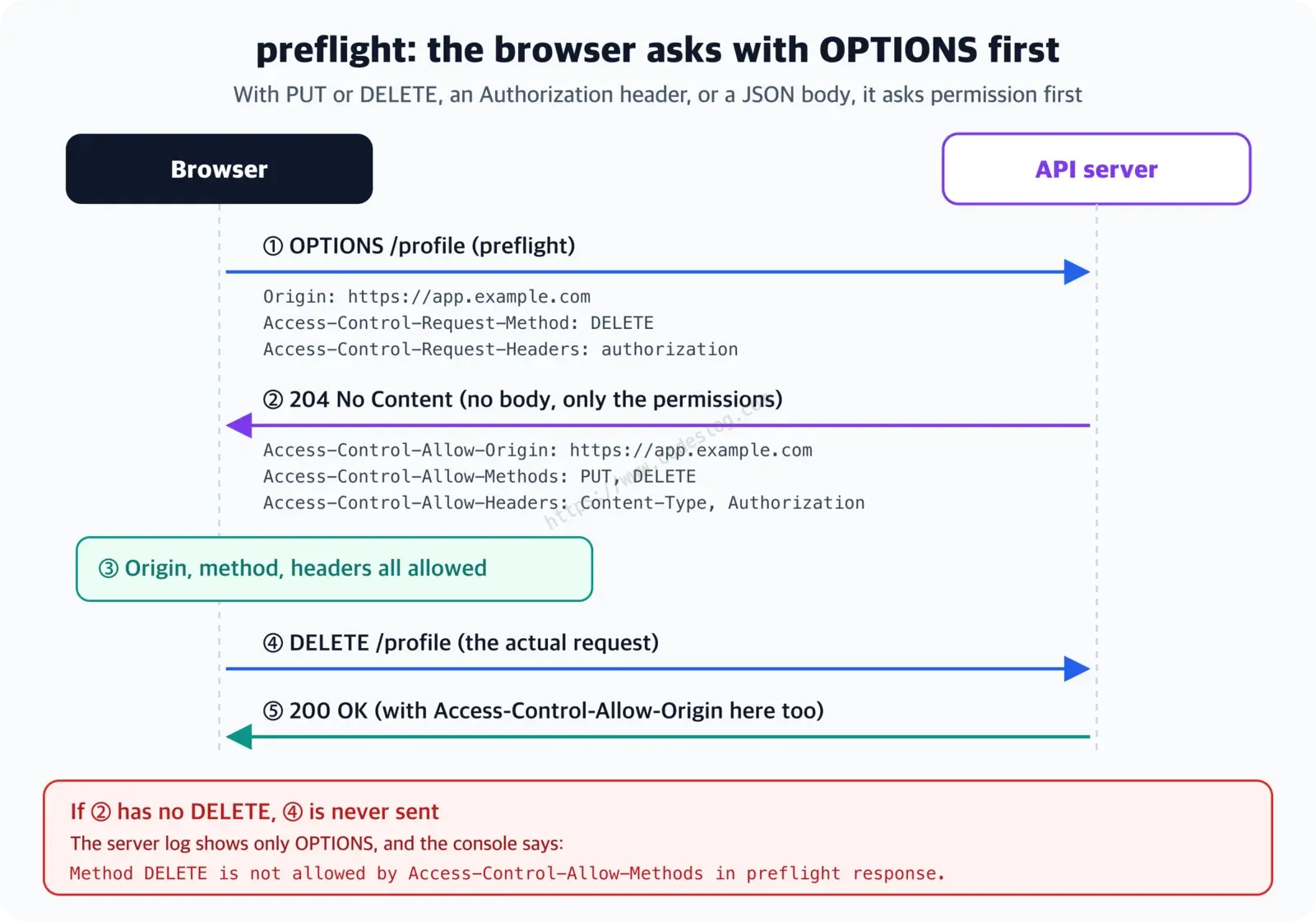
A preflight gets permission with OPTIONS before the actual request
Which requests trigger a preflight#
If any one of the conditions below applies, a preflight goes out first.
| Category | Sent directly, no preflight | Preflight sent first |
|---|---|---|
| Method | GET, HEAD, POST | Any other method, such as PUT, PATCH, DELETE |
| Request headers you set in code | None, or Accept, Accept-Language, Content-Language, Content-Type (the three values below) | Any other header, such as Authorization, Cache-Control, X-Requested-With |
Content-Type | text/plain, application/x-www-form-urlencoded, multipart/form-data | Any other value, such as application/json |
Headers the browser adds on its own (User-Agent, Origin, and so on) don’t count. The case that surprises people most often in practice is a JSON POST. It’s a POST, so you’d expect it to be fine, but the moment Content-Type: application/json is attached, it becomes a preflight target. The same goes for sending a login token in an Authorization header.
If the preflight fails, the actual request is never sent#
I said earlier that what gets blocked is the response, but the preflight is the exception. While writing this post, I removed DELETE from the server’s Access-Control-Allow-Methods and sent a DELETE request, and the server log showed only one OPTIONS line. The browser looked at the preflight response and never sent the actual request. The red box at the bottom of the diagram above is this case.
Conversely, a request that doesn’t need a preflight goes straight to the server. A request that falls in the middle column of the table above is called a simple request. I sent a POST with Content-Type: text/plain to a route without CORS headers, and the server received and processed it anyway, while the browser only hid the response.
That’s why you shouldn’t treat a preflight as a security mechanism. A preflight is just a procedure where the browser asks whether it may send such a request, and a request that arrives without a preflight has already been executed on the server. Why this matters continues in the DELETE discussion later.
Why sending cookies causes a CORS error: credentials and the wildcard (*)#
Credentials are the authentication info the browser attaches to a request, in plain terms cookies (and HTTP authentication info). By default, fetch doesn’t send cookies to a different origin. If you need to send a login session cookie to an API on another origin, you need settings on both the frontend and the server.
| Where | Setting | If it’s wrong |
|---|---|---|
Frontend (fetch) | credentials: "include" | Passing true throws a TypeError (the value is a string) |
| Frontend (axios) | withCredentials: true | If you pass credentials to axios, it’s silently ignored |
| Server | The exact origin in Access-Control-Allow-Origin | With *, Chrome blocks it |
| Server | Access-Control-Allow-Credentials: true | If missing, you get the ... is '' which must be 'true' message |
// fetch: only when you must send cookies to a different origin
const res = await fetch("https://api.example.com/me", {
  credentials: "include",
});

// axios: the key name is different
const { data } = await axios.get("https://api.example.com/me", {
  withCredentials: true,
});
The reason * doesn’t work is simple. * means “any origin,” and letting a script on any site read a response received with the user’s login state is dangerous. So for credentialed requests you have to write the exact origin and also send Access-Control-Allow-Credentials: true.
Also, turn this on only when you really need cookies. If you send the token in an Authorization header, there’s no reason to enable credentials. Access-Control-Allow-Credentials: true means “JavaScript from the allowed origin may also read responses received with our user’s login state,” so the damage grows quickly if the allowed origins widen even a little. That’s also why this post’s server examples keep credentials off.
Even when all the CORS headers are right, whether cookies are actually sent is decided by separate cookie rules. Cookies ignore ports, so they travel fine between localhost:5173 and localhost:3011 locally. But after you deploy and send from app.example.com to a different domain like api.other.com, the cookie must be SameSite=None; Secure, and Firefox and Safari block such third-party cookies or partition them per site by default (MDN “Third-party cookies”). SameSite=None means the cookie is sent even on requests coming from other sites, so CSRF protection has to come along with it. So if a login that worked locally breaks only after deployment, the surest fix is to put the API on the same site (api.example.com) or attach it through a same-origin proxy.
CORS error messages: causes and fixes#
Now you’re ready to read the console messages. There are three steps.
- In the console, look at the line right below the CORS sentence. This is where a server error, a header problem, and a preflight problem get told apart.
- Find the cause sentence after
blocked by CORS policy:in the table below. - Check the headers the server actually sent, using the preflight row in the Network tab and curl.
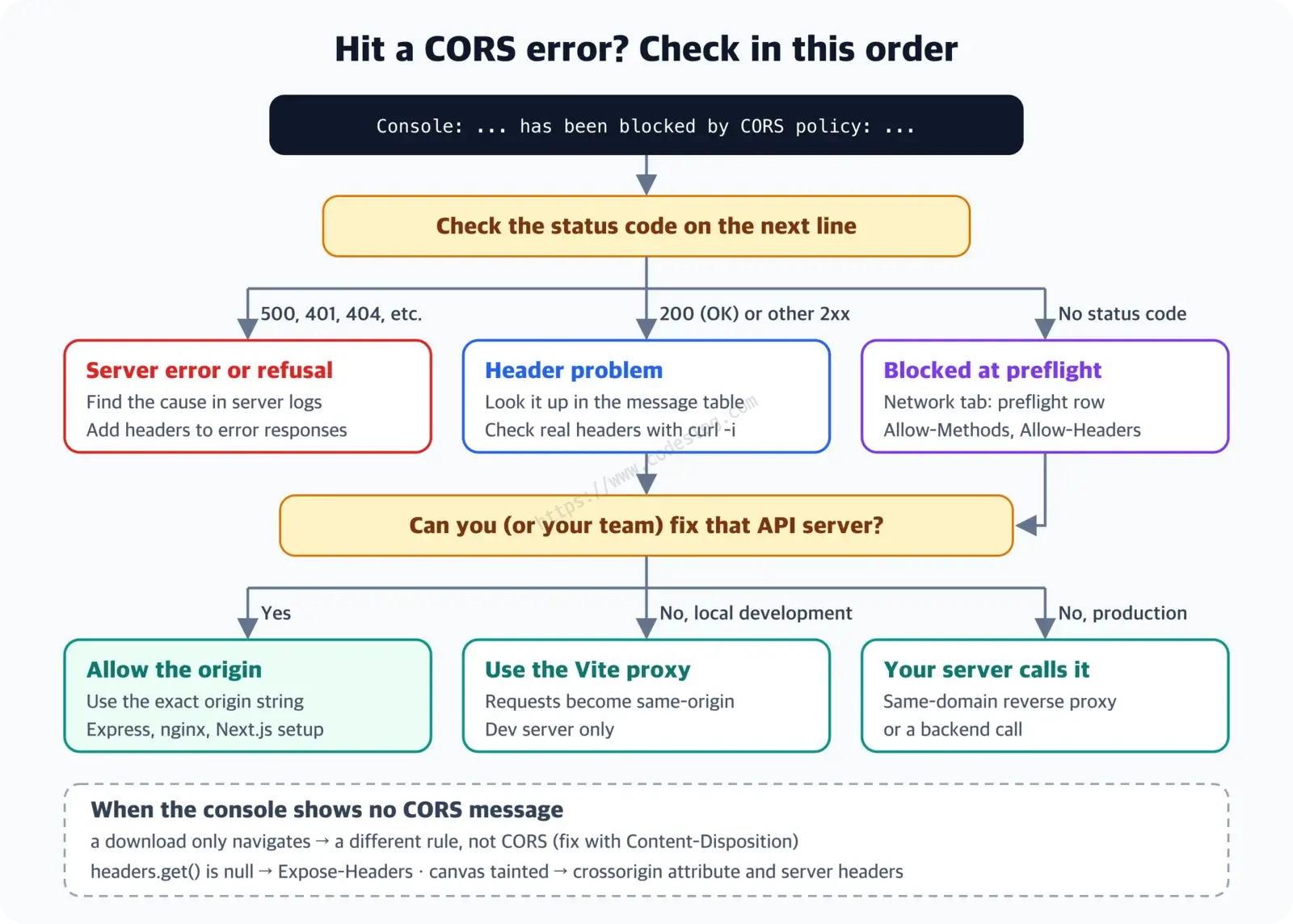
When you hit a CORS error, go in this order
First, look at the line right below in the console#
After has been blocked by CORS policy: and the cause, Chrome’s console prints one more line right below it with the actual request result.
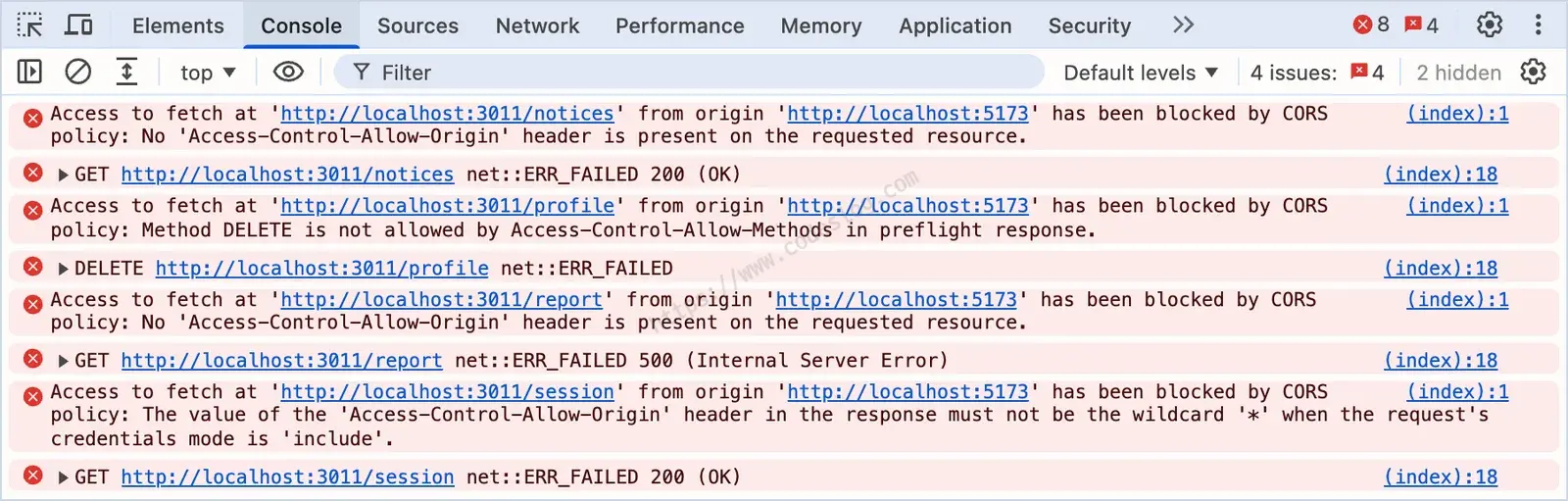
Captured: Chrome 157 DevTools
| Line right below | Meaning | Where to go |
|---|---|---|
A non-2xx status, like net::ERR_FAILED 500 (Internal Server Error), 401 (Unauthorized), 404 (Not Found) | The server answered with an error or a rejection, and that response has no CORS headers | When a 500 error looks like a CORS error |
A 2xx like net::ERR_FAILED 200 (OK) or 201 (Created) | The server sent a normal response. The headers are the problem | The message table below |
net::ERR_FAILED (no status code) | The actual request wasn’t even sent. The preflight blocked it | The lines in the message table below that start with Response to preflight, Method, or Request header field |
Finding the cause from the sentence after blocked by CORS policy#
Next, find the sentence after blocked by CORS policy: in the table below. The wording is exactly as I reproduced it in Chrome 157, so if you copy part of your console sentence and search this page for it, it will match.
Console message (after blocked by CORS policy:) | What it means | How to fix it |
|---|---|---|
No 'Access-Control-Allow-Origin' header is present on the requested resource. | The response has no permission header. There are several possible causes, so look at the line below too | If the line below says 200 (OK), check that this origin is exactly in the server’s allow list |
The 'Access-Control-Allow-Origin' header has a value 'https://app.example.com' that is not equal to the supplied origin. | The server sends one fixed origin, and it differs from the page’s origin | Make the value match the page’s origin character for character. If you have several origins, switch to the list approach |
Response to preflight request doesn't pass access control check: No 'Access-Control-Allow-Origin' header is present on the requested resource. | The preflight (OPTIONS) response has no permission header. This happens when OPTIONS gets 405 or 404, when authentication blocks it first with 401, or when something like Spring rejects it with 403 because it doesn’t match the CORS config | Make the server answer OPTIONS with a 2xx and CORS headers. With Spring, check the origins, methods, and headers in the allow list |
Response to preflight request doesn't pass access control check: It does not have HTTP ok status. | The preflight response isn’t 2xx (401, 405, and so on). It fails even if the headers are there | Make CORS handling answer OPTIONS before authentication does. On IIS, use the CORS Module |
Response to preflight request doesn't pass access control check: Redirect is not allowed for a preflight request. | The preflight got a redirect such as 301 or 302. Common causes are http to https, adding a trailing slash, and sending to a login page | Change the request address to the final address after the redirect. For a login redirect, make CORS answer OPTIONS before authentication |
Method DELETE is not allowed by Access-Control-Allow-Methods in preflight response. | The method isn’t in the preflight response’s allowed methods. It fails even if the preflight is 204 | Add it to Access-Control-Allow-Methods. If you see a lowercase patch in the message, write PATCH in your code (PATCH isn’t uppercased automatically) |
Request header field authorization is not allowed by Access-Control-Allow-Headers in preflight response. | A header you put on the request isn’t in the allowed headers list | Add the name to Access-Control-Allow-Headers |
The value of the 'Access-Control-Allow-Origin' header in the response must not be the wildcard '*' when the request's credentials mode is 'include'. | The server answered a cookie-carrying request with * | Write the exact origin and send Access-Control-Allow-Credentials: true with it. If you don’t need cookies, turn off credentials in the frontend |
The value of the 'Access-Control-Allow-Credentials' header in the response is '' which must be 'true' when the request's credentials mode is 'include'. | The origin is right, but Access-Control-Allow-Credentials is missing | Send Access-Control-Allow-Credentials: true |
The 'Access-Control-Allow-Origin' header contains multiple values '..., ...', but only one is allowed. | The permission header was added twice. Commonly, both nginx and the app add it | Add it in only one place |
Look at the start of the sentence, too. With a library that uses XMLHttpRequest, like axios, it starts with Access to XMLHttpRequest at instead of Access to fetch at, and the reason after the colon is the same as in the table above. If it starts with Access to script at, Access to font at, or Access to image at, a module script, a font, or a crossorigin image was blocked rather than a fetch. I cover those separately in CORS beyond fetch.
In JavaScript code, you get only TypeError: Failed to fetch in every case. With axios it’s AxiosError: Network Error (code ERR_NETWORK), and error.response is empty. The browser doesn’t tell the script the specific reason for a CORS failure and leaves it only in the console. It’s the same error when the network is down, too, so if Failed to fetch or Network Error has piled up in your error tracker, reproduce it in a browser and look at the console first.
The wording in this table is for Chrome 157. Firefox writes the same error as Cross-Origin Request Blocked: ... (Reason: ...), with the reason in parentheses (MDN “CORS errors”), and Safari words it differently, too.
Checking server headers with the preflight row and curl#
Once you’ve guessed the cause from the table, check with your own eyes what the server actually sent.
The preflight row in the Network tab: Open the row whose Type is preflight. If the status code is 405 or 404, the server can’t handle OPTIONS, and if it’s 401, authentication intercepted the request before CORS did. A 403 is either that case or a server’s CORS config rejecting this origin, method, or header, as Spring does (if you send OPTIONS with curl and the body is Invalid CORS request, it’s the latter). A 301 or 302 is a redirect (the Redirect line in the table above). Don’t relax at 204, either. As with the DELETE profile in the Network capture in the preflight section, the preflight can be 204 while the actual request ends in a CORS error. Click the row and read the Access-Control-Allow-Methods and Access-Control-Allow-Headers values in Response Headers yourself.
curl: Look at the headers the server really sends. Swap in your own address and origin. The \ at the end of a line is for line continuation on Mac and Linux, so on Windows paste it as a single line.
# Actual request: check the status code and the access-control-* headers
curl -i https://api.example.com/notices \
  -H "Origin: https://app.example.com"

# Reproduce the preflight: the same OPTIONS the browser sends
curl -i -X OPTIONS https://api.example.com/notices/1 \
  -H "Origin: https://app.example.com" \
  -H "Access-Control-Request-Method: DELETE" \
  -H "Access-Control-Request-Headers: authorization"
There are four things to look at. Is there exactly one access-control-allow-origin line? Does its value match the page’s origin down to the last character? Is the preflight response 2xx? Do Allow-Methods and Allow-Headers contain the values you need? If the API requires login, add the cookie (-b "session=...") or the Authorization header only to the actual-request curl. If you leave it out, you get a different answer from the browser, such as 401. Don’t add it to the preflight curl. The browser doesn’t send cookies or tokens on a preflight either, so adding them would make a preflight that gets blocked with 401 in the browser look like it passes in curl.
Server log: If only OPTIONS shows up and there’s no actual request, the preflight blocked it.
If you changed the settings and the same error remains, first check with curl whether the new headers appear. If they don’t appear in curl either, the server wasn’t restarted, nginx -s reload or a redeploy didn’t happen, or a CDN is serving an old response. If they appear in curl but the browser is unchanged, it’s the browser cache. In the browser, turn on Disable cache in the DevTools Network tab and request again. For a CDN you have to clear the cache, and for Cloudflare, URL-based purge doesn’t change CORS headers, so the docs advise changing the file URL or specifying the CORS headers in the single-file purge API (Cloudflare docs).
If it works locally but is blocked only on staging or production, it’s likely that locally the Vite proxy made it same-origin. Start by checking whether the staging origin is in the server’s allow list.
If the cause turns out to be server headers, go to the server configuration section. What to do when you can’t fix that server is also covered at the start of that section.
When a 500 error looks like a CORS error#
I’ve been bitten by this one myself. The console showed a CORS error, but the real cause was a 500 error on the server. Since you can miss it completely if you only look at the CORS sentence, it gets its own section.
While writing this post, I recreated the same situation. The API server throws an exception and answers 500, and the error response gets no CORS headers. The console prints this.
Access to fetch at 'http://localhost:3011/report' from origin 'http://localhost:5173' has been blocked by CORS policy: No 'Access-Control-Allow-Origin' header is present on the requested resource.
GET http://localhost:3011/report net::ERR_FAILED 500 (Internal Server Error)
The cause sentence is identical to the earlier missing-header case. The only differences are 500 (Internal Server Error) on the second line and 500 in the Network tab’s Status column. If you read only the first line, the 500 has come out wearing a CORS mask.
This happens when whatever adds the CORS headers skips error responses. I confirmed two cases while reproducing it.
- If you don’t add
alwaysto nginx’sadd_header, the header is added only to 200, 201, 204, 206 and 301, 302, 303, 304, 307, 308 responses. It isn’t added to 4xx and 5xx, nor even to some 2xx such as 202. - A route handler sets
res.setHeader("Access-Control-Allow-Origin", ...)itself, but an exception is thrown before that line is reached.
401, 403, and 404 look the same. For 401 (Unauthorized), first check whether a token or cookie wasn’t sent. For 403 (Forbidden), send the same request with curl (the body of a blocked response isn’t visible in DevTools). If the body is Invalid CORS request, a server such as Spring rejected this origin in its CORS config, so fix the allow list. A 502 or 504 error page generated by a gateway in front can look the same, too (per the docs).
Here’s the order to fix it.
- Before touching CORS settings, fix the cause of the 500 from the server log. Changing CORS settings won’t change the 500.
- Then make error responses carry the CORS headers too. In nginx, use
add_header ... always, and in Express, putapp.use(cors(...))before the routes (see the Express example below). When I reproduced it on Express 5, this setup keptAccess-Control-Allow-Origineven on a 500 thrown in a route.
Once error responses carry the headers, things change on the frontend too. The browser hands over the response, so fetch doesn’t reject, and it resolves with a response whose status is 500. That’s why you need to check res.ok to catch server errors.
try {
  const res = await fetch("http://localhost:3011/report");
  if (!res.ok) {
    // We got a response. With CORS headers present, we can read the status code
    throw new Error(`Server error: ${res.status}`);
  }
  const data = await res.json();
} catch (err) {
  // A CORS block or a dropped network (TypeError: Failed to fetch)
  // and the server error thrown above both end up here
  console.error(err);
}
I covered how to handle and test these two kinds of failure separately in how to test async code, timers, and errors. An error message hiding the real cause isn’t unique to CORS, either. The post chasing a task stalled by Vercel Deployment Protection was also solved only after following the symptom all the way through.
Setting up CORS on the server: Express, nginx, IIS, Next.js#
If your diagnosis points to “the server’s headers,” the remaining question is whether you (or your team) can fix that API server. If you can, this section is for you. If you’re developing locally and can’t, go to the Vite proxy. If you have to use someone else’s API in production, you need to change things so that your own backend calls that API on your behalf (with the address to call fixed in server code).
These are the CORS headers a server sends.
| Header | On which response | Meaning |
|---|---|---|
Access-Control-Allow-Origin | Actual response, preflight response | The one origin (or *) whose pages may receive the response |
Access-Control-Allow-Methods | Preflight response | Methods to allow beyond GET, HEAD, POST |
Access-Control-Allow-Headers | Preflight response | Headers the request may include |
Access-Control-Allow-Credentials | Actual response, preflight response | Whether responses to cookie-carrying requests may also be passed on (true) |
Access-Control-Expose-Headers | Actual response | Extra response headers JavaScript may read |
Vary: Origin | Responses whose permission value varies by the request’s origin | Keeps caches from serving a response made for one origin to another. Not needed if the value is fixed or * |
Add the headers in only one place#
Add the CORS headers in only one of these: the app (Express, Next.js), the web server in front that receives requests and passes them to the app (nginx, IIS), or a CDN or API gateway. If you add them in two places, Access-Control-Allow-Origin appears on two lines and you get the multiple values error.
There’s a worse case. I built a setup where nginx answers the preflight with 204 and the app adds headers too, and the DELETE actual request reached the app and actually ran, yet the browser reported it as a failure. That means the screen can show “Delete failed” while the data has already been deleted.
Express#
In Express, use the cors package (npm install express cors).
// index.js (for a CommonJS project created with npm init -y)
const cors = require("cors");
const express = require("express");

const app = express();

// Put this before the routes, so the CORS headers stay even on a 500 thrown in a route.
app.use(
  cors({
    // List only production origins as exact full strings, with no trailing slash.
    origin: ["https://app.example.com", "https://staging.example.com"],
    // GET, HEAD, and POST are always allowed, so no need to list them. List only the rest you actually use.
    methods: ["PUT", "DELETE"],
    allowedHeaders: ["Content-Type", "Authorization"],
    // Turn on only when you must send a cookie session to another origin.
    // Not needed if the API sends its token in the Authorization header.
    // credentials: true,
  })
);

app.get("/api/notices", (req, res) => res.json([{ id: 1, title: "Notice" }]));

app.delete("/api/notices/:id", (req, res) => {
  // In a real service, check login and delete permission here first
  res.status(204).end();
});

app.listen(3000, () => console.log("API on http://localhost:3000"));
When I ran this code, origins in the list got Access-Control-Allow-Origin and Vary: Origin, and origins outside the list got no permission header. The browser doesn’t pass those responses to the page. Even when a route threw and the response became a 500, the permission header stayed (Express 5.3, cors 2.8.6).
If your project has "type": "module" in package.json, change require to import cors from "cors" and import express from "express" (and the require("node:path") in the download example later to import path from "node:path"). Conversely, if you paste import statements into a default project created with npm init -y, you get SyntaxError: Cannot use import statement outside a module.
If you also need to allow http://localhost:5173 during development, don’t just mix it into the production array. Split it out with an environment variable. For local development, you can also connect through the Vite proxy.
What should go in Access-Control-Allow-Origin?#
The browser compares the Access-Control-Allow-Origin value with the page’s origin character for character. That’s why these mistakes are common. With the list approach it shows up as No 'Access-Control-Allow-Origin', and with a fixed value as not equal to the supplied origin.
- Adding a trailing slash:
https://app.example.com/. TheOriginthe browser sends has no path, so it doesn’t match. - A different protocol, port, or www:
httpversushttps, with or without:8080, with or withoutwww.. - Leaving the staging or production origin out of the list: you didn’t notice locally thanks to the proxy, and it blows up after deployment.
Some settings are dangerous. The error goes away, but they open the door to other sites.
- Reflecting the request’s
Originback with no check. Expresscors({ origin: true })and nginxadd_header Access-Control-Allow-Origin $http_originbehave this way. In my reproduction, withorigin: trueand credentials on, a request sent withOrigin: https://evil.examplegot that value echoed straight back. Depending on the cookie settings, this lets any site read the response of a logged-in user. - Comparing only part of the string.
origin.endsWith("example.com")letshttps://evil-example.comthrough, and a regex that isn’t anchored at the end, like/app\.example\.com/, letshttps://app.example.com.evil.netthrough. Compare the full string including the protocol. - Allowing
null. Some people add it to test with local files (file://), but a sandboxed iframe, for example, can make any site sendOrigin: null. - Allowing an
http://origin. If an HTTPS API trusts a plaintexthttp://origin, an attacker on the same network can swap out that page and read the responses.
* is fine for public data that needs no login. Be careful about putting * on an internal API protected only by the company network or an IP restriction, though, because an outside site could read its responses through an internal user’s browser.
When you have several origins to allow, the simplest approach is to pass an array of exact strings, as in the Express example above. The cors package adds Vary: Origin for you in that case. You can also check with a function, but when I ran it, Vary: Origin was missing from responses to origins outside the list (cors 2.8.6). If your API’s responses are cached, the array is safer.
Is it dangerous to list DELETE in Access-Control-Allow-Methods?#
Looking at methods: ["PUT", "DELETE"] in the Express example above, you might worry, “If I open DELETE, can anyone delete my data?” The short answer: this header isn’t the server’s permission setting.
Access-Control-Allow-Methods rides on the preflight response and tells the browser, “JavaScript from an allowed origin may send an actual request with this method.” The only reader is the browser, which makes it easy to misread in both directions.
- If you wrote the allowed origins exactly, then even with DELETE in the list, a page on another site can’t send DELETE. The preflight’s origin check catches it and the browser doesn’t send the actual request. Conversely, if
Access-Control-Allow-Originis*, any site can send a cookie-less DELETE. - Leaving DELETE out of the list doesn’t block DELETE, either. curl, Postman, and other servers don’t do a preflight. I sent a curl DELETE from a non-allowed origin to the Express example above, and the server processed it as usual.
curl -i -X DELETE http://localhost:3000/api/notices/1 -H "Origin: https://evil.example"
# HTTP/1.1 204 No Content  (getting 204 means the DELETE route ran)
Frameworks that also check CORS settings on the server, like Spring, block such a request with 403 (per the Spring source). But if you drop just the Origin line from the curl, the request falls outside that check, so the conclusion is the same.

Photo by Rui Silvassj on Unsplash
Whether a request is allowed to delete is for the server’s authentication and authorization to decide. The real lock against DELETE is server code that checks “does this user have permission to delete this item?” The simple requests we saw earlier call for the same caution. For a service that keeps logins with cookies, depending on the cookie settings and the browser, another site can send a request like a form or a text/plain POST along with the user’s cookie and write posts or change settings. It can’t read the response, but the damage is already done. This kind of attack is called CSRF (Cross-Site Request Forgery), and it’s blocked separately with CSRF tokens or a server-side Origin check. The cookie SameSite attribute is an auxiliary defense you apply alongside.
That doesn’t make it fine to list every method, either. If an XSS vulnerability (a flaw that lets malicious script slip into the page) appears on an allowed origin, the attack code calls your API from the user’s browser as that origin. The methods the browser will then allow are the ones in this list, plus the always-allowed GET, HEAD, and POST. Listing only the methods you use shrinks what can be done even if that happens.
Here’s all you need to remember when deciding the list. GET, HEAD, and POST are always allowed without being listed (a JSON POST to a server that listed only PUT also went through), and you don’t need to list OPTIONS either. If you omit methods, Express cors sends all of GET,HEAD,PUT,PATCH,POST,DELETE, so list only the PUT, PATCH, and DELETE you actually use.
nginx#
If nginx sits in front and forwards requests to the API, you can add the headers in nginx. When there are several allowed origins, build the list with map.
# Put this inside the http block, outside the server block (at the top if it's a file under conf.d/).
# Origins not in the list become an empty value.
map $http_origin $cors_origin {
  default                        "";
  "https://app.example.com"      $http_origin;
  "https://staging.example.com"  $http_origin;
}

server {
  # ... your existing listen, server_name, etc. ...

  # Leave your existing location / alone, and add a separate one for the API path only
  location /api/ {
    # If the value is empty, nginx doesn't emit this line at all (an origin outside the list is blocked in the browser)
    add_header Access-Control-Allow-Origin $cors_origin always;
    add_header Access-Control-Allow-Methods "PUT, DELETE" always;
    add_header Access-Control-Allow-Headers "Content-Type, Authorization" always;
    add_header Vary Origin always;
    # add_header in the server block (security headers like HSTS) isn't inherited here, so write it again
    add_header Strict-Transport-Security "max-age=31536000" always;

    # nginx answers the preflight right away
    if ($request_method = OPTIONS) {
      return 204;
    }

    proxy_pass http://127.0.0.1:3000;  # the real API server address
  }
}
For an origin outside the list, the Access-Control-Allow-Origin line isn’t sent at all, and the header stays even when the API returns a 500. There are four points to note.
- Without
always, 4xx and 5xx responses get no headers. This is the classic reason a 500 looks like a CORS error. - Don’t create the existing
location /from scratch. If there are two of the samelocation /,nginx -tfails withduplicate location "/". - If a location has even one
add_header, the server block’sadd_headerisn’t inherited by that location. Write them again, as in the example above, so the security headers don’t disappear. According to the docs, from nginx 1.29.3 you can also merge the parent’s headers withadd_header_inherit merge;(per the docs; check your version withnginx -v). - If the API server behind it also adds CORS headers, turn one side off. If both add them, you get multiple values.
IIS#
IIS is a server I couldn’t run for this post. I don’t have a Windows Server environment, so I can’t test it at home. I’d love to get another Windows laptop, but that’s hard right now. So this section follows the docs. The key point first: customHeaders in web.config alone isn’t enough, and the right approach is Microsoft’s IIS CORS Module.
Why customHeaders falls short on IIS, and how to set up the CORS Module
customHeaders only appends fixed headers to every response. It doesn’t turn the OPTIONS response into a 2xx. For an internal or campus site that turns off anonymous authentication and uses only Windows authentication, the preflight easily ends up as a 401, because the preflight carries no credentials. I checked in Chrome with a Node server that imitates just those status codes, and even with all the headers attached, both 401 and 405 produced the It does not have HTTP ok status. message. And customHeaders also pins the allowed origin to a single value.
The IIS CORS Module answers the preflight before the other modules and works even on sites with anonymous authentication turned off. It’s for IIS 7.5 to 10, and you must install the module first (Microsoft docs).
<!-- Add this inside <system.webServer> in your existing web.config.
     Replacing the whole file would wipe existing settings like ASP.NET Core's aspNetCore handler. -->
<cors enabled="true" failUnlistedOrigins="true">
  <add origin="https://app.example.com">
    <allowMethods>
      <add method="PUT" />
      <add method="DELETE" />
    </allowMethods>
    <allowHeaders>
      <add header="Content-Type" />
      <add header="Authorization" />
    </allowHeaders>
  </add>
</cors>
If your ASP.NET Core app also uses UseCors, keep only one of the two.
Next.js#
Next.js has two approaches. If you allow a single origin, headers() in next.config.ts is enough. Add it to your existing config file. If you create a separate next.config.js, the .ts config is silently ignored altogether.
// next.config.ts (just add headers() to the file create-next-app made)
import type { NextConfig } from "next";

const nextConfig: NextConfig = {
  async headers() {
    return [
      {
        source: "/api/:path*",
        headers: [
          { key: "Access-Control-Allow-Origin", value: "https://app.example.com" },
          { key: "Access-Control-Allow-Methods", value: "PUT, DELETE" },
          { key: "Access-Control-Allow-Headers", value: "Content-Type, Authorization" },
        ],
      },
    ];
  },
};

export default nextConfig;
Even without creating a separate OPTIONS in the Route Handler, Next.js answered the preflight with 204 and attached these headers (Next.js 16.4.6). Since the value is fixed, Vary: Origin isn’t needed.
With several origins, you have to look at Origin on each request and pick, so use proxy.ts. From Next.js 16, middleware.ts was renamed to proxy.ts (the old name is deprecated), and it runs on the Node.js runtime. On 15 or earlier, put the same code in middleware.ts and rename the function to middleware.
An example proxy.ts for multiple origins
// proxy.ts (project root, or under src/ if you use it)
import { NextResponse, type NextRequest } from "next/server";

const ALLOWED_ORIGINS = new Set([
  "https://app.example.com",
  "https://staging.example.com",
]);

export function proxy(request: NextRequest) {
  const origin = request.headers.get("origin") ?? "";
  const corsHeaders = new Headers({ Vary: "Origin" });

  // Write the permission only for origins in the list
  if (ALLOWED_ORIGINS.has(origin)) {
    corsHeaders.set("Access-Control-Allow-Origin", origin);
    corsHeaders.set("Access-Control-Allow-Methods", "PUT, DELETE");
    corsHeaders.set("Access-Control-Allow-Headers", "Content-Type, Authorization");
  }

  // Answer the preflight right here with 204
  if (request.method === "OPTIONS") {
    return new NextResponse(null, { status: 204, headers: corsHeaders });
  }

  const response = NextResponse.next();
  corsHeaders.forEach((value, key) => response.headers.set(key, value));
  return response;
}

// Without a matcher, this runs on every path, including pages
export const config = { matcher: "/api/:path*" };
When I ran it, origins in the list got the permission headers, and origins outside the list got only Vary: Origin. Thanks to matcher, page (/) responses got no CORS headers, and there was no deprecation warning.
Pick only one of headers() and proxy.ts. The rule is to add headers in just one place.
Fixing CORS errors locally: make it same-origin with a Vite proxy#
But what if you can’t fix the API server? There’s a way to get connected, at least while you’re developing.
A proxy is a middle server that forwards requests on your behalf. The browser calls http://localhost:5173/api/notices, so it’s a same-origin request, and the Vite dev server makes the actual API call. There’s no CORS between servers, so the browser has nothing to block.
// vite.config.js
import { defineConfig } from "vite";

export default defineConfig({
  server: {
    proxy: {
      // Forward requests that start with /api to the API server
      "/api": {
        target: "http://localhost:3011",
        // Changes the Host header to the target address (the Origin header is passed through as is)
        changeOrigin: true,
        // Strip the prefix only when the API server's real path has no /api (for example /notices)
        rewrite: (path) => path.replace(/^\/api/, ""),
      },
    },
  },
});
You also need to change the address your frontend code calls. If you leave the other-origin address as it is, it won’t go through the proxy.
// Before: calling the other origin directly gives a CORS error
fetch("http://localhost:3011/notices");

// After: call /api on the same origin, and Vite forwards it to http://localhost:3011/notices
fetch("/api/notices");
A request changed this way succeeded as a same-origin response (type: "basic"). If the API server’s path is /api/notices from the start, drop the rewrite line. If you leave out the import on the first line, the dev server won’t start at all, with ReferenceError: defineConfig is not defined, so copy it along.
If your backend checks the Origin header itself, as Spring does, there’s one more thing to look at. The browser adds Origin to same-origin requests too unless they’re GET or HEAD, and the Vite proxy passes that value through. In my reproduction, a GET that went through the proxy had no Origin, but POST and DELETE arrived with Origin: http://localhost:5173. So GET can work while only write requests get blocked with a 403 (Invalid CORS request), with no CORS sentence in the console (per the Spring source). Add http://localhost:5173 to the backend’s development allow list and you’re set.
Heads-up: This proxy exists only in the dev server started with npm run dev. It isn’t in the npm run build output, so the same error comes back after you deploy. If you want same-origin in production too, set up a reverse proxy like nginx to serve the frontend and the API under one domain.
# When serving the frontend and the API from one domain (https://app.example.com)
location /api/ {
  proxy_pass http://127.0.0.1:3000/;  # the trailing / strips /api/. If the path starts with /api/, as in the Express example earlier, remove the /
}
This way the browser sees the same origin from the start, so you don’t need any CORS settings at all. If that’s hard, the API server has to allow the production origin exactly. Patching it with origin: true right before a deploy because you’re in a hurry, or putting * on an internal-network API, turns that setting directly into a security hole.
CORS workarounds you shouldn’t use#
If you search for ways around CORS, you find methods that make the error disappear quickly. The message goes away, but they hide the problem or create new holes.
fetch(url, { mode: "no-cors" }): No error appears, but the response becomes opaque, with status 0 and an empty body. It doesn’t solve anything, it just hides the failure.- A public CORS proxy run by someone else: The request address, headers, and body all pass through that server. If you send tokens, cookies, or personal data, it’s the same as handing them to an operator you don’t know. If you need a proxy, put it on a server you manage, and fix the address it calls on the server. If it takes the address from the request (
?url=...) and calls anything on your behalf, it becomes an SSRF (Server-Side Request Forgery) hole that opens up your internal network. - Browser extensions like “Allow CORS,” or launching Chrome with
--disable-web-security: They erase the error only in your own browser, so it comes right back when you deploy. Worse, while they’re on, the sites you open may be able to read other sites’ responses. Chrome’s source also describes this flag as a testing option that turns off the same-origin policy. Turn extensions on only while you use them, and don’t log in to email or work systems in a window launched with the flag.
CORS beyond fetch: module scripts, fonts, and canvas#
Module scripts#
<script type="module"> follows CORS rules when loaded from another origin. The same file loaded as a regular <script> runs without CORS headers, but the moment you change it to type="module", it’s blocked with Access to script at ... has been blocked by CORS policy. Add Access-Control-Allow-Origin on the server that serves the script.
<!-- A module script from another origin: it loads only if the server has Access-Control-Allow-Origin -->
<script type="module" src="https://cdn.example.com/widget.js"></script>
Web fonts#
When you use a font from another origin with @font-face, the font server needs Access-Control-Allow-Origin too. Without it, the console shows a CORS error that starts with Access to font at ..., and the page renders with a fallback font. If your font suddenly turned into the default one, look for this sentence in the console first.
Canvas#
If you draw an image from another origin onto a canvas and then try to read pixels with getImageData(), you get SecurityError: ... The canvas has been tainted by cross-origin data. You need both of these to fix it.
- The image element’s
crossorigin="anonymous"attribute (in JavaScript,img.crossOrigin = "anonymous") - The image server’s
Access-Control-Allow-Origin
With only the server header and no attribute, the canvas is still tainted, and with only the attribute and no server header, the image itself doesn’t load (the console shows Access to image at ...). A canvas that has been tainted once stays tainted even if you wipe it with clearRect(), so after fixing, verify with a new canvas.
const canvas = document.querySelector("canvas");
const ctx = canvas.getContext("2d");

const img = new Image();
img.crossOrigin = "anonymous"; // set this before src
img.onload = () => {
  ctx.drawImage(img, 0, 0);
  // If you get here, CORS passed. Without the server header, it ends as an image load failure (onerror) instead of onload
  const pixel = ctx.getImageData(0, 0, 1, 1);
  console.log(pixel.data);
};
img.src = "https://img.example.com/photo.png";
When a response header comes back null: Access-Control-Expose-Headers#
If there’s no CORS error but res.headers.get("X-Total-Count") returns null, this is your case. For a cross-origin response, the only headers JavaScript can read are a few default ones like Content-Type, and the server has to expose the rest with Access-Control-Expose-Headers. You often run into this when reading a list’s total count (X-Total-Count) or a download filename (Content-Disposition). With Express cors, set it with the exposedHeaders option.
Access-Control-Expose-Headers: X-Total-Count, Content-DispositionWhen the a tag download attribute doesn’t work: it looks like CORS, but it isn’t#
This one I actually ran into. I tried to make a file on another origin download with <a href="..." download>, but the download attribute wasn’t applied. Even an earlier draft of this post filed it under CORS, but when I reproduced it this time, it wasn’t CORS.
<!-- A file on another origin: the download attribute is ignored -->
<a href="https://files.example.com/report.txt" download>Download report</a>| Case | Result |
|---|---|
| Cross-origin link, no server headers | It didn’t download, and navigated to the address and opened the file |
| Cross-origin link, server with four CORS headers | It still only navigated |
Cross-origin link, server sends Content-Disposition: attachment | It downloaded |
| Same-origin link (proxy path) | It downloaded |
Not a single CORS error line appeared in the console. For a cross-origin URL, the browser ignores the download attribute and navigates like a regular link (MDN <a> docs). So no amount of CORS headers helps. “An a download only navigates” in the box at the bottom of the diagnosis flowchart is exactly this case.
There are two ways to fix it.
- Send
Content-Disposition: attachmentfrom the server. This writes “download this” on the file response itself, so it works wherever the link is. In Express,res.download()adds this header for you. - Serve it from a same-origin path. If you serve the file under a path on the same domain, as with the reverse proxy we saw earlier, the
downloadattribute works as is.
// Express: continuing from the index.js above
const path = require("node:path");

// Only pick files to serve from inside this folder
const FILES_DIR = path.resolve("files");

app.get("/files/:name", (req, res) => {
  // For files that need permission, check login and permission here first.
  // res.download adds Content-Disposition: attachment,
  // and with root set, it blocks requests like ../ that try to pull files from outside the folder with a 403.
  res.download(req.params.name, { root: FILES_DIR });
});
When I requested it, Content-Disposition: attachment; filename=report.txt was attached, and a request aimed outside the folder like ..%2Findex.js was blocked with a 403.
Heads-up: Don’t let a download endpoint take the address to fetch from a query either (/download?url=...). Have it pick only from a list the server decides (file IDs, a fixed folder). The SSRF hole I mentioned earlier appears here in exactly the same way.
CORS error checklist#
The order to follow when you’re blocked is in the three steps earlier, so here I’ve collected only what to check before deploying.
Before deploying
Security
One-page summary#
- A CORS error isn’t the server refusing. The response had no permission header, so the browser didn’t hand it to the page. That’s why it works in curl and Postman.
- An origin is a bundle of protocol, host, and port, so
localhost:5173andlocalhost:3011are different origins too. - PUT, DELETE, an
Authorizationheader, and a JSON body send a preflight (OPTIONS) first, and if there’s no permission there, the actual request isn’t sent. - In the console, look at the line right below the CORS sentence. A non-2xx status means start with a server error or rejection, and no status code means a preflight.
- The place to fix is the server sending the response. Write origins as exact strings, add headers in only one place, and turn on credentials only when you need cookies.
- If you can’t fix the server, make it same-origin with the Vite proxy during development (it exists only in the dev server), and in production switch to a reverse proxy or have your own backend call it on your behalf.
Next time you see a CORS error, start with the console line and curl#
Let’s go back to the daycare. The child (the response) is already at the daycare (the browser). The person who came to pick the child up (the page) doesn’t get the child because their name isn’t on the list. So when a CORS error appears, look first not at the frontend code but at whoever writes the list, the server sending the response.
Next time blocked by CORS policy shows up, read the line below it in the console first, then check the headers the server sent with curl -i. Each takes about a minute.
Cases the post didn't cover#
I put * in Access-Control-Allow-Headers, but the authorization header is still blocked
* is treated as a literal * character rather than a wildcard, which is why it fails. If it’s blocked even without cookies, use curl to check whether * is actually on the OPTIONS response. Either way, listing the header names explicitly fixes it (Access-Control-Allow-Headers: Content-Type, Authorization). The spec excludes Authorization from *, but when I reproduced this in Chrome 157, a request without cookies got through with * alone. According to MDN’s compatibility table, the only browser that enforces the spec so far is Firefox with a changed preference. List the names so your setup doesn’t break when browsers start following the spec. The source is MDN’s Access-Control-Allow-Headers page.My server log shows Origin: null
Origin becomes null. In my reproduction, one server sent a 302 to a server on another origin, and the final server received Origin: null. First check whether there’s a redirect in between, such as http to https or to another domain. In the console, the message gets (redirected from '...') appended, and you see not equal to the supplied origin even though the allowed value matches your origin. Requesting the final address directly fixes it. Don’t add null to your allow list as a workaround, though. A sandboxed iframe, for example, can make any site send Origin: null.Requests to a school or company internal address (private IP, localhost) show a permission prompt or get blocked
localhost, the browser asks the user for permission first (Local Network Access). If the user denies it, the request fails. This is a separate rule from the server’s CORS settings, so changing server headers won’t fix it. The conditions are laid out in Chrome’s Local Network Access post (per the docs). Don’t rely on this prompt as protection for an internal API. If the user allows it, the request goes through as usual, and an API that is only restricted by access rules on a public IP isn’t covered by it at all.
Leave a comment
Couldn't load the comments. Check your connection and try again.