This is Part 21 of the “Frontend Testing, Done Right” series. Browse the full series · Glossary
AI-written code is fast, it runs, and the screen looks good. The problem is that it’s wrong in plausible ways.
Two spots go empty especially often. One is accessibility — the things people who use the web without looking at a screen need. The other is what happens in moments that rarely come up — an empty search box submitted, a server returning a 500. We call these edge cases. Both fall into “nobody covers it unless you ask” territory.
This article collects the patterns AI-generated code drops over and over, and shows — with a real before/after — how tests report those holes automatically. Think of it as a seatbelt for vibe coding, the fast, flow-driven way of building things these days.
If you’ve been following the series, this is where its whole concern converges into one piece. If you landed here from a search, the table and examples stand on their own. (Curious about the testing techniques referenced here? Head to the series index.)
Practice code: frontend-testing-lab — the contract test from this article is deliberately left out so you can add it yourself, so
step-21is identical to the previous part.
Today’s checks.
- The patterns AI code repeatedly misses
- Catching those traps with this series’ tests
- Balancing ‘fast generation’ with ‘slow verification’
What AI-generated code keeps missing — accessibility and edge cases#
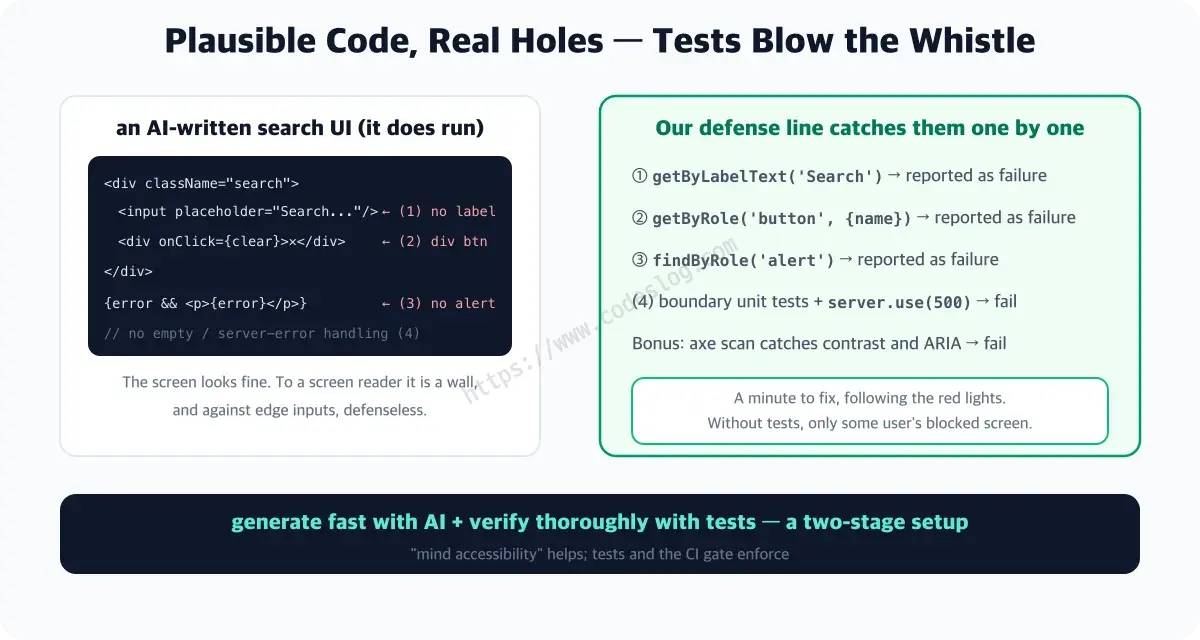
Ask AI to “build a search UI,” and there’s a good chance you’ll get code like this.
// a pattern AI often produces (plausible, but full of holes)
<div className="search">
  <input placeholder="검색..." onChange={...} />   {/* no label */}
  <div className="clear-btn" onClick={clear}>✕</div> {/* div standing in for a button */}
</div>
{error && <p className="error">{error}</p>}          {/* no role="alert" */}
It runs. It looks fine, too. But an unlabeled input, a div pretending to be a button, an error with no announcement — to screen reader users these are walls, and handling for edge cases like an empty query or a server error is usually missing as well.
Keeping the patterns in one place speeds up review. Here’s what I keep running into.
| What’s missing | On screen | In practice |
|---|---|---|
An input with no label (placeholder standing in) | Looks fine | The name rides on the placeholder — the moment you start typing, that text disappears, and there’s no way to check what the field was for |
onClick on a div | Looks like a button | Unreachable by Tab, doesn’t respond to Enter or Space, doesn’t announce as a button |
| An error message with no announcement | Red text is visible | For someone not looking at the screen, nothing happened at all |
| Status shown by color alone | Clear as green vs. red | Indistinguishable for users with color vision deficiency (WCAG 1.4.1) |
| Focus left stranded when an element disappears | Not noticeable | When the clear button vanishes, focus falls back to <body> and loses its place |
| An empty result with no message | Just looks blank | No way to tell whether the search failed, there are simply no results, or it’s still loading |
| Duplicate submits allowed while loading | Feels natural to click | The same request fires more than once and server state gets tangled |
See the pattern? Every one of these is something you can only catch by not just looking. AI optimizes for what gets rendered on screen, not for users who aren’t looking at that screen or for the exceptional moment. A visual review sails right past this entire list.
I’ve scanned an AI-made screen with my own eyes, thought “nice, looks good,” and hit merge. A review that passes whatever looks fine only protects exactly that much — what looks fine.
Defense by test — which hole, which test catches it#
The weapons built in earlier parts of this series aim squarely at these holes. The left column is what we just saw going missing; the right is the test that filters it out. If the test names look unfamiliar, that’s fine for now — the point to take away is just that “a way to check without looking at the screen already exists.”
| What AI missed | The test that catches it |
|---|---|
| unlabeled input | getByLabelText('검색') fails — philosophy part |
| div button | getByRole('button', { name: ... }) fails — a11y queries part |
| unannounced error | findByRole('alert') fails — MSW part |
| contrast/ARIA violations | axe scan fails — accessibility E2E part |
| empty values, server errors | boundary unit tests fail — unit·async part |
Once tests like these are stacked up — all the tests gathered in a project are called a suite — the moment you drop AI-written code in, a red light points straight at whatever’s missing.
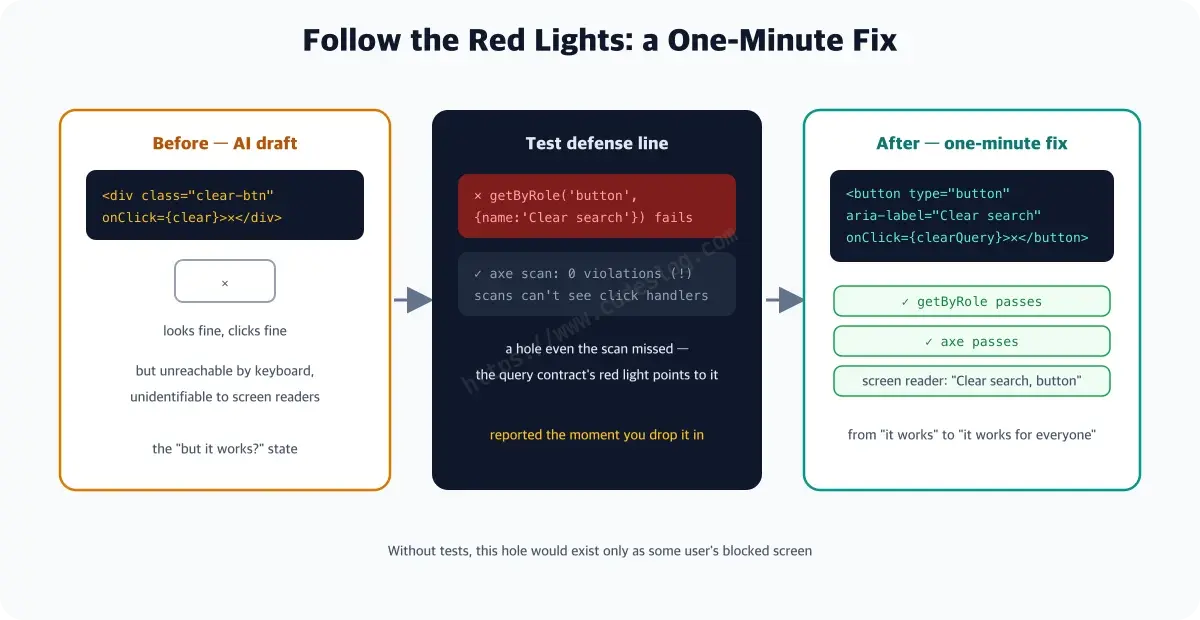
Let’s look at one real pair. Say AI writes the clear button —
// Before: the AI draft
<div className="clear-btn" onClick={clearQuery}>✕</div>
I actually swapped the demo app’s button for this div and ran the suite.
× the clear button is a button with an accessible name
  TestingLibraryElementError: Unable to find an accessible element
  with the role "button" and name "검색어 지우기"
(The test name is translated for readability; the text it’s searching for — “검색어 지우기,” meaning “clear search query” — stays in Korean because the demo app’s UI is Korean.)
The role query reports it right away. But here’s a twist — in that exact same state, the axe scan passed with zero violations.
axe is an automated tool that scans a page’s markup for accessibility rule violations. Because it works off rules, it has no way of knowing that a click handler hanging off a div secretly means “this is a button.” This is precisely the moment the accessibility E2E part meant by “automated checks only guard the floor.” What actually caught this hole was a single role query — which is exactly why you layer safety nets on top of one another.
// After: fixed by following the red light
<button type="button" aria-label="검색어 지우기" onClick={clearQuery}>
  ✕
</button>
// tests pass; screen reader announces "Clear search query, button"
The fix took one minute. Without a test, this problem would have existed only as some user’s blocked screen.
Tests only catch the promises you wrote down#
Everything so far might read as “just have tests and you’re covered” — but to be fair, there’s one more thing to check. Tests only keep the promises we actually wrote down. A promise nobody wrote stays quiet even when AI breaks it.
I ran an experiment on the sixth row of the table above — the message for empty results. The demo app has a branch that shows “검색 결과가 없습니다.” (“No results found.”) when a search comes back empty — exactly the kind of branch AI drafts commonly skip. I deleted that branch entirely and ran the full suite.
# with the empty-result message removed — unit and component tests
  Test Files  5 passed (5)
       Tests  13 passed (13)

# E2E (including the axe accessibility scan)
  5 passed (4.0s)
All 18, green. The user searches and lands on a blank screen with no way to tell whether it’s still loading or genuinely came back empty. The same suite that caught the div button earlier has nothing to say this time.
The reason is simple. The div button broke a promise that was written down as a test — “the clear button is a button with an accessible name.” The empty-result message wasn’t written down anywhere. A promise pinned down as a test like this is what we call a contract. Add one contract, and it gets caught immediately.
it('announces when there are no results', async () => {
  const user = userEvent.setup()
  render(<UserSearch />)
  await screen.findByText('Alice Kim')

  await user.type(screen.getByLabelText('검색'), 'zzz')

  expect(screen.getByText('검색 결과가 없습니다.')).toBeInTheDocument()
})× announces when there are no results
TestingLibraryElementError: Unable to find an element
with the text: 검색 결과가 없습니다.So the conclusion shifts a little. What actually guards against AI code isn’t “there are tests” — it’s “that promise is written as a test.” A test suite doesn’t grow more thorough on its own. Deciding what counts as a promise is still a human call — Part 19 did exactly this work, breaking requirements down into sentences and pairing each one with a test.
Want to try it yourself? This test was deliberately left out of the demo repo. Add the code above to
src/components/UserSearch.test.tsx, delete the empty-result branch from the component, then bring it back. Watching the red light and the green light trade places is the most useful thing you can take from this part.
Balancing vibe coding and verification — the bottleneck has already moved#
A two-stage setup — generate fast with AI, verify carefully with tests — is the realistic answer. Adding “keep accessibility in mind” to your prompt helps, too, but what actually enforces it is the tests and the CI gate. A team that only brags about generation speed ends up paying for it in production.
Think about it, and the bottleneck has simply moved. Writing code used to be the slow part; now writing takes seconds, and checking whether you can trust it is the slow part. But plenty of teams are still running the old time budget — they’ve only cut the time spent generating, while verification still gets the same few minutes it always did. Review then stops at “does it run,” and all seven rows in the table above sail right through.
I’m not knocking vibe coding here — I like that sense of speed myself. But for the flow to stay unbroken, you need something behind it that stops you when you need stopping. That’s what tests and CI are for. It’s like wearing a seatbelt actually letting you drive faster and looser — without the belt, you end up slowing yourself down anyway.
What a person needs to look at shifts, too. Grammar and typos barely need eyes anymore. What you need to check instead is “what is this code promising.” Do the labels and roles match the names users actually reach for? What happens when something fails? What shows up when there’s nothing to show? These are decisions AI quietly made on its own — and they’re actually product decisions.
One-page summary#
- AI code’s regular holes: unlabeled inputs · div buttons · unannounced errors · unhandled empty/error cases — while the screen looks fine
- With a suite in place, dropping AI code in makes red lights point at each hole, the moment you do (role queries, alert, axe, boundary tests)
- But even axe can’t see the div button (scans don’t see click handlers — measured, zero violations) — that hole belongs to the role query contract alone
- Promises you didn’t write down, the suite can’t catch either — removing the empty-result message left all 18 tests green (axe included); adding one contract test turned the light red instantly
- The fix costs minutes — without tests, that hole would have existed only as some user’s blocked screen
- Prompting “mind accessibility” helps; enforcing it is the job of tests and the CI gate
- The realistic balance = generate fast with AI + verify thoroughly with tests
Checking the defense line#
The long journey is nearing its end. Next time, we’ll look back at the series and talk about what comes next.
Tell AI “keep accessibility in mind” and it genuinely will. The problem is it won’t unless you ask. Catching that “unless you ask” moment is exactly what tests are for.
Level up: you now have a safety net that filters out AI code’s classic traps.
Next up: test culture, interviews, and what comes next — wrapping up the series
Ran into an unfamiliar term? The glossary has them all, one line each.
Leave a comment