This is Part 5 of the “Frontend Testing, Done Right” series. Browse the full series · Glossary
Real-world code waits. It waits for API responses; it waits for timers. That makes async testing the first wall most frontend developers hit — but the reason it feels hard boils down to a single question: “when do you verify?” Grade the answer sheet before the answer arrives, and you’re grading a blank page. This one article packs the complete toolkit for code that waits: Promise verification (resolves/rejects), fake timers, and the failure cases.
If you’ve been following the series, you’ll feel the contrast immediately with last time’s filterByQuery — the pure function that answered on the spot. Landed here from a search? You’re fine too: the examples are self-contained. Everything uses Vitest, but on Jest it runs almost unchanged once you swap vi for jest. (No environment yet? See the setup article.)
Practice code: this installment’s exact state lives in the
step-05tag.git checkout step-05to follow along — or diff it against step-04 to see just what this part added.
This installment’s goals#
- Verifying Promises with async/await —
resolvesandrejects - Manipulating time with fake timers
- Testing failure cases, which matter as much as success
How not to grade a blank page#
Let me show you the most common async-testing accident first: the test that forgot its await.
it('fetches the user list', () => {
  expect(fetchUsers()).resolves.toHaveLength(3)   // no await!
})
This test always passes. Even with the server down. The test finishes before the verification does — a green light that protects nothing, the async cousin of the “fake green” we saw in the strategy article. Vitest does print a warning, but it’s safer to burn in the principle:
An async assertion always gets an await. That’s rule number one for everything we learn today.
Building fetchUsers#
Let’s add a function to last time’s src/lib/users.ts that fetches the user list from a server.
// appended to src/lib/users.ts
export async function fetchUsers(): Promise<User[]> {
  const res = await fetch('/api/users')
  if (!res.ok) throw new Error('failed to fetch users')
  return (await res.json()) as User[]
}
Send the request with fetch, throw if the response isn’t healthy (res.ok), unwrap the JSON otherwise. A textbook API call.
But calling this from a test means you’d need a real server. Tests that pass or fail with the server’s mood are trouble, so we’ll borrow a tool a little early — MSW, which intercepts network requests and returns fake responses. Don’t worry that we haven’t covered it yet: for now, all you need to know is that “during tests, /api/users gets a prepared answer.” The proper introduction comes in the component chapter.
If you’re following along, copy the repo’s src/mocks/ folder (three files) as-is, and update src/test/setup.ts to the repo’s version. That’s the entire setup for faking the server.
Nailing down success and failure#
Now we add fetchUsers tests to users.test.ts. Promises get dedicated matchers — resolves for success, rejects for failure.
import { http, HttpResponse } from 'msw'
import { server } from '../mocks/server'
import { fetchUsers } from './users'

describe('fetchUsers', () => {
  it('fetches the user list', async () => {
    await expect(fetchUsers()).resolves.toHaveLength(3)
  })

  it('throws when the server errors', async () => {
    server.use(http.get('/api/users', () => new HttpResponse(null, { status: 500 })))
    await expect(fetchUsers()).rejects.toThrow('failed to fetch users')
  })
})
How to read these:
await expect(promise).resolves.matcher()— “this Promise should succeed, and its result should look like this.” Wait for success, then verify the result.await expect(promise).rejects.toThrow(...)— “this Promise should fail, throwing this error.” You’re waiting for failure, on purpose. If it succeeds instead, the test fails.server.use(...)in the second test is a one-shot override: “for this test only,/api/usersreturns 500.” When the test ends, the original response is restored automatically. Conjuring failure at will — that’s the power of a fake server.
Testing only success is half the job. Network failures, empty responses, server errors — these are situations your users actually meet. Nail down “when it errors, it fails loudly” too, so the test catches whoever deletes the error handling later.
Fake timers — pushing time instead#
Now for a different kind of waiting. Calling the API on every keystroke is wasteful, so let’s build a debounce: “run once, 300ms after the input stops.” src/lib/debounce.ts:
/** Runs once, ms after the last call */
export function debounce<T extends (...args: never[]) => void>(fn: T, ms: number) {
  let timer: ReturnType<typeof setTimeout> | undefined
  return (...args: Parameters<T>) => {
    clearTimeout(timer)
    timer = setTimeout(() => fn(...args), ms)
  }
}
Each call cancels the previous timer and restarts the 300ms clock, so in a burst of calls only the last one survives. (Curious about never[] in the type? The repo has a comment explaining it — skipping it costs you nothing today.)
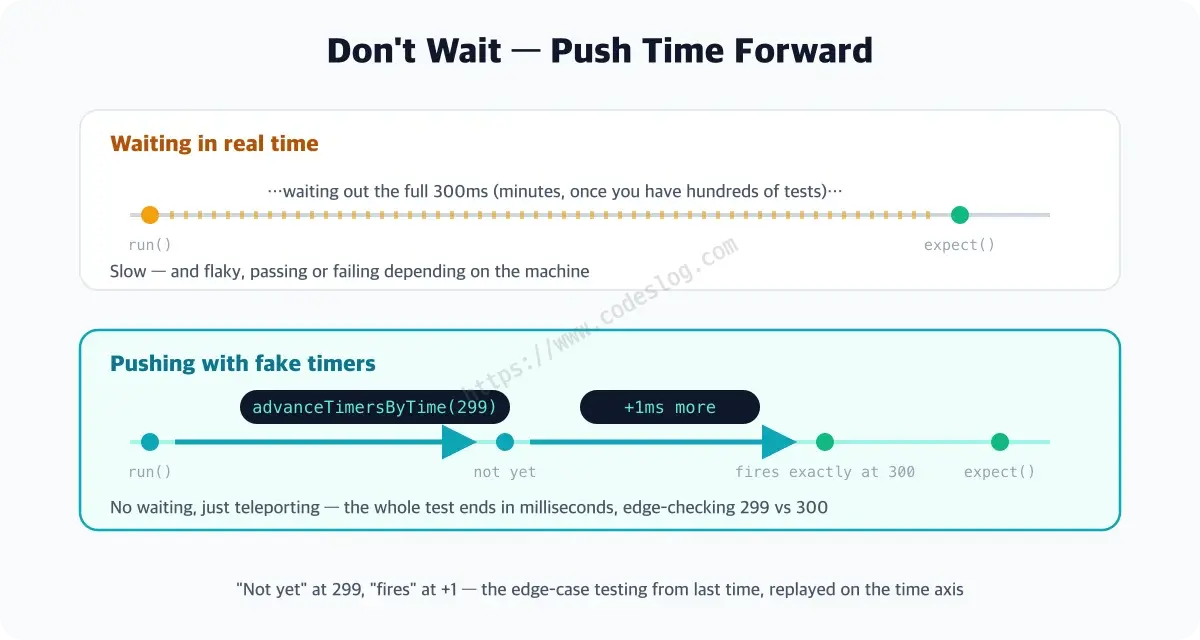
If we tested this by actually waiting 300ms, two things break: tests get slow (minutes, at hundreds of tests), and they turn flaky, passing or failing with the machine’s mood. So instead of waiting, we take control of time itself.
describe('debounce', () => {
  beforeEach(() => vi.useFakeTimers())
  afterEach(() => vi.useRealTimers())

  it('runs only once for a burst of calls', () => {
    const spy = vi.fn()
    const run = debounce(spy, 300)

    run(); run(); run()

    vi.advanceTimersByTime(299)
    expect(spy).not.toHaveBeenCalled()

    vi.advanceTimersByTime(1)
    expect(spy).toHaveBeenCalledOnce()
  })
})
Unpacking the new faces:
vi— Vitest’s built-in helper object, home to tools like fake timers and fake functions.beforeEach/afterEach— hooks that run automatically around every test. Here they guarantee “fake the clock before each test, always restore it after.” Skip the restore and other tests end up living in fake time too — remember these as a pair.vi.fn()— a fake function that records its calls (a “spy”). Being able to ask “how many times were you called?” makes it perfect for verifying debounce. It stars in the next installment; this cameo is enough for today.vi.advanceTimersByTime(299)— pushes time forward 299ms. Not waiting — teleporting.
Stop at 299 to confirm “not yet,” push 1 more to confirm “fires exactly at 300.” Recognize the pattern? It’s last time’s edge-case testing, replayed on the time axis. A test that would have taken hundreds of real milliseconds finishes in a few.
Now break it on purpose#
This installment’s alarm check. Delete the await from the first fetchUsers test:
it('fetches the user list', () => {
  expect(fetchUsers()).resolves.toHaveLength(3)   // await deleted!
})
Then sabotage the code — change the URL in users.ts to /api/userz. The server will return 404, so the test should obviously go red… and yet the light turns green (Vitest logs an “unhandled rejection” warning, but the test itself records a pass). Restore the await, and only then do you get an honest red.
Don’t forget to fix the URL back. Today’s lesson in one line: the more welcome a green light is, the more you should ask whether the test actually waited.
The one-page recap#
- All of async testing hangs on “when do you verify” — an async assertion always gets an
await(without it: a permanently green fake) - Promise success:
await expect(p).resolves.matcher(). Failure:rejects.toThrow(...)— and failure cases are half the job - Don’t wait on time-dependent code — push time with fake timers:
vi.useFakeTimers()+advanceTimersByTime() beforeEach/afterEach: whatever world you fake, always restore- When you’re done, delete an
awaitand witness the false pass yourself — you won’t forget it afterward
Async, no longer scary#
Three weapons for code that waits: await + resolves/rejects, and fake timers. Next up is the art of swapping out dependencies — including the true identity of vi.fn(), which made its cameo today: test doubles, done properly.
If an async test passes sometimes and fails sometimes — congratulations, you’ve already met the flaky test foretold in part one. The culprit is usually a missing await.
Level up: you can now test async code, timers, and failure cases without flinching.
Next up: mock, stub, spy — understanding test doubles properly
Bumped into an unfamiliar term? The glossary has them all, one line each.
Leave a comment