This is Part 13 of the “Frontend Testing, Done Right” series. Browse the full series · Glossary
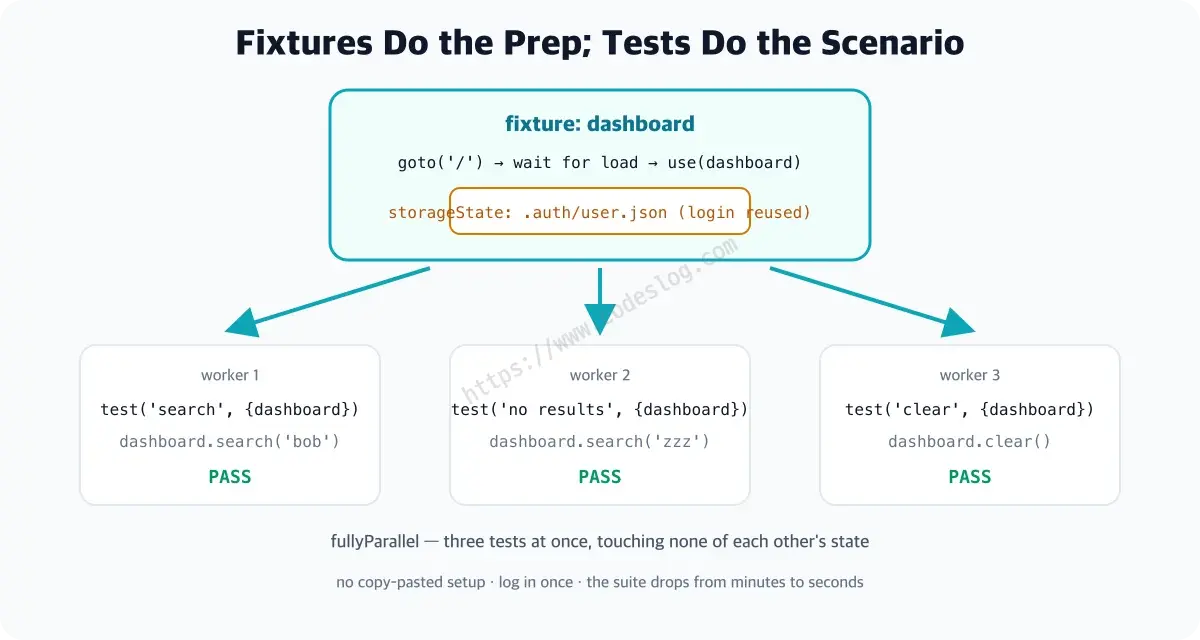
Past ten E2E tests, two things start to hurt: the setup code copy-pasted into every test, and the suite slowing down as it runs in sequence. Playwright’s fixtures (a mechanism that injects repeated setup into tests) and parallel execution solve both at once — this article covers custom fixtures, auth reuse (storageState), and the safety rules for parallelism.
If you’ve been following the series, this is exactly the moment your E2E starts piling up; coming from a search, you’re fine too — examples are self-contained, and basics live in the intro part. (Demo UI strings are Korean — 검색 = “Search”.)
Practice code: this installment’s state lives in the
step-13tag (setup shared via fixtures and a Page Object — later-episode code like debugging or axe isn’t there yet). You can also open it in StackBlitz.
Where we trim the fat.
- Sharing setup with custom fixtures
- The save-and-reuse auth pattern (storageState)
- Parallel runs and test isolation
Custom fixtures#
You’ve been using fixtures all along, actually. The { page } you’ve received in every test since the intro part — that’s a Playwright built-in fixture. It readies a clean tab before each test and tidies up after. In theater terms, a stagehand: props in place before the curtain, cleared away after.
Today we teach that stagehand our chores. Instead of writing “visit, wait for loading” every time, tests receive a ready-made dashboard. (repo e2e/fixtures.ts)
import { test as base, type Page } from '@playwright/test'

class DashboardPage {
  readonly page: Page

  constructor(page: Page) {
    this.page = page
  }

  async goto() {
    await this.page.goto('/')
    // loaded = truly ready
    await this.page.getByText('Alice Kim').waitFor()
  }

  search(q: string) {
    return this.page.getByRole('searchbox', { name: '검색' }).fill(q)
  }

  row(name: string) {
    // a locator for the row containing this name (queried at use)
    return this.page.getByRole('listitem').filter({ hasText: name })
  }
}

export const test = base.extend<{ dashboard: DashboardPage }>({
  dashboard: async ({ page }, use) => {
    const dashboard = new DashboardPage(page)
    // before use = prep (visit + wait for load)
    await dashboard.goto()
    // the test body runs at this moment
    await use(dashboard)
  },
})
export { expect } from '@playwright/test'
(Not using the constructor(readonly page: Page) shorthand is deliberate — it clashes with the erasableSyntaxOnly option in recent Vite templates. The demo repo’s typecheck caught this; a true story.)
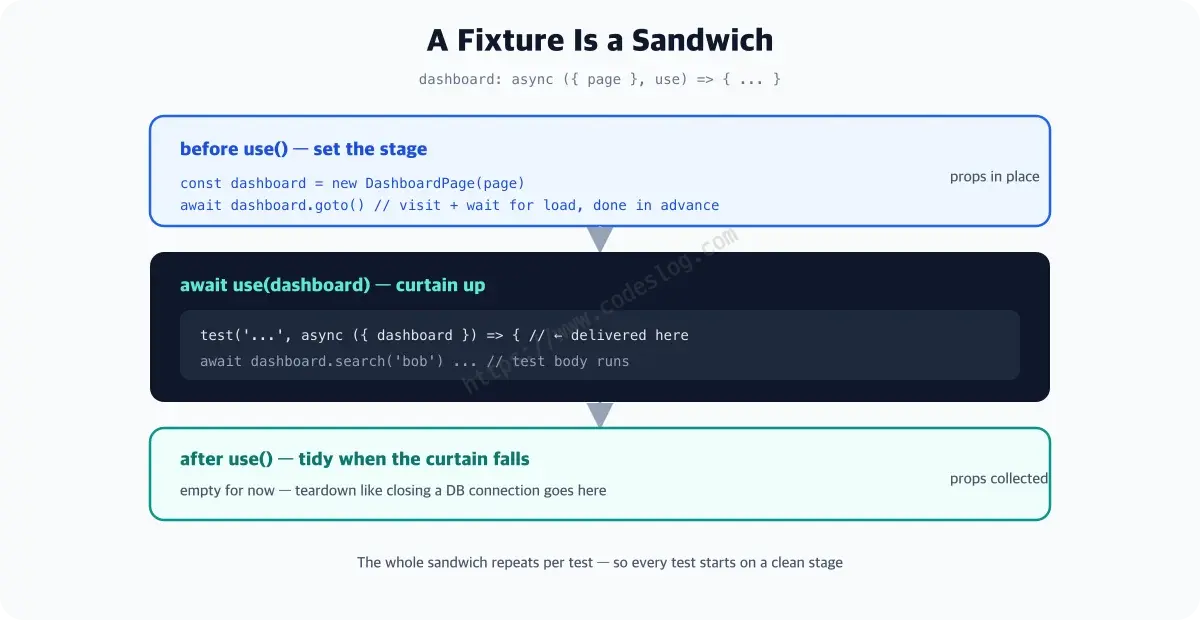
The structure may look foreign, so here’s the flow. DashboardPage collects “how to operate the dashboard page” — the pattern is called a Page Object. And base.extend({ dashboard: ... }) registers the fixture. A fixture function is a sandwich:
- Before
use(...)— prep. Build the dashboard, finishgoto() use(dashboard)— “stage ready!” — the test body runs now, delivered as{ dashboard }- After
use(...)— teardown. (Empty here, but closing a DB connection would go in this slot)
The test body gets to focus on the scenario alone. (repo e2e/search-with-fixture.spec.ts)
import { test, expect } from './fixtures'

test(
  'searches with shared setup from the fixture',
  async ({ dashboard }) => {
    await dashboard.search('bob')

    await expect(dashboard.row('Bob Lee')).toBeVisible()
    await expect(dashboard.row('Alice Kim')).toHaveCount(0)
  }
)
The visit and the loading wait are gone from the body. Just note the import — './fixtures', not '@playwright/test' — that’s you using the test that comes with the stagehand you trained.
Log in once (the pattern)#
The demo app has no login, but this is an essential real-world pattern. Log in once in global setup, save the state, and every test reuses it.
// global-setup: log in, then save state
await page.context().storageState({ path: 'playwright/.auth/user.json' })

// playwright.config.ts
use: { storageState: 'playwright/.auth/user.json' }
What storageState saves is cookies and localStorage — the full “I’m logged in” evidence. Tests inheriting the file start already authenticated. You save tens of seconds per test versus logging in each time, and a login-UI change no longer shakes the whole suite (one global setup to fix).
Parallelism and isolation#
The repo config’s fullyParallel: true runs files and tests concurrently. Run the two search tests for real:
npx playwright test -g "search"

Running 2 tests using 2 workers
  ✓  2 [chromium] › e2e/dashboard.spec.ts:4:1 › searches users on the dashboard (461ms)
  ✓  1 [chromium] › e2e/search-with-fixture.spec.ts:3:1 › searches with shared setup from the fixture (465ms)
  2 passed (1.8s)
using 2 workers — two browsers ran at the same time. The completion order (#2 first) differing from file order is more proof. With only two tests you won’t feel it, but once dozens pile up, these workers earn their keep.
One condition — tests must not share state. A parallel accident looks like this: while test A verifies “deleting an item empties the list,” test B, on the same account, was reading that list. B fails with no idea why. It’s fine in sequence and explodes only in parallel — the worst kind of flaky. Each test must start and end with its own data. (Global variables and same-account data edits are the usual culprits.)
One-page summary#
- Repeated setup (visit, loading waits, login) goes into fixtures — register with
base.extendand it’s delivered as a test argument - Collect page-handling into a Page Object (class): when the UI changes, you fix one place
- Auth once: global setup logs in → save with storageState → all tests reuse
fullyParallel: truefor speed — but no shared state between tests (globals and same-account edits are the culprits)- A bloated fixture body is a signal — prep belongs in fixtures, verification in tests
Wrapping up#
Fast, clean E2E achieved. Tests still break, though — next time, debugging to trace the cause.
The moment your suite drops from five minutes to forty seconds, you become a parallelism believer. Leave one piece of shared state in, though, and those forty seconds become hell.
Level up: you can keep an E2E suite fast and clean with fixtures and parallelism.
Next up: traces, debugging, retries — tracking down causes
Bumped into an unfamiliar term? The glossary has them all, one line each.
Leave a comment