This is Part 11 of the “Frontend Testing, Done Right” series. Browse the full series · Glossary
Playwright is an E2E testing tool that drives real browsers (Chromium, Firefox, WebKit) with code. E2E (End-to-End) is exactly what it says — reproducing the entire flow of a user visiting, searching, and seeing results, in an actual browser. This article goes from install to a passing first scenario in one sitting.
If you’ve been following the series, this is where the stage gets bigger — we’ve been playing inside jsdom, a pretend browser; now we open a real one. New here? No problem: we start from installation, and you can put any Vite/React app of yours where the demo app sits. (Demo UI strings are Korean — 대시보드 = “Dashboard”, 검색 = “Search”.)
Practice code: this installment’s state lives in the
step-11tag (Playwright install, config, and the first scenario — later-episode code like fixtures or axe isn’t there yet). You can also open it in StackBlitz.
What we’ll learn#
- Playwright installation and config (webServer included)
- Writing the first E2E scenario
- The role split against unit and component tests
Wait — didn’t we already test search?#
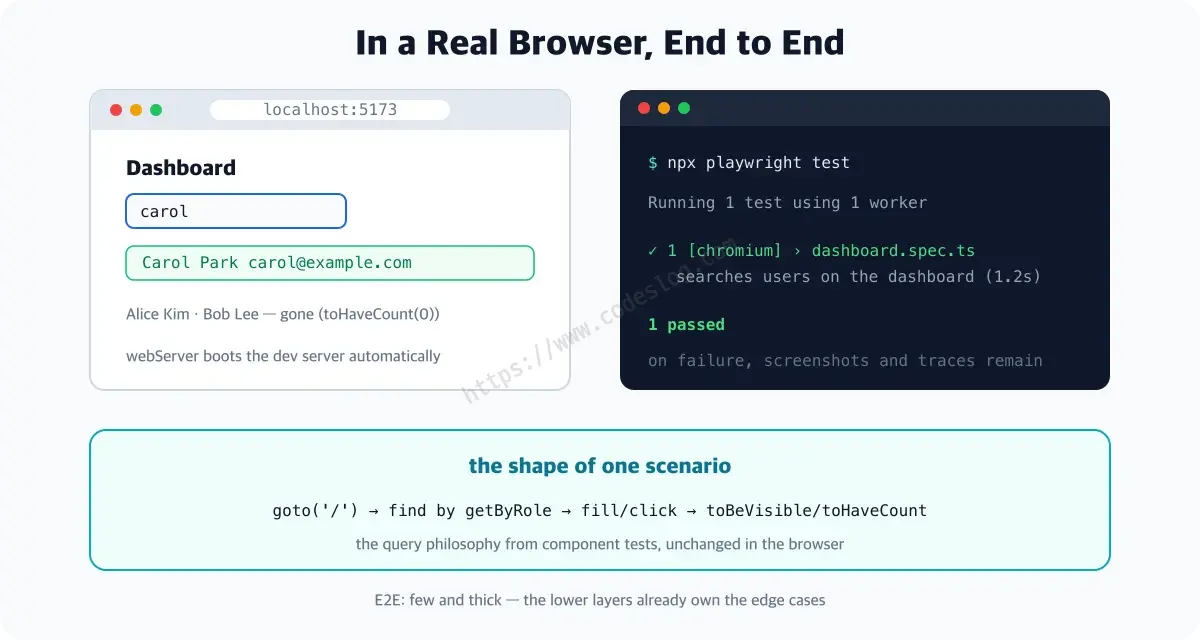
We did. In the interaction part we typed and verified results. But that stage, jsdom, is a pretend browser that only mimics the DOM — it doesn’t paint CSS, has no real network stack, no address bar. So it can’t catch things like:
- Broken build/bundle config where the app itself won’t boot
- Flows tangled with the address bar: routing, redirects, refreshes
- “The element is in the DOM but CSS makes it invisible on screen”
In theater terms: so far we’ve done solo practice (unit) and scene rehearsal (component). E2E is the full dress rehearsal — lights, sound, and stage machinery (build, server, browser) all on, running the whole thing once for real.
Install and configure#
npm i -D @playwright/test
npx playwright install chromium
That second line is unusual — it downloads an actual browser binary, separate from the npm package. Playwright doesn’t borrow your Chrome; it uses its own version-pinned browser. Even “works in my Chrome” gets eliminated.
Point webServer at your dev command and tests will boot the server for you. (repo playwright.config.ts)
import { defineConfig, devices } from '@playwright/test'

export default defineConfig({
  testDir: './e2e',
  fullyParallel: true,
  // fail CI if a stray test.only sneaks in
  forbidOnly: !!process.env.CI,
  // retries on CI only — more on this later
  retries: process.env.CI ? 2 : 0,
  use: {
    baseURL: 'http://localhost:5173',  // what goto('/') resolves against
    // record the full run from the first retry
    trace: 'on-first-retry',
  },
  webServer: {
    // auto-start the dev server for tests
    command: 'npm run dev',
    url: 'http://localhost:5173',      // ready when this URL responds
    // reuse a locally running server
    reuseExistingServer: !process.env.CI,
  },
  projects: [
    { name: 'chromium', use: { ...devices['Desktop Chrome'] } }
  ],
})
Three unfamiliar entries worth naming. fullyParallel runs test files concurrently to save time; trace: 'on-first-retry' records the entire run when a failure triggers a retry (you’ll appreciate how much in the debugging part); projects lists which browsers to run — we start with Chromium alone.
The first scenario#
The repo’s actual E2E. (e2e/dashboard.spec.ts)
import { test, expect } from '@playwright/test'

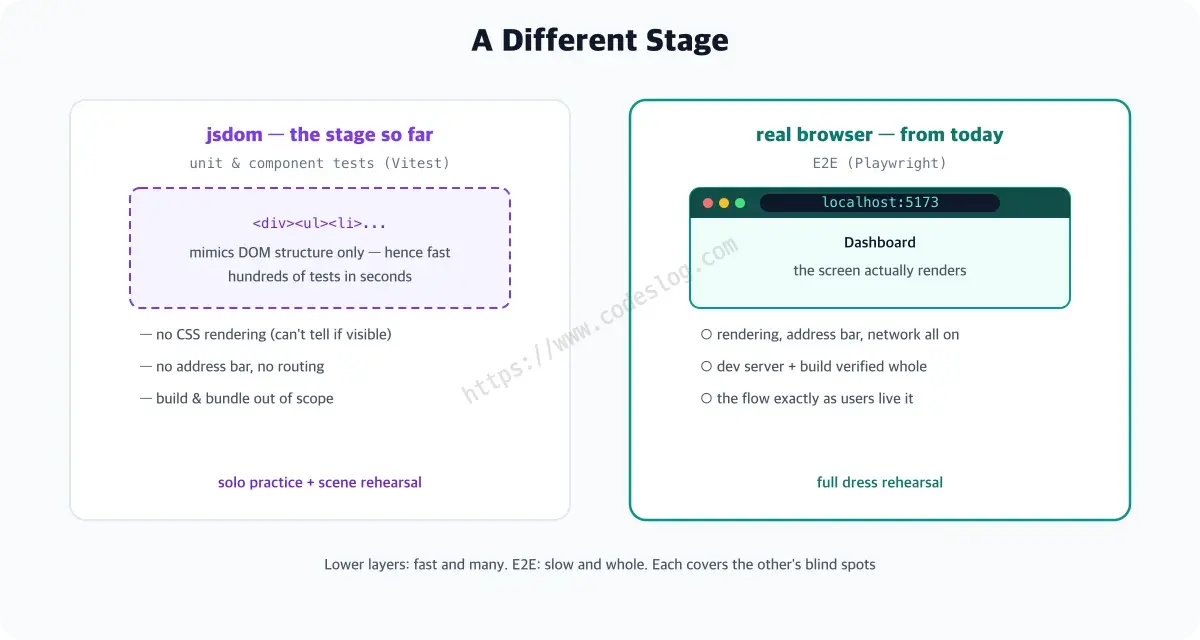
test('searches users on the dashboard', async ({ page }) => {
  await page.goto('/')
  await expect(page.getByRole('heading', { name: '대시보드' }))
    .toBeVisible()
  // list loaded, too
  await expect(page.getByText('Alice Kim')).toBeVisible()

  // like a user: find the searchbox and type
  await page.getByRole('searchbox', { name: '검색' }).fill('carol')

  await expect(page.getByText('Carol Park')).toBeVisible()
  // count 0 = gone from screen
  await expect(page.getByText('Alice Kim')).toHaveCount(0)
})
How to read it. First, async ({ page }) => — this page is a fresh browser tab Playwright hands each test (just take it; cleanup is handled). page.goto('/') resolves against the config’s baseURL, i.e. localhost:5173. toBeVisible() means “shown on screen” and toHaveCount(0) means “zero of them = gone” — web-first assertions playing the same roles as toBeInTheDocument/queryBy in component tests. And the reason this E2E runs without a backend is again the MSW part’s browser mock — the same handlers answering /api/users inside the dev server.
npx playwright test

Running 1 test using 1 worker
  ✓  1 [chromium] › e2e/dashboard.spec.ts:3:1 › searches users on the dashboard (398ms)
  1 passed (1.6s)
Run it and the dev server boots first (webServer at work), a real browser opens and closes, and the light turns green in 1.6 seconds. You probably didn’t see a browser window, though — headless (windowless) mode is the default. Want to watch with your own eyes? npx playwright test --headed. The cursor moving by itself, typing the search — it’s genuinely fun the first time.
getByRole again — the query philosophy you trained on components carries straight into E2E. (Why not getByLabel('검색')? Next time, with a fun war story.)
Let’s break it on purpose#
Passing alone is boring — let’s check the alarm, too. Put a typo in the expected text: Carol Park becomes Carol Prak.
  ✘  1 [chromium] › e2e/dashboard.spec.ts:3:1 › searches users on the dashboard (5.0s)

    Error: expect(locator).toBeVisible() failed
    Locator: getByText('Carol Prak')
    Expected: visible
    Error: element(s) not found
    Call log:
      - Expect "toBeVisible" with timeout 5000ms
      - waiting for getByText('Carol Prak')

    > 10 |   await expect(page.getByText('Carol Prak')).toBeVisible()
         |                                              ^
Look at how much the failure message carries. Which locator (getByText('Carol Prak')), at which file and line (the caret points at the exact spot), doing what (the Call log — it waited five seconds for the element to appear): it’s all there. On top of that, the test-results/ folder keeps the page’s state at the moment of failure as evidence. A different temperature from tools that toss you “expected true, got false” and walk away.
And if that “five-second wait” in the Call log caught your eye — good instincts. Playwright doesn’t give up the moment an assertion misses; it keeps waiting for the element to show up (auto-wait). Why that patience is E2E’s lifeline is exactly next time’s topic.
E2E: few and thick#
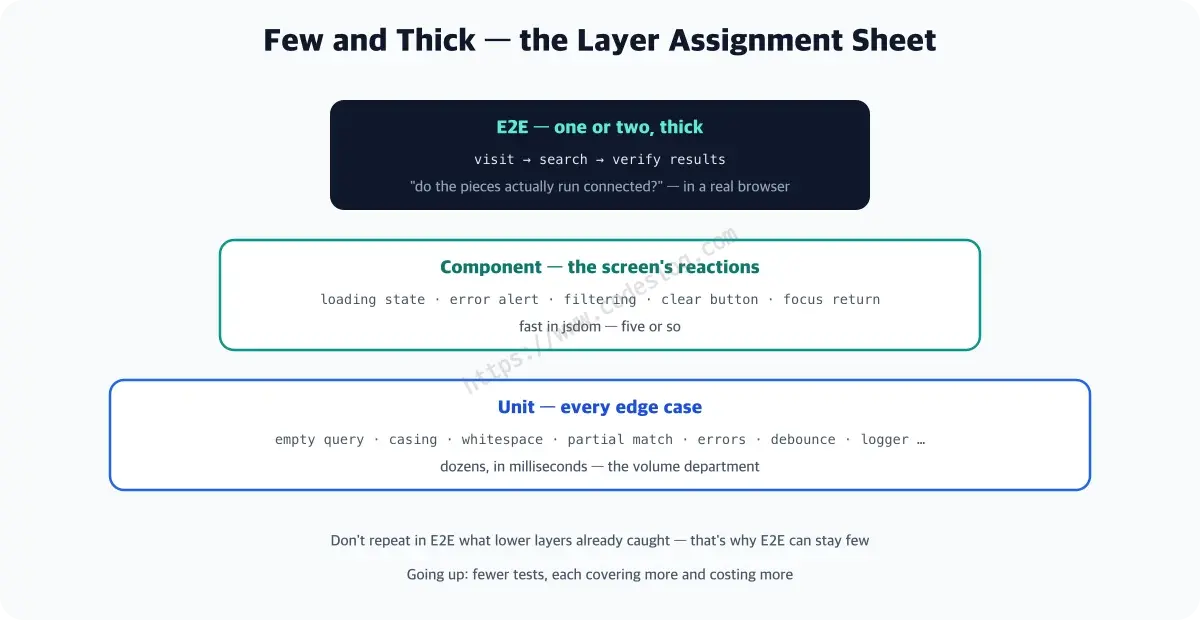
E2E is slow and expensive. While that one test boots a server, opens a browser, and paints a page, hundreds of unit tests finish. So repeating the same checks at every layer is waste.
The split: edge cases like empty queries, casing, whitespace were already caught by the unit tests; screen reactions like loading, errors, focus by the component tests. E2E sits on top and thickly confirms just a few representative flows — “do these pieces actually run connected?” For a search dashboard, “visit → search → results” is enough.
One-page summary#
- Playwright = an E2E tool that drives real browsers with code — install via
npm i -D @playwright/test+npx playwright install chromium - The config’s webServer boots your dev server automatically — thanks to
baseURL, tests justgoto('/') - First-scenario shape:
goto→ find withgetByRole→fill/click→ assert withtoBeVisible/toHaveCount - The query philosophy is identical to component testing — finding by role and name carries over
- Failures come with the locator, the code location, and the waiting record (Call log) — a tool that fails with evidence
- E2E stays few and thick — the lower layers already own the edge cases
Into the real browser#
Your first E2E ran. But E2E’s archenemy, flakiness (tests that flip between pass and fail on the same code), lies in wait. Next time we take it on with locators.
Playwright leaves screenshots, videos, and traces on failure. The era of “works on my machine” is over — there’s evidence now.
Level up: you can verify whole user flows in a real browser.
Next up: locators and auto-wait — taming flaky tests
Bumped into an unfamiliar term? The glossary has them all, one line each.
Leave a comment