
This is Part 12 of the “Frontend Testing, Done Right” series. Browse the full series · Glossary
Flaky tests — the code hasn’t changed, yet some days it passes and some days it fails. It’s the first illness every team catches when adopting E2E, and left untreated it breeds a scary culture: “that one again? just rerun it.” Fortunately the cause is usually singular: finding elements too early, or the wrong way. This article pulls that root out with Playwright’s locators and auto-wait.
If you’ve been following the series, this is the head-on match Part 1 promised. Coming from a search? The examples are self-contained; for Playwright basics, see the intro part. (Demo UI strings are Korean — 검색 = the “Search” label.)
Practice code: this installment’s state lives in the
step-12tag (the first scenario refined with robust locators — later-episode code like fixtures or axe isn’t there yet). You can also open it in StackBlitz.
Today’s catch list.
- Lazy locators and strict mode
- What auto-wait does for you
- Choosing robust selectors (with a real war story)
True story: the selector that broke a test#
This actually happened while building the demo repo. The first attempt:
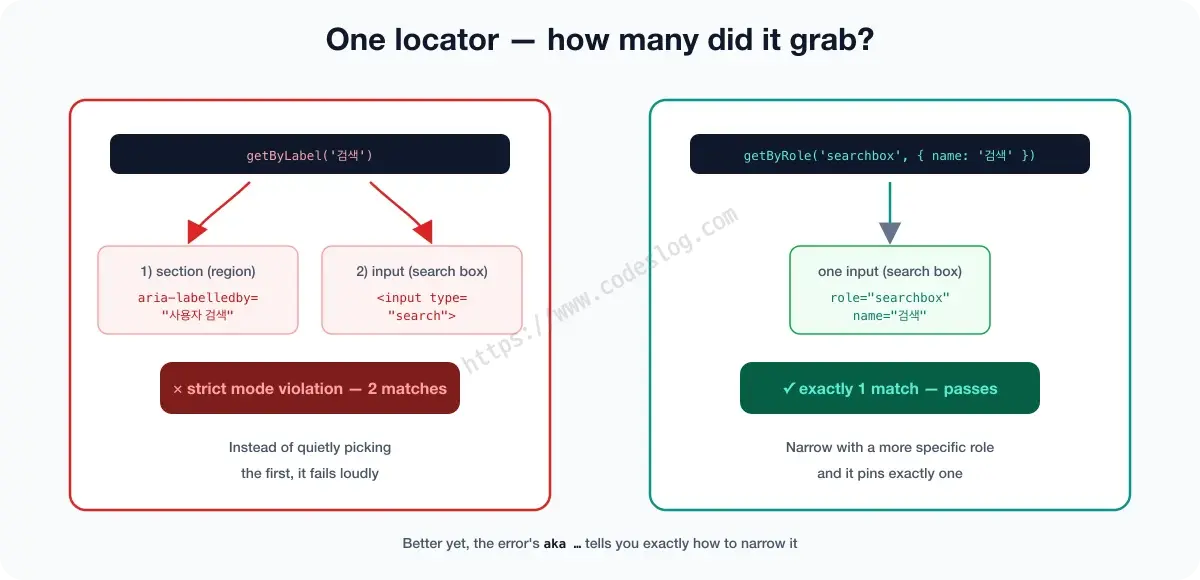
await page.getByLabel('검색').fill('carol') // strict mode violation!
Playwright threw this:
Error: locator.fill: Error: strict mode violation: getByLabel('검색') resolved to 2 elements:
    1) <section aria-labelledby="search-heading">…</section>
       aka getByRole('region', { name: '사용자 검색' })
    2) <input id="q" value="" type="search" placeholder="이름 또는 이메일"/>
       aka getByRole('searchbox', { name: '검색' })
getByLabel('검색') matched two elements — the search input, and the section named “사용자 검색” via aria-labelledby (partial match). Playwright’s strict mode fails immediately when a locator matches multiple elements. Instead of quietly picking the first, it exposes the problem.
Look closer and the error is kinder still — next to each matched element, the aka ... line suggests a locator that would pin that element uniquely. The fix is literally written inside the error. Take suggestion #2 as dictated:
// now exactly one match
await page.getByRole('searchbox', { name: '검색' }).fill('carol')
Better a loud failure up front than an ambiguous selector that snaps some random day.
Locators are lazy (the good kind)#
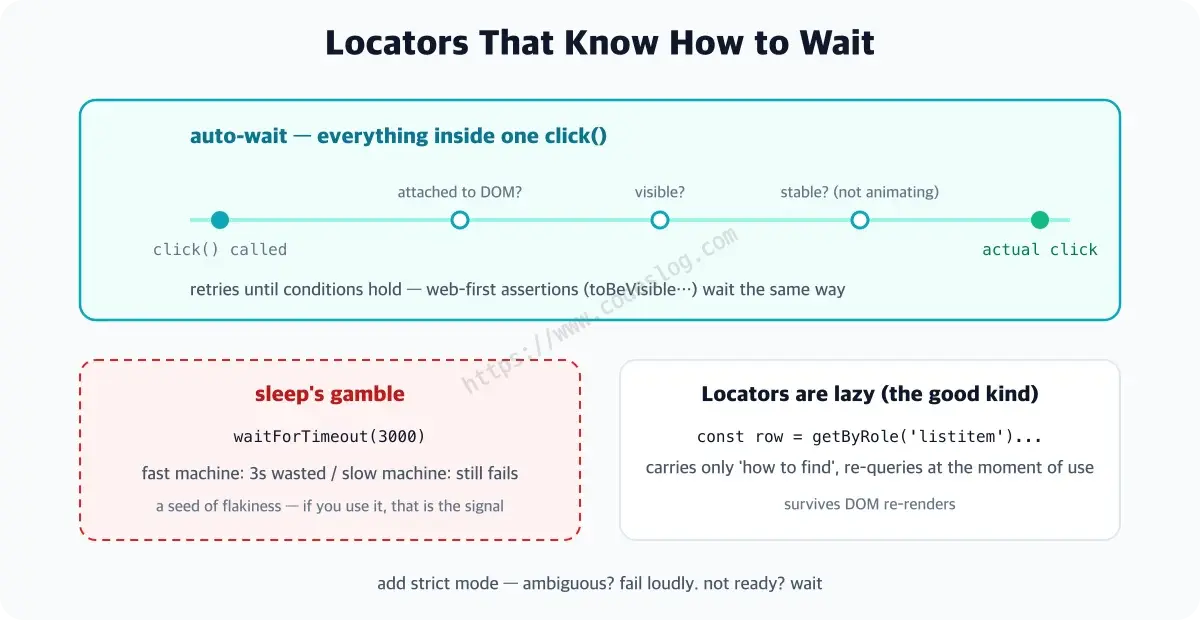
The locator returned by page.getByRole(...) isn’t an “element” — it’s “how to find one.” At creation it queries nothing — the element doesn’t even need to exist yet. It looks only when you act or assert, and freshly each time. Deferring the lookup until the moment of use like this is called lazy evaluation — and it’s exactly what “lazy” in the section title means.
const row = page.getByRole('listitem').filter({ hasText: 'Alice Kim' })
// ↑ nothing happens on this line — fine even before the list loads

// queried here (+ retried until visible)
await expect(row).toBeVisible()
Why is this laziness a blessing? When React re-renders and swaps DOM nodes, the locator isn’t clutching a stale reference — it searches the screen as it is at the moment of use. The classic E2E accident, “grabbed the element early, but it was a dead node by click time,” simply can’t happen. This filter({ hasText }) pattern is what the repo’s final version uses, refining the intro part’s first scenario — it holds up even as similar-named rows multiply.
auto-wait — where flakiness is born, and where it dies#
Watch flakiness being born, in slow motion. Our dashboard loads its list from a server after mount. That response takes 0.1s on a fast day, 1s on a slow day. If you query “right now,” the fast day passes and the slow day fails. Not a character of code changed. That’s all flakiness is.
The classic remedy was planting manual waits:
// don't do this
await page.waitForTimeout(3000)   // "3 seconds should do it"
await page.getByText('Alice Kim').click()
That sleep is bad in both directions. On a 3.1-second day it fails anyway, and on a 0.1-second day it wastes a full three seconds. Multiply by dozens of tests and the waste stacks into minutes.
Playwright’s answer is auto-wait. Actions like click wait on their own until the element is visible, enabled, and done moving; web-first assertions like expect(...).toBeVisible() retry until true (within the timeout). A web-first assertion isn’t “check once and done” — if the screen is still settling, it keeps re-checking until the condition holds. It proceeds the instant things are ready — no waste — and waits out the slow days — no failures.
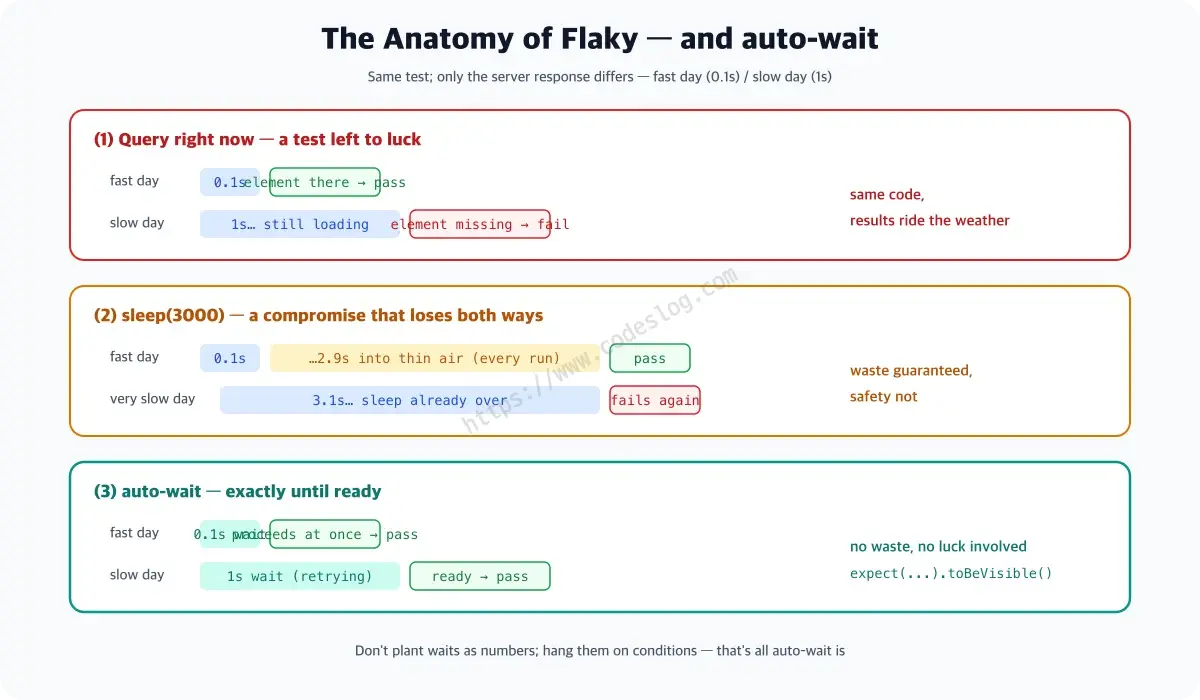
So in Playwright, arbitrary waitForTimeout (sleep) is almost never needed — if it’s in your code, it’s usually a seed of flakiness or wasted time. Typically both.
Accessibility again:
getByRole-based locators reduce flakiness and verify accessibility. Robustness and inclusion point the same way.
Papering over a flaky test with
test.retry()is bailing a leaking boat with a bucket. It works for a while… but eventually you plug the hole.
One-page summary#
- Flakiness’s main culprits: timing and ambiguous selectors — a
sleep(waitForTimeout) in the code is usually a flaky seed - Locators are lazy: they carry “how to find” and re-query at use — resilient to DOM re-renders
- auto-wait: actions wait until the element is ready; web-first assertions retry until true
- strict mode: multiple matches fail loudly instead of choosing quietly — a signal to narrow with a more specific role
- Covering flakiness with retries is a bucket on a leaking boat — the real fix is robust (role-based) locators from the start
Today’s green light#
Robust locators acquired. Next: fixtures and parallelism to cut the repetition.
Level up: you can diagnose flaky tests and fix them with robust locators.
Next up: fixtures, auth reuse, parallel runs
Bumped into an unfamiliar term? The glossary has them all, one line each.
Leave a comment