This is Part 2 of the “Frontend Testing, Done Right” series. Browse the full series · Glossary
Last time we talked about why testing matters. Now for the practical question: “So… what do I test, and how much?” Time is finite, and you can’t test everything.
This installment is really one question, answered in three pieces:
- how to pick the code that’s most worth testing
- what coverage numbers really mean — and where they lie
- the testing strategy we’ll use for our demo app
What to test first#
Not all code carries the same weight. Top priority goes to code that changes often and hurts badly when it breaks.
- core business logic (calculations, validation, state transitions)
- places where bugs keep coming back
- shared utilities used everywhere
On the flip side, things the framework already guarantees (plain rendering) or code that’s about to be deleted can wait.
In our demo app terms: the search filter (filterByQuery) is priority one, while “the title renders” deserves a single smoke test (like sniffing for smoke — the bare-minimum “does it even turn on?” check) and nothing more.
Wait — what is coverage, exactly?#
A quick word on the word. Coverage is the percentage of your code that actually ran while the tests were running. It’s the number your test runner reports as “your tests visited N% of the codebase.”
export function filterByQuery(users: User[], query: string) {
  const k = query.trim().toLowerCase()   // ① executed
  if (!k) return users                   // ② condition evaluated (false)
  return users.filter(/* ... */)         // ③ executed
}

// Suppose your only test calls filterByQuery(users, 'alice').
// All three lines were "visited," so line coverage says 100%.
// But the branch where ② is true — the "empty query" path — never ran.
Same code, different percentages depending on how you count. We’ll dig into line vs. branch coverage and how to read the reports later in the series. Today comes first: how to treat this number at all.
The trap of 100% coverage#
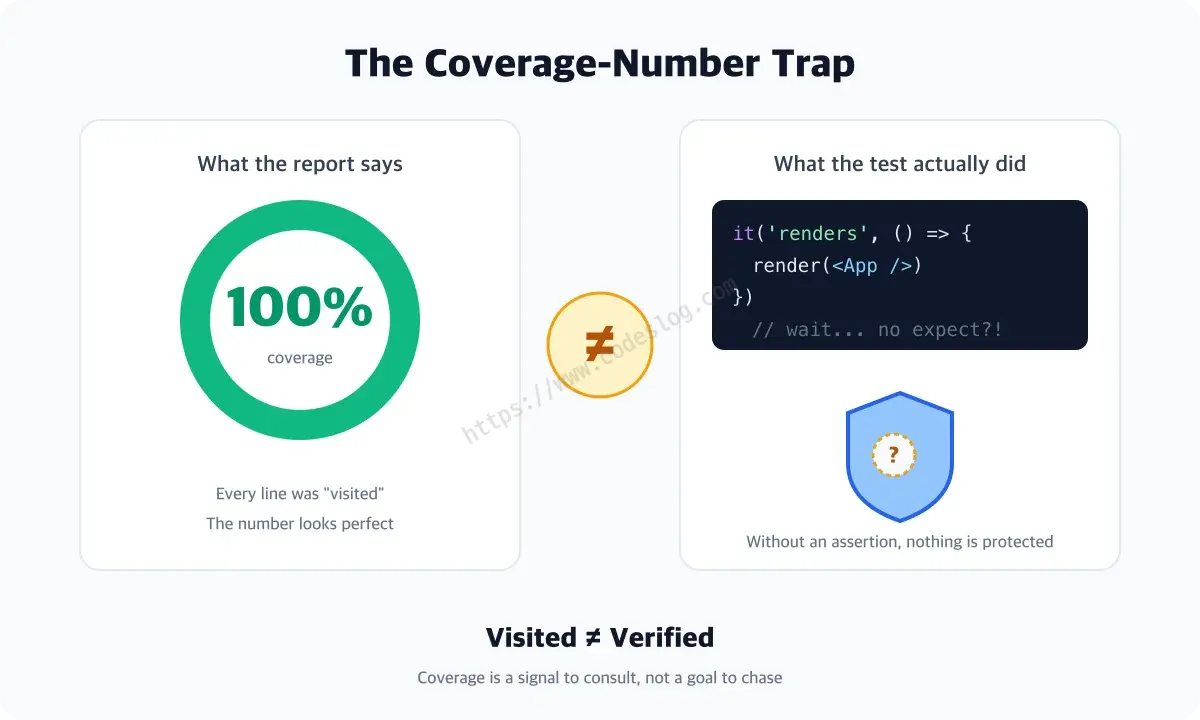
Coverage counts lines executed. It knows nothing about whether anything was verified.
// Coverage goes up. Nothing is checked.
it('renders', () => {
  render(<App />) // no assert!
})
This test “executes” every render path in the component, so it inflates coverage nicely. It also passes when the screen is completely broken.
It has two close cousins:
// Trap 2: snapshot spam — fails when "something changed," says nothing about what's right
it('matches snapshot', () => {
  expect(render(<UserSearch />).container).toMatchSnapshot()
})
// And when it fails? Most people update the snapshot without reading it.
// Trap 3: implementation pinning — breaks on any refactor
it('calls setState twice', () => {
  const spy = vi.spyOn(React, 'useState')
  render(<UserSearch />)
  expect(spy).toHaveBeenCalledTimes(2)  // internal detail no user cares about
})
(Snapshot testing and spies like vi.spyOn each get a proper treatment later in the series. It’s fine if these tools are new; for now, just file away the shape of these traps.)
What all three share: they raise coverage without protecting users. The moment the number becomes the goal, tests like these multiply. Coverage is a signal to consult, not a goal to chase.
Our strategy for this series#
We’ll build from the bottom (unit) to the top (E2E), and at every layer we’ll put user-perspective verification first.
| Layer | Target | Tools | How much |
|---|---|---|---|
| Unit | pure functions in src/lib | Vitest | plenty |
| Component | UserSearch interactions | Testing Library + MSW | the key flows |
| E2E | search scenario + accessibility | Playwright + axe | few, but meaty |
Coverage? We’ll use it for one thing only: finding the gaps.
Teams with 100% coverage still ship incidents — it happens more than you’d think. The number is green while the users see red. What you verified matters more than what percentage you hit.
Wrapping up#
Testing isn’t about volume — it’s about where you put your strength. Next time we get hands-on: setting up the demo app and turning our very first test green.
Open a PR that boasts “100% coverage!” and you’ll sometimes find half the tests are cousins of expect(1).toBe(1). Let’s agree to never be that PR.
Level up: you can now choose what to test first — and read a coverage number without being fooled by it.
Next up: Wiring Vitest into the demo app — all the way to the first green light
Bumped into an unfamiliar term? The glossary has them all, one line each.
Leave a comment