This is Part 4 of the “Frontend Testing, Done Right” series. Browse the full series · Glossary
Unit tests are where all testing begins. You put one function in front of you and nail down “this input produces this output” — the smallest, fastest kind of verification there is. This one article takes you from what a unit test actually is, through pure functions, the AAA pattern, and edge cases, with real code all the way.
If you’ve been following the series — that first green light from last time still on? Good, we continue in the same project today. If you landed here from a search, read on just as you are. Everything you need is explained right here.
Practice code: this installment’s exact state lives in the
step-04tag.git checkout step-04to follow along — or diff it against step-03 to see just what this part added.
What we cover this time#
- What a unit test is — the definition and three defining traits
- Why pure functions are a joy to test
- The AAA (Arrange-Act-Assert) pattern
- How not to miss edge cases
- Breaking things on purpose, and reading the failure report
To follow along you’ll want a project with Vitest installed — the setup article gets you there. On Jest? You’re fine too: apart from names like vi.fn, today’s code runs almost unchanged. And if you’d rather just read, it all works without a terminal as well.
Ready? Keep npm run test:watch running in a corner of your terminal. From today on we work in that rhythm — save, and see the result instantly.
So what is a unit test, exactly#
A unit test takes the smallest piece of a program, isolates it from everything else, and verifies it. In frontend work, the “unit” is usually a single function. No network, no database, no screen involved — and three traits follow from that.
- They’re fast — milliseconds each. You can run hundreds on every save without noticing.
- Failures point precisely — when one breaks, it narrows straight down to “this case of this function.” None of the detective work you get when a whole-screen test goes red.
- They become the spec — test names like “an empty query returns everything” pile up into a user manual for the function.
Unit tests aren’t the whole story, of course. Screens where functions interlock belong to component tests, and full flows in a real browser belong to E2E. But the base fitness for all of those layers is built here — which is why testing strategies put unit tests at the wide bottom of the pyramid. (For the bigger picture of what to test and how much, see the strategy article.)
Why start with pure functions#
A pure function keeps two promises: ①the same input always produces the same output, and ②it doesn’t touch the world outside itself (no side effects).
// Pure: same input, same result, every time
function add(a: number, b: number) {
  return a + b
}

// Impure: the answer depends on the current time
function greet(name: string) {
  const hour = new Date().getHours()
  return hour < 12 ? `Good morning, ${name}` : `Hello, ${name}`
}
add(2, 3) is 5 no matter how many times you call it. greet('Isaac') answers differently depending on whether you ask before or after noon. From a testing standpoint, that difference is everything: with a pure function you just feed it, catch the result, compare — done. An impure function makes you stage the situation first (“let’s pretend it’s morning”) — a skill we pick up next time.
So the unit-testing journey starts with pure functions, by design. Build your form against the easiest opponent, then climb.
Building the search filter#
Let’s write the logic that will become the heart of the demo app: the search filter. Create a new file at src/lib/users.ts. (lib is where screen-independent, pure logic lives — keeping it separate also keeps it testable.)
// src/lib/users.ts
export type User = { id: string; name: string; email: string }

/** Pure function: case-insensitive partial search over name/email */
export function filterByQuery(users: User[], query: string): User[] {
  const k = query.trim().toLowerCase()
  if (!k) return users
  return users.filter(
    (u) => u.name.toLowerCase().includes(k) || u.email.toLowerCase().includes(k),
  )
}
Three lines of logic, but each earns its keep:
query.trim().toLowerCase()— strips surrounding whitespace and lowercases the query." Alice "becomes"alice".if (!k) return users— nothing left after cleanup? Then there’s no query, so return the full list untouched.users.filter(...)— keep only users whose name or email contains the query. Both sides are lowercased, so case is ignored.
Same input, always the same result — a pure function, as promised. Now let’s nail down, in tests, that it really does those three things.
The AAA pattern#
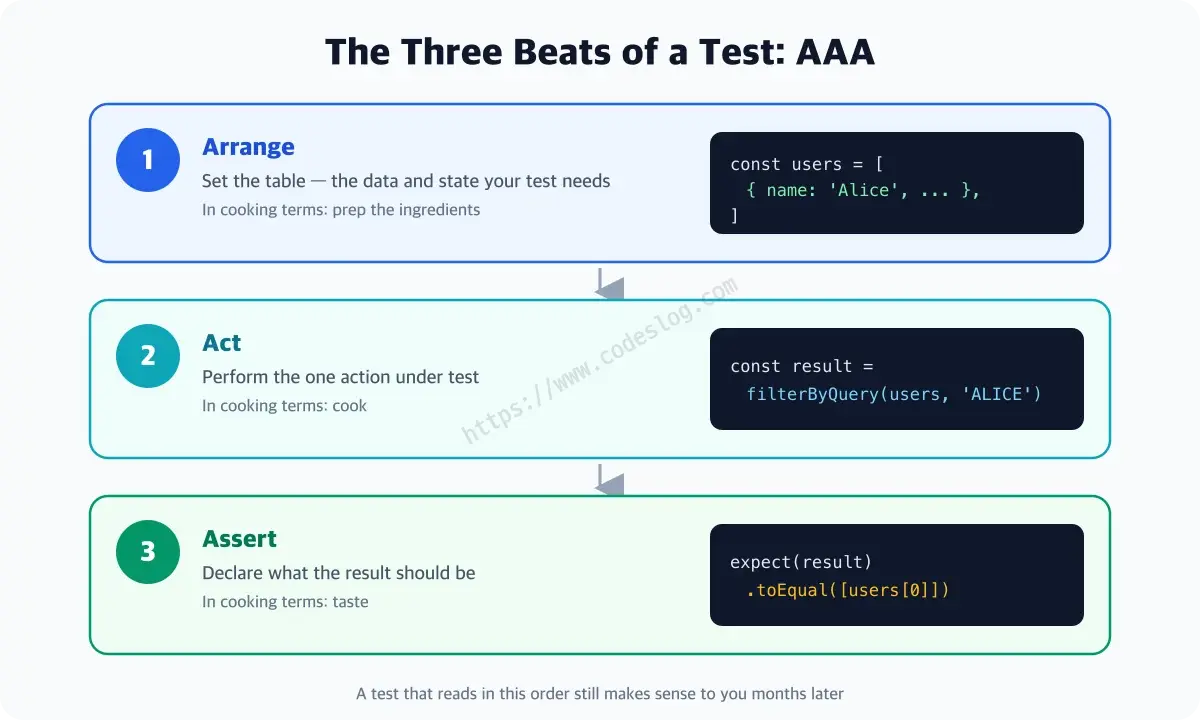
A good test reads in three beats: Arrange — set the table, Act — perform the one action under test, Assert — check the result against expectations. In cooking terms: prep → cook → taste.
Create src/lib/users.test.ts (test files always sit next to their subject, with .test.ts appended) and write the first test in those three beats.
import { describe, it, expect } from 'vitest'
import { filterByQuery, type User } from './users'

// Arrange — ingredients shared by every test
const users: User[] = [
  { id: '1', name: 'Alice', email: '[email protected]' },
  { id: '2', name: 'bob', email: '[email protected]' },
]

describe('filterByQuery', () => {
  it('matches names case-insensitively', () => {
    // Act — the one action under test
    const result = filterByQuery(users, 'ALICE')

    // Assert — compare against the expectation
    expect(result).toEqual([users[0]])
  })

  it('matches by email too', () => {
    expect(filterByQuery(users, 'test.io')).toEqual([users[1]])
  })
})
A few things worth noticing:
describegroups related tests. The report reads hierarchically — “filterByQuery › matches names case-insensitively” — so you see at a glance what broke and where.- Putting the ingredients (
users) at the top of the file shares the Arrange step naturally. The second test compresses all three beats into one line — but the beats are still in there. - Searching for uppercase
'ALICE'was no accident: one test documents two facts at once — “search works” and “case is ignored.” This is the moment a test name becomes a specification.
The instant you save, watch mode kicks in:
 ✓ src/lib/users.test.ts (2 tests)
 ✓ src/App.test.tsx (1 test)

 Test Files  2 passed (2)
      Tests  3 passed (3)
Aim for the edges#
Bugs mostly live at the edges. The middle — an ordinary query — you’ve almost certainly eyeballed while developing. The edges? Odds are nobody has pressed there yet. Put your function in front of you and ask three questions:
- What if the input is “empty”? — empty string, whitespace-only string
- What if the result is “empty”? — zero matches
- What if the input is “weird”? — very long, special characters, unexpected types
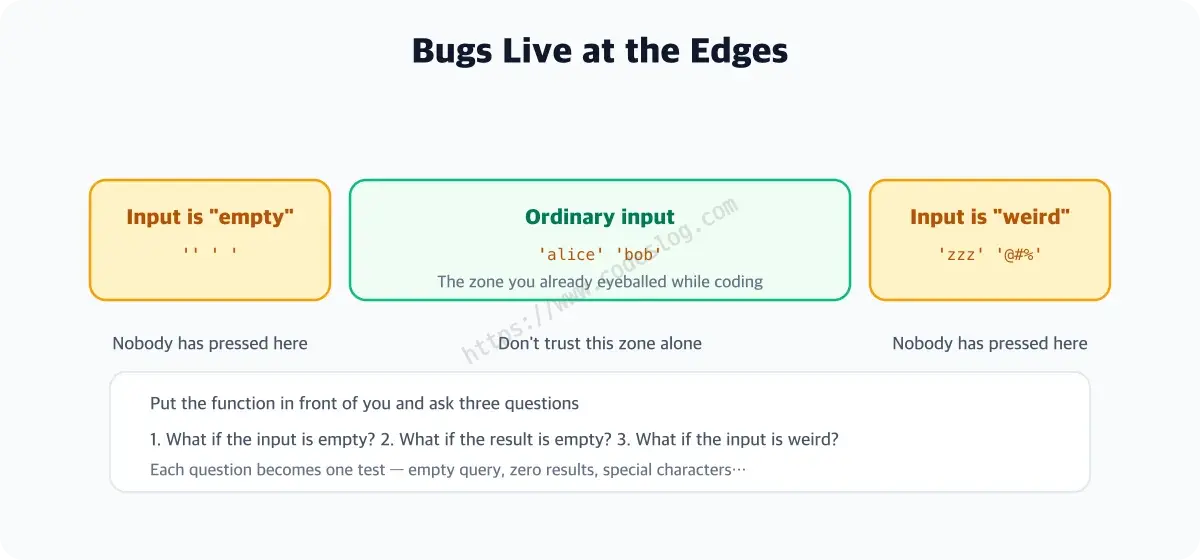
Applying questions 1 and 2 to filterByQuery yields two tests:
it('returns everything for an empty (all-whitespace) query', () => {
  expect(filterByQuery(users, '   ')).toHaveLength(2)
})

it('returns an empty array when nothing matches', () => {
  expect(filterByQuery(users, 'zzz')).toEqual([])
})
toHaveLength(2) is a matcher that checks “the array has length 2.” Since the point is “returns everything,” length is all we need — no need to compare contents. Picking the matcher that fits the intent is part of the craft.
Now break it on purpose#
The best way to confirm an edge test actually works is to deliberately damage the code. Delete trim() from users.ts:
const k = query.toLowerCase() // trim() deleted!
Save, and watch mode goes red:
 FAIL  src/lib/users.test.ts
   × filterByQuery › returns everything for an empty (all-whitespace) query
     AssertionError: expected [] to have a length of 2 but got +0
How to read a failure: the first line names which test (filterByQuery › returns everything…), and the line below says what diverged (expected length 2, got 0). Without trim, the whitespace-only query stayed " " and matched nobody. Restore trim() and the light turns green again — and from now on, this test instantly catches anyone (usually future you) repeating the mistake.
Running this loop once — break, watch it go red, restore — is the cheapest way to prove your tests are alarms, not decorations.
A few instincts for good green lights#
Name tests as sentences. it('works') tells you nothing when it fails. it('returns everything for an empty query') turns the failure report into a bug report.
toBe and toEqual are different. toBe asks “is it the same thing” (reference comparison); toEqual asks “are the contents the same” (value comparison). Numbers and strings are fine with toBe, but arrays and objects with identical contents are still different creatures — toBe fails.
expect([1, 2]).toEqual([1, 2])   // passes — same contents
expect([1, 2]).toBe([1, 2])      // fails! — different arrays
Everyone gets burned by this once. I lost thirty minutes to it; you just spent three and you’re done.
One it, one concern. Stuff “search works AND sorting works AND paging works” into one test, and when it fails you start an investigation into which of the three died. Split them, and the report does the telling.
The one-page recap#
For the busy — today folded into five lines:
- A unit test = the smallest unit (usually one function) verified in isolation. Fast, precise failures, and a living spec
- Start with pure functions — same input, same output, so it’s feed → catch → compare, no staging required
- Write every test in three AAA beats: Arrange → Act → Assert
- Bugs live at the edges, so aim for edge cases — “input empty? result empty? input weird?”
- When you’re done, break the code on purpose and watch the red light — an alarm that never rings is a decoration
The sturdiest layer is down#
Four tests for a three-line function — it may look like overkill, but this function is a recurring protagonist: it resurfaces in the search UI, the API integration, and the E2E flow. This is how a protagonist builds base fitness.
We built our form against the easiest opponent — pure functions. Next come the tricksters of the real world: time that won’t wait, requests that fail, errors that get thrown. On to async testing.
Level up: you can now verify a pure function solidly, with the AAA pattern and edge cases.
Next up: Testing async code, timers, and errors
Bumped into an unfamiliar term? The glossary has them all, one line each.
Leave a comment