This is Part 22 of the “Frontend Testing, Done Right” series. Browse the full series · Glossary
What do you end up with when you stack tests onto one small app, one layer at a time? This article is the retrospective on that journey — and a map of frontend testing as a whole.
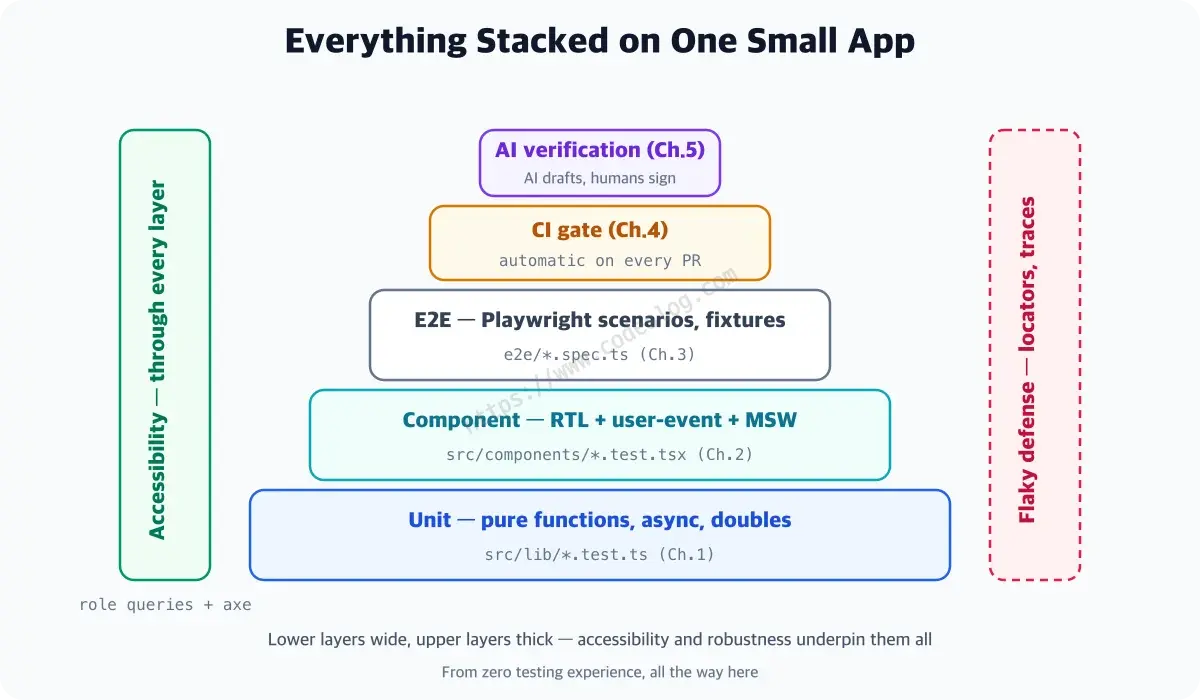
The layers we stacked were these: unit tests that check whether a single function does its one job, component tests that poke at the screen the way a user would, real-browser E2E that sweeps end to end, accessibility checks that protect users who never look at the screen, and CI that runs all of it for you on every PR. By the end, we’d even gotten to verifying code and tests written by AI.
For those who ran the whole series, this is a closing ledger. For readers arriving here first, it’s a table of contents. Each layer in the table below is a chapter of the series, so jump straight to whichever one pulls you via the index.
Befitting a finale, we also go past the tech this time — into what testing means for team culture and careers.
Practice code: frontend-testing-lab — the final state at the end of the series. For the code as each part left it, follow the part-to-tag table in the README and
git checkout step-N.
What this finale looks back on.
- Everything we built, at a glance
- The culture testing creates, and what it means for hiring and competitions
- Where to go from here
What we built — five layers stacked on one small app#
One small dashboard now carries all this. In the table below, the first three rows get closer to what a real user experiences as you go down, and the last two cut across all of them. Don’t worry if the tool names in parentheses don’t mean anything yet — each row is a chapter of the series, so head there when you need it.
| Layer | What | Where |
|---|---|---|
| Unit | filters, debounce, logger (AAA, fake timers, spies) | src/lib/*.test.ts |
| Component | search, error, and accessibility flows (RTL + user-event + MSW) | src/**/*.test.tsx |
| E2E | search scenario + fixtures + screenshot comparison (Playwright) | e2e/*.spec.ts |
| Accessibility | role contracts + axe page scans | query contracts · the axe part |
| Automation | a quality gate that runs on every PR | .github/workflows/test.yml |
In numbers: 8 test files holding 18 tests — 13 unit and component tests, 5 E2E. The app’s own source, meanwhile, is just 9 files. The test-file count nearly matching the source-file count looks strange at first, but well-run projects tend to land right around here.
Coverage — the ratio showing how much of the app’s code the tests actually exercised — finished at 100% statements, 86.36% branches. That remaining 13.64% is exactly two spots, and they’re different in character.
One is the guard that blocks a server response arriving after the component has already left the screen. The coverage metrics part ruled on that one: reproducing it means artificially manipulating unmount timing, and the logic is a single line, so it can wait. The other is the “no results found” message shown when a search returns zero rows — and that one is a different story. Users hit that path often, so it’s worth covering; it was left blank on purpose in Part 21 as homework for you to fill in yourself.
So 86.36% isn’t a failed number. A report’s job ends at pointing out the gaps; deciding which ones to fill is a human’s job. Force the number to 100 and what grows is the suite you have to maintain, not the defects you catch. Choosing not to fill a gap — and leaving one to the reader — is a strategy too.
The full code lives in the demo repo. First time here? Start at Part 1. Just want the code? Follow the README’s part-to-tag mapping table — git checkout step-N opens the code exactly as it stood at the end of each part.
And more important than the table — what you can now do. Check it against your Part 1 self.
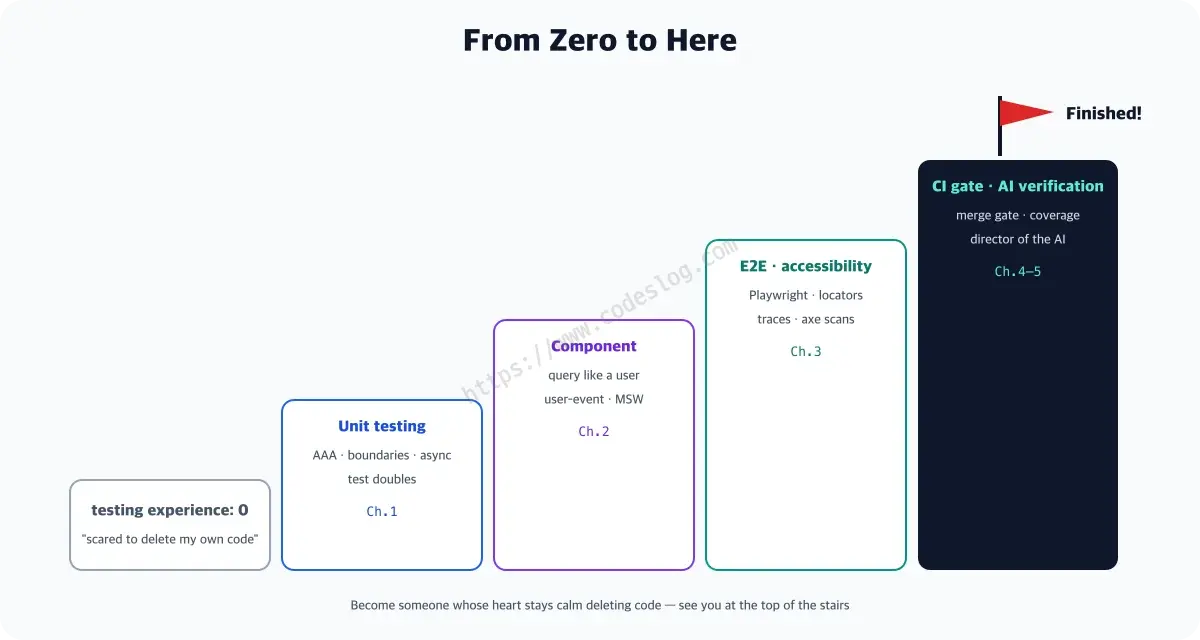
If you opened Part 1 with zero testing experience, checking off every box on this list right now probably feels unfamiliar — and pretty proud. The destination promised back then is exactly here.
Test culture — the habit is harder than the tools#
Wiring up Vitest or Playwright takes a day. What takes far longer is becoming the kind of team that writes tests. A team where testing is simply expected doesn’t fear deploys, reviews stay constructive, and onboarding is fast. That culture doesn’t start with a grand declaration — it starts with a small repetition: one test on every PR.
Three things noticeably change. In reviews, “does this have a test?” becomes a question, not an attack. New hires start opening test files first to understand the code — because a test is a promise about what a function does, written down in a form you can actually run. And refactoring proposals go up. When there’s a way to confirm a change didn’t break anything, people’s hands get lighter.
There’s also a well-worn way this culture fails, and it’s usually when coverage becomes the target. Tell a team to hit 80%, and they’ll hit 80% — just with cousins of the expect(true).toBe(true) we saw in Part 19. The number climbs, the suite gets heavier, and the bugs it actually catches stay flat. If you’re going to enforce something, make it “every bug fix ships with a reproduction test,” not a coverage number — it works far better.
Starting from legacy code with no tests#
Everything so far assumed a project that grew up alongside its tests. The more common reality is the opposite — code that’s been running fine for years without a single test, the stuff we usually call legacy. Try to cover it all at once and you never start. Here’s the order I’d recommend.
First, start with the bug you just fixed. Not a new feature — a bug is the best starting point. The reproduction conditions are already known, you need proof it’s fixed, and above all, nobody questions why you’re writing this particular test. One test per bug turns the suite into a map of the landmines the team has actually stepped on.
Second, target the files you change most often. Pull the churn-heavy files out of git log. Frequent changes mean frequent breakage, and that’s where a test’s return on investment is highest.
Third, hold the line only for new code. Leave the existing code alone and draw the line at “anything added from here on gets a test” — resistance is nearly zero. The legacy code gets covered gradually, a little more each time someone touches it.
All three share one thing — not promising to do everything. Plans to cover it all at once rarely survive two weeks.
Hiring and competitions — what you can now say in an interview#
This isn’t only useful inside a team. Hands-on testing experience sells pretty well outside one too.
In an interview, “how do you write tests?” is a good probe of real skill. Being able to answer “how far do you mock?” or “how do you chase down flaky tests?” from your own experience carries weight. Software testing competitions, which pit verification skills against each other, ultimately come down to the same thing — what you verify, and how. I hope the fundamentals built in this series give you a head start there.
For instance, asked “what’s your testing strategy?” you can now answer — “Core logic gets dense unit tests, user flows get component tests, and E2E covers only the critical paths. Accessibility is held by role queries and axe inside the CI gate, and coverage is never a target — just a metric for finding gaps.” Every clause of that, you actually did in this series. (“Critical path” there means the routes a user can’t avoid — login, search, checkout. E2E is slow and expensive, so you lay it thick only across those.)
That answer usually invites follow-ups: “so how far do you replace things with mocks,” “how do you handle flaky tests,” “if you don’t set a coverage target, how does the team keep it in check.” All three are topics this series gave a full part to, so you already have the material for an answer. What matters isn’t reciting the right answer — it’s being able to explain the decision you made and why. “I stopped at 86% coverage, and here’s why I left the rest unfilled” is a far better answer than “we keep it at 100%.”
What’s next — four roads from here#
There are plenty of roads from here. But not all of them are needed right now — I’ve noted when each one actually becomes necessary.
API contract testing — verifying, on both sides, that the response shape the frontend and backend agreed to actually holds. It shares a word with the “role contract” from earlier, but the counterparty is different — that was a promise the screen makes to assistive technology; this is a promise the frontend makes with the server. It’s the place that confirms the responses we faked with mocks in the MSW part don’t drift from what the real server sends. Its value jumps sharply once the backend is owned by a different team. If you’re building full-stack solo, it’s still too early.
Mutation testing — testing your tests. It automates the “break it on purpose” exercise we did by hand in Part 19, letting a tool run it hundreds of times over (Stryker). You need it once the suite gets too large to break by hand, and once AI-written tests make up a growing share of it.
Performance regression monitoring — wiring Lighthouse CI or Web Vitals into CI so “it got slower” fails the build. Where the visual regression part caught regressions in what’s visible, this one catches regressions in how fast it feels. The signal to add it is when user drop-off starts worrying you.
Production monitoring — catching what tests can’t, through observation. No matter how dense your suite, you can’t reproduce every real combination of a user’s device, network, and data. This is the last layer, not a replacement for testing but the one that backs it up.
If you can only take one of the four, and your backend belongs to another team, start with API contract testing. In my experience, frontend incidents tend to converge on “the server response wasn’t what we thought.”
One page, the whole series#
Here’s all 22 parts, compressed onto one screen.
- What to test: behavior, not implementation. Keep only what passes “if this assertion breaks, does a user actually feel it.”
- How to find things: the way a user finds them on screen — by role and accessible name. This one principle makes tests robust and protects accessibility at the same time.
- How much: dense at the unit level, by user flow at the component level, and only critical paths for E2E. Coverage is a gap-finding metric, never a target.
- Can you trust it: it’s only real if breaking it on purpose turns the light red. A green light alone proves nothing.
- How it sticks with a team: through a CI gate, not willpower. What you enforce is “every bug fix ships with a reproduction test,” not a coverage number.
- And with AI: you can delegate generation, but not responsibility — AI drafts, a human signs off.
At the end of the long road#
That’s the whole run I planned. It doesn’t mean I’m done, though.
One thing I learned while writing: some parts didn’t sit easily with me either. I ran every snippet and copied the output verbatim, but the understanding you get from writing something up is a different layer from the instinct of someone who writes tests every day. Those are probably the parts that read roughly for you, too.
So I’ll keep writing about frontend testing. Less chasing new tools, more going back to the spots that felt stiff here and unpacking them properly — one at a time, learned the hard way. If something lost you along the way, leave a comment. Where readers get stuck is the hardest thing to see from this side, and it’s what sets the table of contents for the next post.
Something odd happens once you start writing tests: deleting code no longer makes your heart clench. That calm is the reason we made this whole long journey.
Thanks for running this together. expect(your_next_project).toBe('with tests') — let’s meet what you learned here out in the field.
Level up: from zero testing experience to strategy, CI, accessibility, and AI verification — complete.
Series complete. The 22 planned parts end here; the frontend testing writing continues.
Bumped into an unfamiliar term? The glossary has them all, one line each.
Leave a comment