At some point while writing JavaScript, you’ll end up with code like this:
greet(); // "Hello World!"

function greet() {
  console.log("Hello World!");
}
Called before the declaration, and it works. But change it to this:
greet(); // TypeError: greet is not a function

var greet = function () {
  console.log("Hello World!");
};
Error. Ten minutes of console.log debugging later, you finally read the message: TypeError: greet is not a function. It’s a function — yet it’s not a function.
Turns out JavaScript does this to everyone, not just me. “Why does the same function behave differently?” — Sound familiar?

Photo: Joan Gamell / Unsplash
Function declarations and function expressions may look similar, but they behave differently. The key to that difference is hoisting. Let’s break it down with practical examples.
Function Declarations#
The most basic function form, starting with the function keyword.
function add(a, b) {
  return a + b;
}
A name is required — function () {} without a name isn’t valid here.
Function Expressions#
Assigning a function to a variable, treating it as a value.
const add = function (a, b) {
  return a + b;
};
The function (a, b) { ... } on the right is an anonymous function expression. You can give it a name too.
const add = function addNumbers(a, b) {
  return a + b;
};
Naming the function means the function name shows up in stack traces, which helps with debugging. However, addNumbers can only be referenced inside the function — externally, you call it via add.
The Key Difference: Hoisting#
The most important difference between the two comes down to hoisting.
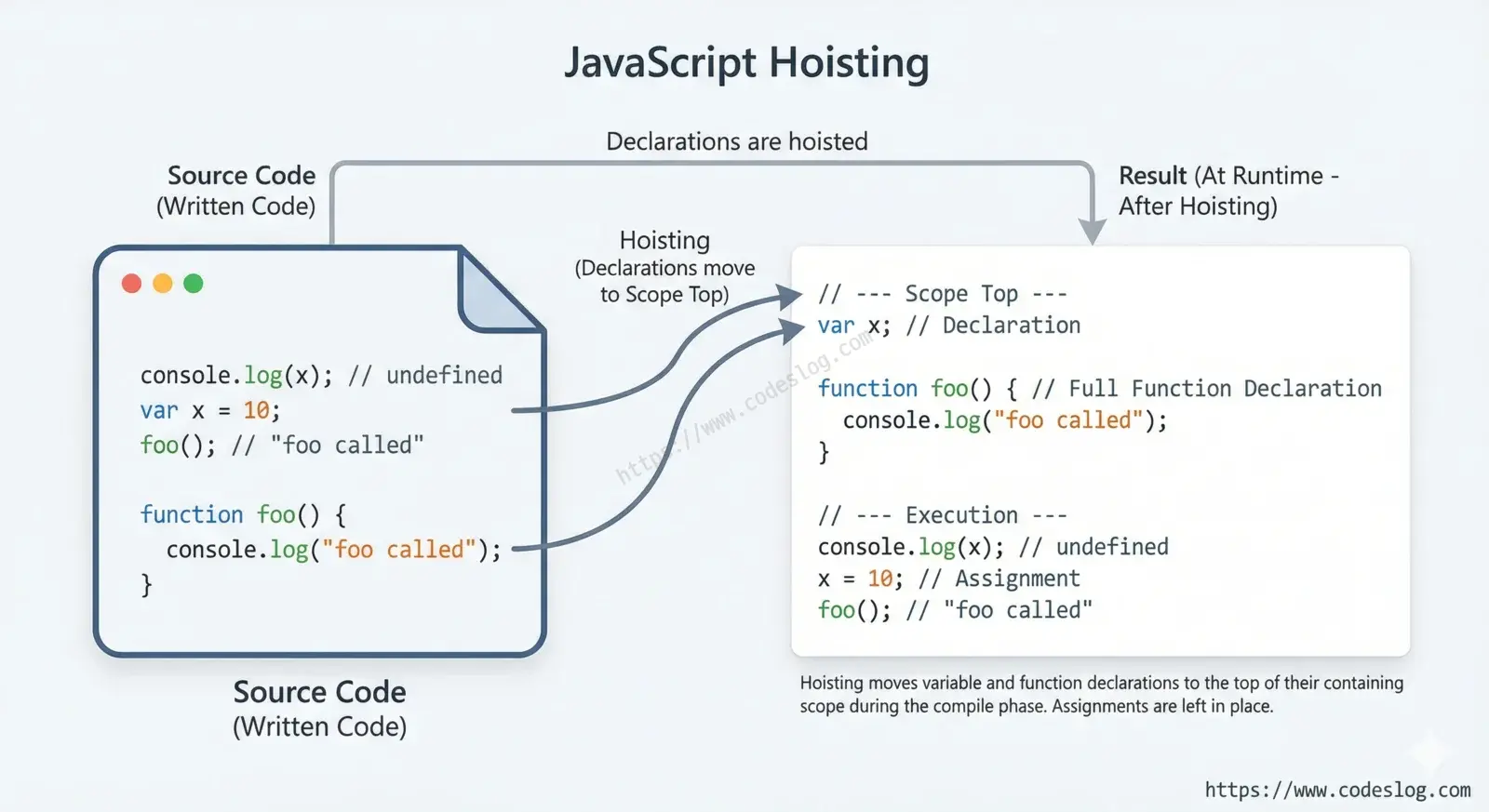
Hoisting is the behavior where the JavaScript engine moves variable and function declarations to the top of their scope before executing any code. The code doesn’t literally move — it happens during the engine’s preparation of the execution context.
Function declarations are fully hoisted#
// Works even when called before the declaration
console.log(add(2, 3)); // 5

function add(a, b) {
  return a + b;
}
Before executing code, the JavaScript engine registers the entire function declaration (name + body). That’s why calling it before the declaration is fine.
Internally, this is what the engine processes conceptually:
// Conceptual order of engine processing
function add(a, b) {
  return a + b;
}

console.log(add(2, 3)); // 5
Function expressions: only the variable declaration is hoisted#
console.log(add); // undefined (var) or ReferenceError (let/const)
console.log(add(2, 3)); // TypeError: add is not a function

var add = function (a, b) {
  return a + b;
};
With var, the variable itself is hoisted, but the function assignment only happens at runtime. Calling it before the assignment tries to execute undefined() — which throws an error.
let and const are stricter. They are hoisted, but due to the TDZ (Temporal Dead Zone), accessing them before their declaration immediately throws a ReferenceError.
console.log(add); // ReferenceError: Cannot access 'add' before initialization

const add = function (a, b) {
  return a + b;
};
Quick comparison#
| Aspect | Function Declaration | Function Expression (var) | Function Expression (let/const) |
|---|---|---|---|
| Hoisting | Full (name + body) | Variable only (value is undefined) | Variable only (TDZ) |
| Call before declaration | ✅ Works | ❌ TypeError | ❌ ReferenceError |
| Name required | Yes | No | No |
After seeing that table, you might think “I’ll just always use function declarations.” I had the same thought — but then arrow functions were quietly waiting.
Where Do Arrow Functions Fit?#
Arrow functions (=>) are a type of function expression. Their hoisting behavior is identical.
// Writing this
const add = (a, b) => a + b;

// behaves the same as this
const add = function (a, b) {
  return a + b;
};
But arrow functions have important differences from regular functions.
this binding is different. Arrow functions don’t have their own this — they inherit this from the surrounding scope where they’re defined.
const counter = {
  count: 0,
  // Regular function: this refers to the counter object
  increment: function () {
    this.count++;
  },
  // Arrow function: this refers to the outer scope (global or undefined)
  incrementArrow: () => {
    this.count++; // May not work as intended
  },
};
When you need this in object methods or event handlers, use a regular function expression.
No arguments object. Arrow functions don’t have an arguments object. For variadic functions, use rest parameters (...args).
// Regular function: arguments available
function sum() {
  return Array.from(arguments).reduce((acc, val) => acc + val, 0);
}

// Arrow function: use rest parameters
const sum = (...args) => args.reduce((acc, val) => acc + val, 0);
Practical Usage#
The theory makes sense, but it can be hard to know which to reach for in practice. Here are a few guidelines.
Use arrow functions for callbacks and short functions#
Arrow functions feel natural as callbacks for array methods like map, filter, and forEach. They keep code concise and readable.
const numbers = [1, 2, 3, 4, 5];

// Arrow functions are much more concise
const doubled = numbers.map((n) => n * 2);
const evens = numbers.filter((n) => n % 2 === 0);
Module-level functions: pick a style, but stay consistent#
Modern frontend code often uses const with function expressions, especially for React components and utility functions.
// Common style in many projects
const formatDate = (date) => {
  return new Intl.DateTimeFormat("ko-KR").format(date);
};

export default function UserCard({ name }) {
  return <div>{name}</div>;
}
Neither style is inherently better — what matters is following your team’s convention and being consistent.
Avoid relying on hoisting#
Some developers intentionally call function declarations before defining them, knowing it works due to hoisting. But this can confuse anyone reading the code later.
// ❌ Works, but the reader has to scroll down to find the declaration
initApp();

function initApp() {
  // ...
}

// ✅ Intent is clearer when you declare first, then call
function initApp() {
  // ...
}

initApp();
Of course, placing initialization code at the top and helper functions below is also a valid style. What matters is that everyone on the team understands and agrees on the approach.
Wrap-Up#
- Function declaration: fully hoisted → can be called before declaration. Name required.
- Function expression: variable-only hoisting → cannot be called before declaration. Name optional.
- Arrow function: a type of function expression. No
thisorargumentsof its own. - Practical tip: code that relies on hoisting is harder to read — prefer declaring before using.
These are functions you use every day, but knowing how they work makes debugging significantly faster. Next time you hit TypeError: xxx is not a function, check hoisting first.