Running a quiz service, we got a complaint one day: “I just took the test — why does it say ‘No score’?” We checked. Their score was zero. The database clearly stored 0, the API returned 0 faithfully. The culprit was a single line in the UI code.
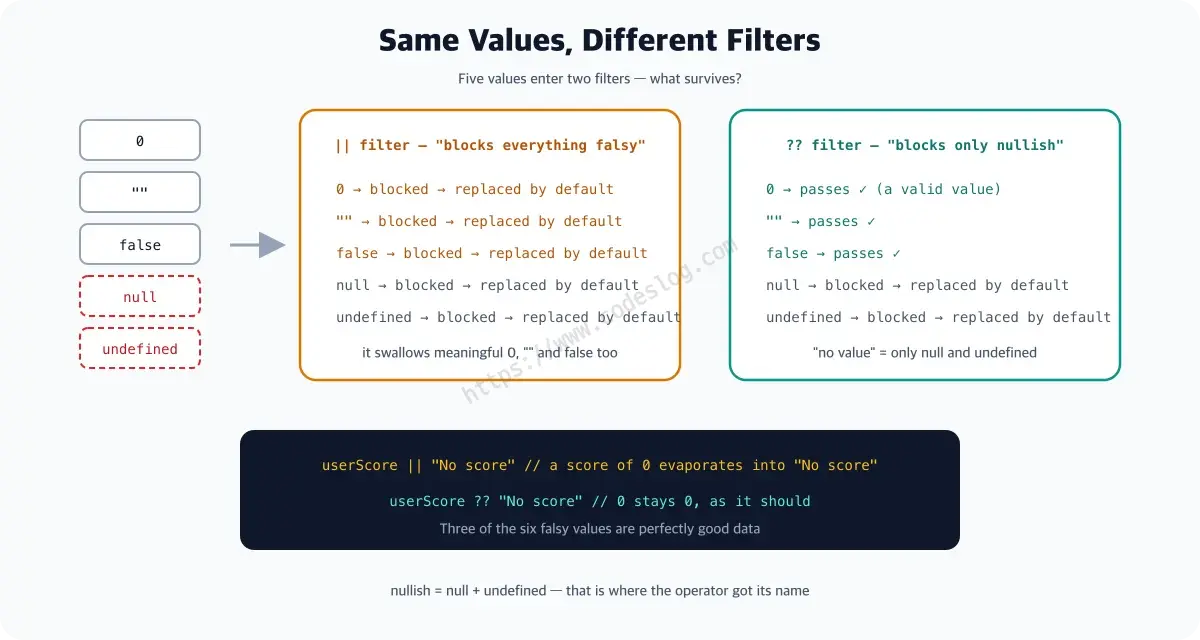
const score = userScore || "No score";|| returns the right side when the left is falsy — the term for values that behave like false in a condition (see the MDN glossary). And in JavaScript, 0 is falsy — so are false, "", null, undefined, and NaN. An intentional value getting swapped for a default: this bug shows up far more often than you’d think.

Photo: Unsplash / Erik Mclean
How || works: falsy means the right side#
|| returns the right-hand value when the left is falsy.
console.log(null || "default");      // "default"
console.log(undefined || "default"); // "default"
console.log(0 || "default");         // "default" ← not what you meant
console.log("" || "default");        // "default" ← not what you meant
console.log(false || "default");     // "default" ← not what you meant
JavaScript’s falsy values:
| Value | Type |
|---|---|
false | Boolean |
0, -0, 0n | Number, BigInt |
"", '', `` | String (empty) |
null | Null |
undefined | Undefined |
NaN | Number |
Of these, 0, "", and false can be meaningful values. That’s the || trap.
null and undefined, fine — but the number 0 meaning “nothing”? One wonders how the person who made that call in JavaScript’s earliest days feels about it now.
How ?? works: only null and undefined#
?? (nullish coalescing) returns the right side only when the left is null or undefined.
console.log(null ?? "default");      // "default" ✅
console.log(undefined ?? "default"); // "default" ✅
console.log(0 ?? "default");         // 0        ✅ passes through
console.log("" ?? "default");        // ""       ✅ passes through
console.log(false ?? "default");     // false    ✅ passes through
Only null and undefined count as “no value”; everything else is treated as valid. Those two together are called nullish — which is where the operator’s name comes from.
By the way, mixing them is a syntax error#
What happens if you put || and ?? in one expression without parentheses? It doesn’t even run.
const value = a || b ?? c;   // SyntaxError!
const value = (a || b) ?? c; // fine with parentheses
That’s not a bug — it was designed this way. People were bound to misremember the precedence between the two, so the spec stepped in as referee: “stop arguing and write your intent in parentheses.” A code review enforced by the language itself.
Patterns you’ll meet at work#
Numeric settings#
// users may legitimately set the timeout to 0
function createTimer(timeout) {
  // ❌ setting 0 gets replaced by the 3000 default
  const delay = timeout || 3000;

  // ✅ 0 is honored as a valid value
  const delay = timeout ?? 3000;
}
Empty strings#
// users may intentionally leave the description blank
const description = userInput || "No description"; // ❌ blanks get replaced too
const description = userInput ?? "No description"; // ✅ only null/undefined do
API response defaults#
const response = await fetchUserSettings();

// ❌ fontSize of 0 gets overwritten with 14
const fontSize = response.fontSize || 14;

// ✅ default applies only to explicit null/undefined
const fontSize = response.fontSize ?? 14;
Together with optional chaining#
?? shines alongside ?. (optional chaining).
const user = {
  profile: {
    age: 0, // a 0-year-old user (rare, but valid)
  },
};

// ❌ age 0 displays as "No age on file"
const age = user?.profile?.age || "No age on file";

// ✅ default only when null/undefined
const age = user?.profile?.age ?? "No age on file";
Only when user?.profile?.age is undefined (property missing) does “No age on file” appear; a 0 shows as 0.
The ??= assignment operator#
??= assigns only when the value is null or undefined. Handy for initializing settings.
const config = {
  theme: "dark",
  language: null,
};

// assign defaults only where null/undefined
config.language ??= "ko";    // was null → gets "ko"
config.theme ??= "light";    // has "dark" → untouched

console.log(config);
// { theme: "dark", language: "ko" }
We used to write this:
config.language = config.language ?? "ko";??= cleans it right up.
When should you use ||?#
?? isn’t always the answer. Sometimes 0, "", and false genuinely should fall back to a default.
// empty or missing input falls back to the default query
const query = searchInput || "All"; // "" → "All" is intended

// users without a role get the default one
const role = userRole || "guest"; // false/undefined/null all become "guest"
The rule of thumb:
- If
0,"",falseshould also count as “no value” →|| - If only
null/undefinedcount as “no value” →??
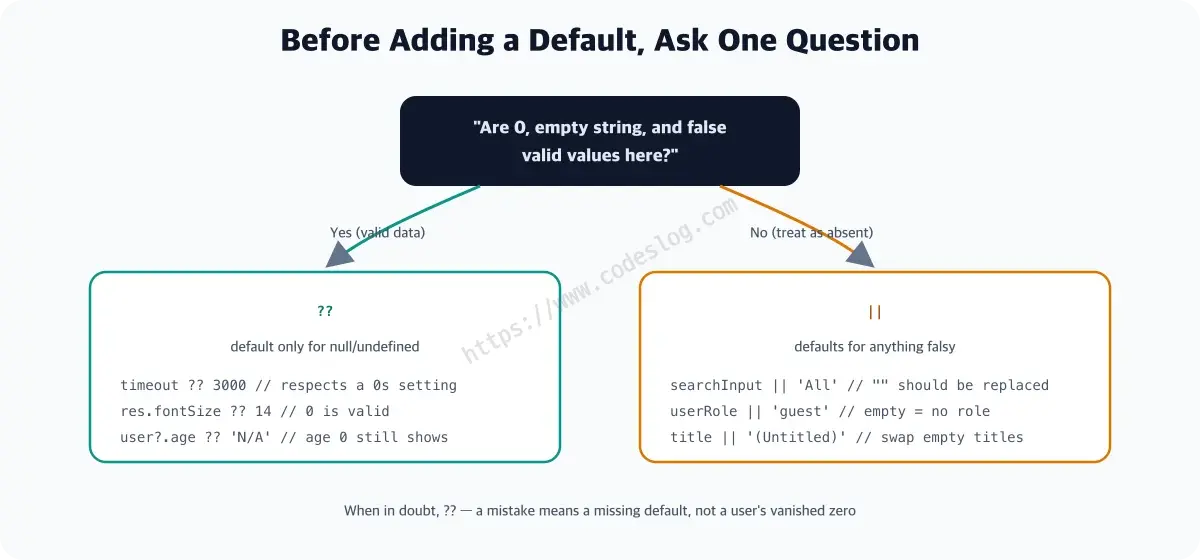
When in doubt, ?? is the safer baseline — a mistake there means a default fails to appear, not a user’s zero evaporating.
Wrapping up#
||: returns the default for any falsy value (0,"",false,null,undefined, …)??: returns the default only fornullorundefined??=: assigns only when the variable isnull/undefined
Before you write a default, ask: “is 0 or an empty string a valid value here?” The answer tells you which operator to reach for.
The reply to that complaint was a one-character-class fix — || to ??. Apologies to the person who scored zero, but hey, we got this article out of it.
Leave a comment