I built a dashboard. I was proud of it. Three lines of code using Promise.all to fetch three APIs at once — and the code review feedback was “clean.”

Photo: Unsplash
const [user, notifications, activity] = await Promise.all([
  fetchUser(),
  fetchNotifications(),
  fetchActivity(),
]);
Then one day, the entire dashboard became a blank white screen. Turned out fetchNotifications had been failing occasionally due to a server issue. Even though the other two were succeeding just fine.
Promise.all treats the whole thing as a failure if even one fails. One notification API took down the entire dashboard.
Promise.all: All or Nothing#
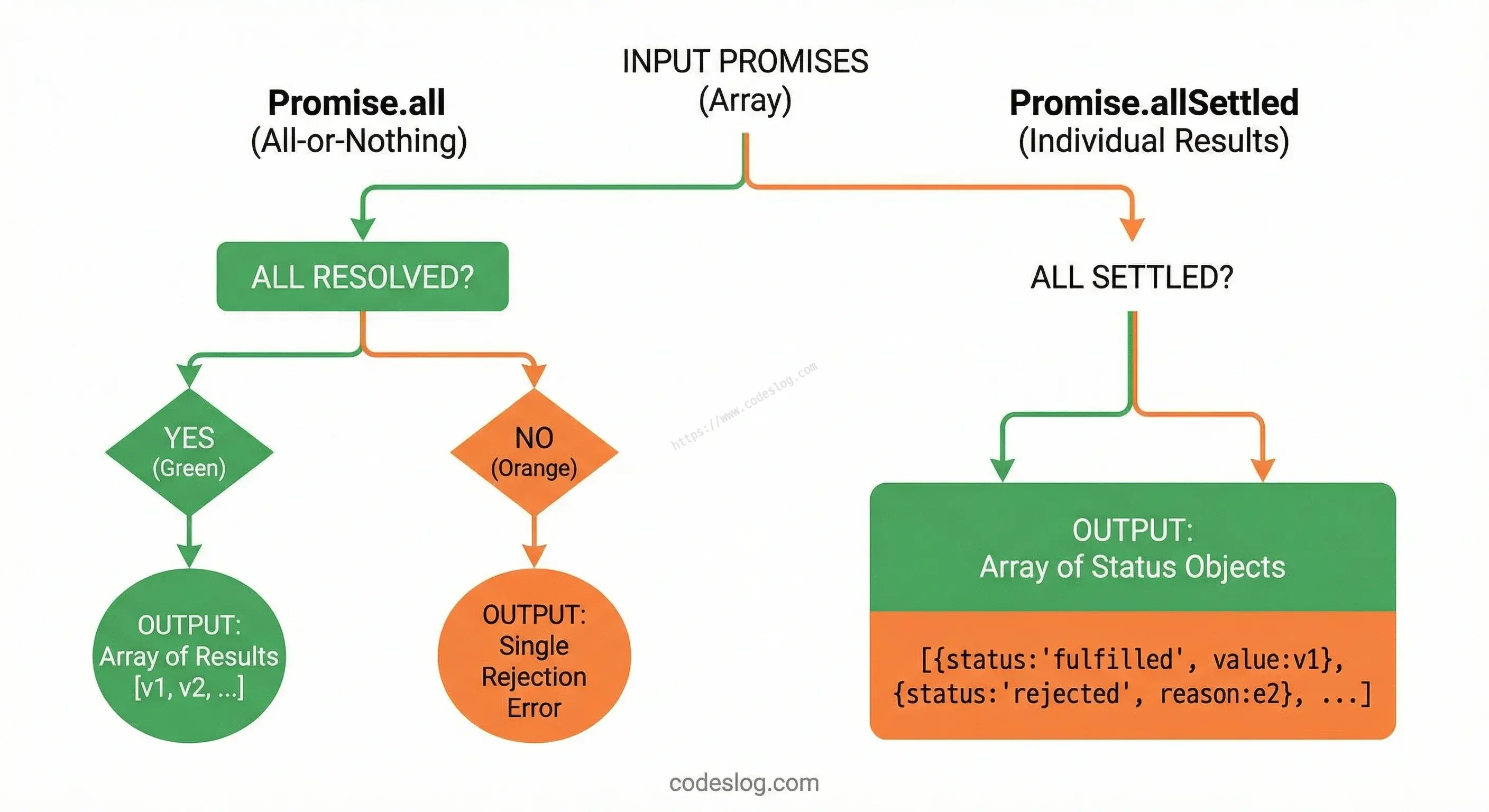
Promise.all returns results only when all the Promises succeed.
const results = await Promise.all([
  Promise.resolve("A"),
  Promise.resolve("B"),
  Promise.resolve("C"),
]);

console.log(results); // ["A", "B", "C"]
Order is guaranteed. Even if the third Promise finishes first, the result array follows the input order.
But if even one fails, it rejects immediately.
try {
  const results = await Promise.all([
    Promise.resolve("A"),
    Promise.reject(new Error("B failed")),
    Promise.resolve("C"),
  ]);
} catch (error) {
  console.log(error.message); // "B failed"
  // A and C results are lost
}
The important thing is that the remaining Promises aren’t cancelled. They keep running internally, but there’s no way to retrieve their results. Like shredding a report before reading it.
Promise.allSettled: Waits for Everyone#
Promise.allSettled waits until all Promises complete, whether they succeed or fail.
const results = await Promise.allSettled([
  Promise.resolve("A"),
  Promise.reject(new Error("B failed")),
  Promise.resolve("C"),
]);

console.log(results);
// [
//   { status: "fulfilled", value: "A" },
//   { status: "rejected", reason: Error("B failed") },
//   { status: "fulfilled", value: "C" },
// ]
Each result uses the status field to distinguish success from failure.
- Success:
{ status: "fulfilled", value: result } - Failure:
{ status: "rejected", reason: error }
This structure lets you handle each result individually.
const results = await Promise.allSettled([
  fetchUser(),
  fetchNotifications(),
  fetchActivity(),
]);

const [userResult, notifResult, activityResult] = results;

const user = userResult.status === "fulfilled" ? userResult.value : null;
const notifications =
  notifResult.status === "fulfilled" ? notifResult.value : [];
const activity =
  activityResult.status === "fulfilled" ? activityResult.value : [];
Even if notifications fail to load, the dashboard displays normally. Just show a “failed to load” message for that section.
When to Use Which?#
Now that we know the difference, let’s set some guidelines.
When to use Promise.all
When you need all results for anything to make sense.
// Order processing: stock check + payment + shipping must all succeed
const [stock, payment, shipping] = await Promise.all([
  checkStock(items),
  processPayment(card),
  reserveShipping(address),
]);
Stock is available but payment failed? No reason to reserve shipping. Promise.all is the right choice when a failure in any one part means the whole operation should be cancelled.
When to use Promise.allSettled
When tasks are independent of each other, and some failures shouldn’t stop the rest from being processed.
// Uploading multiple images: process the ones that succeed
const uploadResults = await Promise.allSettled(
  images.map((img) => uploadImage(img))
);

const succeeded = uploadResults
  .filter((r) => r.status === "fulfilled")
  .map((r) => r.value);

const failed = uploadResults
  .filter((r) => r.status === "rejected")
  .map((r) => r.reason);

console.log(`${succeeded.length} uploaded successfully, ${failed.length} failed`);
You wouldn’t throw away 8 photos just because 2 out of 10 failed.
Now that the difference is clear, you can use them with confidence, right? That’s what I thought too.
Common Mistake Patterns#
Skipping Error Handling with Promise.all#
// ❌ If even one fails, you get an unhandled rejection error
const results = await Promise.all([api1(), api2(), api3()]);

// ✅ Wrap it in try-catch
try {
  const results = await Promise.all([api1(), api2(), api3()]);
} catch (error) {
  // You can't tell which Promise failed
  console.error("One or more requests failed", error);
}
Using Promise.allSettled Without Checking Status#
const results = await Promise.allSettled([api1(), api2()]);

// ❌ Accessing value without checking status
const data = results.map((r) => r.value); // failed ones return undefined

// ✅ Check status first
const data = results
  .filter((r) => r.status === "fulfilled")
  .map((r) => r.value);
Using allSettled isn’t enough on its own. You must check status before using each result.
Summary#
| Situation | Choice |
|---|---|
| All results must be present to make sense | Promise.all |
| Some failures are okay — process what succeeds | Promise.allSettled |
| Need to handle each error individually | Promise.allSettled |
Promise.all: One failure → immediate reject. Use when everything must succeed.Promise.allSettled: Returns a results array after all complete. Use for independent tasks.
If I could go back to when I first built that dashboard, I’d use allSettled for the notifications API — and only use all for things like user data, where the page itself makes no sense without it.
Want to run the code and see it in action? Try the demo page.