Not long ago I received a trend summary titled “The Spread of AI-Based Accessibility Standards.” Its first line said “W3C’s ARIA-AI Framework discussions are underway.” I went looking, and there’s no such standard. The only places that name appeared were auto-generated posts without a single W3C link.
AI and accessibility really have come together, though. Not in standards, though. In tools. OpenAI’s developer FAQ for its AI browser, ChatGPT Atlas, says: “Making your website more accessible helps ChatGPT Agent in Atlas understand it better.”
In May 2026, Google added an Agentic Browsing category to Lighthouse (the audit tool built into Chrome DevTools and PageSpeed Insights). It checks whether a site is ready for AI agents, meaning AI programs that read and click through the web on a person’s behalf.
So does a page that passes Agentic Browsing have decent accessibility, too? I built one clean baseline page and seven defective ones and measured them with Lighthouse 13.5.0. A div button that a keyboard can’t press got an Accessibility score of 100 and Agentic Browsing 2/2 at the same time. Here, 2/2 means the page passed both of the items that were scored. When I captured the same pages with two browser tools made for AI agents, they didn’t even receive the pages in the same form. If you want the results first, jump to the results.

Photo by Evgeni Tcherkasski on Unsplash
There’s no W3C ARIA-AI Framework: where AI accessibility standards stand today#
The short version: W3C (the international body that develops web standards) has no standard called ARIA-AI, and no discussion under that name either. ARIA is a W3C standard for adding roles and names to HTML elements with attributes like role and aria-label, so that assistive technologies such as screen readers can pick them up. The charter of the ARIA Working Group that develops it (December 2024 through January 2027) lists no such deliverable, and neither does the charter of the APA Working Group, which handles AI and personalization research (July 2025 through July 2027). A charter is the list of documents a group has promised to produce in that period, so if it’s not there, it isn’t official work.
W3C’s AI-related document is a non-normative editor’s draft (March 28, 2026) about how AI affects alt text, captions, and evaluation tools, and the August meeting minutes show the group is still reorganizing its table of contents. There has been some discussion of AI and ARIA. At TPAC 2025 (W3C’s annual meeting), a session took up that very Atlas document and asked whether ARIA is the right tool for agents, and the ARIA Working Group’s July 2026 meeting went over the risks of using ARIA for agents. But no standard has come out of any of it.
When you hear news of a standard, check the maturity level at the top of the document first. A document carries more weight as it moves from Editor’s Draft to Working Draft (WD), Candidate Recommendation (CR), Proposed Recommendation (PR), and Recommendation (REC). A Note is non-normative from the start, and Community Group (CG) reports sit outside the Recommendation Track.
While the standards are still fixing their table of contents, the tools have already started grading.
AI agents read the web through the accessibility tree, too#
A screen reader doesn’t look at the screen. It asks the browser what’s on the page and reads back answers like “button, Add to cart.” The structure where the browser lines up every element with its role and name (the accessible name) is the accessibility tree. If the button isn’t in it, or its name is wrong, a screen reader user can’t find the cart button, or can’t tell what it does.
Plenty of AI agents use this tree, too. Some agents only look at screen pixels (OpenAI’s CUA, Google Gemini’s Computer Use), but receiving a tidy list is faster and gives more consistent results. Playwright MCP, an MCP server (a connection standard for plugging external tools into an AI) that lets AI models drive the browser automation tool Playwright, also hands over an accessibility snapshot instead of a screenshot by default. Capture this post’s baseline page that way and the product card looks like this. (The demo page’s text is in Korean, so I’ve translated the labels here and in the rest of the post.)
- article [ref=e8]:
  - img "Sky-blue mug. The handle is on the right and steam is rising" [ref=e9]
  - generic [ref=e10]:
    - heading "Sky-blue mug" [level=2] [ref=e11]
    - paragraph [ref=e12]: 12,000 won
    - paragraph [ref=e13]: 350ml · Microwave safe
    - button "Add to cart" [ref=e14] [cursor=pointer]
    - status [ref=e15]
[ref=e14] is the reference an agent passes back to click that element, and [cursor=pointer] marks an element whose mouse cursor turns into a hand. Playwright’s default snapshot in test code has neither, and I’ll come back to that difference in the measurements.
The OpenAI FAQ says Atlas understands a page through the same ARIA labels and roles as a screen reader (the FAQ calls them “ARIA tags”) and recommends following WAI-ARIA best practices. That may give sites a reason to take accessibility seriously, but I’m uneasy that the reason is bots rather than disabled users.
Accessibility consultant Adrian Roselli criticized the framing as treating ARIA like metadata for bots, and Steve Faulkner, a former editor of the ARIA in HTML specification, pointed out that native HTML was missing from the story. The WebAIM Million 2026, which checks a million popular home pages every year, adds to the worry: home pages that used ARIA averaged more errors (59.1) than those that didn’t (42). That’s only a correlation, but if “add ARIA” becomes the standard advice, badly applied ARIA is likely to spread with it.
So what does Google’s check actually look at?
What Lighthouse Agentic Browsing checks#
Agentic Browsing has been a default category since Lighthouse 13.3.0 (May 7, 2026), and you can see it in Chrome 150’s DevTools and in PageSpeed Insights (where it’s the fifth score, checked October 2, 2026). The latest version, 13.5.0, has seven audits.
| Audit | What it checks | On a typical site |
|---|---|---|
| agent-accessibility-tree | Whether the accessibility tree is well-formed | Scored |
| cumulative-layout-shift | Whether the layout stays put at the moment you tap (CLS) | Scored |
| webmcp-form-coverage and 2 others | Whether you’ve registered tools for agents through WebMCP | Not applicable |
| llms-txt | Whether /llms.txt follows the recommended format | Not applicable if the file is missing (404) |
| ard-schema | Whether /.well-known/ai-catalog.json is correctly formed (added in 13.5.0) | Not applicable if the file is missing |
The three audits at the bottom check for things most sites don’t have yet. A typical site that correctly returns 404 for missing URLs is left with just two scored items: the accessibility tree audit (the tree audit from here on) and CLS. Six of the ten Korean home pages I measured this time were in that position. You only need to know the names of the other three. WebMCP is an API (a W3C Community Group draft) that lets a web page expose JavaScript functions as features an agent can call. llms.txt is a proposed file that describes a site in Markdown so LLMs can understand it (see my llms.txt write-up). And ai-catalog.json is a listing file, from the ARD (Agentic Resource Discovery) specification Google announced in June 2026, that lets agents find a site’s resources.
Scores come as fractions like “2/2”: the number of audits passed over the number of audits scored. Here’s how it looks in an actual report.
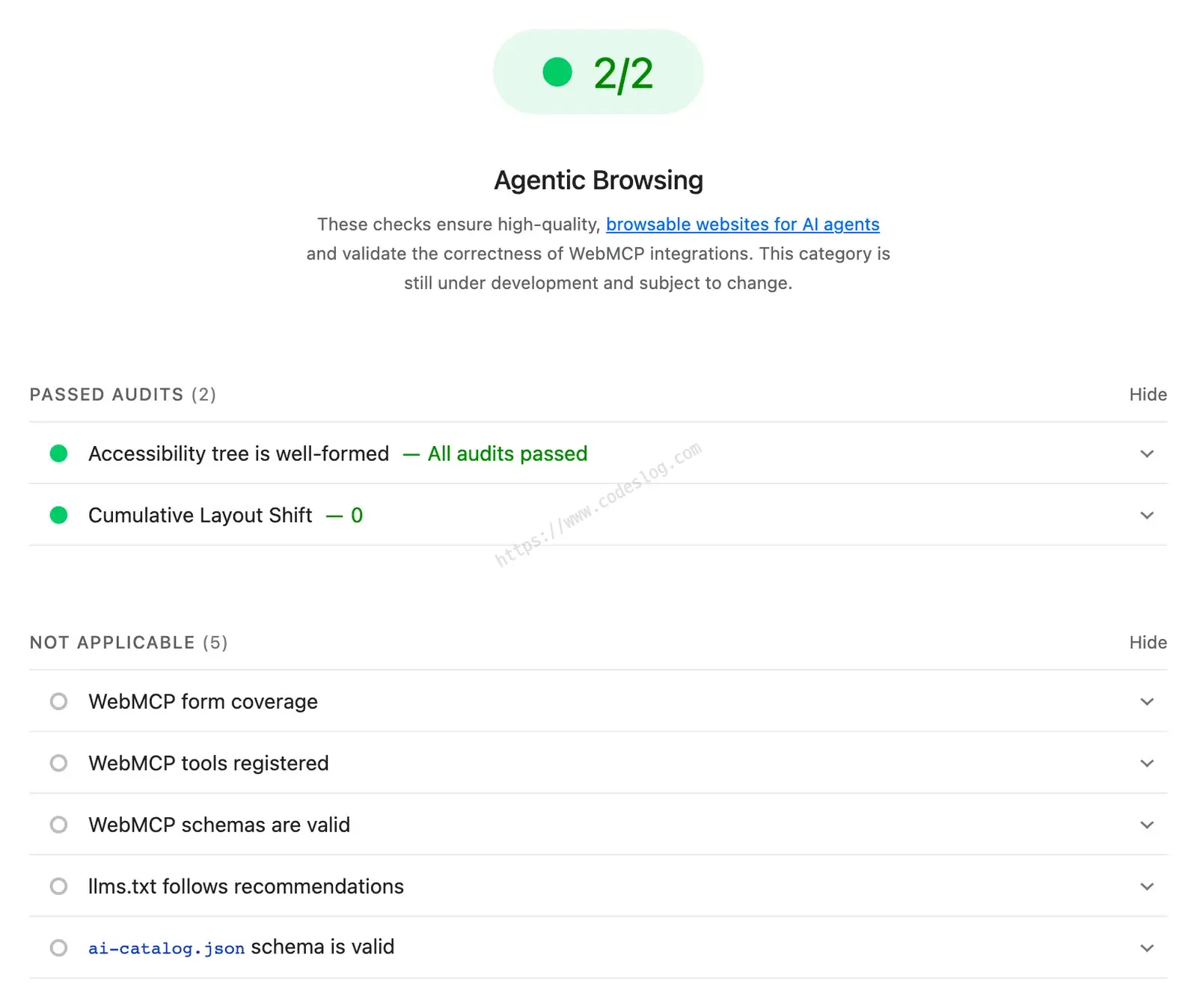
The report for case 03, the div button no keyboard can press. Only the two passed audits count toward the fraction. The five marked Not applicable drop out of the denominator.
Google says the standards for the agentic web are still being formed, so the goal is to give data and signals rather than a ranking. It also says the tree audit is a narrowed-down set of accessibility audits that matter for machine operation. For accessibility as a whole it points you to the Accessibility audits documentation, and it says to build the tree with semantic HTML and correct ARIA labels first.
2/2, 3/3, 1/4: how to read the fraction#
Two rules cover it.
- Denominator: how many of the seven audits were scored rather than marked Not applicable
- Numerator: how many of those passed
The site decides which audits get scored. The accessibility tree audit and CLS are always scored, so the denominator is at least 2. Each of the others adds one to the denominator only when its condition is met.
- llms.txt: scored when a request for
/llms.txtdoesn’t end in a 4xx such as 404. To pass, the file needs an H1 title (# Name), at least one link in the[name](url)form, and at least 50 characters. - ai-catalog.json: scored when
/.well-known/ai-catalog.jsondoesn’t return a 4xx, and passes if it matches the ARD format. - The three WebMCP audits: scored when the browser supports WebMCP and the page has forms or registered tools.
CLS passes at 0.1 or less, Google’s “good” threshold (checked in the Lighthouse 13.5.0 source). Here’s how the rules play out on measurements covered later in this post.
| Case | Fraction | Scored audits (denominator) | Failed audits |
|---|---|---|---|
| Test page 03 | 2/2 | Tree, CLS | None |
| Naver | 1/2 | Tree, CLS | CLS |
| National Tax Service | 1/2 | Tree, CLS | Tree |
| Musinsa | 2/3 | Tree, CLS, llms.txt | CLS |
| Codeslog (this blog) | 3/3 | Tree, CLS, llms.txt | None |
| 11st | 1/3 | Tree, CLS, ai-catalog.json | CLS, ai-catalog.json |
| Seoul Metropolitan Government | 1/4 | Tree, CLS, llms.txt, ai-catalog.json | Tree, llms.txt, ai-catalog.json |
Three things to take from the table.
- The same 1/2 can fail in different places. Naver failed on CLS and the National Tax Service on the tree audit. Don’t stop at the fraction. Expand the failed items in the report.
- Fractions with different denominators can’t be compared. 3/3 doesn’t mean better than 2/2. It just means one more audit was scored.
- Adding a file grows the denominator. An llms.txt adds one scored audit, and one more failure if its format is wrong. Seoul Metropolitan Government and 11st never made such files, yet their denominators grew. The soft 404 section later explains why.
The tree audit checks 33 axe rules#
Google’s docs don’t list the rules behind the tree audit, so I opened the Lighthouse source. agent-accessibility-tree.js contains 33 rules from axe-core (the automated checking engine behind Lighthouse’s Accessibility category), and a single hit means failure (identical from 13.2.0 through 13.5.0). If your report shows “Accessibility tree is not well-formed,” you tripped one of these.
By my own grouping, 14 check that buttons, links, inputs, image buttons, ARIA widgets, document titles, and the like have a name. Another 14 are ARIA syntax rules, such as nonexistent roles, missing required attributes, and focusable elements inside aria-hidden. The remaining 5 are structural rules like tabindex and autocomplete.
What’s missing: color contrast (color-contrast), alt text on regular images (image-alt), and document language (html-has-lang). (Alt text on image buttons and SVG images is checked.) From the agent’s side that’s an understandable choice, but all three are common barriers for people. People with low vision miss faint text, screen reader users miss photos with no alt text, and without a document language a screen reader can’t pick a pronunciation. All three are among the WebAIM Million 2026 top six errors, and two of them are #1 and #2.
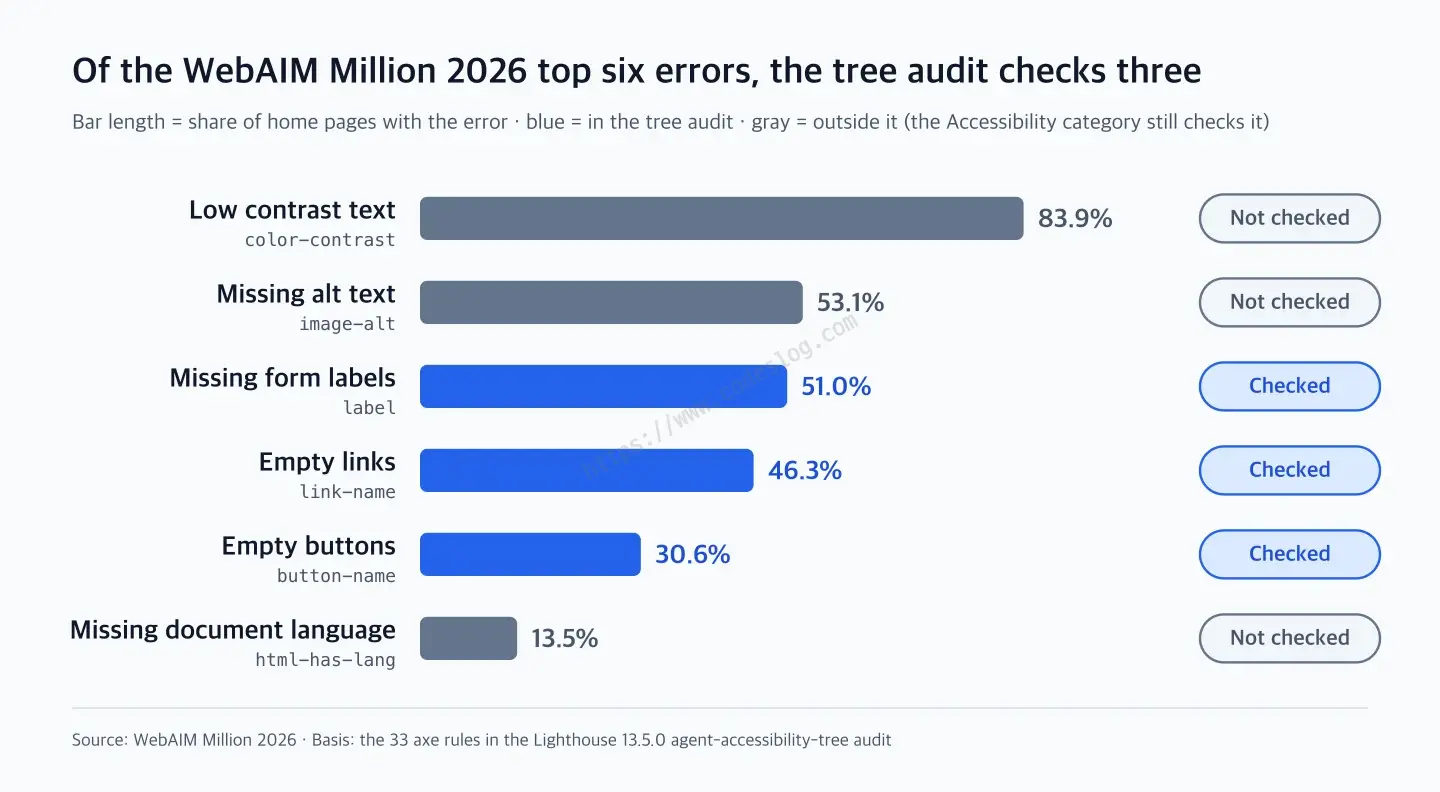
| Rank | Error | axe rule | Home pages with the error | Tree audit |
|---|---|---|---|---|
| 1 | Low contrast text | color-contrast | 83.9% | Not checked |
| 2 | Missing alternative text for images | image-alt | 53.1% | Not checked |
| 3 | Missing form input labels | label | 51.0% | Checked |
| 4 | Empty links | link-name | 46.3% | Checked |
| 5 | Empty buttons | button-name | 30.6% | Checked |
| 6 | Missing document language | html-has-lang | 13.5% | Not checked |
To sum up, the tree audit asks “do the things you can press have names, and is the ARIA grammar right?” and leaves “does it actually reach human eyes and ears?” to the Accessibility category. A conclusion drawn from source is still a hypothesis, so I measured it.
Seven test pages with planted accessibility defects#
The experiment page is a small shopping screen that sells one mug (a menu, a search box, a product card, and an “Add to cart” button). From a baseline page (01) built with semantic HTML, I made seven defective pages. Page 02 bundles three changes (alt text, contrast, lang), 06 changes the cart button and two menu links together, and the rest change one thing each.
| Case | What changed |
|---|---|
| 01 Baseline | Nothing. A healthy page built with semantic HTML |
| 02 Missing alt, contrast, lang | Removed the product photo’s alt text, made the price and description text light gray (contrast about 2.4:1, against a requirement of 4.5:1), and removed lang from <html> |
| 03 div button | Turned “Add to cart” into a <div> with only a click handler |
| 04 Icon button without a name | Cart icon only, with no text and no name |
| 05 Name differs from visible text | The screen says “Add to cart” while aria-label says “Put product in basket” (in the Korean original, 장바구니 담기 and 상품을 카트에 추가 share no words) |
| 06 Keyword-stuffed aria-label | Appended keywords like “lowest price free shipping” to the aria-label of the cart button and two menu links |
| 07 aria-hidden mistake | aria-hidden="true" on the whole product card |
| 08 Search box without a label | Removed the <label> from the search input |
I picked the defects on purpose. Four are outside the list of 33 rules (02, 03, 05, 06) and three are inside it (04, 07, 08), so I could check whether verdicts come out the way the source suggests. The out-of-list defects came from the top WebAIM errors (02), the div button that automated checks can’t catch in principle (03), and the mistakes likely to multiply once advice to “add ARIA for AI” spreads (05, 06). So “how many out of 7” is a number my choices produced, not a detection rate.
I measured four ways.
- Lighthouse 13.5.0: the Accessibility and Agentic Browsing categories, with desktop settings
- Role-and-name lookup: finding the cart button and the search box with Playwright role-based queries (
getByRole, with the name matched as a substring). It resembles how automation and voice control that find elements by name work. I didn’t hand any task to an LLM agent - Keyboard check: Tab to the cart button, then Enter. A script imitating the path of people who operate with a keyboard or a switch that behaves like one
- Snapshot comparison across tools: the snapshots two MCP servers for agents (Playwright MCP and Google’s Chrome DevTools MCP) hand over, set next to Chrome’s accessibility tree (what assistive technology receives). I captured and clicked these two by hand rather than with a measurement script
I measured on October 2, 2026, with Chrome 154 and Playwright 1.63. I didn’t listen to any of it with a screen reader.
Results: the four defects the tree audit doesn’t check all scored 2/2#
2/2 means both scored items (the tree audit and CLS) passed, and every 1/2 in this table is a tree audit failure (any one of the 33 axe rules fails it). The two columns on the right are the keyboard check and the role-and-name lookup.
| Case | Agentic Browsing | Accessibility score | Press by keyboard | Find by role and name |
|---|---|---|---|---|
| 01 Baseline | 2/2 | 100 | Success | Success |
| 02 Missing alt, contrast, lang | 2/2 | 87 | Success | Success |
| 03 div button | 2/2 | 100 | Fail | Fail (not a button) |
| 04 Icon button without a name | 1/2 | 95 | Success | Fail (no name) |
| 05 Name differs from visible text | 2/2 | 100 | Success | Fail (name differs) |
| 06 Keyword-stuffed aria-label | 2/2 | 100 | Success | Success |
| 07 aria-hidden mistake | 1/2 | 96 | Success | Fail (missing from the tree) |
| 08 Search box without a label | 1/2 | 95 | Success | Search box fails (button succeeds) |
The tree audit failed 04, 07, and 08. Each hit a rule on the list (button-name, aria-hidden-focus, label) exactly. The four cases with out-of-list defects (02, 03, 05, 06) got the same 2/2 as the baseline, and for 03, 05, and 06 the Accessibility category also said 100, so that’s closer to a limit of automated checking as a whole. 02 is the only one Agentic Browsing missed that the Accessibility category caught, with an 87. The pages are static, so rerunning them gave the same results.
A div button: Lighthouse Accessibility 100, Agentic Browsing 2/2, and the keyboard can’t press it (03)#
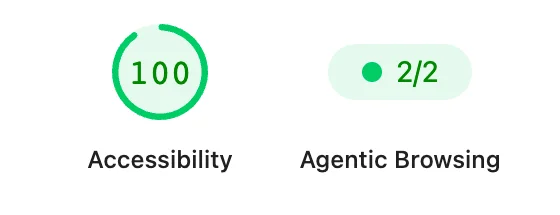
Lighthouse report for case 03. This is the report card for a button the keyboard can't press.
This button responds to the mouse but can’t be reached with Tab. The people it blocks are the ones who move with the Tab key. Someone operating with a keyboard, or a switch that behaves like one, can’t get to the button. A screen reader doesn’t announce the element as a button either, so it won’t show up in a list of buttons or while tabbing. Some screen readers, such as NVDA with Chrome, do tell users an element with a click event is “clickable” (I didn’t listen myself), but the user then has to guess that it’s the cart button.
Automated checks can’t tell from HTML alone that a <div> has a click handler, and since axe doesn’t treat this div as a button, it can’t flag it as a “button without a name” either. Lighthouse leaves this kind of problem only under “Additional items to manually check,” which doesn’t count toward the score (weight 0), and the category description tells you to test by hand. Google’s docs say this audit helps verify that the accessibility tree is complete. But in Chrome’s accessibility tree for this 2/2 page, the cart wasn’t a button. It was text inside an unnamed generic (a role-less blob). I’ll show how agent tools receive it in a table later.
An aria-label that doesn’t match the visible text (WCAG 2.5.3): checked, then left out of the score (05)#
This button’s on-screen text is “Add to cart” and its accessible name is “Put product in basket.” Voice control users, who operate a computer by speaking instead of using their hands, say “click Add to cart” the way they see it. The software matches that phrase against the accessible name, so it may not find the button. The workaround of showing a number on every screen element and speaking the number turns what should be one phrase into two or three. That’s why WCAG 2.5.3 Label in Name requires the visible text to be part of the name. The equivalent in KWCAG 2.2, Korea’s web accessibility standard, is called “Label and Name” in Korean.
The role-and-name lookup didn’t find the button. But the Playwright MCP snapshot has both the name (in quotes) and the visible text (after the colon), as in button "Put product in basket": Add to cart, so an agent reading snapshots would probably have found it. Chrome DevTools MCP handed over only the name.
Lighthouse does check for this problem. The label-content-name-mismatch audit is recorded as a failure, yet the score stays at 100. axe-core rates the rule’s impact as serious but tags it experimental, and Lighthouse gives every experimental rule weight 0 and leaves it out of the report. On real sites, too, this audit caught a case where the English name a slide library attaches by default (Previous slide) overrode the Korean text on screen.
Stuffing keywords into aria-label passes, too: Lighthouse can’t stop the SEO trick (06)#
The case with search keywords appended to the aria-label passed every measurement. The visible text comes first in the name, so 2.5.3 is formally satisfied, and it’s a named button, so the tree audit passes as well.
But every time a screen reader user lands on that button, they hear “Add to cart lowest price free shipping ships today limited deal coupon discount, button.” You can cut the speech off and move on, but to know where the button’s name ends you end up listening to it. It’s like bolting an infomercial onto a single button. “Free shipping” and “coupon discount” aren’t on the screen, so only screen reader users hear promises they have no way to verify. This is exactly the scene Roselli worried about. If “add ARIA and AI will read you better” spreads like an SEO trick, the audit tools won’t stop it.
Alt text, contrast, and lang all broken, still 2/2 (02)#
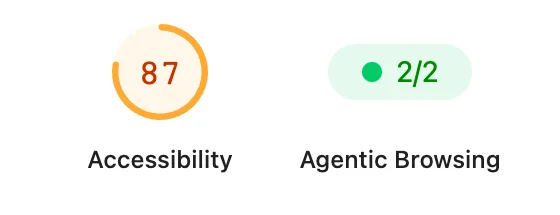
Lighthouse report for case 02. Same page, same run.
The Accessibility category caught all three problems and gave 87, while Agentic Browsing in the same report says 2/2. That doesn’t make it a problem-free page for agents, though. The product photo with its alt text removed vanished entirely from both MCP tools’ snapshots. Screen reader users and agents lose the photo’s information alike, and the tree audit doesn’t look at it.
What the tree audit did catch: names and ARIA syntax (04, 07, 08)#
04 hit button-name, 08 hit label, and 07 hit aria-hidden-focus. In 07 the whole card drops out of Chrome’s accessibility tree, so someone reading down the page with a screen reader can’t even tell there’s a product. But when Tab moves focus to a button inside the card, Chrome ignores this aria-hidden and puts the card back in the tree (confirmed in Chrome 154). A product that wasn’t there while reading appears when you press Tab, which leaves you with a page where you can’t tell whether the card is hidden or not. Catching a mistake like this is clearly useful. 07 also went differently depending on the agent tool.
Agent tools receive different trees: Playwright MCP vs. Chrome DevTools MCP#
I captured the same cases with two MCP servers for agents, Playwright MCP and the Chrome DevTools MCP from Google’s Chrome team. Next to Playwright’s default snapshot in test code and Chrome’s accessibility tree (what assistive technology receives), it looks like this.
| Case | Playwright MCP | Chrome DevTools MCP | Chrome accessibility tree (assistive tech side) | Playwright default snapshot (test code) |
|---|---|---|---|---|
| 03 div button | generic [cursor=pointer]: Add to cart | StaticText "Add to cart" | Role generic, no name (the text remains as plain text) | text: Add to cart |
| 05 Name differs from visible text | button "Put product in basket" [cursor=pointer]: Add to cart | button "Put product in basket" | Role button, name “Put product in basket” | button "Put product in basket": Add to cart |
| 07 aria-hidden mistake | button [cursor=pointer]: Add to cart under article [aria-hidden] | No card | The whole card hidden (Chrome restores it when you Tab in) | No card |
Playwright MCP keeps visible elements even when they’re aria-hidden. That’s intended behavior (Playwright PR #42268), and from Playwright 1.63 and Playwright MCP 0.0.80 it also adds an [aria-hidden] marker. Elements whose mouse cursor turns into a hand (CSS cursor: pointer) get cursor=pointer. Chrome DevTools MCP builds on Chrome’s accessibility tree, so 03 is just text and in 07 the card doesn’t exist at all. The two tools agreed that 02’s photo disappears and that 04 is an unnamed button.
The tree audit’s verdicts and the way things looked in the tools didn’t line up either. For 04 and 07, which failed the tree audit, clicking the element by its ref in Playwright MCP put the item in the cart. And 03, which passed, showed up in Chrome DevTools MCP as plain text with no sign that it could be pressed (picking that text and clicking did add the item). I did the clicking myself through the MCP servers, so whether an LLM would pick the unnamed 04 or the unmarked 03 is a separate question. Google’s docs assume agents that use the accessibility tree as their main data, so whether 2/2 means “my agent handles this page well” depends on what input that agent receives. This is a record of two tools and five cases (02, 03, 04, 05, 07), so I can’t speak for “agents in general.”
And just because an agent can press something doesn’t mean a disabled user can use it. Even if an agent presses 07’s button for you, to someone reading the page down with a screen reader, that product still doesn’t exist.
10 Korean home pages measured: passing the tree audit still left contrast deductions#
The test pages are small screens with hand-picked defects, so of course the results are tidy. What about real sites?
A few caveats before the table. This is one home page run through an automated engine, so it says nothing about a site’s overall accessibility. I picked the public institutions, portals (Naver, Daum), and shopping sites myself. They’re not a representative sample, and the table isn’t something to read as a ranking or a public-versus-private comparison. All four public sites display the mark of Korea’s web accessibility quality certification (as of the measurement date). That certification adds a task review by users with disabilities on top of an expert KWCAG review, so its yardstick differs from this table, which measured one home page automatically. I ran headless Chrome (a browser launched without a visible window) three times over about ten minutes, finishing at 2:34 p.m. KST on October 2, 2026, and recorded the value that appeared at least twice.
You don’t need to know every rule name. The frequent ones: color-contrast is color contrast, target-size is the size of the tappable area, landmark-one-main is marking up the main content area, heading-order is heading order, and link-name is link names. Look for rows where the tree audit says Pass but the last column isn’t empty.
| Site | Tree audit | Agentic Browsing score | Accessibility score | Rules that failed the tree audit | Other failures that counted toward the score |
|---|---|---|---|---|---|
| National Health Insurance Service | Fail | 1/2 | 71 | aria-allowed-attr, aria-required-children, aria-required-parent | color-contrast, heading-order, list, listitem, meta-viewport |
| National Tax Service | Fail | 1/2 | 89 | aria-hidden-focus, aria-input-field-name | target-size, landmark-one-main |
| Naver | Pass | 1/2 | 93 | None | color-contrast, skip-link, target-size |
| Daum | Fail | 1/2 | 78 | aria-allowed-attr, aria-required-children, aria-valid-attr-value, link-name, tabindex | color-contrast |
| Musinsa | Pass | 2/3 | 93 | None | color-contrast, target-size |
| Seoul Metropolitan Government | Fail | 1/4 | 87 | aria-hidden-focus | color-contrast, target-size, landmark-one-main |
| 11st | Pass | 1/3 | 96 | None | color-contrast |
| Gmarket | Fail | 1/2 | 81 | aria-allowed-attr, link-name | color-contrast, heading-order, image-alt |
| Korea Employment Agency for Persons with Disabilities | Fail | 1/2 | 96 | link-name | None |
| Codeslog (this blog) | Pass | 3/3 | 100 | None | None |
The table is in Korean alphabetical order, with this blog last.
I originally measured eleven sites, including Government24, but dropped it. If the final URL’s host differs from the one requested, I may have measured a different page. Only Government24 was caught that way: the measurement browser got redirected to an access-blocked notice page. That’s a security measure against automated access, not a defect.
The three sites other than this blog that passed the tree audit (Naver, 11st, Musinsa) all lost points on color contrast. Same shape as test page 02.
Five of the six sites that failed the tree audit hit ARIA rules. National Health Insurance Service, National Tax Service, and Seoul Metropolitan Government failed on ARIA rules alone, Gmarket along with an unnamed link, and Daum along with an unnamed link and tabindex. The ARIA came from two sources. At the National Tax Service and Seoul Metropolitan Government, it was the default ARIA a slide library attaches (aria-hidden on invisible slides, plus role="listbox" on the slide track at the National Tax Service). At National Health Insurance Service, Daum, and Gmarket, it was ARIA attached by hand to tabs, buttons, and so on.
Even when it’s a library default, the fix is on whoever shipped it, and not one site failed for lack of ARIA. The “Read Me First” page of the ARIA Authoring Practices Guide (APG), which OpenAI pointed to, opens with a section titled “No ARIA is better than Bad ARIA.”
Since the verdict is only pass or fail, results are extreme and can wobble. Korea Employment Agency for Persons with Disabilities scores 96 in Accessibility but failed on a single rule, the unnamed link rule (link-name). To a screen reader user that’s a link with no known destination, so there’s plenty of reason to fix it. But with the verdict hanging on one defect, comparing sites by score is hard. Musinsa failed in one of three runs within about ten minutes when an unnamed link was caught (the element wasn’t recorded), and counting score (Gmarket) and CLS (Korea Employment Agency for Persons with Disabilities) too, three sites wobbled, Musinsa included.
As the fraction guide above showed, the same 1/2 can fail in different places. All three sites other than this blog that passed the tree audit failed on CLS.
No llms.txt, yet it fails? Blame the soft 404#
Seoul Metropolitan Government has a denominator of 4 and 11st has 3 because the report shows “llms.txt does not follow recommendations” and “ai-catalog.json schema is invalid.” Neither site has such files. Seoul Metropolitan Government redirects (302) requests for both addresses to an error page (/common/errorAccess.html) instead of returning 404, then answers 200. 11st does that only for ai-catalog.json (llms.txt correctly returns 404, confirmed October 2, 2026). Lighthouse drops 4xx responses as not applicable, but on a 200 it doesn’t check the response format. It runs the audit on that HTML and fails it. A response that serves an error page with 200 for a nonexistent address is called a soft 404, and when it overlaps with how Lighthouse decides, you lose points for a file you never made. Return 404 for addresses that don’t exist.
I had to recheck my own blog’s 3/3, too#
My blog’s 3/3 and 100 come with the same caveats. The denominator is 3 because I have an llms.txt (the same reason as Musinsa), and the hidden audit label-content-name-mismatch, which doesn’t count toward the score, failed in all three runs. A post card shows the title and summary together on screen, but its aria-label is only “글 이동:” (“Go to post:”) plus the title (the English pages use “post link to:” plus the title), so the visible text isn’t fully contained in the name. I laid an aria-label over a link that already has text, which breaks recommendation 5 below, so it’s on my fix list.
How to read the Lighthouse Agentic Browsing score, and what to fix#
The tree audit is a minimum-bar check of whether the things you can press have names and the ARIA grammar is right. It found real defects on six real sites, so it’s plenty useful. Just read and fix with these in mind.
- 2/2 is not an accessibility pass. It doesn’t look at color contrast, alt text on regular images, or document language. Keep the Accessibility category on all the time, and look at Agentic Browsing next to it.
- Accessibility 100 isn’t the finish line, either. Walk through the page with the Tab key and press everything that can be pressed (Keyboard Accessibility A to Z).
- Check the names yourself. In the DevTools Elements panel, open the Accessibility tab and look at the accessible name under Name, or listen to a few key buttons with a screen reader (NVDA on Windows, which is free, or VoiceOver on a Mac, which you turn on with Command+F5). Problems like a name that differs from the visible text (05) or one stuffed with promo copy (06) show up there.
- Don’t paint ARIA over things for agents. The problems came not from missing ARIA but from not using HTML, or using ARIA wrong. Semantic HTML (
<button>,<label>,alt) is what disabled users needed from the start, and agents benefiting is a later matter. For the places where ARIA is truly needed, see the practical guide to ARIA. - Use the visible text as the name, as is. A button with text rarely needs an
aria-label. If you must use one, start it with the visible text, and don’t append promo phrases that aren’t on the screen.
Measuring Agentic Browsing yourself: from PageSpeed Insights to the measurement script#
To check a single page of your own site, PageSpeed Insights is the fastest (it defaults to mobile, so use the desktop tab to compare with this post). On Chrome 150 or later, the Lighthouse panel in DevTools works too. The Lighthouse version there follows your Chrome version, so check it at the bottom of the report.
Chrome 150 ships 13.3.0, 151 ships 13.4.0, 152 through 155 ship 13.4.1, and 156 onward ship 13.5.0. The case verdicts were the same on 13.3.0 and 13.4.1.
You can open the test pages in the live demo (the pages, README, and results are in Korean), and the measurement scripts are in the GitHub demo folder (Node.js 22.19 or later and an installed Chrome are required).
git clone https://github.com/IsaacEryn/isaaceryn.github.io.git
cd isaaceryn.github.io/demo_codes/lighthouse-agentic-browsing/measure
npm ci
npm run measure              # 8 test pages: Lighthouse + role-and-name lookup + keyboard + snapshot
npm run sites -- --runs 3    # measure the sites in sites.txt three times and summarize by majority
Case results land in results/summary.md and snapshots in results/snapshots/. The raw data for this post’s site table is in results/sites-2026-10-02/, and the record of my hands-on captures and clicks with the two MCP servers is in results/tool-snapshots.md. For failing elements the original run hadn’t recorded, I re-measured 50 minutes later and wrote them up separately in results/sites-2026-10-02/recheck-nodes.md. The default sites.txt contains only this blog and example.com. If you measure someone else’s site, please respect its access-blocking policy and terms of service.
What this experiment doesn’t tell you#
- It isn’t an experiment where an AI agent was given a task. The role-and-name lookup was done by a measurement script and the ref clicks by me through the MCP servers. A real LLM agent might be more flexible, or might click the wrong thing entirely.
- It isn’t an experiment where anyone listened with a screen reader or where disabled users tried the pages. What a screen reader would announce is inferred from the accessibility tree and the docs, and I didn’t measure voice control either. Don’t read “success” in the keyboard check as “a person succeeded” (07 is the example).
- Results can change with tool versions. Google has said Agentic Browsing is a category still in development, and Playwright MCP’s snapshot rules have changed several times recently. If the audit list changes, I’ll measure again.
- The real-site numbers are one home page each, from ten sites I picked, measured three times within about ten minutes. Other pages or screens behind a login may differ, and sites that block automated measurement couldn’t be measured.
The one-page summary#
- On a typical site, Lighthouse Agentic Browsing is two items, the tree audit and CLS, and the tree audit checks 33 axe rules (mostly names and ARIA syntax)
- It doesn’t check color contrast, alt text on regular images, or document language. A div button a keyboard can’t press got Accessibility 100 and 2/2
- Agent tools receive different trees, so 2/2 doesn’t mean your agent will succeed
- Among 10 Korean home pages, all three sites other than this blog that passed the tree audit lost points on color contrast, and five of the six that failed hit ARIA rules
- Don’t read 2/2 as an accessibility pass. Check the Accessibility category, the keyboard, and a screen reader as well
- There is no W3C “ARIA-AI Framework” (there has been discussion about AI and ARIA, though)
True to Lighthouse’s name, the Agentic Browsing score works like a lighthouse beam: it lights only what it reaches. Case 03’s div button got Accessibility 100 and 2/2 and still stopped dead at a single press of Tab. To see what’s outside the beam, you have to walk the page yourself with the Tab key and a screen reader.
질문으로 다시 보기#
If Lighthouse Agentic Browsing says 2/2, has my site passed accessibility, too?
I never created an llms.txt. Why does the audit fail?
Is there a W3C standard called the ARIA-AI Framework?
References#
- Publishers and Developers FAQ (OpenAI, ChatGPT Atlas) · Korean version
- OpenAI, ARIA, and SEO: Making the Web Worse (Adrian Roselli)
- ChatGPT sez Build with semantics first (Steve Faulkner)
- Lighthouse v13.3.0 release notes · v13.5.0
- agent-accessibility-tree.js (Lighthouse 13.5.0 source, 33 rules)
- Lighthouse agentic browsing scoring (Chrome for Developers)
- Accessibility for agents (Chrome for Developers)
- llms.txt audit (Chrome for Developers) · llmstxt.org · Announcing the Agentic Resource Discovery (ARD) specification (Google, 2026-06-17)
- PageSpeed Insights
- Playwright MCP (Microsoft) · Playwright PR #42268 (aria-hidden handling in AI snapshots)
- Chrome DevTools MCP (Google)
- Computer-Using Agent (OpenAI) · Gemini API Computer Use (Google)
- Understanding SC 2.5.3: Label in Name (W3C)
- Read Me First: ARIA Authoring Practices Guide (W3C)
- NVDA User Guide (NV Access)
- ARIA Working Group Charter (W3C) · APA Working Group Charter (W3C)
- Accessibility of machine learning and generative AI (W3C editor’s draft) · RQTF minutes (2026-08-12)
- TPAC 2025 breakout: Semantics for the Agentic Web · Minutes
- ARIA Working Group issue #2796 · ARIA Working Group minutes (2026-07-02)
- W3C Process Document
- WebMCP (W3C Web Machine Learning Community Group)
- The WebAIM Million (WebAIM)
Leave a comment