You built a modal. You press Tab, and the buttons in the background get focus. You press ESC, and nothing closes. A screen reader plows through the content without even saying “dialog.” And when you click the close button, focus vanishes into thin air.
Anyone who builds modals runs into all four of these at some point. The name focus trap sounds great, but the problem is that the trap tends to get set in the wrong place. Let’s fix them one by one.
Modal accessibility: what to get right#
On screen, a modal is just a box. For someone using a keyboard or a screen reader, it comes with a few promises. When it opens, focus moves inside. The background behind it can’t be touched. ESC closes it. When it closes, focus returns to the button that opened it. A screen reader announces that it’s a dialog and reads its title. And visually, the page behind it doesn’t scroll along.
The good news is that there’s a way to get the browser to keep most of those promises for you.
The dialog element and showModal(): what the browser does for you#
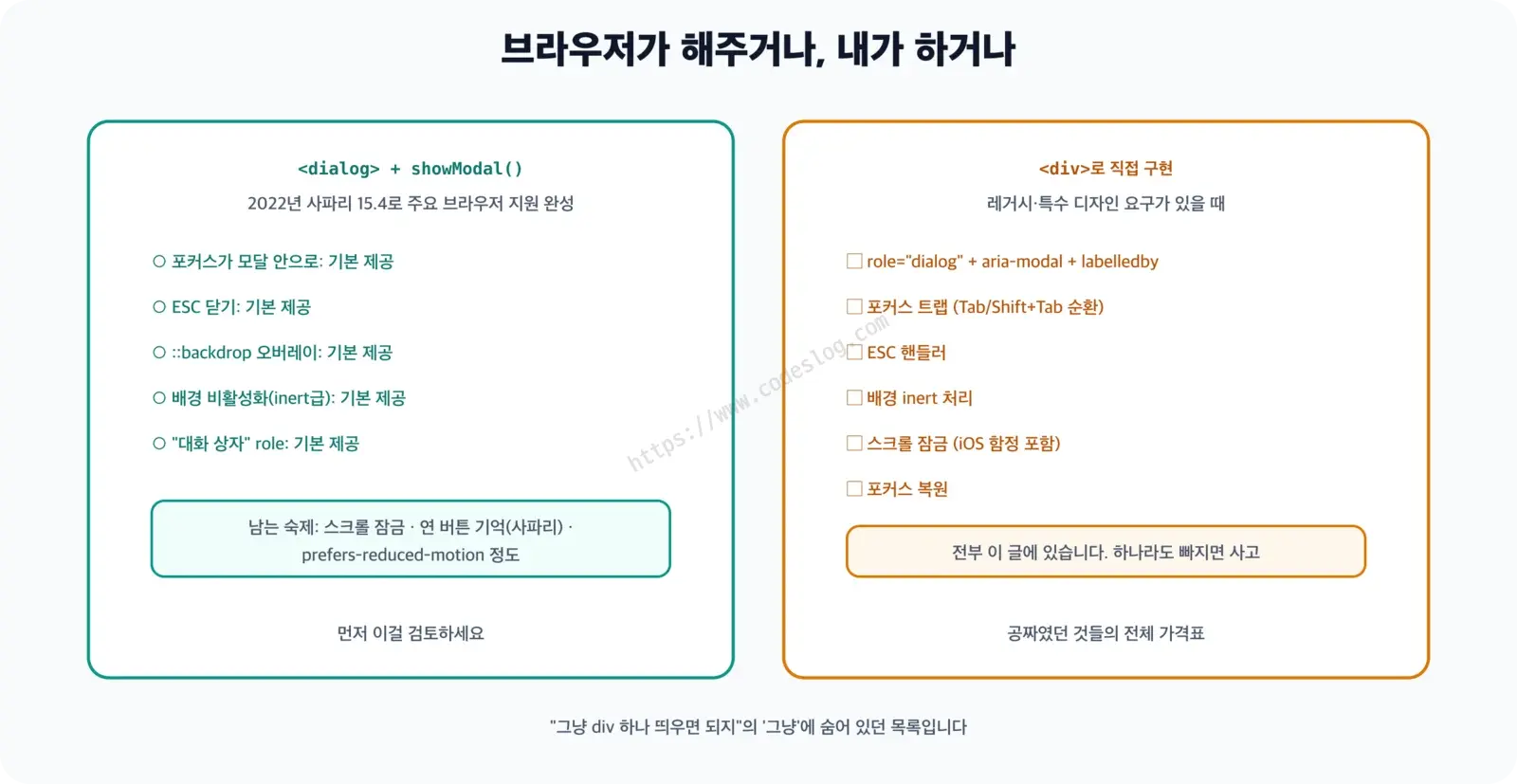
Open a <dialog> element with showModal() and most of the work is done. Safari 15.4 and Firefox 98 joined in March 2022, so every major browser supports it.
<h2 id="list-heading" tabindex="-1">Items</h2>
<button type="button" id="open-modal-btn">Delete item</button>

<dialog id="confirm-modal" aria-labelledby="modal-title">
  <h2 id="modal-title">Delete this item?</h2>
  <p>This cannot be undone.</p>
  <div class="modal-actions">
    <button type="button" id="modal-cancel">Cancel</button>
    <button type="button" id="modal-confirm">Delete</button>
  </div>
</dialog>
When you open it with showModal(), the browser does this for you.
- Moves focus into the modal (usually to the first focusable element)
- Closes it when you press ESC
- Draws a background overlay with the
::backdroppseudo-element - Makes the page outside the modal
inert. Aninertregion can’t be focused, can’t be clicked, and can’t be reached by screen reader navigation. It’s still visible, but it’s treated as if it weren’t there - On close, returns focus to whatever had it at the moment
showModal()was called
Open it with show() and none of this happens. It has to be showModal(). In React, opening it with the open attribute, as in <dialog open={isOpen}>, behaves like show() and doesn’t block the background, so use a ref and call showModal() and close() instead.
There are two things the browser doesn’t do for you. One is locking the background scroll, and the other is remembering the opener. Safari (both Mac and iOS) doesn’t give a button focus when you click it. So for a dialog opened with the mouse, the “focus at the moment of opening” isn’t the opener button, and when you close the dialog, focus lands somewhere random (this is filed as a WebKit bug and is still open as of October 2026). Remembering the opener yourself fixes it.
The code below also uses the scroll lock functions (lockScroll and unlockScroll, covered in the next section). Put both pieces of code in the same <script>, right before </body>.
const modal = document.getElementById('confirm-modal');
const openBtn = document.getElementById('open-modal-btn');
let opener = null;

openBtn.addEventListener('click', () => {
  opener = openBtn;   // remember the opener ourselves, for Safari
  modal.showModal();  // showModal(), not show()
  // the browser doesn't lock scrolling for us (next section)
  lockScroll();
});

document.getElementById('modal-cancel')
  .addEventListener('click', () => modal.close());
document.getElementById('modal-confirm')
  .addEventListener('click', () => {
    // The actual delete logic goes here
    modal.close();
  });

// Whether it closes via Cancel, Delete, or ESC, the close
// event fires once
modal.addEventListener('close', () => {
  unlockScroll();
  // Try to send focus back to the opener; if it was removed or hidden
  // and can't take focus, use the list heading
  opener?.focus();
  if (document.activeElement !== opener) {
    document.getElementById('list-heading').focus();
  }
});
The key is to do the cleanup in one place, the close event, instead of attaching it to each button. ESC closes the dialog without going through any button click code. If you only release the scroll lock in the Cancel handler, a user who closes with ESC is left with a locked page. The Android back gesture also closes a dialog, and that doesn’t go through a button either.
The last if is for cases like “Delete item,” where the row containing the opener is removed, or a row menu closes and hides the button. A button like that can’t take focus even if you call focus() on it, so you send focus somewhere nearby, like the list heading. If the target is an element like a heading that doesn’t normally take focus, give it tabindex="-1" so focus() works. If you send it nowhere, focus falls to body, and the next Tab sends a keyboard user to some random place.
Tab leaving a showModal() dialog for the address bar is normal#
In a modal opened with showModal(), if you press Tab once more after the last button, focus doesn’t go back to the first button in the modal. It goes out to browser UI such as the address bar (confirmed in Chrome 155). At first glance it looks like the trap is leaking, and you want to plug it with JavaScript. But leaving it alone is the right call.
A proposal to block exactly this was filed with WHATWG, which maintains the HTML spec (issue #8339), but it settled on keeping the current behavior and was closed in November 2023. The W3C Accessible Platform Architectures group (APA) weighed in on the decision. Keyboard users should be able to open a new tab or change browser settings while a modal is showing, and some environments, like kiosks, need a way out. What you have to guarantee is no leaking into the background page, and inert already does that.
The W3C’s ARIA Authoring Practices Guide (APG) modal pattern says “Tab cycles within the dialog,” which can be confusing. But the APG pattern is for dialogs you build from a div, and it doesn’t cover the <dialog> element. So this post leaves the browser’s behavior alone for <dialog>, and adds the cycling per the APG for the hand-built div modal.
Locking modal scroll: shared by dialog and div#
When the page behind an open modal scrolls, it’s easy to lose track of where you are. This is something you have to do yourself even with <dialog>.
// The simple way: works most of the time, but on iOS Safari the
// background can still scroll document.body.style.overflow = 'hidden';

// A more reliable way: pin the body at the current position
function lockScroll() {
  const scrollY = window.scrollY;
  document.body.style.position = 'fixed';
  document.body.style.top = `-${scrollY}px`;
  document.body.style.width = '100%';
}

function unlockScroll() {
  const top = document.body.style.top;
  document.body.style.position = '';
  document.body.style.top = '';
  document.body.style.width = '';
  // Restore the original position. Without instant, sites with
  // scroll-behavior: smooth will roll down to it
  window.scrollTo({
    top: parseInt(top || '0', 10) * -1,
    behavior: 'instant'
  });
}
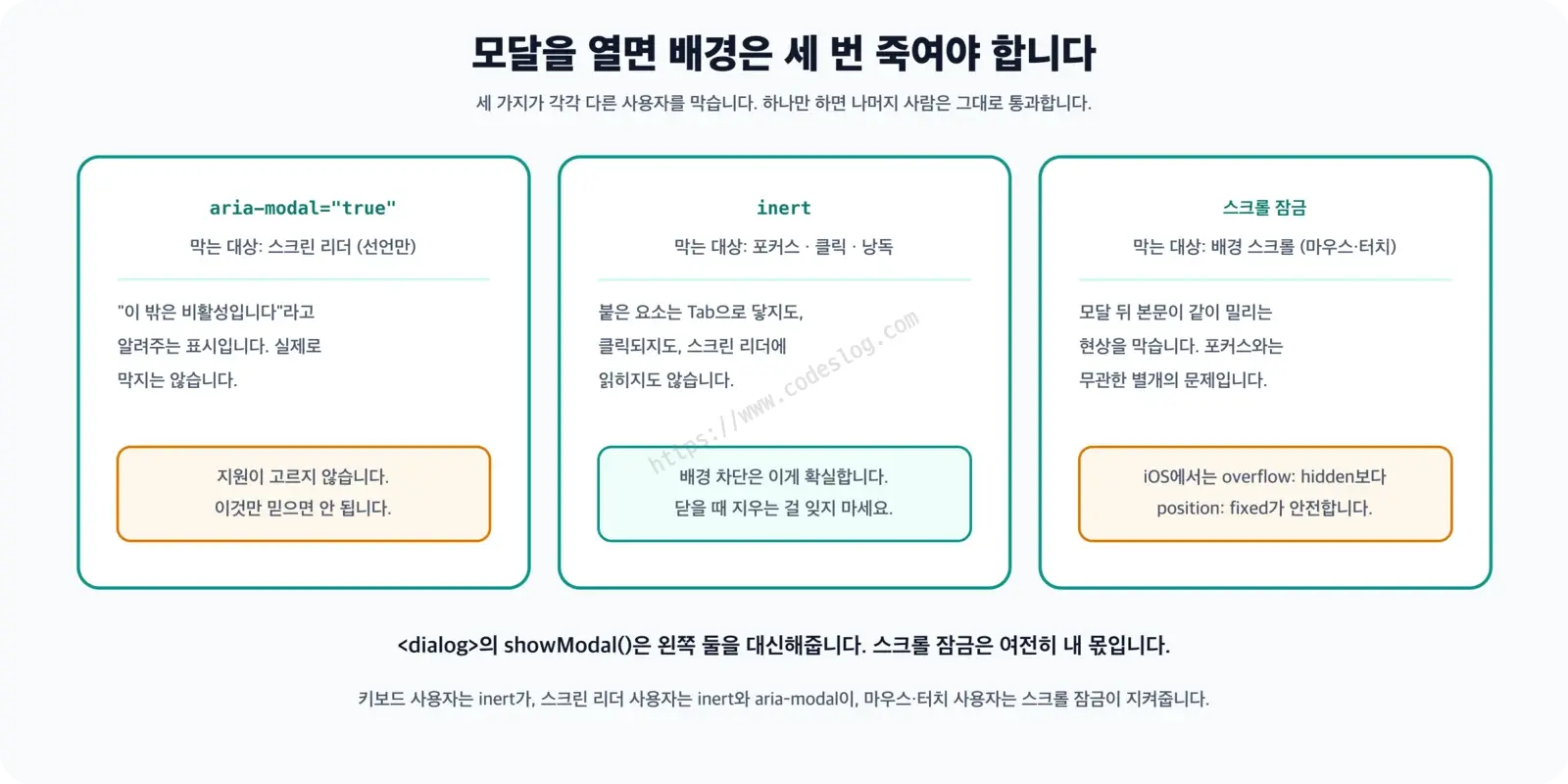
Pinning with position: fixed resets the scroll position to the top, so you store the position in top when opening and restore it when closing. The iOS Safari problem where overflow: hidden leaked was largely fixed in Safari 26.4, but similar symptoms are still reported separately, and plenty of people are on earlier versions, so position: fixed is the safer choice. Mixing the two approaches throws off the restoration, so pick one.
On Windows, where the scrollbar takes up space, locking the scroll makes the scrollbar disappear and the content shifts sideways by its width (this doesn’t happen with overlay scrollbars, like the Mac default). A common fix is html { scrollbar-gutter: stable; }, which always reserves room for the scrollbar, but I haven’t verified this in such an environment. Please open and close a modal on Windows and see whether the content moves.
Build it yourself or use a library?#
Before building a modal, choose in this order.
- If you can use
<dialog>andshowModal(), use that. Most cases end here. - If you use a framework like React and need a modal that fits your design system, use the dialog from a library that manages accessibility for you. React Aria (Adobe), Radix UI, and Headless UI have well-known Dialog components, and if you only need a trap without a framework, there’s the focus-trap package.
- Only if neither works, build it from a
div.
The rest of this post is about option 3, building it yourself. Even if you never need to, it’s worth reading. Knowing what a library or <dialog> does behind the scenes tells you where to look when something breaks.
When you build it yourself, you attach five pieces in order: markup and ARIA (1), blocking the background with inert (2), the focus trap (3), opening, closing, and focus restoration (4), and wiring up ESC and the buttons (5). The scroll lock functions from earlier go along with them. Put all the JavaScript in a single <script> right before </body>.
role=“dialog” and aria-modal: announcing a dialog (build it yourself 1)#
If it isn’t a <dialog>, you have to tell assistive technology with ARIA that this is a dialog. Make the modal div a direct child of <body> (the next section explains why).
<body>
  <main>
    <h2 id="custom-list-heading" tabindex="-1">Items</h2>
    <button type="button" id="open-custom-modal">Delete item</button>
    <!-- The rest of the page content -->
  </main>

  <div
    id="custom-modal"
    role="dialog"
    aria-modal="true"
    aria-labelledby="custom-modal-title"
    aria-describedby="custom-modal-desc"
    tabindex="-1"
    hidden
  >
    <h2 id="custom-modal-title">Confirm deletion</h2>
    <p id="custom-modal-desc">
      The selected item will be deleted. This cannot be undone.
    </p>
    <button type="button" id="custom-modal-cancel">Cancel</button>
    <button type="button" id="custom-modal-confirm">Delete</button>
  </div>
</body>role="dialog": “this is a dialog”aria-modal="true": “everything outside this dialog is unavailable right now”aria-labelledby: links the dialog’s name to its title elementaria-describedby: links the body description (optional)tabindex="-1": lets the modal itself take focus when it contains nothing focusable
When the modal opens, a screen reader usually announces the title and role, something like “Confirm deletion, dialog,” and then reads the “Cancel” button that received focus. That said, the reading order and wording differ between screen readers, and I didn’t measure this by actually listening. VoiceOver on Apple devices also has open <dialog> bugs. On iOS, a dialog with aria-labelledby opened by showModal() isn’t announced, and on Mac, elements inside a dialog can’t be interacted with (see WebKit bugs 273846 and 302351 in the references).
aria-modal="true" is only a declaration to the screen reader. It doesn’t actually block the background. What actually blocks it is inert in the next section.
If you want to know more about when to use
roleandaria-*and when not to, see The Golden Rule of ARIA in the ARIA Practical Guide.
Decide where the first focus goes, too. For a modal that asks about an action that can’t be undone, focus should land on “Cancel,” not “Delete,” so an absent-minded Enter does nothing. In this example “Cancel” comes first, so that’s what happens. Strictly speaking, a warning window that demands a response, like a delete confirmation, fits role="alertdialog" better, and in that case you must link the warning text with aria-describedby. I used role="dialog" in this post so it can be compared side by side with <dialog> in the same role.
Here’s a minimal style that centers it on the screen.
#custom-modal {
  position: fixed;
  inset: 0;
  margin: auto;
  box-sizing: border-box;
  width: min(400px, 90vw);
  height: fit-content;
  max-height: calc(100dvh - 2rem);  /* if it's taller than the screen */
  overflow-y: auto;                 /* scroll inside the modal */
  padding: 24px;
  background: #fff;
  /* shows up as a border in high contrast mode */
  border: 1px solid transparent;
  border-radius: 8px;
  /* darkens everything outside */
  box-shadow: 0 0 0 100vmax rgb(0 0 0 / 0.5);
}
Without max-height and overflow-y, buttons in a long modal end up off screen for people on mobile or zoomed far in. The page behind is scroll-locked, so they can never reach those buttons. The transparent border is for Windows high contrast mode. In that mode box-shadow disappears, but a transparent border turns into a line in a system color, which keeps the modal’s edge visible (Supporting High Contrast Mode Properly).
There’s also a reason display isn’t set here. If you write #custom-modal { display: flex; }, the CSS beats the hidden attribute, and the modal stays visible even after closing. If you need display, add #custom-modal[hidden] { display: none; } along with it.
Blocking the background with inert (build it yourself 2)#
If aria-modal is a declaration, inert is the real lock. An element with inert, and everything inside it, can’t be focused, clicked, or reached by screen reader navigation. Every major browser has supported it since Firefox 112 in April 2023.
function setInert(modal, on) {
  // Among the direct children of body, keep only the one that contains
  // the modal and lock the rest
  const keep = Array.from(document.body.children)
    .find((el) => el.contains(modal));

  for (const el of document.body.children) {
    if (el !== keep) el.inert = on;
  }
}
Because it finds the element containing the modal and leaves it out, even a structure like a React portal that renders the modal inside <div id="modal-root"> keeps only modal-root and locks the rest. On the other hand, if the modal is deep inside <main>, the whole <main> is kept and most of the background stays open. That’s why the modal goes directly under <body> (or in the portal container).
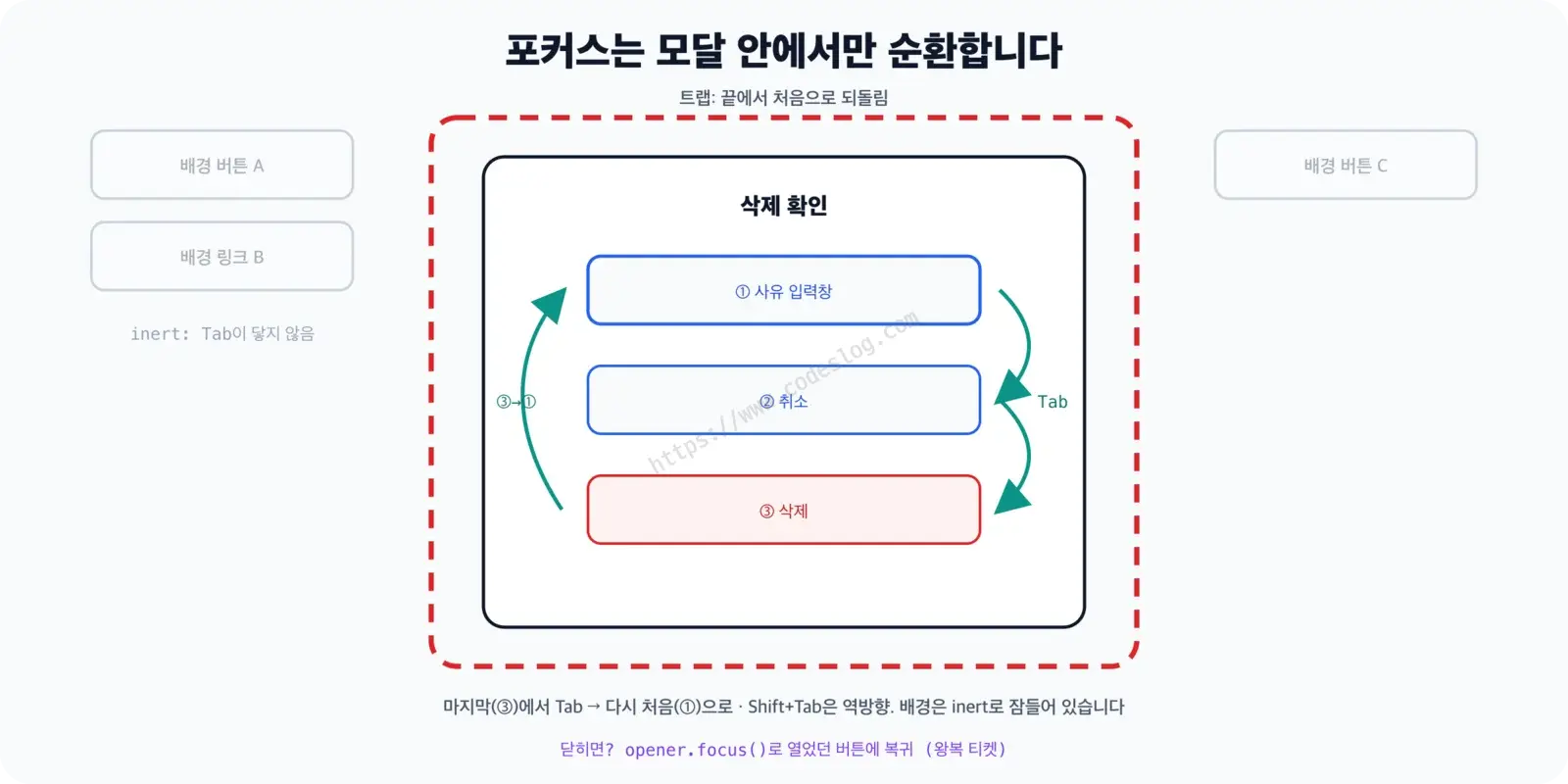
This section is actually the most important one. With inert alone, Tab won’t leak into the background. The whole background drops out of the Tab order, so focus only moves between the buttons in the modal and the browser UI. That’s exactly how a <dialog> opened with showModal() behaves. The focus trap in the next section adds the “stay inside the modal” loop on top of this.
Focus trap implementation: cycling Tab inside the modal (build it yourself 3)#
The APG modal pattern recommends that Tab on the last element goes to the first, and Shift+Tab on the first goes to the last. Focus circles inside the modal instead of leaving for the browser UI. The two functions in this section are used as is by the Modal class in the next section, so even if you skip the explanation, do copy the code.
First, a function that picks out “elements Tab can reach.”
// Candidates for elements Tab can reach
const FOCUSABLE_SELECTOR = [
  'a[href]',
  'area[href]',
  'button:not([disabled])',
  'input:not([disabled]):not([type="hidden"])',
  'select:not([disabled])',
  'textarea:not([disabled])',
  'iframe',
  'audio[controls]',
  'video[controls]',
  'summary',
  '[contenteditable]:not([contenteditable="false"])',
  '[tabindex]',
].join(',');

function getFocusableElements(container) {
  return Array.from(
    container.querySelectorAll(FOCUSABLE_SELECTOR)
  ).filter(
    (el) =>
      // tabindex="-1" is out of the Tab order
      el.tabIndex >= 0 &&
      // exclude anything inside an inert region
      !el.closest('[inert]') &&
      // display:none or hidden means no box
      el.getClientRects().length > 0 &&
      // also exclude elements that take space but are invisible
      getComputedStyle(el).visibility !== 'hidden'
  );
}
Without input:not([type="hidden"]), a hidden input that forms commonly contain (like a CSRF token) gets picked as the “first element,” and the focus move fails entirely. The last two lines filter out elements that aren’t on screen, for the same reason.
Next is the trap.
function createFocusTrap(modal) {
  function handleKeyDown(e) {
    // Leave keys alone if other code in the modal (like an editor that
    // inserts tab characters) already handled them
    if (e.key !== 'Tab' || e.defaultPrevented) return;

    // Some modals change their content, so recompute on every Tab press
    const focusable = getFocusableElements(modal);

    // If there's nothing to focus, hold focus on the modal itself
    // (tabindex="-1")
    if (focusable.length === 0) {
      e.preventDefault();
      modal.focus();
      return;
    }

    const first = focusable[0];
    const last = focusable[focusable.length - 1];
    const active = document.activeElement;

    // If focus is outside the modal or on the modal box itself, bring
    // it to the inner edge
    if (!modal.contains(active) || active === modal) {
      e.preventDefault();
      (e.shiftKey ? last : first).focus();
      return;
    }

    if (e.shiftKey && active === first) {
      // Shift+Tab: from the first element to the last
      e.preventDefault();
      last.focus();
    } else if (!e.shiftKey && active === last) {
      e.preventDefault(); // Tab: from the last element to the first
      first.focus();
    }
  }

  // Attach to document, not the modal, because we need to catch Tab
  // even when focus is outside the modal
  document.addEventListener('keydown', handleKeyDown);

  // Return a cleanup function
  return () => document.removeEventListener('keydown', handleKeyDown);
}
There’s a reason the listener goes on document instead of the modal. If it’s only on the modal, then when focus happens to be outside the modal (say, on body), the Tab key event never reaches the modal and the trap is ignored entirely.
The basics of Tab order,
tabindex, and focus indicators are covered separately in Core Concepts: Focus and Tab Order in Keyboard Accessibility A to Z.
Focus restoration: back to the opener on close (build it yourself 4)#
The same restoration pattern is used in SPA routing, too. It’s a companion to the Focus Restoration Pattern in Focus Management in SPAs.
This is a class that ties together the functions so far. When you close it, focus goes back to the button that opened the modal. That way you never lose track of “where you were.”
class Modal {
  constructor(modalEl) {
    this.modal = modalEl;
    this.opener = null;          // the element that opened the modal
    this.removeFocusTrap = null;
    this.isOpen = false;
  }

  open(triggerEl) {
    if (this.isOpen) return;     // don't open twice

    // Remember the opener. Safari doesn't give a button focus when you
    // click it, so trusting document.activeElement alone might
    // remember body
    this.opener = triggerEl || document.activeElement;

    this.modal.hidden = false;
    setInert(this.modal, true);
    lockScroll();
    this.removeFocusTrap = createFocusTrap(this.modal);

    // Focus the first focusable element, or the modal itself if
    // there is none
    const first = getFocusableElements(this.modal)[0];
    (first || this.modal).focus();

    this.isOpen = true;
  }

  // fallbackEl: where to put focus if the opener disappeared while the
  // modal was closing
  close(fallbackEl) {
    if (!this.isOpen) return;
    this.isOpen = false;

    this.removeFocusTrap?.();
    setInert(this.modal, false);
    unlockScroll();
    this.modal.hidden = true;

    // Try to send focus back to the opener; if it was removed or hidden
    // and can't take focus, use the fallback
    this.opener?.focus();
    if (document.activeElement !== this.opener) fallbackEl?.focus();
  }
}
The order matters. When opening, you have to remove hidden first so getFocusableElements can find the buttons in the modal (while it’s hidden it has no box, so everything is filtered out). When closing, you have to lift inert first so you can give focus back to the opener in the background.
close(fallbackEl) does the same job as the last if in the <dialog> example. For actions like delete, where the opener can disappear or get hidden, pass in somewhere else to go (that element needs tabindex="-1" too).
Closing with ESC and wiring up the buttons (build it yourself 5)#
Finally, we connect the buttons and ESC.
const customModal = new Modal(document.getElementById('custom-modal'));
const openCustomBtn = document.getElementById('open-custom-modal');
const listHeading = document.getElementById('custom-list-heading');

openCustomBtn.addEventListener('click',
  () => customModal.open(openCustomBtn));
document.getElementById('custom-modal-cancel')
  .addEventListener('click', () => customModal.close());
document.getElementById('custom-modal-confirm')
  .addEventListener('click', () => {
    // The actual delete logic goes here (the opener may disappear,
    // so pass in a place to go instead)
    customModal.close(listHeading);
  });

// Close on ESC, but only while open, and only if something like a list
// inside the modal didn't already use it
document.addEventListener('keydown', (e) => {
  if (e.key === 'Escape' && !e.defaultPrevented && customModal.isOpen) {
    customModal.close();
  }
});
Say the modal has an autocomplete list in it. If a user presses ESC meaning to close only that list and the whole modal closes, that’s a problem. The !e.defaultPrevented condition prevents it (assuming the list’s code calls preventDefault()).
By default, ESC should mean the same thing as “Cancel.” In a confirmation modal, pressing ESC closes it without deleting anything. If the modal contains a form in progress and closing would throw the content away, don’t block ESC. Instead, ask once more inside the same modal with a confirmation like “Your changes will be lost.”
Put the markup and CSS from build it yourself 1 together with the scroll lock functions and the JavaScript from build it yourself 2 to 5, and you have a modal that works as is. I ran this assembled version in Chrome 155: Tab and Shift+Tab cycled only through the two buttons in the modal, and even when I deliberately moved focus out to body, the next Tab brought it back into the modal. Closing with ESC returned focus to the opener and released both inert and the scroll lock, and opening and closing at a position 2,359px down the page returned to that same position.
What this code assumes#
To keep it short, I left out a few cases on purpose. If any of them apply to you, <dialog> or a library is the safer choice.
- Only one modal is open at a time. If you open a modal on top of a modal, the second modal gets locked by
inerttoo (showModal()keeps only the topmost one alive even when stacked). - Elements added to
<body>while the modal is open (like toast notifications) are not locked. - Radio button groups, inputs inside
<fieldset disabled>, and elements inside a closed<details>can makegetFocusableElementscount differently from the real Tab order. If one of these is at the very start of the modal, the first focus goes wrong, and if it’s at the very end, the cycling goes wrong, so open the modal and press Tab on the last element yourself to check. - When focus enters an
<iframe>inside the modal, key presses don’t reach the parent document, so the trap and ESC don’t work in there. - Dismiss gestures like Android’s back gesture are only handled by
<dialog>. Adivmodal only handles the ESC key.
div modal vs dialog, measured: pressing Tab#
Pressing Tab a few times beats reading an explanation of focus traps. In the modal accessibility comparison demo, I put a modal built from a div with no handling at all (labeled “Bad modal”) next to one built with <dialog>.showModal() (“Good modal”). Open a modal and keep pressing Tab. The bottom of the screen shows live whether focus is currently in the modal or in the background.
The demo’s div modal is a control group that has none of build it yourself 1 to 5 applied. No role, no inert, no trap, no ESC, no restoration: I made it that way on purpose to show what that state looks like from the keyboard. These are the results of operating that demo with the keyboard in Chrome 155 (October 11, 2026). I sent key presses with Playwright and measured five times, and for “outside the page” I also pressed the keys by hand in a browser window to confirm that focus leaves the page (blur).
| Action | div modal (no handling) | <dialog>.showModal() |
|---|---|---|
| Focus right after opening by keyboard | Still on the opener (background) | “Cancel” in the modal |
| Tab 1 | “Button A” in the right panel (background) | “Delete” in the modal |
| Tab 2 | “Button B” in the right panel (background) | Outside the page (browser UI) |
| Tab 3 | “Open good modal” (background) | “Cancel” in the modal |
| Tab 4 to 6 | “Cancel” in the modal, then “Delete” in the modal, then the footer link “codeslog.com” (background) | Alternates between the buttons in the modal and the browser UI (never reaches the background) |
| ESC | Stays open | Closes, and focus returns to the opener |
| After closing with “Cancel” | Focus falls to body | The opener (the demo’s restoration code puts it back) |
In the div modal, Tab never got into the modal across three presses. A dialog sits in the middle of the screen, and the keyboard is circling behind it. Because the modal div comes after the main content (<main>) in the HTML, Tab only reaches the modal after passing every button in the main content. It gets in on the fourth press and slips back out to the footer on the sixth. For someone using a mouse, this accident is invisible.
The <dialog> never touched a background button. The first loop was the same in all five runs: “Delete, outside the page, Cancel.” From the second loop on, it sometimes went through the outside of the page and sometimes went straight back to “Cancel” from one measurement to the next. Automation tools couldn’t reproduce “outside the page” reliably, so I grouped Tab 4 to 6 into a single row.
When ESC closed the dialog and focus returned to the opener, that was the browser’s doing, not the demo’s restoration code. The demo only returns focus to the opener when you press the “Cancel” button, and ESC doesn’t go through that code. Since I opened it with the keyboard, the “focus at the moment of opening” was the opener, and the browser sent focus back there. If I had opened it with the mouse in Safari, the result would have been different.
This table is from one browser, Chrome. I didn’t measure Safari or Firefox, and how screen readers actually read these isn’t in this table either. The surest way is to press through the demo in your own browser.
Animation and prefers-reduced-motion#
If you animate the modal when it opens, take care of prefers-reduced-motion as well. Users who turn on reduced motion may not want animation, or find it hard to bear because of dizziness.
/* Open animation. For a div modal, replace both dialog[open]
   below with #custom-modal:not([hidden]) */
dialog[open] {
  animation: slide-up 0.2s ease-out;
}

@keyframes slide-up {
  from {
    opacity: 0;
    transform: translateY(20px);
  }
  to {
    opacity: 1;
    transform: translateY(0);
  }
}

/* When reduced motion is on */
@media (prefers-reduced-motion: reduce) {
  dialog[open] {
    animation: none;
  }
}
Modal accessibility checklist#
Once you’ve built a modal, check these one by one.
- A
<dialog>is opened withshowModal(), or it hasrole="dialog"(alertdialogfor a warning-style confirmation) andaria-modal="true" - The title is linked with
aria-labelledby - When it opens, focus moves into the modal, and for an action that can’t be undone it goes to “Cancel” first
- The background is actually blocked:
<dialog>.showModal()orinert(aria-modalalone doesn’t pass) - Tab doesn’t leak into the background. A
divmodal cycles inside the modal - There’s a visible close (Cancel) button, and ESC closes it too
- On close, focus returns to the element that opened it, and if that element is gone, it goes somewhere nearby
- The background doesn’t scroll, and the scroll lock is released even when closing with ESC
- Long content scrolls inside the modal
- If there’s animation, it’s turned off under
prefers-reduced-motion
Wrapping up#
If you can, use <dialog> and showModal(). The browser handles blocking the background, ESC, and focus movement and restoration, leaving mostly scroll locking and remembering the opener. If you have to build it yourself, blocking the background with inert comes first, and the focus trap is a loop layered on top.
The four accidents from the intro (Tab leaking into the background, ESC doing nothing, a screen reader reading content with no announcement, and focus vanishing) are now a few lines in a checklist. And the trap is finally set in the right place: inside the modal, not the background.
질문으로 다시 보기#
Should I build modals with the dialog element?
Tab takes me out to the address bar in a dialog modal. Is that a bug?
Does a div modal need both inert and a focus trap?
More in this series#
- Focus Management in SPAs: Keeping Screen Readers on Track After Route Changes: the same root as modal focus restoration
- Form Validation Timing: From Blur to aria-invalid: if you put a form inside a modal, validation timing matters too
- Supporting High Contrast Mode Properly: forced-colors and System Colors: the mode where a modal overlay disappears entirely
Browse the full Frontend × Accessibility series: a series that connects an accessibility lens to everyday frontend topics.
References#
- The dialog element (HTML Living Standard)
- Allow modal dialogs to trap focus, avoiding tabbing to the URL bar (WHATWG issue #8339)
- Dialog (Modal) Pattern (W3C ARIA Authoring Practices Guide)
- inert (MDN)
- button: Clicking and focus (MDN)
- WebKit bug 229895: Clicking button drops focus entirely
- WebKit bug 236322: Dialog’s “previously focused element” and focus-visible
- WebKit bug 273846: VoiceOver does not announce dialog on showModal when it uses aria-labelledby (iOS)
- WebKit bug 302351: VoiceOver not interacting with dialog elements (macOS)
- WebKit bug 317941: body with overflow: hidden is still scrollable on iOS sometimes
- focus-trap (GitHub)
Leave a comment