Sound Familiar?#
3 PM. Your phone rings, right on schedule.
“I posted an announcement on the website, but the text looks weird. There are question marks everywhere.”
The person on the other end insists they “just typed it normally, nothing special.” But if you’ve dealt with Korean systems long enough, you already know where this is going. A few more questions confirm it: they copied and pasted from an HWP document directly into the web editor. It looked fine in the preview. But after saving, this is what appeared on screen:
Course Registration ? How to Apply
Tuition ?150,000 KRW (installment available)
What is HWP?
HWP (Hangul Word Processor) is a word processing application developed by Hancom, a South Korean software company. It holds a near-monopoly in South Korea’s public sector — government agencies, public institutions, schools, and many large enterprises use it as their primary document format. Think of it as Korea’s Microsoft Word, only far more entrenched in official settings.
If you work with Korean organizations or government clients, encountering HWP files is essentially unavoidable. And HWP documents are well known for containing Unicode special characters that fall outside the safe range for non-Unicode database columns — which is exactly what this post is about. Working with Korean institutions means working with HWP, and working with HWP means this issue will eventually find you.
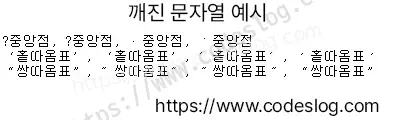
Screenshot: codeslog
The middle-dot character that was clearly in the original text had been replaced with ? somewhere along the way.
Checking the database…
SELECT content FROM notices WHERE id = 123456;
-- Result: Course Registration ? How to Apply
Sure enough, the data was already stored as ?. The corruption happened at save time.
The HWP file is innocent. The network is innocent. The browser is innocent.
The suspect was the VARCHAR column all along.
This post explains why this happens and how to fix it, step by step.
Which Characters Are the Problem?#
We tested a set of characters commonly used in HWP documents — middle dots, quotes, and dashes — against a VARCHAR column. The results varied:
Middle Dot Variants#
| Char | Unicode | Name | VARCHAR Result |
|---|---|---|---|
・ | U+30FB | Katakana Middle Dot | ❌ ? |
• | U+2022 | Bullet | ❌ ? |
· | U+00B7 | Middle Dot | ✅ OK |
˙ | U+02D9 | Dot Above | ✅ OK |
Single Quote Variants#
| Char | Unicode | Name | VARCHAR Result |
|---|---|---|---|
' | U+2018 | Left Single Quotation Mark | ✅ OK |
' | U+2019 | Right Single Quotation Mark | ✅ OK |
′ | U+2032 | Prime | ✅ OK |
´ | U+00B4 | Acute Accent | ✅ OK |
Double Quote Variants#
| Char | Unicode | Name | VARCHAR Result |
|---|---|---|---|
" | U+201C | Left Double Quotation Mark | ✅ OK |
" | U+201D | Right Double Quotation Mark | ✅ OK |
″ | U+2033 | Double Prime | ✅ OK |
˝ | U+02DD | Double Acute Accent | ✅ OK |
Only ・ (Katakana Middle Dot) and • (Bullet) came out as ?.
What do those two have in common? They are not included in the server’s code page.
The Root Cause: Code Pages and Unicode#
What Is a Code Page?#
When a computer stores text, it ultimately converts characters into numbers (bytes). The mapping table that defines “which character maps to which number” is called a code page.
In Korean-language environments, the most common code page is CP949 (an extension of EUC-KR). For example: 가 → 0xB0A1, 나 → 0xB3AA.
The problem is that characters not listed in this mapping table simply cannot be stored. SQL Server silently replaces them with ?.
・(U+30FB, Katakana Middle Dot) → not in CP949 →?•(U+2022, Bullet) → not in CP949 →?·(U+00B7, Middle Dot) → included in KS X 1001 character set → stored correctly
What Is Unicode?#
Unicode is a universal standard that assigns a unique number to virtually every character in the world. 가 = U+AC00, A = U+0041, ・ = U+30FB, and so on.
MSSQL’s NVARCHAR stores text using UTF-16LE encoding, which is Unicode-based. Because it doesn’t rely on code pages, any special character copied from HWP can be stored without corruption.
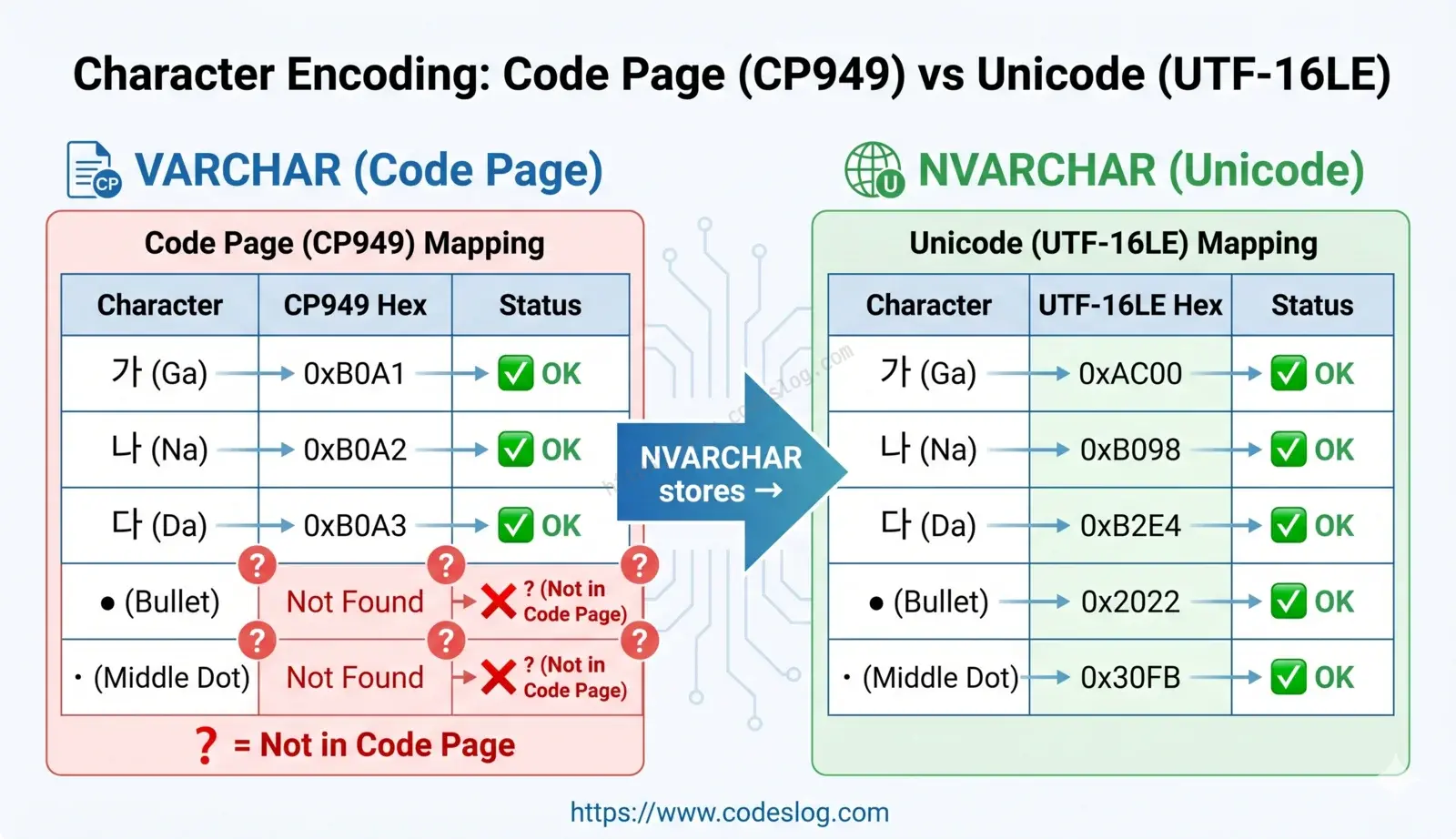
Image: Generated with Nanobanana AI
VARCHAR vs NVARCHAR: What’s the Difference?#
| Feature | VARCHAR | NVARCHAR |
|---|---|---|
| Storage method | Server code page (CP949, etc.) | Unicode (UTF-16LE) |
| Bytes per character | 1 byte (ASCII), 2 bytes (Korean) | 2 bytes for all (4 bytes for surrogate pairs) |
| Storage example | VARCHAR(100) = up to 100 bytes | NVARCHAR(100) = up to 200 bytes |
| Characters outside code page | Corrupted to ? | Stored correctly |
| Recommended for | ASCII-heavy data (e.g., English-only logs) | Korean, special characters, multilingual data |
The Storage Size Misconception#
Since NVARCHAR uses 2 bytes per character, it takes up twice the storage for the same length. This leads some legacy systems to stick with VARCHAR in the name of “saving space.”
But given modern storage costs, this difference is negligible for user-facing data.
Bytes saved with VARCHAR vs. late nights avoided with NVARCHAR — which matters more?
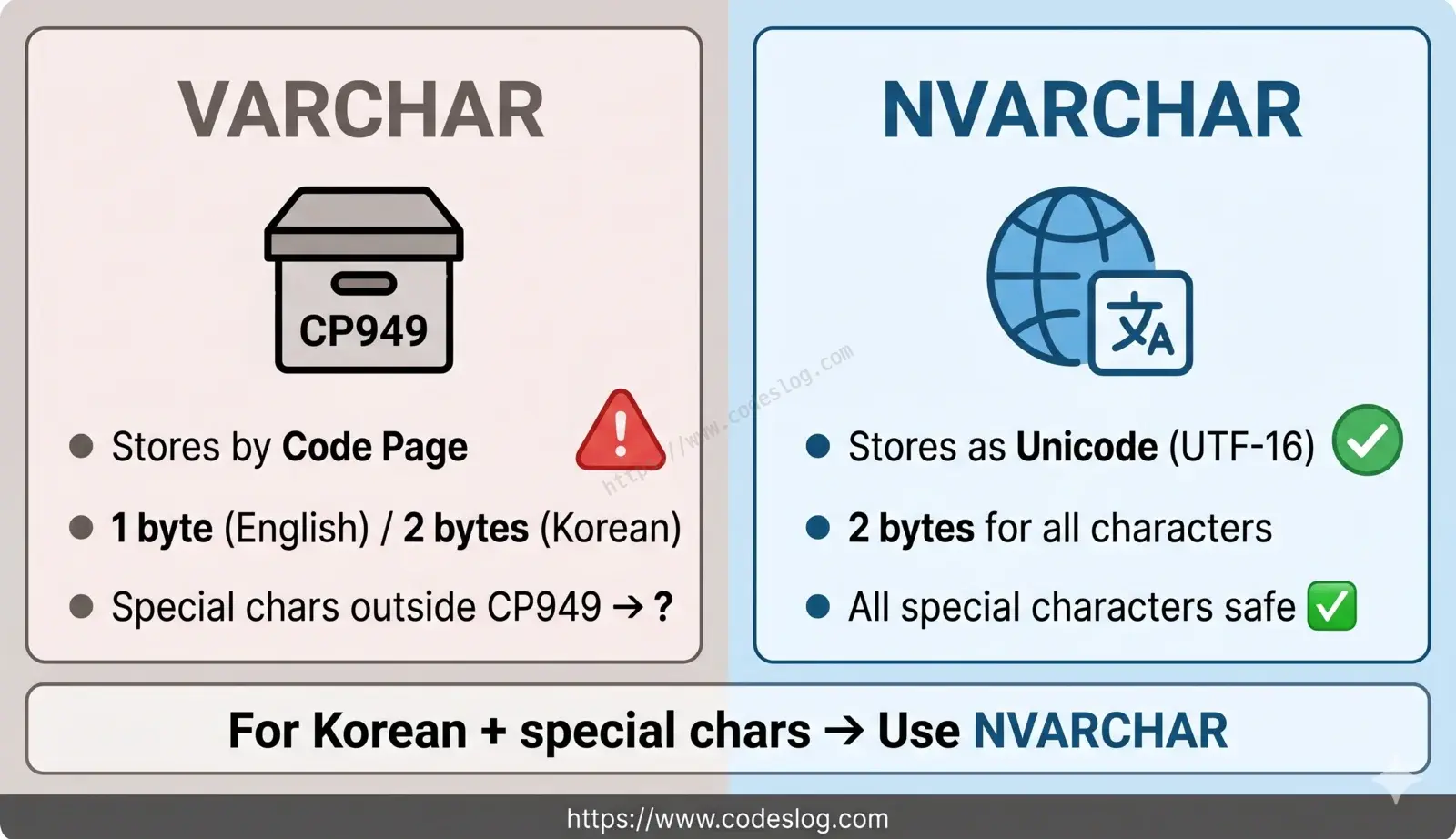
Image: Generated with Nanobanana AI
How to Fix It#
Step 1: Change the Column Type to NVARCHAR#
ALTER TABLE notices
ALTER COLUMN content NVARCHAR(4000);Note: Data already stored as
?cannot be recovered by changing the column type. The original content must be re-entered.
Step 2: Add the N Prefix to Query Literals#
This step is easy to miss. Even if the column is NVARCHAR, string literals without the N prefix are still processed through the code page.
-- ❌ May still result in ?
INSERT INTO notices (content) VALUES ('Course Registration ・ How to Apply');

-- ✅ Correct
INSERT INTO notices (content) VALUES (N'Course Registration ・ How to Apply');

-- Same applies to UPDATE
UPDATE notices SET content = N'Tuition ・ 150,000 KRW' WHERE id = 42;
The N'...' notation explicitly tells SQL Server: “treat this string as Unicode.”
Handling It in the Application Layer#
Beyond writing raw SQL, check the parameter type when using ADO.NET or similar libraries.
// ❌ Binding as SqlDbType.VarChar may cause corruption
cmd.Parameters.Add("@content", SqlDbType.VarChar).Value = content;

// ✅ Explicitly use NVarChar
cmd.Parameters.Add("@content", SqlDbType.NVarChar).Value = content;
Most modern ORMs (like Entity Framework) automatically map string types to NVARCHAR, but always double-check when working with legacy code or raw ADO.NET.
When You Can’t Change the DB: Server-Side Character Replacement#
Switching to NVARCHAR is the cleanest fix, but it’s not always immediately feasible. Legacy systems, third-party solutions, or tight deployment schedules can make schema changes difficult. In those cases, replacing problematic characters on the server side before saving is a practical alternative.
Think of it as placing an interpreter between HWP and your database. When ・ arrives from an HWP document, the interpreter swaps it for the safe · before handing it off to the DB.
Replacement Principles#
- Prefer a visually similar character when one exists (e.g.,
・→·) - When no close match is available, use the nearest ASCII equivalent (e.g.,
—→-)
C# Example#
private static readonly Dictionary<char, string> HwpCharReplacements = new()
{
    { '\u30FB', "·" },  // Katakana Middle Dot → Middle Dot (U+00B7)
    { '\u2022', "·" },  // Bullet → Middle Dot
    { '\u2027', "·" },  // Hyphenation Point → Middle Dot
    { '\u2014', "-" },  // Em Dash → Hyphen
    { '\u2013', "-" },  // En Dash → Hyphen
    { '\u2010', "-" },  // Hyphen (U+2010) → Hyphen-Minus
    { '\u2015', "-" },  // Horizontal Bar → Hyphen
    { '\u2192', "->" }, // Right Arrow
    { '\u21D2', "=>" }, // Double Right Arrow
    { '\u3000', " " },  // Ideographic Space → Regular Space
    { '\uFF01', "!" },  // Fullwidth Exclamation Mark
    { '\uFF08', "(" },  // Fullwidth Left Parenthesis
    { '\uFF09', ")" },  // Fullwidth Right Parenthesis
    { '\uFF1A', ":" },  // Fullwidth Colon
};

public static string ReplaceUnsafeChars(string input)
{
    if (string.IsNullOrEmpty(input)) return input;

    var sb = new StringBuilder(input.Length);
    foreach (char c in input)
    {
        if (HwpCharReplacements.TryGetValue(c, out var replacement))
            sb.Append(replacement);
        else
            sb.Append(c);
    }
    return sb.ToString();
}
Call it before saving:
string sanitized = ReplaceUnsafeChars(userInput);
cmd.Parameters.Add("@content", SqlDbType.VarChar).Value = sanitized;
To check upfront whether a string contains characters that CP949 can’t handle:
public static bool IsVarCharSafe(string input)
{
    var cp949 = Encoding.GetEncoding(949);
    byte[] bytes = cp949.GetBytes(input);
    return cp949.GetString(bytes) == input;
}
If the round-tripped string differs from the original, there are characters that will be corrupted to ?.
Python Example#
For Python users connecting to MSSQL via pyodbc or pymssql:
CHAR_REPLACEMENTS = {
    '\u30FB': '·',  # Katakana Middle Dot
    '\u2022': '·',  # Bullet
    '\u2027': '·',  # Hyphenation Point
    '\u2014': '-',  # Em Dash
    '\u2013': '-',  # En Dash
    '\u2010': '-',  # Hyphen
    '\u2015': '-',  # Horizontal Bar
    '\u2192': '->',
    '\u21D2': '=>',
    '\u3000': ' ',  # Ideographic Space
    '\uFF01': '!',
    '\uFF08': '(',
    '\uFF09': ')',
    '\uFF1A': ':',
}

def replace_unsafe_chars(text: str) -> str:
return ''.join(CHAR_REPLACEMENTS.get(c, c) for c in text)Limitation: Any special character not in the replacement table will still corrupt to
?. This is not a complete solution. Migrate toNVARCHARas soon as your schedule allows.
What About Other Databases?#
MSSQL isn’t alone in having this issue — but each database handles it differently.
| DB | VARCHAR Behavior | Recommended Setting |
|---|---|---|
| MSSQL | Stored using server code page. Characters outside the code page corrupt to ? | NVARCHAR + N prefix |
| MySQL | Character set can be set per column, table, or database. Default latin1 causes the same problem | CHARACTER SET utf8mb4 |
| PostgreSQL | With UTF8 encoding at DB creation, even VARCHAR stores Unicode correctly. Defaults to UTF-8, so this rarely occurs in practice | ENCODING 'UTF8' (usually the default) |
| Oracle | VARCHAR2 follows the DB character set. NVARCHAR2 is Unicode-only | NVARCHAR2 or set DB to AL32UTF8 |
| SQLite | Stores all text as UTF-8 internally. TEXT type has virtually no Unicode issues | Default is sufficient |
Had this system been built on PostgreSQL or SQLite — both of which default to UTF-8 — this problem likely never would have come up. MSSQL carries the legacy of its code-page-based design, which still has real consequences today, especially in Korean-language environments.

Photo: Unsplash
Practical Checklist#
Auditing an Existing Database#
-- Find rows with ? in VARCHAR columns
SELECT id, content
FROM notices
WHERE content LIKE '%?%';

-- List all VARCHAR/CHAR/TEXT columns that may contain user input
SELECT
    TABLE_NAME,
    COLUMN_NAME,
    DATA_TYPE,
    CHARACTER_MAXIMUM_LENGTH
FROM INFORMATION_SCHEMA.COLUMNS
WHERE DATA_TYPE IN ('varchar', 'char', 'text')
  AND TABLE_SCHEMA = 'dbo'
ORDER BY TABLE_NAME, COLUMN_NAME;
Best Practices for New Table Design#
In any MSSQL environment handling Korean data, columns that accept user input should be designed as NVARCHAR from the start.
CREATE TABLE notices (
    id       INT            IDENTITY(1,1) PRIMARY KEY,
    title    NVARCHAR(500)  NOT NULL,
    content  NVARCHAR(MAX)  NOT NULL,  -- MAX = up to ~2GB
    reg_date DATETIME       DEFAULT GETDATE()
);
NVARCHAR(MAX) supports up to approximately 2GB and is the right choice when content length is unpredictable, such as in bulletin board posts.

Photo: Unsplash
Summary#
Now you know why text copied from HWP ends up as ? in MSSQL:
VARCHARstores data based on the server’s code page (e.g., CP949).- Some special characters in HWP documents are not included in that code page, so they corrupt to
?. - Change the column type to
NVARCHARand add theNprefix to string literals to resolve the issue. - PostgreSQL and SQLite default to UTF-8 and rarely show this problem, but MSSQL requires extra care, especially in Korean-language environments.
If you’re designing a new system that handles Korean data, defaulting all text columns to NVARCHAR is the safest starting point. Recovering corrupted data after the fact is far more painful than getting it right upfront.
Data corruption happens silently. By the time you find it, it’s often too late.
References#
- KS X 1001 — Wikipedia: Character list included in the KS X 1001 standard. Useful for verifying why characters like
′(U+2032) and˙(U+02D9) are safe in CP949. - CP949 to Unicode Mapping — Unicode Consortium: The official Unicode mapping table for Windows Code Page 949.