There’s a moment when you’re idly scrolling a running service’s logs and your hand stops. That day, I hit that moment in the audit logs of A11y Check, a web accessibility auditing service. Two audits had been stuck “scanning” for hours.
Not in progress, not failed — just stuck. This is what people call a zombie task: a job left in the queue, neither dead nor alive. This is the story of catching those two zombies, of two fixes I was sure of missing, and of finding the real cause only on the third try. To skip to the end: the culprit wasn’t my logic but Vercel’s Deployment Protection — or more precisely, my internal-call code that didn’t account for it.
Background: how an audit runs#
Let me set the scene first. A11y Check’s audits run in serverless functions. A serverless function only spins up briefly when a request comes in, with one important constraint — there’s a maximum execution time. But a single audit crawls several pages and renders them in a headless browser, which takes a while. If the function that received the request did the whole audit itself, it would hit the time limit.
So the work is split across a queue. A queue is a line where jobs pile up in order and get processed one at a time.
Audit request → save to DB as queued
             → the drainer checks the global concurrency cap
             → if there's room, call the run endpoint
               as a "separate invocation"
             → that function runs the audit and closes it as done/failed
The drainer is what pulls jobs off the queue and hands them to execution. And the key here is “call as a separate invocation.” Serverless has no always-on background worker, so a function calls another endpoint of the same app over HTTP to hand off the heavy work. An invocation is just “calling a function to run once.” The pattern itself is common on Vercel. The problem was the URL of that call.
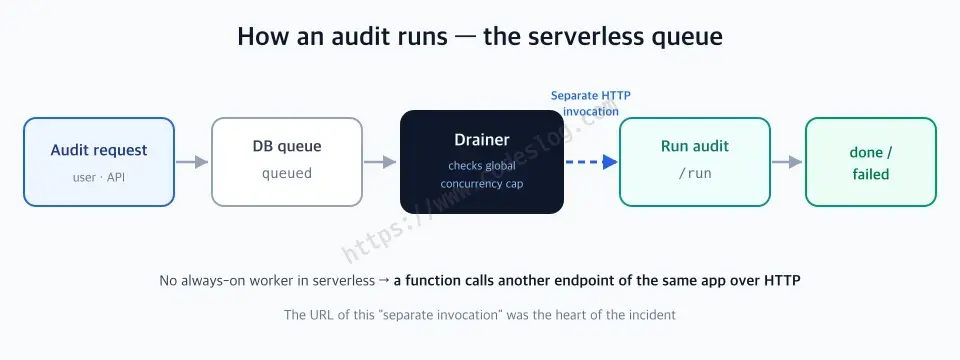
Serverless has no always-on worker, so a function calls another endpoint of the same app over HTTP to hand off work.
First attempt: suspecting the reclaim logic#
The first thing I did after finding the stuck audits was, of course, recovery. But re-running them for recovery, they stalled again. At this point I had two hypotheses.
Hypothesis 1 — the zombie reclaim isn’t running. If a function is force-killed, the running state lingers. There was reclaim logic for exactly this, but it happened to be triggered only when a user started a new audit. If nobody starts a new audit, the zombie lives forever. → I reinforced it with a global reclaim on a cron (past 10 min in running or 30 min in queued, fail it and auto-requeue once).
Hypothesis 2 — page collection takes too long. If the target site is slow, the page-collection step can burn all of the function’s time. → I put a 75-second time budget on collection, falling back to just the representative page when exceeded.
Both were improvements worth making in their own right. I confirmed the deploy. And yet the audits still stalled.
Stop, and think again#
Here was an important fork. I could have kept repeating “let me just re-run it once more.” But running the same fix a third time isn’t debugging — it’s prayer. I stopped re-running and went back to observing.
Looking again, something odd caught my eye. The audit wasn’t dying in running; it couldn’t even start out of queued. All my fixes — time budgets, reclaim — were for the “dies mid-execution” scenario. If I’d read the symptom precisely from the start, I could have known both fixes would miss. That was the price of glossing over observation and jumping to hypotheses.
Stuck in queued means the very point where the drainer calls the run endpoint is failing. But then — why is there no error log?
The real cause: VERCEL_URL + Deployment Protection + a swallowed failure#
The drainer’s internal-call code looked roughly like this.
// internal-call base URL — this was the problem
const base = process.env.VERCEL_URL
  ? `https://${process.env.VERCEL_URL}`
  : "http://localhost:3000";

// hand off the run as a separate invocation (fire-and-forget)
fetch(`${base}/api/.../run`, { ... }).catch(() => {
  // the next cron will handle it if it fails... (it won't)
});
Three problems were stacked here.
First, VERCEL_URL is not a public domain. This env var holds the unique *.vercel.app address generated per deployment. That’s true even when you have a separate production domain.
Second, Deployment Protection blocks that address. Deployment Protection is Vercel’s feature that requires authentication so preview deployments can’t be viewed by outsiders. Turn it on and access to the auto-generated domain (*.vercel.app) requires auth. When a serverless function calls its own app via VERCEL_URL, that request is treated exactly like an unauthenticated external one, and a 401 auth page comes back. The run function never even executes.
Third, that failure was silently swallowed. Because it was fire-and-forget — a pattern that only makes the call and doesn’t wait for the result — even a 401 landed in an empty .catch() and got recorded nowhere. That completed the perfect zombie condition: “the drainer exits fine, the audit waits forever in queued, the logs are clean.”
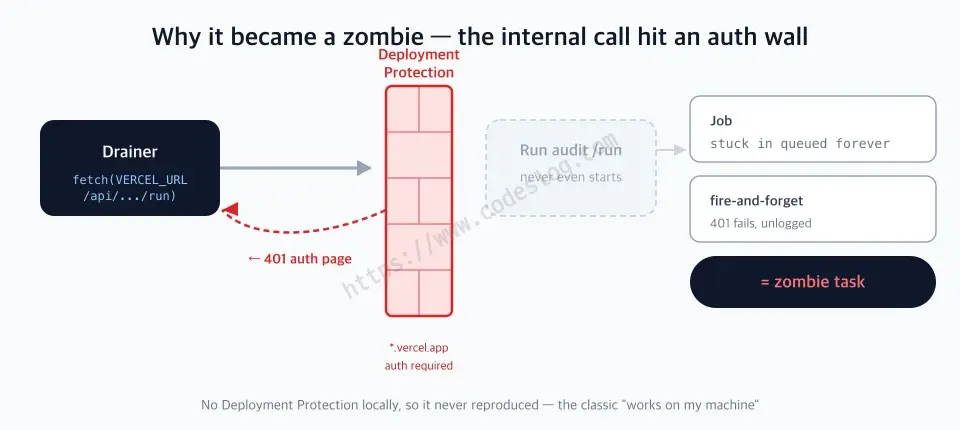
The VERCEL_URL call hits the auth wall and 401s → the run function never starts, and the failure isn't even logged.
This also explains why it never reproduced locally. There’s no Deployment Protection locally.
And here comes the scene every developer knows. You run it dozens of times locally, the tests are all green, you deploy thinking “no bugs here” — and something always breaks in the real user environment. That famous line, “It works on my machine.” The meme is a meme for a reason.
This was a textbook case of exactly that. My local has no auth wall, so the internal call never got blocked and the audits passed cleanly every time. The thing is, that wall stood only in production. The single way the test environment differed from the real one — that one thing stopped everything. There are bugs that, no matter how much you test, only surface in the user’s real environment. I relearned that from two zombies.
The fix: one URL, one log line#
Once I knew the cause, the fix was almost anticlimactically small.
// 1) prefer the public production domain for internal calls
const base =
  // public domain (not behind Protection)
  process.env.NEXT_PUBLIC_SITE_URL
  ?? (process.env.VERCEL_URL
    ? `https://${process.env.VERCEL_URL}`
    : undefined)
  ?? "http://localhost:3000";

// 2) even fire-and-forget must log its failures
fetch(`${base}/api/.../run`, { ... })
  .catch((e) => logAppError("drain.invoke", e));
NEXT_PUBLIC_SITE_URL is a public domain I manage myself, so it isn’t subject to Deployment Protection. Route the internal call there and there’s no auth wall to hit. On deploy, the two stuck audits completed as-is.
I kept the global reclaim and the collection time budget I’d added earlier. They weren’t the cause of this incident, but they’re still valid safety nets against other kinds of zombies. The flailing wasn’t a total loss.
And I sent users an apology email for the delay along with the completion notice. An incident doesn’t end with code; it ends with communication.
What I learned#
- Don’t call your own app via
VERCEL_URL. With Deployment Protection on, even internal calls get blocked with 401. An internal call that needs no auth should prefer a public domain you manage yourself (likeNEXT_PUBLIC_SITE_URL). The fix is to change the address, not to turn the protection off. - Log fire-and-forget calls, at least. “The next cycle will handle it if it fails” only holds when that failure is visible. A silent failure isn’t a failure that didn’t happen — it’s one you didn’t see.
- Read the symptom all the way before you fix. Dying in
runningand failing to start out ofqueuedare entirely different problems. I glossed over the classification and started from hypotheses, and missed twice. If you keep retrying the same fix, that’s a sign it isn’t debugging. - A queue system needs a global reclaim safety net. Reclaim that depends on a trigger won’t run without the trigger. Put a time-based global reclaim on a cron and even mystery zombies get cleaned up eventually.
The one-page recap#
- Symptom: audits stuck in
queued— zombie tasks. Clean logs, no local repro. - The three-part cause: ① the internal call went to
VERCEL_URL(per-deployment*.vercel.app) ② Deployment Protection blocked that address with 401 ③ fire-and-forget made the 401 vanish silently. - The fix: point the internal call’s base URL to a public domain (
NEXT_PUBLIC_SITE_URL) + one line of error logging in.catch(). - The debugging lesson: read the symptom (
runningdeath vsqueuednon-start) precisely first. Repeating the same fix is prayer, not debugging. - The safety net: a time-based global reclaim on a cron cleans up even mystery zombies.
If you use the same shape (serverless + a DB queue + internal invocations), I hope this post lets you skip one rabbit hole. A11y Check is open source, so the actual change is on GitHub.
Leave a comment