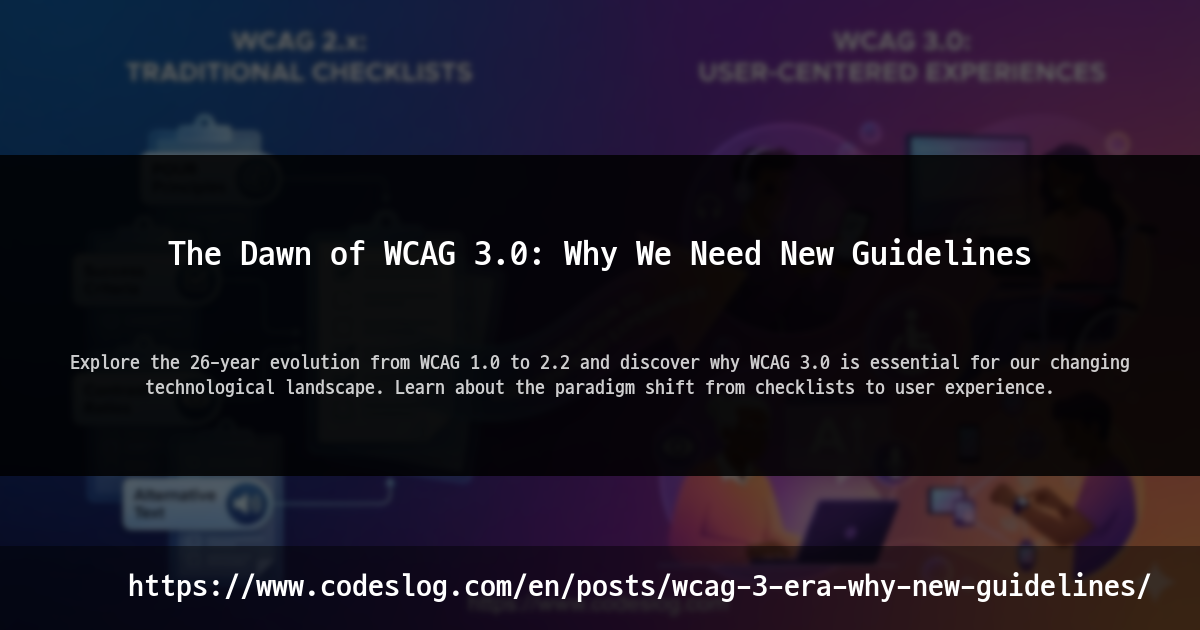
Introduction#
“Our site passed WCAG 2.1 AA 100%, but screen reader users still can’t sign up.”
I keep thinking about this comment I heard at a conference last year. They passed accessibility audits, got the green badge, but users with disabilities still couldn’t use core features. This is the biggest dilemma facing WCAG 2.x today.
If you’re a developer or designer working on web accessibility, you’ve probably heard of WCAG (Web Content Accessibility Guidelines). Recently, a new guideline called WCAG 3.0 has emerged, and many people are wondering:
“Another new version? We haven’t even fully implemented 2.2 yet…”
That’s a perfectly valid concern. But WCAG 3.0 isn’t just a version upgrade. It’s an attempt to fundamentally change how we think about accessibility.
In this post, we’ll explore why we need new accessibility guidelines and what WCAG 3.0 means for us.
The Evolution of WCAG: A 26-Year Journey#
Looking back at WCAG’s history isn’t just about listing versions. It’s the story of accessibility evolving alongside the web.
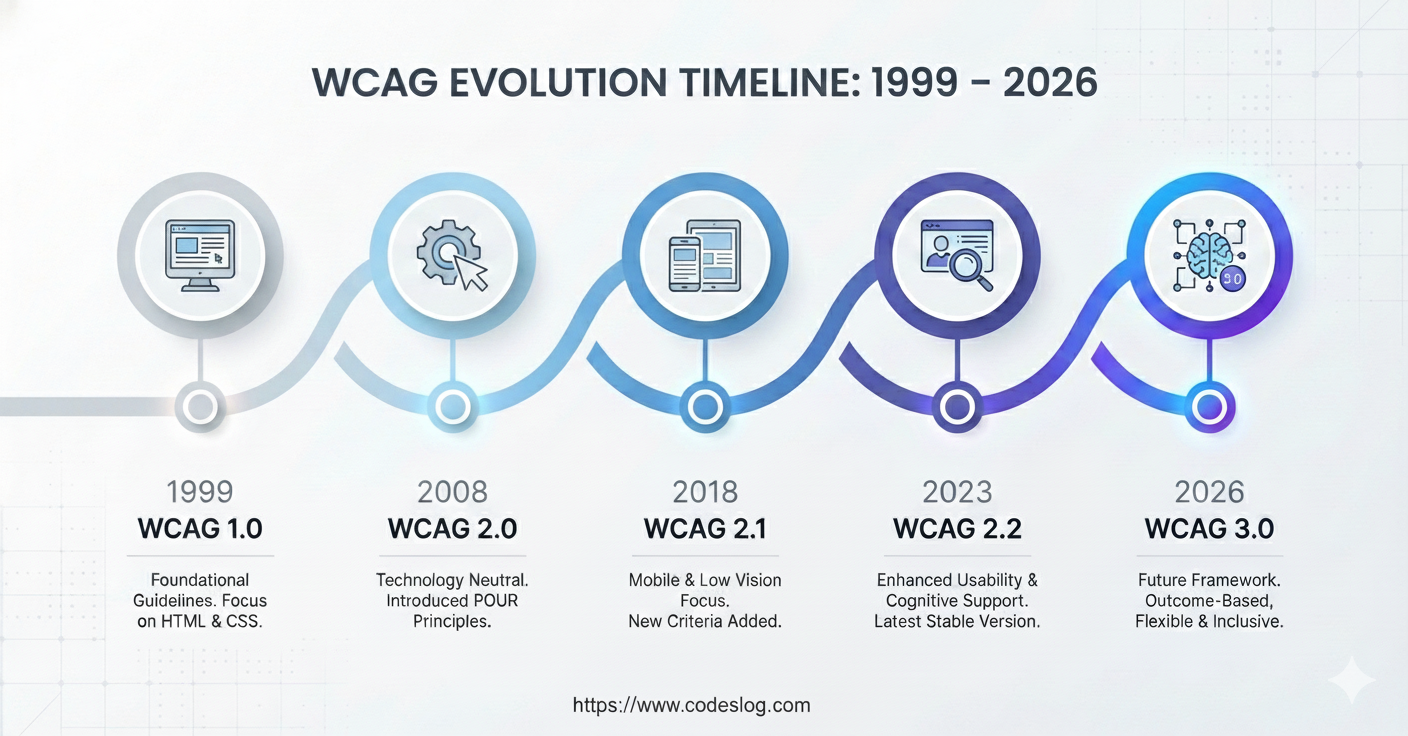
Created by: NanoBanana
1999: The Birth of WCAG 1.0#
On May 5, 1999, WCAG 1.0 was born. This was when Internet Explorer 5 and Netscape were fighting the browser wars. When we used <table> for layouts and <frame> was considered innovative technology.
With 14 guidelines and 65 checkpoints, WCAG 1.0 played a crucial role in establishing the very concept of web accessibility.
2008: WCAG 2.0 and the POUR Principles#
On December 11, 2008, WCAG 2.0 arrived. This is when the four principles we still use today were established: POUR (Perceivable, Operable, Understandable, Robust).
WCAG 2.0’s biggest innovation was its “technology-neutral” approach. It wasn’t limited to HTML but designed for PDF, mobile apps, and even future technologies. Thanks to this foresight, WCAG 2.0 remained a valid standard for over 10 years.
2018: WCAG 2.1, The Mobile Era#
On June 5, 2018, WCAG 2.1 was published. Between 2008 and 2018, the world changed completely. The iPhone launched, and smartphones became essential rather than optional.
WCAG 2.1 reflected these changes by adding 17 new success criteria, including touch target sizes, screen orientation, and improvements for low vision users.
2023: WCAG 2.2, Strengthening Cognitive Accessibility#
On October 5, 2023, WCAG 2.2 was published. Originally planned for 2021, it arrived 2 years late.
It added 9 new success criteria, focusing on improving experiences for users with cognitive and learning disabilities, including consistent help mechanisms, accessible authentication, and larger touch targets.
Limitations of WCAG 2.x: Problems in Practice#
So was WCAG 2.x not perfect? In practice, we encounter several fundamental limitations when applying WCAG 2.x.
Photo: Unsplash by ThisisEngineering
1. The ‘All or Nothing’ Dilemma#
Imagine a large e-commerce site with 5,000 pages. After months of effort, 99.98% of pages perfectly meet WCAG 2.1 AA. But one hidden legacy page is missing alt text on one image.
The result? The entire site is deemed ’non-compliant’.
It’s like failing a student who scored 99 points because they didn’t get 100. An organization’s massive accessibility improvements go unrecognized because of one missing alt attribute.
2. The ‘Checkbox Accessibility’ Trap#
Here’s a real example from a financial services site. It passed accessibility audits because all images had alt text. But the actual content looked like this:
<img src="chart.png" alt="chart">
<img src="graph.png" alt="graph">
<img src="data-visualization.png" alt="image">
Technically, alt text “exists.” It passes WCAG 2.x criteria. But can users with visual impairments understand stock charts from this information? Absolutely not.
WCAG 2.x success criteria were designed to be clearly testable. While this is definitely an advantage, it led many organizations to focus on “can we pass the audit” rather than “can users actually use it.”
3. Cognitive Disabilities: The Invisible Users#
WCAG 2.x primarily focused on visual, auditory, and motor disabilities. As a result, cognitive and learning disabilities were relatively overlooked. But the statistics are striking:
- According to WHO, about 15% of the world’s population has disabilities
- Many of them experience cognitive difficulties
- Dyslexia, ADHD, autism spectrum, memory impairments significantly affect web usage
Complex navigation, inconsistent UI, and time-limited tasks create major barriers for these users, but weren’t sufficiently addressed in WCAG 2.x.
4. Expert-Only Language#
Let’s look at a passage from official WCAG 2.2 documentation:
“Success Criterion 1.4.11 Non-text Contrast: The visual presentation of user interface components and graphical objects have a contrast ratio of at least 3:1 against adjacent color(s)…”
This is clear to accessibility experts, but for regular frontend developers or designers, it might as well be code. “What’s adjacent color? Is 3:1 enough?” The questions never end.
This technical language barrier isolates accessibility as an “experts-only domain.” The developers and designers who actually need to implement accessibility end up searching for more documentation just to understand the documentation.
Technology Landscape Changes: Beyond the Web#
Let’s compare when WCAG 2.0 first came out in 2008 with today:

Photo: Unsplash by Jakub Żerdzicki
2008:
- One year after iPhone 1st generation
- Facebook had 100 million users
- Netflix still a DVD rental service
- “Apps” were still an alien concept
2026 Today:
- 6.8 billion smartphone users globally
- VR/AR devices becoming everyday tools
- Talking to voice assistants is natural
- The boundary between web and apps has dissolved
The problem is that WCAG 2.x still focuses on “Web Content.”
New Platforms, Old Guidelines#
Real examples show this gap clearly:
Smartwatch apps: Small screens, touch and voice input, haptic feedback. Which WCAG 2.x criteria do you use to evaluate?
VR shopping mall: 3D space navigation, gaze-controlled UI, spatial audio. Does it fit the definition of “web content”?
Voice-based banking: “Alexa, check my balance” - how do you evaluate an interface with no visual elements?
IoT devices: Smart refrigerator touchscreens, washing machine braille buttons, thermostat voice commands. Are these web or not?
WCAG 2.x was certainly designed so many principles could apply to other platforms. But “applicable” and “having clear guidance” are completely different stories. Developers still have to guess, interpret, and find answers themselves.
The Emergence of WCAG 3.0: A Philosophical Shift#
Recognizing these limitations, W3C began developing a fundamentally different guideline. That’s W3C Accessibility Guidelines (WCAG) 3.0.
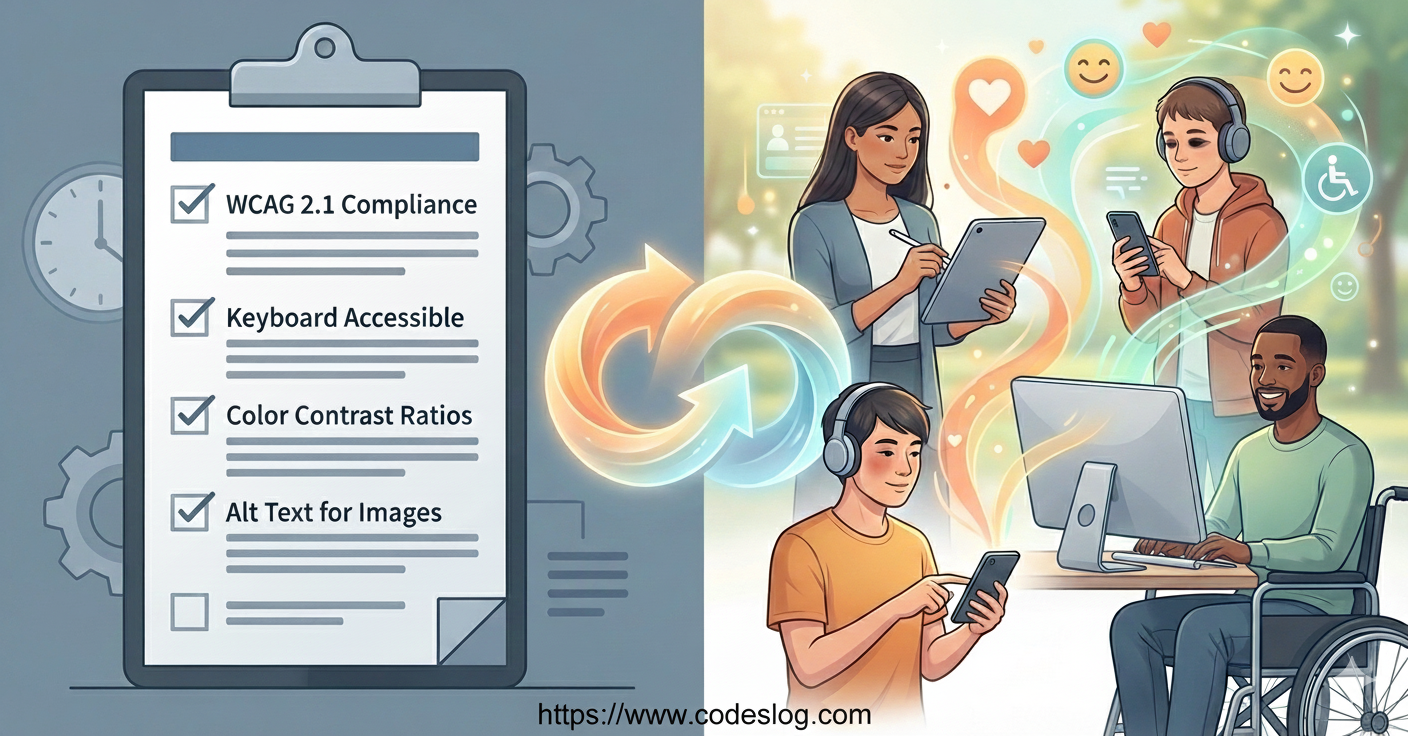
Created by: NanoBanana
Notice the name. The restriction of “Web Content” is gone, replaced with “W3C.” This isn’t just a name change. It’s a declaration to expand beyond the web to all digital experiences.
Question Transformation: From Compliance to Experience#
WCAG 3.0’s biggest philosophical shift is changing the questions we ask.
WCAG 2.x asks: “Does this element meet 4.5:1 contrast ratio?” → YES/NO
WCAG 3.0 asks: “Can users with low vision actually read and understand this content?” → 0 points (very poor) to 4 points (excellent)
Feel the difference? The former is a checklist, the latter is actual user experience.
Practicing “Nothing About Us Without Us”#
There’s one more notable point. The development process of WCAG 3.0 itself has changed innovatively.
Past WCAG was mainly created by accessibility experts, technical standards experts, and policy makers. While they received feedback from users with disabilities, it was mainly as “testers.”
WCAG 3.0 is different. The AG WG (Accessibility Guidelines Working Group) has involved people with disabilities as core contributors in the development process. In writing guidelines, discussing, and making decisions at every stage.
“Nothing about us without us”
This old principle of disability rights movement is finally being properly implemented in web standards development in the 2020s.
Revolutionary Evaluation Methods#
The evaluation system changes completely too.
WCAG 2.x:
- Levels: A, AA, AAA
- Evaluation: Pass/Fail
- Concept: Success Criteria
WCAG 3.0 (In Development):
- Levels: Multiple conformance levels (specific names still being determined)
- Evaluation: Proposed score-based evaluation system
- Concept: Outcomes + Methods
Note: While the Working Draft has proposed Bronze/Silver/Gold levels and a 0-4 scoring system, these are not yet finalized and may be implemented differently in the final version.
The concept of “Outcomes” is particularly important. Rather than simply “do this/don’t do that,” it focuses on “users should be able to achieve these results.”
For example:
- WCAG 2.x: “All link text must describe its purpose”
- WCAG 3.0: “Users can understand the link’s purpose and outcome”
It’s a subtle but important difference. The former focuses on implementation, the latter on user success.
WCAG 3.0: Where Are We Now?#
By now, you’re probably asking: “So when can we apply WCAG 3.0?”
Created by: NanoBanana
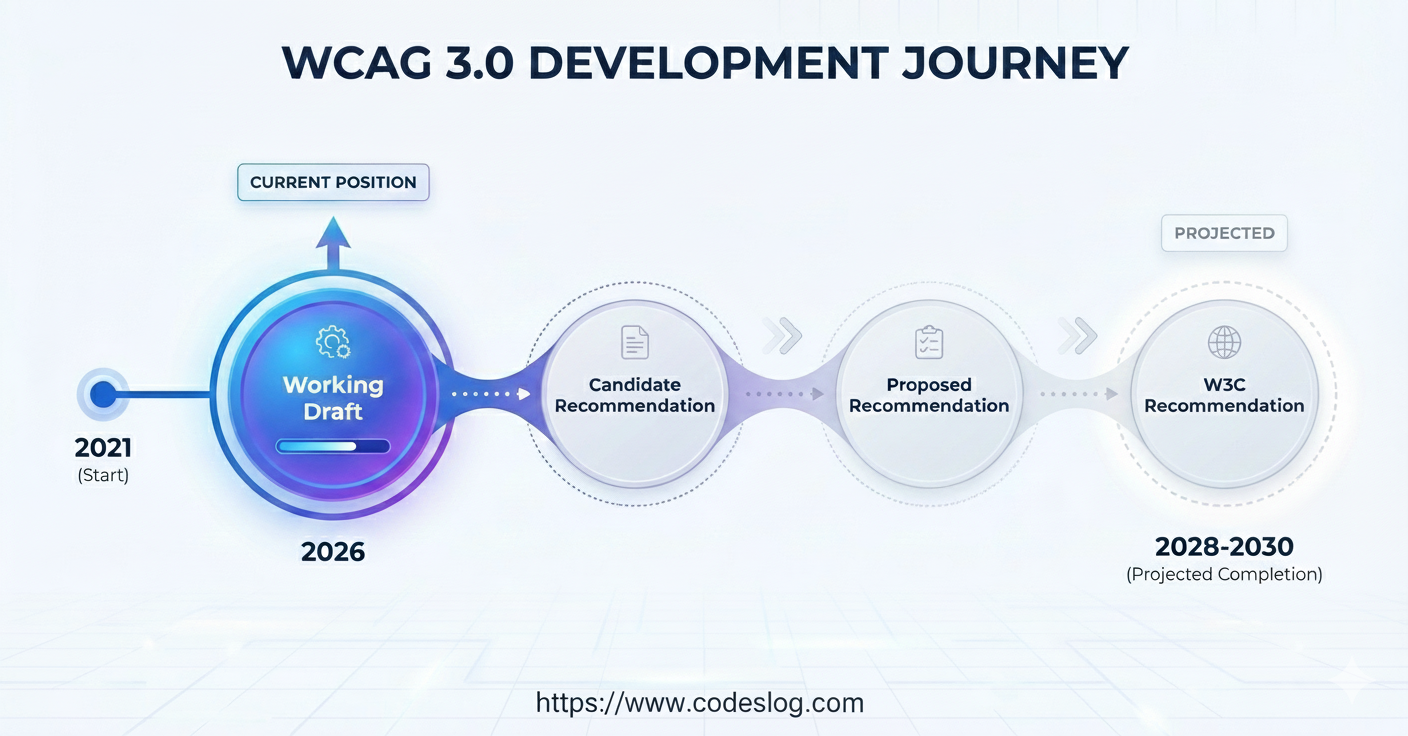
Here’s the important fact: WCAG 3.0 is currently (as of January 2026) in Working Draft status. It’s not yet an official standard.
WCAG 3.0’s Journey#
Let’s look at the timeline:
- January 21, 2021: First Public Working Draft published
- May 16, 2024: Major update including 174 new Outcomes
- September 4, 2025: Guidelines progressed to Developing status
- December 2025: Latest update published
- April 2026: AG WG plans to develop official timeline
Initially aimed for 2023 completion. But considering even WCAG 2.2 was delayed 2 years from its 2021 target to October 2023, this is expected.
When Will It Be Complete?#
W3C officially states “WCAG 3 is expected to take several more years.” Industry experts’ realistic predictions?
- Most optimistic scenario: 2028
- Realistic expectation: 2029-2030
- Some experts’ view: Beyond that
Why so long? Because WCAG 3.0 isn’t just an update but creating an entirely new accessibility evaluation system. Everything needs redesigning: conformance models, test methods, scoring systems.
Wilco Fiers (former WCAG 3.0 project manager at Deque) said:
“WCAG 3.0 is still in exploration phase. Many Outcomes currently in it will be changed or removed.”
What Should We Do Until Then?#
Clear answer: Keep targeting WCAG 2.2 AA.
Importantly, W3C has officially promised:
- Even after WCAG 3.0 is finalized, WCAG 2.x will remain valid for at least several years
- If you meet WCAG 2.2 AA well, transitioning to WCAG 3.0 will be relatively smooth
- Both standards will run in parallel for a while, giving organizations sufficient transition time
So all effort you invest in WCAG 2.2 now is never wasted.
Important Notes When Viewing the Working Draft#
For those interested in exploring the Working Draft, here are some important cautions.

Photo: Unsplash by Светлана Химочка
1. This Is Not a Finalized Standard#
At the top of the WCAG 3.0 document is this warning:
“This is a draft document and may be updated, replaced, or obsoleted by other documents at any time. It is inappropriate to cite this document as other than work in progress.”
According to W3C process documentation, “Working Drafts do not necessarily reflect consensus of the working group and do not imply endorsement by W3C or its members.”
What could actually happen?
- Many Outcomes currently in the Draft might be deleted in the final version
- Evaluation methods could completely change
- The proposed conformance model (level systems, scoring methods, etc.) might be implemented in completely different forms
- The evaluation approaches currently being discussed might be significantly revised
2. Check Development Status#
Each section in the WCAG 3.0 Draft has status indicators:
| Status | Meaning | Feedback Needed |
|---|---|---|
| Placeholder | Temporary content, will be replaced soon | Feedback not needed |
| Exploratory | Exploring direction, details undecided | Opinions on proposed direction |
| Developing | Rough consensus reached, details in progress | Feedback on specific content and definitions |
| Refining | Nearly complete, final adjustments | Review for clarity and testability |
| Mature | Completion stage | Final review |
As of January 2026, most content is Exploratory or Developing status. Much is still uncertain.
3. Don’t Apply to Production Right Now#
Recently Eric Eggert (accessibility expert) warned:
“More people are recommending looking at WCAG 3.0 Working Draft and cherry-picking parts for their needs. This is clearly the wrong approach.”
Why is it risky?
- Not legally compliant: No laws or regulations reference WCAG 3.0
- No backward compatibility: Completely different structure from WCAG 2.x
- Subject to change: What you apply today might be removed tomorrow
- Creates confusion: Teaching team members unfinalized standards is inefficient
Instead, do this:
✅ Target WCAG 2.2 AA - This is the current valid standard ✅ Learn about WCAG 3.0 - Understanding and preparing for the future is good ❌ Don’t use WCAG 3.0 for legal basis - It won’t be recognized in audits or lawsuits
4. Use It as a Learning and Preparation Opportunity#
That doesn’t mean ignore WCAG 3.0! Now is actually the best time to learn.
What you can do now:
- Read WCAG 3 Introduction - Understand the overall direction
- Explore the Draft document - Get ahead of future requirements
- Participate in GitHub issues - Your input can influence the standard
- Inform your team - Share “this is how things will change”
- Shift mindset - Think “user outcomes” not “checklists”
As W3C stated, if you’re meeting WCAG 2.2 AA well, transitioning to WCAG 3.0 will be relatively smooth. All efforts now are investments for the future.
What This Series Will Cover#
This post starts the “Preparing for the WCAG 3.0 Era” series. While WCAG 3.0 still has time until completion, let’s prepare together starting now.

Photo: Unsplash by Mizanur Rahman
Phase 1: Foundation#
“Learning a New Language”
WCAG 3.0 uses completely new terms and concepts. We’ll deeply explore what Guidelines, Outcomes, Methods, and Assertions mean and how they connect.
- Understanding structure: Success Criteria → Outcomes transition
- Evaluation system: A/AA/AAA to multi-level conformance model transition
- Scoring system: Pass/Fail to score-based evaluation shift
- Comparative analysis: Practical differences between WCAG 2.x and 3.0
Phase 2: Core Changes#
“What Actually Changes”
We’ll examine the most controversial and impactful changes one by one.
- Test methodology: What can and can’t be automated
- Cognitive accessibility: Cognitive disabilities finally center stage
- Multimodal UX: How to evaluate VR/AR, voice, haptics?
- Real cases: Evaluating actual sites with current Draft Outcomes
Phase 3: Practical Implementation#
“How Should Our Organization Prepare”
Theory is enough. Now for practice.
- Migration strategy: WCAG 2.2 → 3.0 transition roadmap
- Team training: Developers, designers, PMs, QA… who needs what?
- Tools and automation: Can we keep using current tools?
- Budget planning: How much will WCAG 3.0 compliance cost?
- Organizational culture: From “checklist” to “user outcome” mindset
Phase 4: Future Outlook#
“The Next Decade of Accessibility”
Looking beyond WCAG 3.0.
- AI and accessibility: Auto alt text, voice interfaces, and new barriers
- Legal environment: ADA, European EAA, Korean laws… when will they reference WCAG 3.0?
- Global trends: How are other countries preparing?
- Technology evolution: Brain-computer interfaces, AR glasses… accessibility?
Our Promise to Readers#
- Practicality: Not just theory, but actually applicable content
- Currency: Updated whenever WCAG 3.0 Draft updates
- Honesty: Not just the good, but controversies and limitations too
- Interaction: Actively incorporating your questions and feedback
Ready to start this journey together?
Conclusion: Accessibility Is a Journey, Not a Checklist#
Remember the story from the beginning?
“Our site passed WCAG 2.1 AA 100%, but screen reader users still can’t sign up.”
WCAG 3.0 was born to bridge this gap. From “Compliance” as a checklist to “Experience” as actual user success. This isn’t just a version upgrade. It’s a paradigm shift in how we view accessibility itself.
Change Has Already Begun#
WCAG 3.0 still needs several years to become an official standard. But the wave of change has already started.
- Viewing accessibility as “user experience” rather than “legal obligation”
- The fundamental question: “Can all users use this?”
- Development processes with people with disabilities at the center
These changes don’t need to wait for WCAG 3.0 completion. We can start right now.
What We Can Do Now#
- Solidify WCAG 2.2 AA - This is the strongest foundation for the future
- Shift mindset - Ask “can users use this?” not “did we pass?”
- Test with real users - Actively seek feedback from users with disabilities
- Involve the whole team - Accessibility is no longer experts-only territory
- Continuous learning - Regularly check the WCAG 3.0 Draft and track changes
Building the Future Together#
WCAG 3.0 isn’t a finished product. It’s still in progress. And you can participate in that process.
- Raise issues on GitHub
- Attend AG WG meetings
- Share your practical experience at [email protected]
The future of web accessibility is built by all of us, not just a few experts.
Next Story#
In the next post, we’ll dissect WCAG 3.0’s new structure in detail. We’ll deeply explore how Guidelines, Outcomes, and Methods connect, and what this means for our practice.
Accessibility isn’t a goal you achieve once and forget. It’s a continuous journey that grows as technology evolves, user needs change, and our understanding deepens.
WCAG 3.0 will be the compass making that journey clearer, more flexible, and more user-centered.
Let’s prepare together. 🌐♿️✨
Next post preview: “WCAG 3.0 Structure Dissection: From Success Criteria to Outcomes”
Did you find this post helpful? Feel free to leave your questions or comments below!