“Can we actually say our service is accessible?”
Is it done when the checker reports zero errors? If a service has hundreds of screens, do you have to scan them all — or is checking a few enough? And if you pick a few, which screens, how many, and on what grounds can you claim “we comply”?

Photo: Jakub Żerdzicki / Unsplash
When you study accessibility, there is plenty of material about the standard (WCAG), but surprisingly little about this “how do we evaluate” question. As it turns out, the W3C has had an official answer all along. And on July 23, 2026, that document got its first new version in twelve years: WCAG Evaluation Methodology (WCAG-EM) 2.0.
If you know WCAG but WCAG-EM is new to you#
Let’s sort out the terms first. WCAG (Web Content Accessibility Guidelines) is the W3C guideline that defines the accessibility criteria web content should meet — a collection of success criteria like “provide text alternatives for images” and “keep text contrast at 4.5:1 or better.”
WCAG-EM answers the question that comes right after: “so how do we verify that our product meets WCAG?” EM stands for Evaluation Methodology. If WCAG is the exam syllabus, WCAG-EM is the grading rubric — a document that lays out, step by step, which screens to sample, what to check, and how to report the results.
One thing worth noting: WCAG-EM is published as a W3C Group Note. Unlike a W3C Recommendation (a formal standard), a Group Note is informative in nature — it is not a “violate this and you’re non-compliant” rulebook. But accessibility evaluators, consultants and government monitoring programs have long used this procedure as their common language, so in practice it carries nearly the weight of a standard.
Version 1.0 came out in 2014 — when IE 11 was still on active duty. Since then SPAs became the default and services spread to apps and kiosks, while the evaluation methodology stayed frozen for twelve years. If the update feels overdue, that’s because it is.
‘Website’ disappeared from the title#
The biggest change of this revision is right there in the document title. The formal name of 1.0 was “Website Accessibility Conformance Evaluation Methodology.” 2.0 is “WCAG Evaluation Methodology.” The word “website” left the title.
It left because the target widened. What 2.0 evaluates is not a website but a digital product. The document defines a digital product as a coherent collection of one or more related views that together provide common use or functionality, and lists websites and web apps alongside mobile apps, e-books, kiosk apps, and documents like PDF and EPUB. The unit term changed too, from “page” to “view” — a word that can hold an app screen or a document spread, screens with no URL at all.
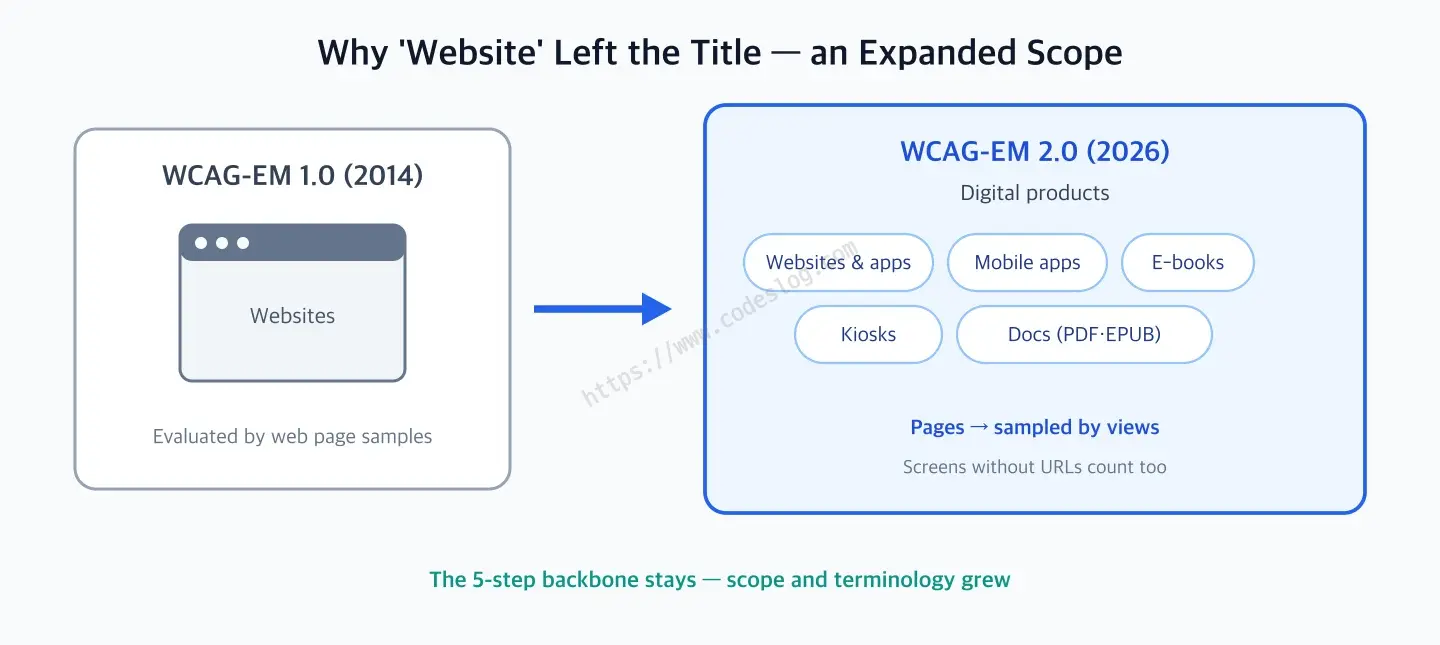
A revision that widened rather than rewrote — the procedure stays, the scope and terminology grew.
The expansion follows regulatory reality. Regulators in Europe and elsewhere have long required apps and other digital products — not just websites — to be accessible, and WCAG 3, the next-generation guideline, is broadening its applicability in the same direction. The fact that two of 2.0’s three editors work at Logius, the Dutch government’s digital agency, is probably no coincidence either.
What did not change is just as clear. The five-step backbone is almost identical to 1.0 — the editors themselves describe the process as mostly the same. If you have run a 1.0 evaluation before, the new things to learn are the terminology and the scope.
Side by side, the two versions line up like this.
| Aspect | WCAG-EM 1.0 (2014) | WCAG-EM 2.0 (2026) |
|---|---|---|
| Formal name | Website Accessibility Conformance Evaluation Methodology | WCAG Evaluation Methodology |
| Target | Websites | Digital products — web, apps, e-books, kiosks, documents |
| Unit | Web pages | Views — including screens without URLs |
| Conformance | WCAG 2.0 | WCAG 2.2 |
| Procedure | 5 steps | 5 steps (same backbone) |
| Sample | Structured + random + processes | Same |
Walking the five steps in order#
Let’s walk the procedure from the top. The overall flow looks like this.
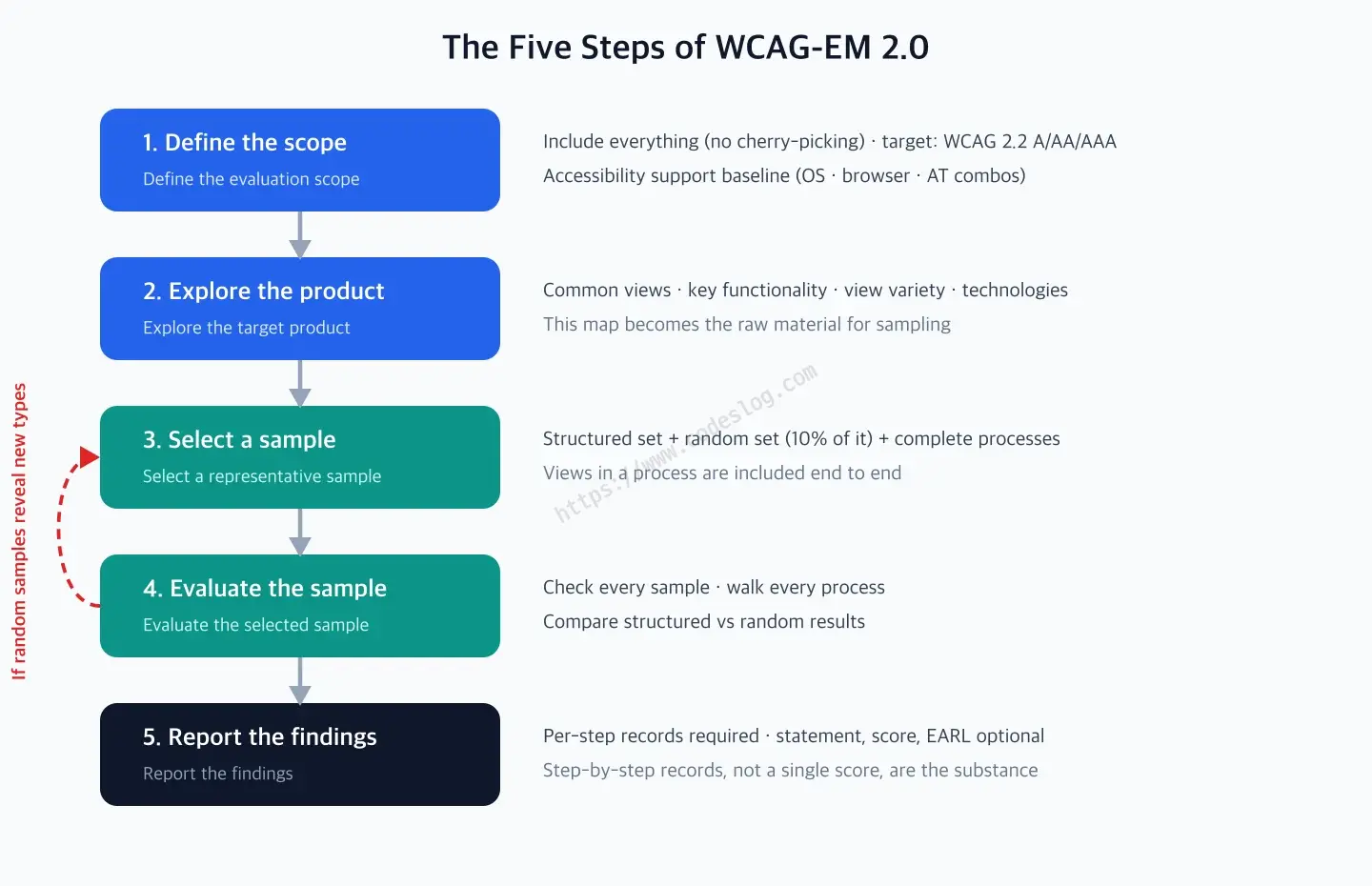
The five steps are not one-way — step 4's verification can send you back to step 3.
Step 1. Define the evaluation scope#
This is where you draw the line around what gets evaluated. One principle matters here: every view, state and function of the product goes into scope, and cherry-picking parts out is not allowed. “The admin pages are weak on accessibility, let’s exclude them” is exactly the move the methodology forbids.
Along with the scope you settle three more things.
- Conformance target: which WCAG 2.2 level to evaluate against — A, AA or AAA. In practice AA is the de facto default.
- Accessibility support baseline: which combinations of operating system, browser and assistive technology (software or devices, like screen readers, that help people with disabilities use a product) must work for a feature to count as “supported.” Agreed with the evaluation commissioner — for example, “we verify with VoiceOver + Safari on iOS and NVDA + Chrome on Windows.”
- Additional requirements (optional): anything extra the commissioning party asks for.
Step 2. Explore the target product#
Before sampling, you survey the product: the common views that appear everywhere (the standard screens with header, footer and navigation), the essential functionality (for a shop, search and checkout), the variety of view types (lists, detail pages, forms, tables, media players…), and the technologies the product relies on (which framework renders it, whether a PDF viewer is involved). The map you draw here becomes the raw material for the next step.
Step 3. Select a representative sample#
You cannot evaluate hundreds of views, so you sample. The sample has three parts.
The structured sample is a set chosen to represent, without gaps, the common views, key functionality, view types and technologies you identified in step 2. This is the main force of the evaluation.
The random sample adds views chosen at random, sized at 10% of the structured sample — if the structured sample has 40 views, you draw 4 more at random. Why bother? Think of a classroom: if the teacher only ever grades the presenting team, everyone polishes only the presentation. There is a reason teachers occasionally call on someone at random. Only when a screen that didn’t expect to be picked also passes can you say “the product complies,” not just “the sample complies.”
Complete processes are flows that span several views — sign-up to confirmation, cart to payment. If any view of a process enters the sample, every view of that process, start to finish, must be included. If only two of three checkout steps are accessible, you still can’t check out.
Step 4. Evaluate the sample#
Now you actually evaluate: every sampled view against the conformance target and baseline set in step 1, and every complete process walked end to end.
This step carries 2.0’s built-in self-check: comparing the structured and random sample results. If the random sample surfaces types of content or problems the structured sample never showed, that is a signal your sample design didn’t fully represent the product. You go back to step 3, reinforce the sample, and evaluate again. This is why the evaluation is a loop, not a one-way street.
Step 5. Report the findings#
Only one thing is required: documenting the outcome of each step — what was in scope, what was sampled, what failed and how. The rest is optional: detailed records, a conformance statement, an aggregated score, and machine-readable reports, for which the document recommends EARL (Evaluation and Report Language), W3C’s reporting vocabulary.
The document’s stance on aggregated scores is worth pausing on. It warns that no single metric yet delivers the reliability, accuracy and practicality required — and that aggregated scores can actually be misleading. A methodology document drawing its own line against “accessibility score: 98” as a product summary.
For writing the report itself, the WCAG-EM Report Tool generates a document that follows the step structure.
But mobile apps don’t have URLs?#

Photo: SumUp / Unsplash
A practical question that comes with 2.0 embracing apps. For websites you sample from a list of URLs — but for native and hybrid apps, kiosks, or set-top box interfaces, there is no URL list to extract in the first place.
The document addresses exactly this: for products where a URL list cannot be generated, build the sample by screens (views). In practice, an app’s screen-flow diagram or the screen list in its design files plays the role a sitemap plays on the web. State changes — screen transitions, modals, bottom sheets — each count as a view too. “It has no URL, so it’s out of scope for accessibility” no longer holds even at the methodology level.
How other countries run their evaluations#
Plenty of countries run accessibility evaluation as an institution. The formats differ, but look closely and the same backbone repeats: sample, check against a standard, report.
The European Union is the most systematic. Under the Web Accessibility Directive (EU 2016/2102), member states must periodically monitor public-sector websites and mobile apps and report the results to the EU every three years. The standard is EN 301 549, the European standard that incorporates WCAG, and monitoring combines simplified checks (mostly automated) with in-depth checks where humans review a sample — the in-depth check is structured, for all practical purposes, as a compact WCAG-EM. That a Dutch government agency sits on 2.0’s editorial team fits the picture: the countries actually running this monitoring are among the methodology’s most active users. And since 2025, the European Accessibility Act (EAA) has extended accessibility obligations to private-sector products and services — e-commerce, banking, e-books. In Europe, evaluation reaching beyond “websites” is already the law’s reality.
The United States moves by regulation and litigation together. Section 508 of the Rehabilitation Act has long required accessibility of federal agencies, and in 2024 the Department of Justice issued an ADA rule requiring WCAG 2.1 AA for state and local governments’ web content and mobile apps, with phased compliance deadlines through 2027–2028 depending on entity size. Note that “mobile apps” is spelled out in that scope as well.
Japan took the route of adopting WCAG as a national standard: JIS X 8341-3 is built to harmonize with WCAG, and public institutions customarily test against it and publish the results.
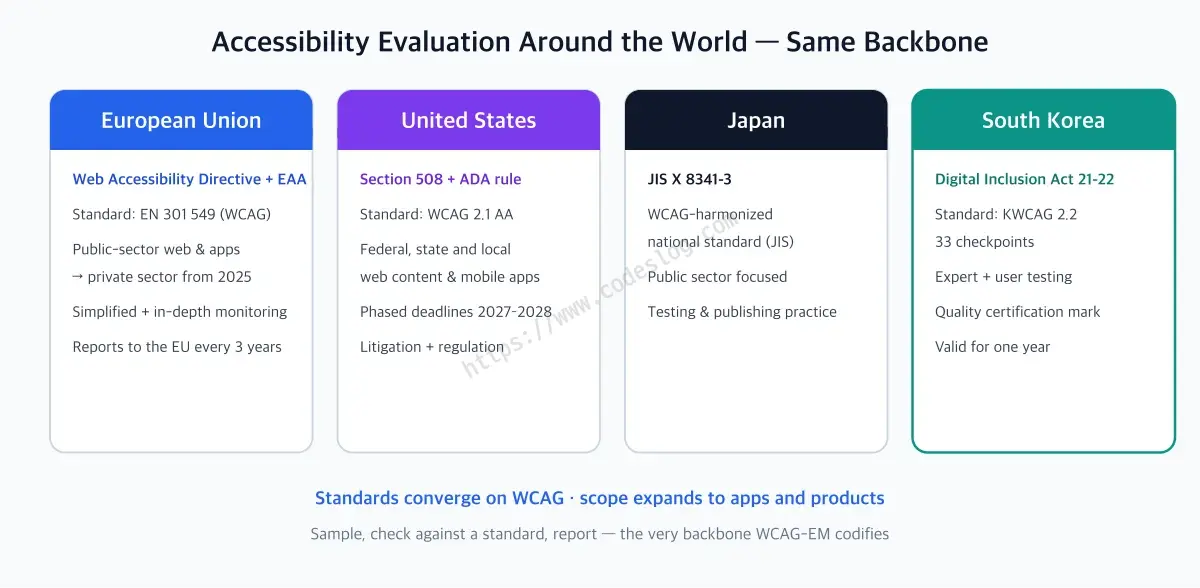
The formats differ by country, but the backbone — sample, check against a standard, report — is the same.
In short, the worldwide direction is standards converging on the WCAG family and evaluation targets expanding to apps and products. WCAG-EM 2.0’s expansion is the methodology catching up with that current.
How does this relate to Korea’s quality certification?#
Korea, too, has institutionalized accessibility evaluation: the web accessibility quality certification scheme. Grounded in Articles 21–22 of the Digital Inclusion Act (which replaced Article 47 of the Framework Act on Intelligent Informatization on January 22, 2026), three certification bodies designated by the Ministry of Science and ICT review services and grant a certification mark valid for one year.
The standard this certification uses is KWCAG (the Korean Web Content Accessibility Guidelines) — WCAG adapted into a national standard for the Korean context, currently comprising 33 checkpoints in KWCAG 2.2. Reviews originally ran on 22 checkpoints and expanded to 33 in September 2024 to reflect the revised standard.
Look at how the review works and the family resemblance to WCAG-EM shows.
- Sample-based review: not the whole service but a representatively chosen set of review pages — the same idea as WCAG-EM’s step 3.
- Expert review: specialists check the sampled pages against the 33 checkpoints — WCAG-EM’s step 4.
- User testing: here is the Korean scheme’s distinctive part — a separate review where people with disabilities, using assistive technology such as screen readers, perform real tasks. What WCAG-EM leaves as optional, the Korean certification pins down as a requirement.
- Reporting and renewal: you receive a review report, and certification renews every year.
So reading WCAG-EM 2.0 changes how the domestic certification reads, too: “why the review picks these screens” and “why processes are checked end to end” stop being one agency’s custom and become the logic of an evaluation methodology. And while the certification is still a “web” accessibility certification, with the international methodology now reaching apps and kiosks, the reference points available to the domestic scheme have widened along with it.
Automated checkers find their place on this procedure as well. Tools like axe, Lighthouse, or A11y Check, which I built, are aids for step 4 (evaluate the sample), quickly filtering the errors a machine can catch. Which screens to review and how many (steps 1–3), whether alt text fits its context, whether the keyboard flow is genuinely usable (the rest of step 4) — those calls still belong to humans. Tools don’t replace the methodology; the methodology assigns tools their seat.
One more note: this revision was not someone else’s news to me. I updated A11y Check to apply WCAG-EM 2.0 while keeping compatibility with its existing 1.0-based evaluations. The service had barely launched when the standard moved first, which made for some unscheduled busy days. The experience of a standards revision arriving not as “reading material” but as a to-do list — you only really get it once you’ve built a tool.
The one-page recap#
- WCAG is the standard; WCAG-EM is the evaluation procedure — 2.0 was published as a W3C Group Note on July 23, 2026, twelve years after 1.0.
- The biggest change is the target: websites → digital products (web, apps, e-books, kiosks, documents), pages → views. Conformance references WCAG 2.2.
- The procedure is five steps: define the scope → explore the product → select a sample → evaluate the sample → report the findings. The backbone is nearly identical to 1.0.
- The sample combines a structured set + 10% random + complete processes; if random samples reveal new types, you return to step 3 and reinforce.
- On aggregated scores, the document itself warns they “can be misleading” — step-by-step records, not a single number, are the substance of an evaluation.
- The EU (EN 301 549, three-year reports), the US (ADA rule, WCAG 2.1 AA), Japan (JIS X 8341-3), and Korea’s quality certification (KWCAG 2.2 · 33 checkpoints · expert + user testing) all share the same sample-based family — know the methodology and the reviews read as logic.
질문으로 다시 보기#
What is the difference between WCAG and WCAG-EM?
What is the biggest change in WCAG-EM 2.0?
Can automated checkers replace a WCAG-EM evaluation?
What does Korea's web accessibility quality certification evaluate against?
References#
- WCAG Evaluation Methodology (WCAG-EM) 2.0 — W3C Group Note, 2026-07-23
- W3C publication news
- WCAG-EM Report Tool — step-by-step report builder
- Website Accessibility Conformance Evaluation Methodology (WCAG-EM) 1.0 — the 2014 predecessor
- WCAG-EM 2.0 lets you report on accessibility of more than just websites — commentary by editor Hidde de Vries
Leave a comment