“Our site needs accessibility certification — where do we even start?”
That’s usually the first overwhelming question once this lands on your desk. Running a scanner and clearing every error it flags doesn’t get you certified, and the guidance out there is scattered across too many places. This post exists to cut through that confusion — walking through what certification actually verifies, what standard it’s judged against, and where the pass line sits, aimed squarely at someone preparing for it for the first time.
What Does Certification Actually Verify?#
Let’s clear up a misconception first. Web Accessibility Quality Certification isn’t a legal requirement. The obligation to ensure accessibility itself comes from the Anti-Discrimination Against Persons with Disabilities Act (장애인차별금지법, Korea’s law prohibiting discrimination based on disability and requiring reasonable accommodation). Certification is just a way for a third-party body to verify — and mark — that you’ve met that obligation. Think of it as a certificate showing you passed an exam, not a rule saying you have to take the exam.
The certification program’s own legal basis recently changed, too. For years it rested on Article 47 of the Framework Act on Intelligent Informatization (지능정보화 기본법), but as of January 22, 2026, it runs under Articles 21 and 22 of the Digital Inclusion Act (디지털포용법). Existing certifications and certification-body designations carry over through transitional provisions, so organizations that already hold certification don’t need to re-apply. Article 19 of the same act separately obligates public institutions to ensure accessibility — so “don’t discriminate” (Anti-Discrimination Act), “ensure access” (Digital Inclusion Act), and “we’ve been verified” (quality certification) each sit on a different layer. I covered what this law changes in the Digital Inclusion Act post.
So why does everyone pursue certification anyway? Because public-sector procurement and bidding processes often award extra points for accessibility certification, and having proof that “we’ve been verified” makes life easier for whoever owns the project in a lot of ways. It’s not mandatory, but it frequently becomes necessary in practice.
The Ministry of Science and ICT (MSIT, 과학기술정보통신부) designates which organizations can issue certification. As you prepare, you’ll come across three: the Korea Information Accessibility Certification Authority (한국정보접근성인증평가원), WebWatch (웹와치), and the Korea Digital Accessibility Promotion Agency (한국디지털접근성진흥원). Note that a lot of material still refers to the first one by its former name, “Korea Web Accessibility Certification Authority” (한국웹접근성인증평가원) — it’s the same organization. Whichever body you go through, they all evaluate against the same national standard, and the current list of designated bodies is published on MSIT’s website.
Let me also correct a common misunderstanding. Many people treat the Web Accessibility Quality Mark shown on pages run by the Ministry of Culture, Sports and Tourism (문화체육관광부) or the Korea Culture Information Service (한국문화정보원) as a separate program — but the quality mark is the mark this very certification grants. Those pages are simply announcing that their own websites are certified. What actually deserves caution is something else: quite a few public-sector guidance pages still carry outdated information — KWCAG 2.0/2.1, or the now-repealed Article 47 of the Framework Act on Intelligent Informatization. When guidance conflicts, treat the three certification bodies’ current announcements as the source of truth.
The Review Standard: KWCAG 2.2#
Certification is reviewed against KWCAG 2.2 (한국형 웹 콘텐츠 접근성 지침, Korean Web Content Accessibility Guidelines). This version has been in effect since January 2025.
KWCAG is the detailed standard for “what to comply with.” I broke down what its 4 principles, 14 guidelines, and 33 success criteria actually look like in The Complete Guide to KWCAG 2.2.
The specific pass threshold for each checkpoint is set by the National Information Society Agency’s (NIA, 한국지능정보사회진흥원) Standard Review Guidelines for Web Accessibility Quality Certification (웹 접근성 품질인증 표준심사 지침, in effect since January 1, 2025). In practice, whenever a debate comes down to “exactly how well does this checkpoint need to be met to pass,” this is the document you end up opening.
You’ll likely hit a snag trying to find this document, though. It’s not on NIA’s own site — you’ll find it as a copy posted on a certification body’s own site instead. WebWatch’s Certification Procedure and Standards page has the guidelines PDF linked, along with the pass lines themselves: a 95%+ compliance rate for expert review, and a 100% task success rate across every disability type for user review.
The Process: Document Review → Technical Review#
The certification process breaks down into two main stages.
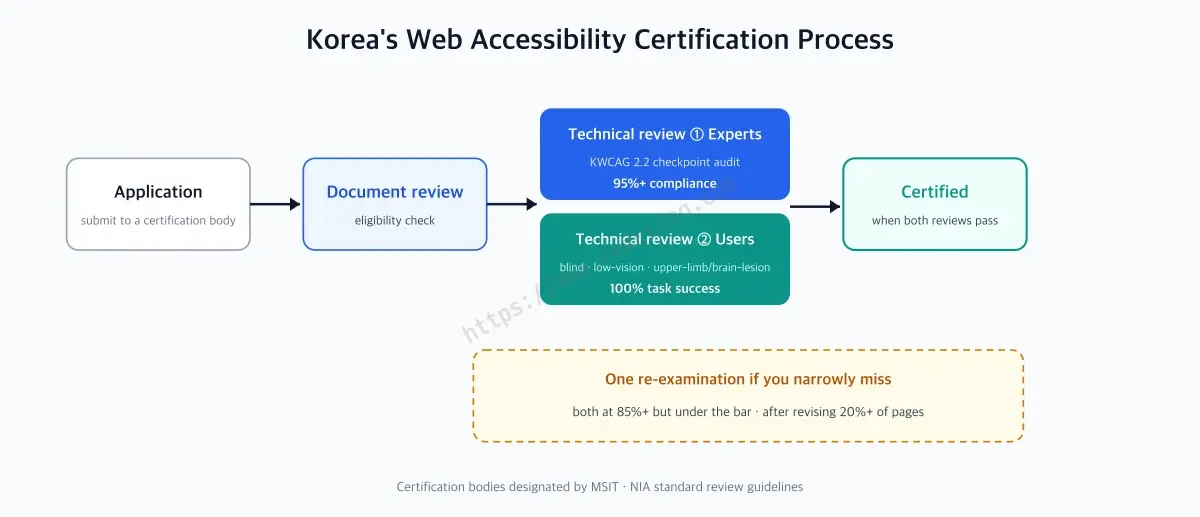
Document review comes first. The applying organization submits self-assessment materials and related documents to the certification body, which verifies them. It’s a gate that checks basic readiness.
Once you pass document review, you move on to technical review, which splits into two parts.
- Expert review: An accessibility expert checks sample pages against each of KWCAG 2.2’s success criteria one by one.
- User review: Users with actual disabilities look at the screens themselves and complete real tasks.
You need to pass both to get certified. Here’s the breakdown:
| Stage | What it checks | Who reviews |
|---|---|---|
| Document review | Self-assessment results, related documents | Certification body |
| Expert review | Compliance with KWCAG 2.2 success criteria | Accessibility expert |
| User review | Whether real tasks can be completed | People with disabilities |
You’ll notice the term “sample pages” above — it means reviewers don’t check every screen in the service, only a representative subset. If you’re curious how those screens get chosen and why sampling is used at all, the WCAG-EM 2.0 post covers the sample-selection process in detail. Minimum sample sizes are set by site scale, but how the size brackets are drawn varies a bit by certification body — one groups 21–99 pages into a single bracket requiring 20+ pages, while another splits it more finely, requiring 20 pages for 21–50 and 23 for 51–100. Check the specific body you’re applying through for the exact numbers. Either way, certification bodies can add pages based on the site’s characteristics. The underlying idea — a sample survey rather than a full census — stays the same everywhere.
The Pass Lines: 95% and 100%, One Retake Allowed#
This is the part that should really make whoever’s preparing sit up. Both reviews have pass thresholds defined in pretty exact numbers.
Expert review requires a compliance rate of 95% or higher across all success criteria to pass. User review is far stricter: task success rate must be 100% across every disability type tested. If even one type fails to complete the task, the review doesn’t pass.
You don’t fail outright, though. If expert review lands at 85% or above but under 95%, or user review’s task success rate lands at 85% or above but under 100%, you get one retake (a second review). That’s one chance to fix what was flagged the first time around and try again — but it isn’t automatic: you need to have revised at least 20% of the pages from the first review before the second one proceeds. Drop below 85%, though, and there’s no retake — you have to start preparing from scratch.
Why User Review Is the Real Gate#
Expert review is a familiar format — checking items off a list one by one, so automated tools can catch a good chunk of it in advance. User review is different. People from the tested disability categories — total blindness, low vision, and upper-limb or brain-lesion disabilities — have to actually use the screens and complete tasks: finishing sign-up start to finish, or finding a search result and adding the item to a cart, for example.
Code following spec doesn’t guarantee a person can actually use the screen. An alt attribute that exists but describes the wrong thing still leaves a screen reader user lost. Focus order that technically follows DOM order but conflicts with the visual flow still slows down a switch-access user with an upper-limb disability. Problems like these don’t show up in a spec check — they only surface when someone actually uses the thing.
That’s why a 100% task success rate feels like such a heavy bar for user review. Expert review has a 5% margin; user review has none.
Worth keeping that difference in mind as you prepare: expert review asks “did you follow the spec,” and user review asks “so can people actually use it?” You need to pass both, but preparing for them isn’t the same exercise.
Prep Strategy: Automated Checks Are the Qualifiers, Human Review Is the Finals#
So how should you prepare? It helps to think in reverse order.
Start by clearing out the errors automated tools can catch — things like contrast ratio failures, missing alt text, and missing form labels, which machines find reliably. I run an accessibility scanner myself, A11y Check, and tools like it save a ton of time at this stage. But they’re only the qualifiers. Passing an automated scan is no guarantee you’ll pass expert or user review.
Once you’re through the qualifiers, it’s time to prep for the finals: walking through your core tasks yourself, using actual assistive technology (software or devices that help people with disabilities use a computer, like screen readers). Check whether you can complete your service’s key flows — sign-up, search, checkout — start to finish using only a screen reader or keyboard. Wherever you get stuck is likely where user review will get stuck too.
It’s especially easy, with multi-step flows like checkout or booking, to check one step and move on — but user review only counts a flow as passing if it’s completed start to finish. If focus gets tangled up at step 2 of a 3-step checkout, that whole flow gets recorded as a failure no matter how clean steps 1 and 3 are. That’s why it helps to build the habit of reviewing entire flows as a unit, rather than screen by screen.
Easier said than done, though — you’ll still hit snags in spots you were sure you’d already checked with a screen reader. If you’ve been through this process before, you’ve probably had a screen you were confident about get flagged in user review at some unexpected point. That’s because real people always find more ways to use something than any checklist accounts for.
Certification Isn’t the Finish Line — It’s Valid for One Year#
Getting the certificate lets you breathe out, but this certification is valid for one year (per the Digital Inclusion Act’s enforcement decree). You need a renewal review every year to keep using the mark.
The year in between isn’t entirely hands-off either. Within six months of certification, a follow-up monitoring check takes place, and if accessibility has noticeably degraded, the certification can be revoked. Shipping a new feature that quietly breaks accessibility after certification is more common than you’d think — and it does get caught in this monitoring.
Renewal reviews are smaller in scale than the initial one: fewer sample pages, fewer reviewers, and typically a discounted fee (details vary by certification body). But a review is still a review — the difference between a team that maintains accessibility year-round and one that scrambles to patch things right before renewal shows up plainly in the renewal review. Treating certification like a driver’s license you renew every year, rather than an exam you pass once, ends up cheaper too.
What the Certification Mark Doesn’t Guarantee#
Since this post is about how to get certified, it’s only fair to be honest about what happens after you get it, too. Having the quality certification mark doesn’t mean a site is 100% accessible. That’s not a knock on the program — it’s just how the program is designed.
Think back to the numbers from earlier. Expert review’s pass line is a 95% compliance rate. Flip that around and it means up to 5% can be non-compliant and still pass. With a sample of around 100 pages and 33 checkpoints, 5% isn’t a small number. The program doesn’t demand perfection because a perfectly compliant site barely exists in the real world — that’s a reasonable design choice. But it does mean you shouldn’t read “certified” as “flawless.”
The review is a sample survey. It doesn’t look at every screen in the service, only a representative subset. A 21–50-page site needs a minimum sample of 20 pages or more. If a problem exists on a screen that wasn’t sampled, the review won’t catch it. Picking a good sample is both the core skill of the review and its inherent limit.
The Human Element Means Some Variance#
The program’s strength is that a person actually looks at the page. Automated tools can check whether an alt attribute exists, but not whether its content is accurate. Only a person can make that call.
But that same strength introduces variance in the outcome. Questions like “does this alt text convey the image’s meaning well enough,” “is this focus order logical,” or “does this error message tell you what to fix” don’t come with a ruler. Different reviewers can reach different conclusions — and in practice, they sometimes do. NIA’s standard review guidelines, which pin down a minimum bar for each checkpoint, exist partly to narrow that variance. The fact that a narrowing mechanism is needed at all tells you the variance is real.
So it’s healthier to read a certification result this way: passing means “this reviewer didn’t find a problem in this sample during this review” — not “there is no problem.”
Certification Is a Snapshot — Especially for Bulletin Boards#
This is where the biggest gap opens up. Review looks at the site at one point in time. But the site keeps changing every day after that.
We already covered how a feature release can quietly break accessibility, and the follow-up monitoring check catches that once. The bigger issue is content — bulletin boards especially.
During certification review, bulletin boards are usually checked only at the template level — the list and detail-page shells. The dev team built those, so they hold up fine. But starting the day after certification, posts pile up inside that shell. The people posting aren’t developers — they’re department staff, and most have never had accessibility training. So this is what ends up going in:
- Tables pasted in from Word or Hangul, with no header cells, used purely for layout
- Images with no alt text — a whole notice crammed into a single image is especially common
- Attachment names that tell you nothing, like
attachment1.hwp - Fake headings made by just resizing and recoloring body text, which screen readers never register as headings
The shell got certified, but nobody’s watching what fills it. The 17.1% alt-text compliance rate found in Korea’s national survey isn’t unrelated to this structure. It’s not a development problem — it’s a number that shows up because nobody owns the content that piles up every single day.
So How Should You Read a Certification, Then?#
Certification is a floor, not a ceiling. It means “this much has been verified” — how much higher you build above that is a separate matter from certification itself.
Having laid out nothing but limitations so far, let me add some balance. Getting certified is still worthwhile. Knowing its limits actually makes the case for it clearer, not weaker.
It forces a minimum line into existence. Accessibility always loses out to whatever’s more urgent. When a deadline hits, alt text is the first thing to get pushed, and once it slips to the next sprint, it’s forgotten. A scheduled review is the one thing that doesn’t let that happen. A 95% pass line might look low, but without that line, teams end up well below it in practice — the 17.1% alt-text compliance rate from the national survey is what “no line at all” looks like as a number.
It gives the team language and leverage. “This isn’t great for accessibility” is a hard sell, but “this checkpoint is part of the review, and we’re currently non-compliant” comes with a timeline and a budget attached. For anyone trying to champion accessibility, certification becomes a lever to move the organization. The one-year validity and six-month monitoring cycle work the same way — they’re built so you can’t do it once and be done.
It’s also a good starting point. “Let’s work on accessibility,” said with nothing to go on, is overwhelming — there’s no baseline for where to look or how far is far enough. Preparing for certification hands you that map. Once you’ve been through all 33 checkpoints and watched real users work through user review, the team’s instincts change. That experience outlasts the certificate itself.
So maybe the cleanest way to put it is this: certification is a starting line, not a finish line. Getting the mark doesn’t mean you’re done, but the process of getting it leaves the team with a minimum baseline and the habit of maintaining it. The limitations above aren’t reasons to skip certification — they’re closer to a to-do list for what comes after you get it.
In practice, a few things help most: keeping a separate list of screens that weren’t in the review sample, giving whoever posts content a few minimum rules to follow (describe images, use tables for actual tables, name attachments so people can tell what they are), and wiring automated checks into your deploy pipeline to catch regressions. None of the three show up in the certification review, but all three shape what accessibility actually looks like after you’ve been certified.
Getting certified and maintaining accessibility overlap, but they’re not the same thing. Once you know the difference, it’s obvious there’s still work left after the mark goes up.
Will WCAG 3 Change the Standard?#
This question tends to come up during preparation too: “Is KWCAG 2.2 really the right standard to prep for right now, or is WCAG 3 about to replace it?”
Short answer: as of now, there’s no publicly announced transition plan. I checked the review-standard pages of all three certification bodies and NIA’s standard review guidelines directly — none of them mentions WCAG 3. If you want a head start on how the two standards differ, see the KWCAG vs. WCAG 3 comparison.
It helps to picture two separate clocks. KWCAG’s underlying standard (KS X OT0003) was revised on December 28, 2022, and national standards are typically reviewed on a 5-year cycle — so the next revision discussion would land around 2027. Meanwhile, WCAG 3, per the W3C working group’s own schedule, is targeting a Candidate Recommendation (CR) snapshot in Q4 2027 — though that’s a work plan, not a commitment. And even if WCAG 3 does emerge in some form around then, the WCAG 2.x line won’t be deprecated right away. Both standards will likely coexist for a while.
Bottom line: if you’re preparing for certification right now, KWCAG 2.2 is the standard to prepare against. Even once the standard eventually shifts, there will most likely be substantial advance notice before it hits day-to-day practice.
One-page summary#
- Certification isn’t mandatory — it’s a way to demonstrate compliance. The obligation itself comes from the Anti-Discrimination Against Persons with Disabilities Act; the certification program itself now rests on Articles 21–22 of the Digital Inclusion Act (in effect January 22, 2026).
- The review standard is KWCAG 2.2 (in effect since January 2025), with detailed pass thresholds set by NIA’s Standard Review Guidelines for Web Accessibility Quality Certification.
- The process runs document review → technical review (expert review + user review).
- The pass lines are a 95%+ compliance rate for expert review and 100% task success across every disability type for user review. Scores at 85% or above but under the bar get one retake (after revising 20%+ of the first-review pages).
- The real gate is user review (total blindness, low vision, upper-limb/brain-lesion disabilities) — automated checks are the qualifiers, actual human use is the finals.
- Certification is valid for one year — a monitoring check within six months, then annual renewal.
- Certification isn’t a guarantee of zero defects — the pass line is 95%, review is sample-based, and judgment calls carry some reviewer-to-reviewer variance.
- The biggest gap opens up after certification, in bulletin-board content — the template gets reviewed, but new content keeps arriving every day.
- There’s no announced plan for a WCAG 3 transition — prepare against KWCAG 2.2 for now.
Leave a comment